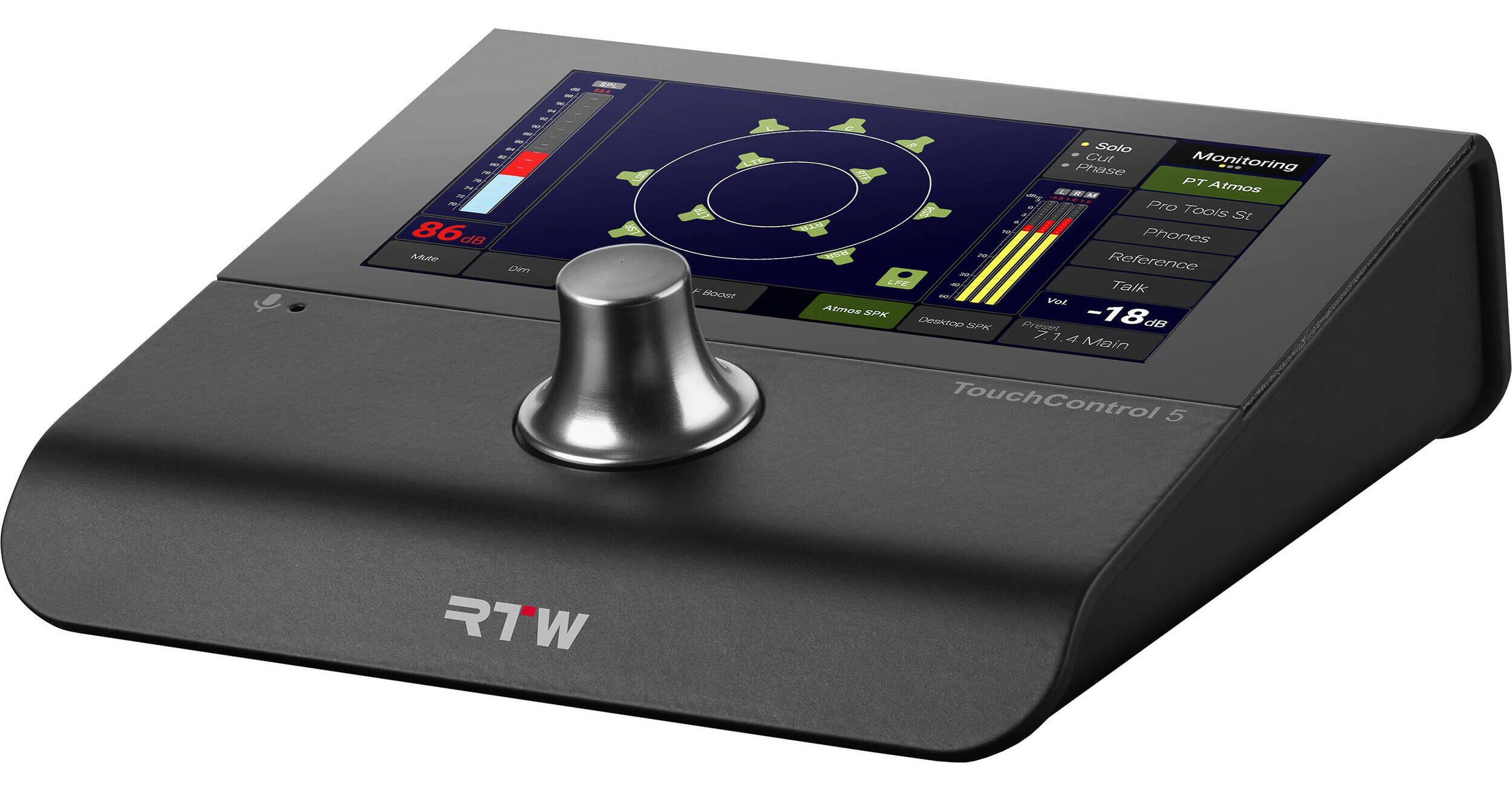
Take control of your monitoring setup with the RTW TouchControl 5, a small AoIP (Audio over IP) based monitor controller that uses the monitoring control engine of the well-known SurroundControl. It supports the AoIP standards Dante and is powered via Ethernet. This gives you instant control over up to 32 channels of audio, controlled by a single knob, when properly equipped. TouchControl 5 also offers a high-quality microphone input, speaker output, headphone output, and features such as mute/solo, metering, SPL metering, and talkback.
The TouchControl 5's graphical user interface is easily operated with a single finger and pushable rotary knob. The integrated applications are distributed across three display views, on which the required instruments can be freely scaled and positioned for optimal use of the screen area. The TouchControl 5 can be adapted to your personal needs within the AoIP network, thanks to the comprehensive WebApp and IP address. The latest firmware update v2.2 offers numerous workflow enhancements, an updated preset editor, a major expansion for OSC capabilities, and numerous improvement throughout the platform.
- Immersive tabletop monitor controller and meter with 5" touch display and 32 Dante or RAVENNA channels
- Support for stereo surround and immersive speaker formats, including 5.1 and 7.1.4
- Support of array speaker layouts according to Dolby guidelines
- Comprehensive monitor control feature set with speaker calibration, SPL measurement, bass management and up to 4 sources/destinations
- RTW precision metering with customizable bargraphs and support for international loudness standards
- Audio Vectorscope, Real Time Analyzer, Loudness Chart
- LFE Bleed, Ratio instrument, Clock
- Toolbox with independently routable leveling and talkback
- Customizable view pages
- Network Display (license option) for audio measurement in the network with a standard web browser
- Action instrument with powerful control capabilities
- Built-in microphone preamp with +48V phantom power
- Built-in calibrated microphone for talkback and SPL measurement
- Powerful headphone output: 1/4" headphone output with the option of monitoring a user-defined downmix
- Analog speaker output: 3.5mm speaker output with the option of monitoring a user defined downmix
- Easy setup with web-based interface
- Power over Ethernet (PoE – IEEE 802.3af compliant)
- Sample rate up to 96 kHz
- Assignable knob press action: DIM, Mute, Recall of calibrated level
- Lockable operation mode: fool-proof setup with access only to relevant controls. Prevents unintentional operation during showtime
- Additional ATSC dialog-gated loudness scales
- Updated Dialog Detector instrument
- Faster and more reliable routing workflow
- Extensive remote control of monitoring and metering
- OSC Feedback for synchronized controls
- Tried, tested, and approved by many broadcast engineers around the world, you find the very same monitor control engine that you might know from our legacy surround monitor controllers.
- The list is long, but let’s emphasize downmix, DSP-powered speaker calibration (using the internal microphone OR manual set), SPL readout, 4 input sources, speaker set selection (up to 4), solo, cut, swap, phase, mono, dim, mute, and test tone generator.
- The source compare feature lets you toggle between sources for easy comparison and lets you set individual delays for each of the sources.
- On the output side, you can set up four speaker sets and easily switch between them or you can listen to your work with your favorite headphones using the headphones output.
- The SPL meter shows the measured sound pressure level in your room, and you can show SPL either as a bar graph or as a number – or both.
- The downmix instrument outputs your surround or immersive mix in stereo and mono.
- The downmixed signal can be monitored on speakers or phones or sent to any destination in your audio network.
- Each speaker can be muted or soloed, and you can invert polarity.
- The talkback feature lets you talk to speakers or any destination in your Dante network.
- LF Boost lets you boost your LFE channels with 10 dB and Surr. Att. attenuates the surround channels with 3 dB.
- The speakers in your setup can be calibrated with regards to level, delay, and EQ. The support for measurement microphones, the built-in test tone generator, and the live-input SPL meter is the optimal tool combination for calibrating your speaker levels to ensure they are perfectly aligned.
Loudspeaker DSP Section
- Each speaker has a DSP section for ultimate control. You can set individual delay, gain, and phase, and a 8-band EQ is available for each speaker in your setup. The Dolby Atmos Music Curve can also be added to the EQ.
- Calibrated speaker levels can easily be recalled by the press of a knob.
Bass Management
- The bass management system allows for up to two LFE channels with adjustable crossover frequencies to be tailored to your specific needs. Full-range and compact speakers can be precisely matched and integrated within the same system. Additionally, high-pass filters for bass-managed speakers, all-pass filters for others, and an extra SUB output channel for formats without an LFE track are all supported.
Dedicated Bass Management Outputs
- Traditionally, in a 7.1.4 setup, the LFE channel handles both the dedicated LFE signal and the redirected low-frequency content from bass management. With dedicated BM outputs, you can route bass-managed low frequencies to separate subwoofers, allowing the LFE sub to handle only the LFE signal – a major step forward in flexibility and precision.
- Beyond the dedicated BM outputs, the enhanced Bass Management system offers even greater flexibility to meet the demands of any setup. A new expert mode empowers advanced users to fully bypass the Bass Management filters for complete manual control. Plus, with precise signal routing, you can now fine-tune exactly how much signal is sent from each individual speaker to the BM outputs, putting ultimate customization at your fingertips.
Dolby Atmos Music Curve
- TouchControl 5 supports Dolby Atmos Music Curve, which can be enabled with just one click.
Besides the level control fader instrument, TouchControl 5 also comes with a comprehensive equipped PPM meter for reliable measurement of any network channel.
TouchControl 5 supports all the different scale types need for a professional production environment.
- TP20: +3..-30 dB
- Dig60: 0..-60 dB
- Dig40: +20..-40 dB
- Dig20: 0..-20 dB
- Dig0: 18..0 dB
- Dig18: +18..-18 dB
- ARD9: +9..-60 dB
- DIN5, +5..-50 dB
- DIN10: +10..-50 dB
- Nordic: +12..-42 dB
- BRIIa: 7..1
- BRIIb: -12..+12
- BRIIa ext: 7..1
- BRIIb ext: -12..+12 dB
- ZOOM1: +1..-1 dB
- ZOOM10: +10..-10 dB
The switchable peak hold indicator, peak memory, and over indicator complete the functionality.
Between the bargraphs of a Stereo-PPM, there is a correlation indicator that helps identifying stereo correlation problems.
Moving Coil
- The Moving Coil instrument is available in 2-channel stereo mode.
- It provides several scales and setting options. The PPM (British) or VU displays can be shown as single or combined, vertical, or horizontal instruments.
- Loudness scales or a combined PPM and Loudness display (BBC mode) are also available.
Stereo Correlator
- The Stereo Correlator visualizes the phase relationship between the two channels of a stereo signal, providing quick insight into stereo compatibility.
- Essential in mixing, mastering, and broadcast, the Correlator helps engineers maintain consistent sound quality and ensure reliable mono compatibility.
Audio Vectorscope
- The 2-channel Audio Vectorscope uses a Lissajous display to visualize the phase relationship between two stereo channels in real time. It quickly reveals stereo width, balance, and phase issues such as shifts, rotations, or cancellations.
- Widely used in mixing, mastering, and broadcast, the Vectorscope is an essential tool for ensuring proper stereo imaging, phase alignment, and mono compatibility.
The Real Time Analyzer
- Visualize the energy distribution of your audio with precision and clarity.
- The RTA works with any speaker format and offers flexible octave resolutions, customizable layouts, and enhanced color visualization.
- With zoomable low-frequency analysis, high-band display, and multiple filter options, it’s the ideal tool for accurate monitoring in music, broadcast, and postproduction.
- TouchControl 5 features a built-in microphone that can be used for calibrated monitoring.
- Alternatively, it can be used for intercom talkback and can address any node in the audio network .
- TouchControl 5 supports all international loudness standards such as EBU R128, ITU-R BS.1770-4/1771-1, ATSC A/85, ARIB, OP-59, AGCOM, CALM, LEQ(M), TASA, and SAWA.
- On top of the ITU/EBU loudness standards, you’ll find support for Dialog Gated Loudness Measurement, enabling compliance with dialog-based specifications, which are aligned with Netflix delivery standards.
Loudness Chart
- The loudness chart provides a detailed visual representation of audio loudness levels over time, offering a clear and comprehensive overview of your audio’s loudness dynamics. It is a crucial tool for analyzing and maintaining consistent loudness in various audio production contexts, including broadcasting, streaming, and postproduction.
Loudness Summation
- The Loudness Summation instrument provides a bargraph display of summed loudness values — M, S, and/or I.
- It can also present dialog-gated measurements: Momentary Dialog-gated (MD), Short-term Dialog-gated (SD), and Integrated Dialog-gated (ID).
- An SPL meter is also included.
Numeric
With the Numeric instrument, you can monitor some or all relevant values of a loudness measurement on a numerical display:
- Momentary (M)
- Short-term (S)
- Integrated (I)
- Loudness Range (LRA)
- True-peak Max (TPmax)
- Momentary Max (Mmax)
- Short-term Max (Smax)
- Integrated Duration (Itime)
- Short-term, Dialog Gated (SD)
- Integrated, Dialog Gated (ID)
- Loudness Range, Dialog Gated (LRAD)
- Dialog Percentage (D%)
LRA (Loudness Range)
- The LRA (Loudness Range) instrument displays a graphical representation of the loudness variances within short time periods.
- These are measured against the Loudness Range (LRA) descriptor specified in EBU R 128.
- It is used to show whether a program has a continuously constant loudness or a high variation between low- and high-level components.
- It allows for making assumptions on whether the program has seen or requires dynamic processing with regard to the intended distribution path.
Dialog Gated Loudness Measurement
- The TouchControl 5 supports dialog-gated measurements, ensuring compliance with dialog-based specifications that for example adhere to Netflix delivery standards.
- The Loudness Number instrument provides metrics such as ID (Dialog-Based Integrated), SD (Dialog-Based Short-Time), and D (Dialog Content Percentage).
- The LRA instrument displays the Dialog-Gated Loudness Range, while the Dialog Detector identifies when dialog is present. This detector can be resized, ranging from a small overlay to covering the entire screen.
- Users can specify which channels contain dialog, typically assigning it to the Left, Center, and Right channels.
LFE Bleed
- It is essential to ensure that no high-frequency content is present in the LFE channel, as this can cause severe playback issues with certain encoders, including binaural formats.
- As a general recommendation, the LFE frequency range should be limited to avoid problem during distribution.
- The LFE Bleed Instrument measures energy above a certain frequency (120 Hz by default) and displays a momentary loudness value on a dBFS scale in a compact bargraph. The bar appears in red by default, indicating that the expected state is absolute silence. Any visible activity signifies unwanted content leaking into the LFE channel.
- The Fader instrument allows level control of any channel in your network, and you can freely configure each fader to control the number of channels you wish. More faders can be combined, so you can control multiple groups of channels, and if you do so, levels are controlled relatively, using TouchControl 5's knob.
- TouchControl 5's touch screen can of course also be used to control each fader, and you can create up to 4 faders each controlling single channels, stereo-, surround- or immersive formats.
- Toolbox instruments also include a Talkback feature that lets you talk to any audio channel in you network. Talkback sources include the built-in mic, the external XLR input or any audio network channels.
Action Instrument & OSC
The Action Instrument & OSC adds powerful control capabilities directly into your metering environment. It lets users create fully customizable buttons and assign specific actions, while also extending TouchControl 5 with full Open Sound Control (OSC) support.
- Customizable Buttons – design buttons with complete control over size, position, and color
- Flexible Protocol Support – trigger commands via Open Sound Control (OSC) over TCP/UDP, or send HTTP requests
- Two-Way OSC Integration – TouchControl 5 and TouchMonitor not only send commands but also respond to incoming OSC, enabling control of key functions such as preset recall, loudness start/stop/reset, reference level recall, mic gain adjustment, and more
- Seamless Workflow Integration – connect directly to mixers, automation systems, and external devices to streamline production workflows
- Actions are also available in all current buttons. So, when you hit MUTE, you can send an action at the same time
- With Action Instrument & OSC, TouchControl 5 evolve from pure metering solutions into fully interactive, customizable control hubs
Network Display: Metering Anywhere, Anytime
- With Network Display, engineers, mixers, and operators can view real-time audio measurements anywhere on the local network using a standard web browser - without the need for extra hardware.
- Whether monitoring from the control room, a production suite, or across multiple workstations, Network Display provides unmatched flexibility and helps streamline workflows.