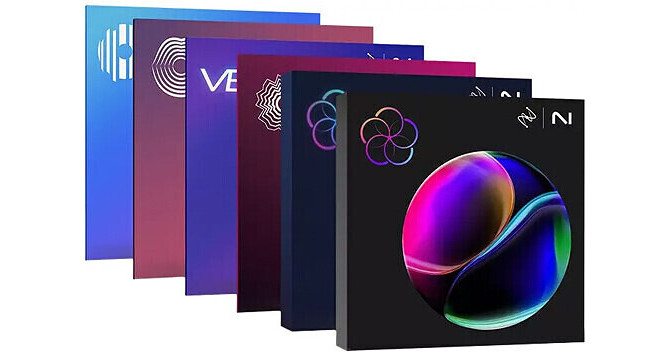


The iZotope Everything Bundle 2025 is a collection of every flagship product iZotope. From creative production to mixing, and mastering to repair, this is the complete solution for any type of audio work.
Note: This pricing is for users of any paid iZotope product. You must have a previously purchased and licensed version of that product to qualify for this pricing.
Neutron 5 from iZotope is a fully-equipped mixing suite, and this version features a faster Mix Assistant compared to the previous version. Use its plugins to sculpt and shape your sound by using the 10-component module individually or use the "Mothership" plugin to control the 10 modules for complete control. This download works with Windows and macOS systems, and it even supports Apple Silicon natively.
- Single-use license
- Digital download of Neutron 5 for Mac and PC
- Neutron 5 mothership
- Visual Mixer
- Tonal Balance Control 2
- 10 Neutron 5 component plugins
- iZotope Relay
- Audiolens
- Logic Pro 11
- Pro Tools 2024
- Ableton Live 12
- Cubase 13
- Nuendo 13
- Studio One 6
- REAPER 7
- FL Studio 21,
- Reason 12.5
- Maschine 2
- Cakewalk by Bandlab
Audio engineers and video editors in need of a complete audio restoration tool set will be impressed with iZotope RX 11 Advanced, the latest update to their audio repair software, which is considered a staple within the recording, mastering, audio-for-video, and postproduction communities. The software can operate either as a standalone application or a plug-in for both Mac- and Windows-based DAWs and NLEs. From fixing common audio problems like noises, distortions, and inconsistent recordings, to repairing severely damaged audio using Spectral Repair, the software can transform previously unusable audio into something usable.
The advanced edition of RX 11 features new state-of-the-art neural networks that supercharge the machine-learning algorithms, enabling real-time, low-latency processing for Dialogue Isolate, the highest quality stem separation for Music Rebalance, and improved intelligence and speed for Repair Assistant. iZotope also added an industry-first Loudness Optimize tool alongside the new Streaming Preview, so you can release tracks in confidence—major upgrades to their Audio Random Access (ARA) processing for a seamless workflow. All previous modules are in place for RX 11 including multichannel support, high-quality resampling, dithering, and the rest of RX's classic features. As always, RX 11 can be used as a standalone audio editor (including standalone but connected to your host via RX Connect, or as your DAW's audio editor in the case of Logic Pro), although much of it can be used as a suite of plug-ins in any DAW.
- New and Improved Dialogue Isolate: iZotope overhauled Dialogue Isolate, adding in Dialogue De-reverb and state-of-the art machine learning that enables lightning-fast (real time) processing. Now you can de-noise dialog or vocals and control reverb in one easy-to-use module (also available as part of RX 11 Standard for the first time). The Advanced version includes a brand-new high-quality offline processing mode with multiband processing.
- New Streaming Preview: There’s no worse feeling than putting heaps of time into a track only to be disappointed with how it sounds on streaming services—so here comes Streaming Preview. Now you can hear your tracks the way the rest of the world hear them and release with confidence.
- New Loudness Optimize—Tracks still sounding quiet at maximum loudness? Analyze any opportunity for improvement with the smart Learn function, and automatically adjust your tracks with Loudness Optimize. Just export your new master, and you’re ready for release.
- Improved Music Rebalance: Easily reanimate an existing mix, prep for a remix, or create instrumentals and vocal stems with Music Rebalance. Shape your sound with laser focus thanks to Music Rebalance’s improved stem separation, featuring upgraded machine-learning based on the most modern neural network available. (Included in Standard and Advanced.)
- Improved Repair Assistant: Clean up tracks faster than ever with enhanced precision. Polish dialog and vocals with ease thanks to new machine-learning tech, and make final tweaks with deeper controls. The next-generation Repair Assistant goes from trusty helper to lifesaver.
- Improved Dialogue Contour: Adjust the character and expressivity of a voice with new levels of control in Dialogue Contour, ensuring that dialog edits flow seamlessly. Take care of frankenbites with ease, no matter how many takes you need to stitch together for a perfect delivery.
- New Mid/Side Mode: Visualize and process your stereo image with new Mid/Side mode in RX’s main window.
- New Audio Devices Refresh: Refresh audio devices in preferences without having to quit and restart RX.
It is designed to separate spoken dialog from nonstationary background noise such as crowds, traffic, footsteps, weather, or other noise with highly variable characteristics. It can be particularly effective at increasing the level of dialog in challenging low-signal-to-noise-ratio conditions.
There are two Quality settings:
- Good: for faster high-quality processing that is optimized for speed over separation
- Best: for higher quality processing with fewer artifacts and better isolation at the cost of a longer processing time
You can also use the legacy Dialogue Isolate algorithm from before version 9. Choose this in the settings.
In Static mode, you can target hum with a fundamental tone and the 16 harmonic bands above it. In Dynamic mode, RX can learn and remove any amount of hum with up to 1024 dynamically variable notch filters.
Seamlessly connect dialog and ADR cuts with real background movement and textures with Complex mode, allowing you to quickly match ambiences never before possible: ocean, wind, traffic, crowds, and more. Or, use Static mode to match stationary ambiences like a quiet room with a soft hum.
When hovering your cursor over an item in the History list with a selection made in the spectrogram, an icon appears in line with the text. Clicking this icon will restore your selection to that point in its history. This is the same as going back to that point in undo history, except for your current selection.
- De-plosive eliminates every plosive from any dialogue track with transparency
- Leveler smooths any volume inconsistencies with an automatic clip-gain envelope; leveler is optimized for dialogue using intelligent De-breath and De-ess algorithms
- Instant Process tool is a one-click eraser for removing unwanted coughs, scene-interrupting sirens, and more
- Module Chain can process multiple modules at once, save your customized chains as presets, and execute them all with a single click, enhancing workflow and reducing mouse clicks
- Sync and integrate the RX Audio Editor with any DAW or NLE timeline using RX Connect
- Corrective EQ for removing harsh high frequencies, whines, rumbles, resonances, and distortion artifacts, and for accurately homing in on any problem-frequency areas
- Problem-oriented presets across several modules
- Signal Generator creates accurate test tones, calibration tones for postproduction delivery specs, and bleep tones for eliminating obscenities in dialogue
- Markers and regions (search) provide greater flexibility for those longer edits, with the ability to perform text-based searches of any markers, regions, and comments in the metadata of the audio
- Turn flawed audio into usable material by removing noises, distortions, and more
- Edit audio with visual editing techniques using precision drawing tools, such as a brush and magic wand
- Salvage unusable material by filling in audio gaps instantly with Spectral Repair
- Seamlessly integrates with audio- or video-editing software, both as a standalone application or plug-in
- EQ Match allows for quickly learning the EQ of a source audio clip and applying that EQ curve to a target audio clip, enabling sonic balance and smooth transitions between multiple audio sources with different EQ qualities
- Ambience Match for matching the environment noise of two different audio recordings
- Learn the ambient noise from a source audio clip, apply it to another audio clip, and create long sections of constant ambient noise to insert under inconsistent dialogue recordings
- High-quality resampling using the SRC sample-rate conversion algorithm
- Reduce bit resolution for final delivery of a project without sacrificing quality with the MBIT+ Dither algorithm
- Rebuild distorted audio caused by analog and digital overload, and get through projects faster with the automatic Suggest feature
- Spectrum Analyzer delivers a detailed spectral display that detects peaks automatically
- Adaptive Hum Removal notches out fundamental hum frequencies that may change over time, like when recording a shot in multiple locations
- Nondestructive Clip Gain allows you to easily adjust and balance the volume of vocals and instrumentals
- Export marker regions as files
- Metadata display ID3 tags and broadcast WAV metadata like source timecode, etc.
- Time-reverse audio
- Updated timeline ruler that displays original recorded source timecode
- Movable tabs
- Full-screen support for Mac
Featuring a complete graphical redesign and a whole new voice-modeling module, iZotope VocalSynth 2 is a tool designed to transform an input signal—usually a vocal—into a creative, synthetic sound. An instance of this plug-in provides access to five separate vocal engines. You get the four modules from the original Vocalsynth (Vocoder, Talkbox, Polyvox, & Compuvox), and a whole new one called Biovox.
Biovox utilizes scientific modeling of the human vocal tract, allowing you to change aspects like formants, vowel shapes, and nasality in a smooth manner. Use Biovox for subtly-changed vocal doubles when you've only got a single vocal track, or utilize this module as an eccentric sound-design tool.
The effects section has been updated to provide better sound quality, and two new stompbox-style modules have been added to the mix: Chorus and Ring Mod, the latter also serving as an idiosyncratic tremolo effect. As with the previous version of VocalSynth, you can use the plug-in in various modes, including Auto Mode (requiring no MIDI or sidechaining), MIDI Mode (imparting the consonants, formants, and vowels of a sidechain inpun upon the MIDI synth); and Sidechain Mode (applying the quality of the vocal to an audio source, say a guitar for example).
This plug-in also allows for inter-communication between iZotope plug-ins, meaning you can seamlessly integrate VocalSynth 2 with Neutron 2, Ozone 8, and Tonal Balance Control. VocalSynth 2 can be seen and manipulated within Neutron 2's Visual Mixer and Masking Meter as well. This software is compatible with Mac and Windows platforms, and supports AU, VST, and AAX formats.
Available for download, iZotope Insight 2 is an update to their renowned metering software and comprises a set of tools designed for post-production and broadcast applications. Insight 2 provides an extensive set of audio analysis and metering tools that can help you visualize the changes made during mixing and mastering. These meters can be essential for troubleshooting problematic mixes, as well as ensuring compliance with broadcast loudness standards.
Fully customizable and scalable, Insight 2 allows you to visually monitor all the relevant information from your mono, stereo, or multichannel mix in a convenient floating window. This window has been redesigned and updated to provide a sleek look more in concert with iZotope's current design scheme. Also, the GUI is now resizable: it can encompass a full screen or just one tiny meter floating in the corner of your DAW. Thus, the metering can be adapted to suit your workflow as it changes.
Insight 2 visually guides you throughout the mixing process, empowering you to look deeper into your audio with intelligent analysis tools and real-time monitoring capabilities. Loudness meters are clearly visible with color-coded readouts for short-term, momentary, and integrated values. Multichannel RMS metering is on hand, as is sound-field monitoring, a loudness history graph, a spectrum analyzer (for frequency content), a customizable spectrogram, and a new addition to the family: the Intelligibility Meter.
This tool works in conjunction with iZotope's new Relay module to help you see, at a glance, whether or not dialogue is intelligible over the rest of the mix. Simply put Relay on your mix, and track the results in the meter. With an easy-to-read scale, you will discover if your dialogue's intelligibility will translate to other listening environments. You can even choose listening environments to check if the dialogue will read well over moderately noisy or severely noisy confines.
The included Relay module facilitates intercommunication with compatible iZotope products as well as the ability to monitor the output of audio affected by third-party plug-ins; the latter function is accomplished by instantiating Relay as the last plug-in in your chain. The module itself has multiple useful features, including delay offset, phase invert, sum-to-mono, L/R swap, and high-pass filtering.
Fully compliant with EBU R128, ITU-R BS.1770-1/2/3/4, ATSC A/85, OP-59, and other current standards, Insight 2 provides the tools you need to be confident that your audio meets regulations. It is compatible with Mac and Windows platforms, and operates in AU, AAX, AAX-AS, RTAS, DPM-AS, VST2, and VST3.
Quit wasting hours trying to blend your reverb correctly in the mix; instead, download iZotope's Neoverb, and hear the right reverb in seconds, thanks to its AI-powered technology. The Reverb Assistant customizes the verb to your particular needs. No matter the sound source, Neoverb can listen to it, analyze it, and create the perfect reverberation setting in response.
Neoverb is a rare piece of software that is equally useful to beginners and professionals. For the beginner, tweaking a reverb to blend correctly is difficult and time-consuming, but Neoverb accomplishes this feat quickly. The Reverb Assistant also shows you how it generated settings through its intuitive interface, teaching you about reverb in the process. The professional engineer, on the other hand, is often working against deadlines. Neoverb cuts down on the time it takes to select and tweak the right plug-ins, helping you achieve the sound you want with greater speed.
Transport, transcend, and transform with a spectrum of sonic possibilities, comprehensive controls, and lightning-fast workflows with iZotope Equinox, a premium reverb plug-in for music and postproduction that fuses the legendary Exponential Audio algorithms from the Stratus and Symphony plug-ins with iZotope’s adaptive unmasking tech to keep your mixes crystal clear.
Equinox is flexible and customizable with advanced controls, macro tone settings, and over 1250 pro presets. The plug-in provides you with a blueprint for realistic reflections, eccentric experiments, and everything in between. Place your instruments, dialogue, and more, into a real space, or get creative and take them into new worlds.
Built around a core of advanced machine-learning technology for state-of-the-art hardware modeling, Guitar Rig 7 Pro from Native Instruments provides you with all the warmth, grit, crunch, and fuzz you could want with 26 classic guitar and bass amplifiers with matching cabinets and a staggering 115 different effects, all modeled in stunning detail. Not only can you process your guitar for virtually any tone you can imagine, you can also use the customizable processing chains and fantastic sounding effects to run bass, drums, synths, and vocals through it as well.
Guitar Rig 7 Pro sports five Modifiers (such as analog-style sequencers, an LFO, and an envelope), and 10 Helpers (crossover mix, splits, metronome, tuner, and more) for fine-tuning your production to perfection. You get tons of artist presets for inspiration from a wide range of respected guitarists, bassists, producers, and songwriters, covering the entire musical spectrum. And with a newly redesigned intuitive scalable interface, you can easily manage your workflow for optimal efficiency. This plug-in is available in AAX, AU, and VST3 plug-in formats on macOS and Windows computers (64-bit only.
- A legendary 100W all-tube amp that defined the sound of modern rock with its shiny cleans, creamy leads, and high-gain sounds.
Reverb Delight
- A timeless classic from the mid-'60s, played on countless hits, and regarded as one of the most essential workhorse guitar amps ever made.
AC Box XV
- Modeled after a legendary '60s tube amp renowned for its clean tone and gritty breakup, AC Box XV features a meticulously designed point-to-point handwired chassis produced in the UK. This two-channel tone monster shaped the sound of Liverpool.
Bass Rage
- An iconic all-tube bass amp that delivers 300 watts of classic bass tone, designed for players who are looking for the authentic, vintage tube sound that has earned the respect of the industry.
- Emulate the warbling effect from improperly adjusted analog tape machines, providing an easy way to achieve a classic lo-fi effect—especially on sustained notes, pads, and melodic content.
Noise Machine
- Create tones inspired by classic gear like cassette tapes, VHS tapes, electrical hum, and vinyl.
Vintage Vibrato
- Recreate the chorus/vibrato sections of a vintage rock organ: a rare and sought after circuit.
Kolor
- ICM-powered Kolor adds character to tracks using black-box models of popular hardware distortion circuits, including two iZotope Trash components, building layers of texture that make your music truly stand out.
- A legendary green overdrive pedal that creates beautiful crunch sounds, helps high-gain amps tame the low end, and adds punch.
Chainsaw
- Are you a fan of early '90s Swedish death metal? Then Chainsaw is the pedal for you. Just dial all the controls clockwise, and you’ll be transported to the Stockholm metal scene.
IVP Stomp
- A compact reinterpretation of the Instrument Voicing Preamp, a cult classic and long-discontinued rackmount preamplifier. The IVP is best known for its distinctively clangy tone and harsh attack at high treble settings.
Seattle Fuzz
- A distortion device emulating the beloved pedal of a legendary producer from the grunge era, capturing its room-rattling sound while offering a streamlined two-knob layout.
NI added a curated selection of IRs made by a couple of pretty knowledgeable guitar music producers and IR creators.
- Jens Bogren: A selection of five IRs taken from Jens Bogren’s signature pack and matched from real sessions. Profiled from cabs used on some of the biggest acts in metal. Mic'd and EQ'd to fit a dense mix, fast.
- Kristian Kohle / Eminence: Introducing the Eminence Bass Guitar Cabinet Impulse Response Pack by German metal producer Kristian Kohle. Guitar Rig 7 Pro’s factory content includes a selection of three impulse responses specifically engineered for bass. But that doesn’t mean this should only be used on bass. Experiment with guitar, synths, and much more. Created in partnership with Eminence, this pack is a must-have for serious bassists and producers.
- Lancaster Audio: Lancaster Audio engineers' industry-leading music production software. Their guitar cabinet impulse responses have received critical acclaim and are featured in the studios and on the stages of top producers and recording artists worldwide. We’ve included a selection of five high-quality IRs to get you inspired.
- cabIR: Creates incredibly authentic speaker cabinet impulse responses: absolutely accurate digital emulations of real guitar cabinets. We’ve included a selection of ten IRs taken from super-rare vintage cabinets to make our amps sound and feel even more authentic, delivering a wider spectrum of sonic characteristics.
- 3 Sigma Audio: One of the most renowned manufacturers of high-quality IRs. NI has added eight impulse responses for even more versatility in your guitar tone. As with everything here, it doesn’t always have to be guitar. Did you ever try to send a roaring synth through an amp and a big speaker? Now you can.
- Artist presets: Guitar Rig 7 Pro comes loaded with an inspirational collection of presets from a variety of heavy-hitting guitarists, bassists, producers, and songwriters, including Ace (Skunk Anansie), Alexander Dietz (Heaven Shall Burn), Andrew Bolooki, Billy Gould (Faith No More), Jens Bogren, Kristian Kohle, Michael Uzowuru, Rob Bisel. Wherever you sit on the musical spectrum, from metalcore to synth pop or from blues to grunge, there’s something here to get you started crafting that perfect tone.
- Part amp, part historical artifact, this warm and fuzzy number will drench your guitar tones in flavor from the '50s or give whichever audio source you choose a dose of wondrous tube saturation.
Fire Seeker
- A sonic sibling to Fire Breather, this handwired American boutique amp can do everything from metal tones to classic clean sounds.
Bass Invader
- With a broad variety of powerful tone shaping tools, this versatile bass amp gives you everything you need to make low end sounds cut through your mix. Run any sounds through it to infuse them with a classic '90s British indie flavor.
Fire Breather
- With a huge range of sonic possibilities, this amp provides anything from beautiful clarity to all out thrash aggression. Team it up with overdrive and delay for soaring solo shredding styles.
Jump
- The sound of Jump is a well-behaved alternative to the Lead 800, sporting a little less gain but perfecting the smooth, singing lead sounds we love from British amps.
Van 51
- A heavy amp with a signature sound, from hard rock to blistering crunch: great for drop tunings and menacing palm-muted chords, but also extremely flexible.
Hot Solo+
- Paying homage to a classic handwired tube amp with a boutique, responsive, overdriven tone. For expressive, singing solos that still pack a punch, the Hot Solo+ is your amp.
Plex
- The classic Plex sound probably needs no introduction; it's the vintage amp sound that’s powered too many hit records to mention. This is the ultimate classic for blues and rock.
Hot Plex
- A gain-spiced version of the classic Plexi sound, this amp comes with a generous amount of distortion to give vintage tones a boost.
Cool Plex
- For a heart-warming vintage clean sound, this amp has you covered. The Cool Plex adds soul to any retro tone—transparent yet thick and charismatic.
Lead 800
- This smooth intense lead sound cuts through the mix and offers plenty of flexibility. While the Plex works very well for both chunky rhythm sounds and leads, the Lead 800 gives a brighter edgier tone.
- Ultramodern and ultrahigh-gain, the Ultrasonic is a two-channel boutique amp with all the modern tones you could ever want.
AC Box
- AC Box delivers the famous sound that powered the British reign of pop music. We chose a model that not only features a unique flavor but also some nice circuit wizardry, adding a Brilliant channel.
Citrus
- If you’re yearning for a '70s British sound with a bunch of flavor, the Citrus amp has what you need. Its tones range from the edge of clean to gritty distortion when the master and gain controls are cranked.
Rammfire
- This ground-breaking amp emulation unlocks Rammstein guitarist Richard Z. Kruspe’s iconic trademark sound.
Bass Pro
- This monster amp delivers that gritty, growling sound that really makes bass stand out in a mix. Along with Bass Pro’s unique tonal qualities, the amp boasts a graphic equalizer, allowing you to tailor your sound with precision.
High White
- Looking for the signature British sound of David Gilmour and Pete Townsend? High White delivers with 100 virtual watts of pure tone.
Jazz Amp
- The Jazz Amp produces a warm, clean tone. An essential part of its sound is the Ensemble effect, which adds chorusing or vibrato. As a result, the Ensemble is built into the Jazz Amp.
Gratifier
- Gratifier emulates a famous multichannel solo head with a tube power amp. A fourth channel has been added to span the tonal range from clean to over-the-top distortion.
Tweedman
- Our Tweedman was initially designed as a bass amp. Since then, it has made its way as a classic guitar amp without losing its bass excellence.
Twang Reverb
- Twang Reverb simulates the rich tube sound of a classic amp. It’s ideal for screaming blues leads, crunchy rhythm guitar sounds, and clean tones.
Tweed Delight
- This amp, based on an American legend, is designed to go from glassy clean to bluesy squawk with just three control knobs.
- Control Room delivers instant pro sound. Each preset gives you a classic cabinet set up with eight high-end microphones, painstakingly positioned by studio legend Peter Weihe for perfect phase alignment. Each mic has its own fader on the 8-track mixer, so you can blend them however you like.
Control Room Pro
- Control Room Pro gives you eight custom setups at once for the ultimate in fine-tuning. Choose from 27 cabinets, up to 16 microphones, and up to three mic positions, including room mics.
- Guitar Rig 7 Pro boasts a wide selection of distortion and overdrive units. Including the new Seattle Fuzz for grunge moods, Skreamer Deluxe for added punch, Chainsaw for Swedish death metal tones, and the IVP Stomp, best known for its distinctively clangy tone.
Reverb and delay
- A comprehensive range of delays and reverbs, including Raum, Replika GR, Replika Shimmer, and Softube’s RC 24 and RC 48, plus a time-honored selection of versatile DJ effects from Traktor’s 12. Based on award-winning NI algorithms, these units give you all you need to send your sounds into space.
Modulation
- Phasers, flangers, chorus, and tremolo effects add depth, movement, and texture to your guitar tones. Whether you're crafting intricate soundscapes or adding subtle shimmers to your riffs, these modulation effects provide the versatility to experiment and craft your sound.
Lo-fi
- Kolor adds character to tracks using black-box models of popular hardware distortion circuits. Tape Wobble emulates the warbling effect from improperly adjusted analog tape machines. Noise Machine creates various noises inspired by classic gear like cassette tapes, VHS tapes, electrical hum, and vinyl. Vintage Vibrato recreates the chorus/vibrato sections of a vintage rock organ. Combine with Bite and Freak for a true lo-fi sound.
Equalizers and filters
- Filtering is one of the most powerful ways to refine your tracks, and Guitar Rig 7 Pro offers several great tools to do it. Choose from an assortment of filters and wah-wahs, plus a range of equalizers, including Solid EQ.
Levels and dynamics
- Take control of your levels and then push them into overdrive. Add bite, depth, warmth, and saturation to your sounds with this collection of compressors. Plus, enhance the dynamics and loudness of your tracks with the newly added Ozone Maximizer from our friends at iZotope.
Custom multi-effects
- The Container Module is a utility for creating multi-effects and custom channel strips. Assemble your processing chain, then assign the eight macro controls to the key parameters of any effects in the chain.
Global FX
- Keep effects engaged while switching between presets. Add global effects like reverb and delay to a Global FX module. This will stay at the end of your signal chain, regardless of what happens in front of it.
Split mix
- Create parallel effects chains: split the sound into two streams, process each stream with different effects, and then mix the results back together at the end.
Crossover
- Split your signal into high and low frequencies. Choose to apply effects to the high frequencies only, leaving the low frequencies untouched as a solid foundation for your sound.
Split M/S
- Adjust the mid and side channels of your mix and separately control and process the center and edges of a stereo image.
- Step Sequencer: Up to 16 on/off steps for hard triggering.
- Analog Sequencer: Up to 16 adjustable steps for more variable triggering.
- Input Level: An envelope follower that scans the volume of the input signal and transforms it into a control signal. Useful for dynamic response effects: the louder you play, the more distortion you get.
- Multi-Step Envelope: Graphical sound editing where the shape of the curve defines the modulation.
- LFO (low frequency oscillator): Five waveform options and a choice of continuous or arbitrary modulation.
Rack tools
- Loop Machine Pro: Fuel your creative fire with the new Loop Machine Pro. Jam along to your favorite tracks, create captivating loops, layer ideas, and elevate live shows. Loop Machine Pro makes Guitar Rig 7 Pro a serious performance machine.
- Tape Decks: Tape Decks are a great tool for recording and capturing ideas. Use time-stretching to slow down a riff while practicing or use the pitch-shifting function to transpose a riff into a different key. The Tape Decks play WAV files and MP3s. Play along to the loops provided or load your own backing tracks.
- Tuner and Metronome: Besides simple, precise tuning, the Tuner offers presets for common tunings, such as Chromatic, Bass, Open DEGA, and DADGAD. The Cent and Strobe modes provide two different visual pointers, and the Mute mode lets you tune silently.
- The Metronome isn’t just for keeping time; it also serves as the clock for all synchronized rack modules, such as modulation and delay effects. Easily adjustable and with numerous helpful features, the Metronome helps keep you in time.
- Preset volume: This simple volume control can attenuate or boost the level of your rack.
- Macros: The Macro device features 8 (or 16) control parameters that can be freely configured as knobs and buttons. All rack presets in Guitar Rig 7 Pro come with premapped macros. An external MIDI or automation based hardware controller can be easily connected for remote control of the macro parameters.
Polish your vocals to a professional sheen with iZotope Nectar 4 Advanced, complete vocal production software that's designed for vocal mixing and production. Everything you need to process the human voice is here, from high-quality equalizers and compressors to modulation and time-based effects. No longer will you need to break out a vocal into parallel tracks or aux returns—now you can do it all in one intuitive yet powerful interface.
Nectar 4 Advanced builds upon its predecessor but still retains the same ease of use and studio-quality sound. Explore new modules like Auto-Level for consistency, Voices for vocal layering, Backer for background singers, and Vocal Assistant for easy and powerful processing. Unleash a suite of powerful plug-ins for complete control over your vocal sound.
- Two 24-band EQs come equipped with Dynamic and Follow modes for adaptive tone crafting.
Pitch
- Get transparent or extreme pitch correction and color to taste with an array of creative parameters.
Dimension
- Dimension includes chorus, flanger, and phaser effects to add movement and depth to your vocal.
Compressor
- Two compression modules ensure dynamic balance and add unique character to your vocals.
Reverb
- Add natural space for a subtle halo effect, or dial in a wash of reverb with intuitive controls.
De-esser
- Tame sibilant vocal sounds in seconds with Nectar’s new De-esser module.
Audio engineers, producers, and musicians in need of a complete mastering solution will appreciate iZotope Ozone 11 Advanced, software that delivers superior-sounding releases with an innovative suite of mastering plug-in components. Ozone 11 Advanced boasts several updates and enhancements including Clarity, Transient/Sustain, Upward Compression, and Assistive Vocal Balance functions, which make it easier than ever to craft a balanced and precise sound.
Use the new and improved Master Assistant to get you to the level you wish as transparently as possible, or choose Vintage mode if the mix needs some more weight, vibe, or color. The Vintage mode is very useful as it applies colorful strokes in the mastering process, generating custom, vibey presets. Or, use Match EQ to help you get the most out of this process in every part of the frequency spectrum. As with previous versions, you can load up your favorite tunes into the referencing section for instant A/B comparisons. You can audition lossy codecs and apply dithering to the master. The software is compatible with Mac and Windows platforms in AU, VST3, and AAX formats, as well as NKS environments as well.
- Psychoacoustic Clarity Processing
- Mid/Side and Transient/Sustain Modes
- Action Region Selection
- Difference Metering
- Delta Monitoring
- Soft Clip—boost loudness while maintaining high fidelity
- Intelligent Release Control (IRC) modes react to your sound to reduce distortion and pumping
- Threshold Learn mode intelligently sets loudness to a target LUFS level
- True Peak detection ensures your audio doesn’t clip after export
- New Transient/Sustain mode
- Emulate classic analog EQs or modern digital models depending on your style.
- Use Mid/Side mode to correct frequencies in the sides of your audio.
- Enjoy smooth, fluid metering and a resizable window that lets you see more of your sound.
- Multiband microdynamics control
- Musical envelope times
- Delta mode allowing you to hear just the frequencies that are being cut or boosted
- The Impact Module is available in Ozone 11 Advanced only
- Adaptive tonal balancing in Shape Mode
- Automatic resonance suppression in Cut Mode
- Delta mode allowing you to hear just the frequencies that are being cut or boosted
- New Transient/Sustain mode
- Recover Sides—reduce width without losing stereo information,
- Two modes for Stereoize give you new flavors for widening your track.
- Sculpt your image in stereo with per-band widening and narrowing.
- Monitor stereo width and phase using fluid metering.
- Master Rebalance works in real time—no need to render or bounce your tracks.
- Use DAW automation to add excitement in song sections with small gain changes.
- Twin spectrum meters let you see rebalanced source against the rest of your track.
- New design and metering
- Set a Boundary region to add or remove low-end contrast.
- Use the Delta button to hear what’s being removed and avoid overprocessing.
- New design and metering
- Light, Medium, and Heavy settings offer different smoothing flavors.
- Shape lows, mids, and highs with adjustable boundary controls.
- Delta mode lets you hear what parts of the sound you’re removing, helping you find the perfect settings.
- Make subtle boosts and cuts that occur only when frequencies are too loud or soft.
- Control threshold, attack, and release along with frequency and gain.
- More precise than a compressor and more subtle than a normal EQ.
- New Transient/Sustain mode.
- Use different flavors of distortion such as Tape, Retro, or Tube.
- Add different distortion modes on multiple bands to create your own unique tonal balance.
- Compress up to four bands, or use the Detection Filter mode.
- Use Auto-release mode for a smooth, natural response.
- Take a snapshot of a track in your session or from a reference track loaded into Ozone.
- Use boundary controls to set which part of the spectrum you want to match.
- Save your favorite snapshots as presets for later sessions.
- Vintage Tape: The Vintage Tape module is inspired by a well-maintained Studer A810 two-track tape deck, a clean and accurate machine perfect for mastering. Add the frequency response (magnitude plus phase) and saturation characteristics of magnetic tape without the crosstalk, hiss, wow, and flutter that could ruin a master. Introduce rich saturation with all the frequency coloration, distortion, and phase effects of tape.
- Vintage Compressor: The Vintage Compressor is an emulation of a feedback compressor with a detection filter in the feedback loop. The Vintage Compressor includes a versatile detection filter in the feedback loop that filters the signal passed into the level detector to change which components of the signal are triggering the compressor. Some compressors use a highpass filter or a high shelf boost to reduce pumping. Others have a wide boost in the high frequencies to let high frequency content drive the compressor. The Vintage Compressor in Ozone includes all of these filters. We combined some of the best elements of vintage analog compressors to create this feedback compressor algorithm.
- Vintage Limiter: The Vintage Limiter, modeled after the Fairchild 670, allows you to create a louder and fuller master by limiting the dynamic range and boosting the overall level of your mix.
- Vintage EQ: The Vintage EQ module can be used to add the emulated frequency response of the Pultec EQP-1A and Pultec MEQ-5.
- Dither: Ozone includes a comprehensive set of dithering tools to help you prepare studio-quality audio for different delivery formats. The Dither panel includes iZotope’s MBIT+ dither algorithm along with a unique set of meters to offer a complete view of the conversion process.
- Track Referencing: Referencing in Ozone helps you compare and contrast audio in your DAW by allowing you to import up to 10 reference tracks, visualize differences in your music with overlaid spectrum metering, and quickly A/B your audio without leaving Ozone.
Available for download, iZotope's Stutter Edit 2 is a creative mixing and sound design tool that can accomplish anything from glitchy stacatto sound manipulations to esoteric phase-distortion effects and more. Use this tool in fashioning electronic music, in creating strange soundbed tapestries for viewable media, or to process individual elements of a mix in ideosyncratic ways. With a MIDI mode that allows you to play presets with your compatible MIDI controller, Stutter Edit 2 can also be performed in a manner similar to a virtual instrument.
For a plug-in chockfull of complicated effects, the GUI is relatively simple to understand. At the top of the window your global effects are layed out, where you can implement all the glitchy, stuttering effects the original Stutter Edit was famous for and more. Below these processors is a list of other individuated effects, such as Phaser, Flanger, Delay, Reverb, and other processing options. The effects can be reordered in nearly any series configuration you wich, and selecting each effect tabs a window of parameters that you can change.
This is where the fun begins: Corresponding to each parameter is a Curve Editor, which allows you to draw in and program the exact timing of a paramter as it progresses or cycles from its minimum to maximum values. Create phasers that modulate faster over time, distortions that get less crunchy as the effect goes on. Nearly every parameter into the plug-in can be manipulated with the Curve Editor.
This is a mammoth plug-in to understand for sure. But to get you started, iZotope has included a variety of preset banks and gestures. Some of them have been designed by the famous music producer BT.
This plug-in is compatible with Mac and Windows platforms. It will operate in AU, VST2, VST3, and AAX platforms.
Auto mode is great for quickly auditioning gestures or for when you need a little instant gratification in your mix. Using MIDI mode lets you control Stutter Edit 2 with a MIDI keyboard. Setup is a breeze, with a built-in help screen that detects your DAW and gives step-by-step instructions
Stutter controls how many slices of your audio play back with your gesture and how fast they are. Buffer controls what sections of your audio Stutter Edit 2 stores and plays back. Deep customization options let you control Rate, Quantization, and more, to keep your edits in time with your session.
Available for download, iZotope Dialogue Match is a tool designed to make the lives of post-production engineers easier, specifically by matching the timbre and ambience of ADR dialogue with material recorded in production. Using iZotope's machine learning, the company's forensic technologies, and Exponential Audio's reverb algorithms, Dialogue Match expertly massages looped dialogue so that it naturally matches the tone of the original scene.
Operating has been made streamlined and simple: first, you capture a reference profile from a desired track such as a character's dialogue as recorded within the scene itself from a boom or lapel microphone. Then in Pro Tools, you highlight the audio you're intending to affect, such as the ADR. Hit the Capture button in the GUI, and the software will automatically calibrate an EQ curve and an ambience and reverb profile, creating the perfect match.
From here, you can tweak the EQ curve, the reverb, and the ambience by ear if need be. Hit render, and the processing is completed.
Dialogue Match allows you to save snapshots as presets, so you don't have to keep tweaking the chain every time you're working with similar audio. You can also save captured references for storage. This speeds up your workflow, because you won't have to keep recapturing the same audio for targeting.
This software is only available as an AudioSuite process in Pro Tools 11 or later. It is compatible with Mac and Windows operating systems.
- Amount: Controls the dry/wet ratio for your processed audio file
- Up to 8 frequency band nodes for sonic flexibility and versatility
- 5 shapes for each band node: Bell, High Pass, High Shelf, Low Pass, and Low Shelf
- Individual Enable/Bypass controls on each band node for easy A-to-B comparisons
- Wet and Dry controls: Presented as individual parameters to better balance your desired reverb tone
- Bypass: Enables and disables the Reverb module
- Early Reflections: Controls the Level (gain) and Time (length) of the first reverb reflections
- Tail: Controls the Predelay, Level, Attack, and Time (length) of the reverb tail
- Reverb types: Choose from Chamber, Hall, or Plate reflections to tailor the right reverb for your project
- Output Filter: Offers high and low pass filtering for your reverb signal
- Density: Colors your reverb for even more precise fine-tuning
Musicians, producers, and audio engineers looking for a quick and easy way to use reference tracks when mixing and/or mastering will be impressed with iZotope Audiolens, a desktop software application that analyzes and saves information from any audio source including your personal library or streaming service, allowing you to match the tone, dynamics, and width of a commercial release track with your own productions.
Audiolens works with the AI-powered Master Assistant in Ozone 10 Elements, Standard, and Advanced, as well as Neutron 4 and Neutron Elements. After the software automatically populates itself with the reference files, you can make further adjustments using the Assistant view.
Make polished voice recordings with the iZotope VEA, a Voice-Enhancement Assistant software plug-in with an easy-to-use interface, well suited for podcasters and content creators. VEA uses artificial intelligence to enhance voice recordings to professional standards by improving tonal clarity, setting consistent levels, and reducing background noise.
Add color and chaos to your mix with iZotope Trash, the iconic distortion engine that's back by popular demand with a whole new take on mangling and transforming your sound. With over 60 types of distortions and 600 impulse responses, you can explore new, unexpected directions, or roll the dice to randomize settings for truly wild results. Escape reality and discover the beauty of imperfection with Trash.
Available for download, Celemony Melodyne 5 Editor is pitch-and-time-shifting software that is well-regarded for its ability to tune and rhythmically realign notes. Professional mixing engineers often use Melodyne to heighten the performance of parts that don't quite make the cut, either in monophonic or polyphonic situations.
Version 5 boasts many new features and various improvements over version 4. A New Fade tool enables the precise control of dynamics, allowing you to naturally change the level and intensity of any note without traditional compression or automation. A Level Macro can execute dynamics control in a more broadstroke manner, without sacrificing musical results. Control sibilance more effectively without instantiating a dedicated de-esser, all by using the new Sibilant tool.
The new Melodic algorithm tunes material in such a way as to preserve its fundamental humanity and natural sound. It also has sibilance detection. For tuned instruments such as tablas or 808 kick drums, Melodyne 5 Editor offers a new Percussive Pitch algorithm. Editing chords is also much easier thanks to the new Chord Track.
Overhauls have been made in integrating shortcuts and saving presets. Also, the file-saving system has been revamped: no more separate .mdd files; all detection data is now saved to the audio file itself, simplifying your file directory in the process.
Melodyne 5 Editor is a standalone piece of production software, but it can communicate with your DAW via ARA integration; also you can use the sotware as a VST, AU, or AAX plug-in. It is compatible with Mac and Windows operating systems.
- Fade Tool: extensive control of dynamics with note-based fades
- Sibilant Tool: per-note adjustment of volume ratio between pitched and unpitched vocal sounds (de-essing)
- New Melodic algorithm with sibilant detection for natural-sounding results
- New Leveling macro to reduce or eliminate excessive volume disparities between notes
- New Percussive Pitched algorithm for instruments such as tabla, berimbau, or 808 kick drums
- search functions for keyboard shortcuts, saving of shortcut sets
- Psychoacoustically Accurate Pitch Correction: Sometimes an out-of-tune note needs to stay untweaked to preserve the humanity of a performance. Sometimes a note needs to be tuned to sound correct. Melodyne can now better identify and pin down the all important human element while tuning vocal. The software can identify problem areas precisely, and the offset shown in the Note Inspector will be calculated from the pitch of each note at the crucial moment only, rather than its duration. As a result, double-clicking a note value can now yield a musical, correct result. Each individual note is pitched to perfection. Yet everything still sounds natural and alive
- Chord Track and Chord Grid: Melodyne 5 Editor offers a chord track that is linked to the Pitch Grid in the Note Editor. This makes working with chords far more enjoyable and working with harmonies much more transparent. Because you can see which pitches are compatible with the current chord at any time, you can adapt the notes accordingly with lightning speed. This is helpful when you're altering chords, and if you want to match any sample harmonically to your music
- Robust Pitch Curve: With this new option, you can obtain better sound quality when editing certain signals, such as those with a great deal of reverberation. When it is activated, the monophonic algorithms employ a pitch curve that has been slightly smoothed out
- Improved Complex Algorithm: This algorithm has been improved, and can now be used just as flexibly as the Tonal algorithm when it comes to formant preservation and manipulation
- Better Keyboard Shortcut: A new search function for keyboard shortcuts has been added, and the saving of personalized shortcut sets has been improved
- No More .mdd Files: Melodyne's detection data, which was previously saved to separate .mdd files, is now stored in the audio files themselves, making file directories clearer, and the sharing of projects easier
- Comprehensive audio editing software with Melodyne technology
- Suitable for monophonic, polyphonic, and rhythmic/complex audio material
- DNA technology allows direct access to individual notes within chords
- Perfect for extensive sound design
- Transfer melodies from track to track
- Works as a plug-in or in standalone mode
- Connect via ReWire to compatible DAWs
- Supports ARA Audio Random Access in compatible DAWs
- Dynamic just intonation for transparent chord tuning
- Universal time-stretching algorithm
- Extended tempo functions let you map and edit sudden or gradual changes of tempo
- Extended scale functions let create and modify scales, or extract scales from audio material
- DNA Direct Note Access on an unlimited number of tracks
- Two more polyphonic algorithms: sustain (for strings, organs, and the like) and decay (guitar, piano, and other staccato bursts of chordal information)
- Streamlined user-interface
- Enhanced key commands
- Tempo Intelligence: map and edit tempo fluctuations within a recording
- Manual or automatic correction of intonation and timing errors
- Refashioning of melodies, harmonies, timing, and rhythm
- De-essing, leveling, and dynamics processing
- Transposition, including adjustment to scale
- Creation and editing of scales
- Extract scales from audio, edit, and apply them to other recordings
- Modifying various note parameters such as volume, vibrato, and formant spectrum
- Send audio in real time as MIDI notes to a plug-in (virtual instrument)
- In-depth editing of the timing of notes
- Pitch shifting and time stretching
- Requantization
- Audio-to-MIDI with MIDI file export
- Modifying the pitch
- Modifying the pitch drift
- Modifying the pitch modulation
- Modifying the position
- Modifying the length
- Modifying the attack speed
- Modifying the time course within notes
- Modifying the volume
- Modifying the overtone content of notes
- Shifting the formant spectrum
- Modifying the pitch of any transition between notes
- Modifying the volume of any transition between notes
- Shifting the formant spectrum of any transition between notes
- Timing requantization, manually, or via macro
- Pitch quantization, manually, or via macro
- Cut, copy, and paste
- Modifying the pitch (relative)
- Modifying the position
- Modifying the length
- Modifying the volume
- Modifying the attack speed
- Modifying the time course within notes
- Shifting the formant spectrum
- Modifying the volume transition between blobs
- Shifting the formant spectrum of transitions between blobs
- Timing quantization, manually, or via macro
- Cut, copy, and paste