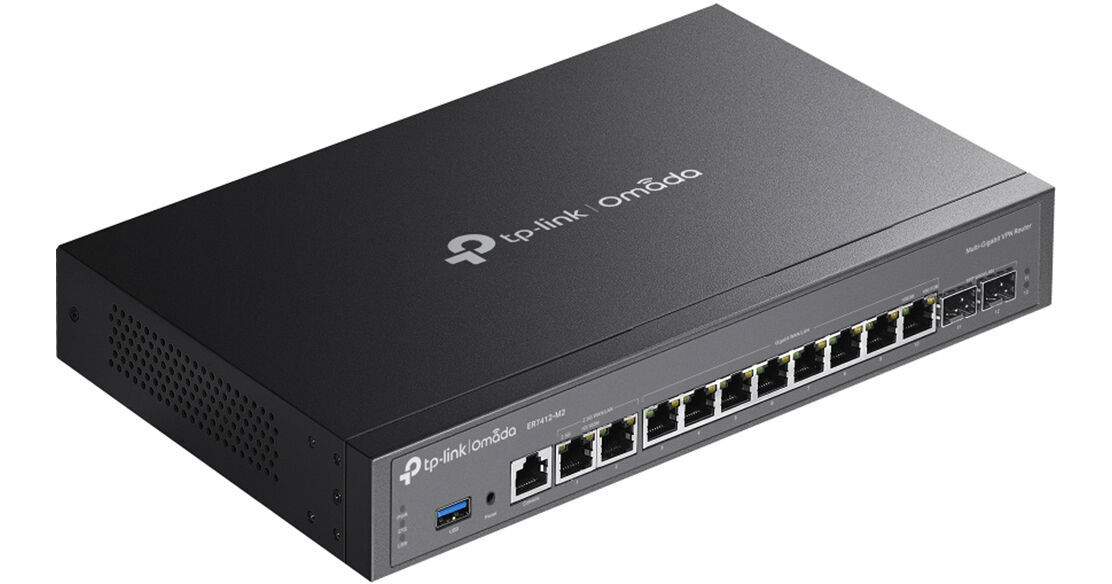
TP-Link ER7412-M2 Omada Multi-Gigabit VPN Gateway

BH #TPER7412M2 • MFR #ER7412-M2
Print
TP-Link ER7412-M2 Omada Multi-Gigabit VPN Gateway
Key Features
  • 2 x 2.5 GbE RJ45 WAN/LAN Port
  • 2 x GbE SFP WAN/LAN Port
  • 8 x GbE RJ45 WAN/LAN Port
  • Quad-Core 2.0 GHz CPU
Enable secure, high-speed network access for your schools, hotels, and offices with the ER7412-M2 Omada Multi-Gigabit VPN Gateway from TP-Link. With up to 2.5 Gb/s support and comprehensive security features, this device helps you to protect and manage your multi-line broadband connections.
More Details
Temporarily Out of Stock
No Store Display
Free 2-Day Shipping
Ask an Expert
800-606-6969

TP-Link ER7412-M2 Overview

Enable secure, high-speed network access for your schools, hotels, and offices with the ER7412-M2 Omada Multi-Gigabit VPN Gateway from TP-Link. With up to 2.5 Gb/s support and comprehensive security features, this device helps you to protect and manage your multi-line broadband connections.

Powered by a Quad-Core 2.0 GHz CPU, this device has two 2.5 Gb/s RJ45 WAN/LAN ports for high-speed network applications, two SFP WAN/LAN ports that support up to 1 Gb/s fiber links, and eight GbE RJ45 WAN/LAN available ports. Connecting a mobile broadband modem to the USB-A 3.0 port provides backup LTE internet if the main connections go down, as well as supporting USB storage and file sharing. Cloud-based management via the web interface or Omada app makes it easy to monitor your network devices from almost anywhere. This gateway device may be mounted onto a desktop, wall, or rack.

Load Balancing
Load Balancing on up to 11 WAN ports increases the utilization rate of multi-line broadband.
Software Defined Networking (SDN) with Cloud Access
Remotely manage your access points, switches, and gateways across multiple sites all from a single interface.
High-Security and High-Performance VPN
Support for SSL, IPSec, GRE, WireGuard, PPTP, L2TP, and OpenVPN allows you to easily build secure VPN tunnels for internet browsing, communication between different branches, or enabling remote work from home.
DPI (Deep Packet Inspection)
Easily specify internet access rights and strategies via DPI (Deep Packet Inspection), IP/MAC/URL Filtering, and Access Control List (ACL).
IDS/IPS
The integrated IDS/IPS engine bolsters threat detection and defense. Additionally, there is an embedded, regularly updated signature database for attack prevention.
DoS/DDoS Protection
This gateway can automatically detect and block Denial of Service (DoS) attacks such as TCP/UDP/ICMP Flooding, Ping of Death, and other related threats.
UPC: 840030711077

TP-Link ER7412-M2 Specs

Key Specs
Networking I/O
12 Total Connections Supporting up to 2.5 GbE
Networking I/O
2x RJ45 2.5 GbE WAN/LAN
2x SFP Gigabit Ethernet WAN/LAN
8x RJ45 Gigabit Ethernet WAN/LAN
Other I/O
1x USB-A 3.0 / 3.1/3.2 Gen 1
1x RJ45 RS-232 (Console)
Protocols
Supported Protocols
DHCP Server
IPv4
IPv6
Port Mirroring
RADIUS
Security
Security Features
DoS Attack Prevention
RADIUS Authentication
Performance
Throughput
263.1 Mb/s SSL VPN
Supported VPN Tunnels
80 SSL
150 IPsec
150 PPTP
150 L2TP
Computer
Flash Memory
128 MB
CPU
Quad-Core:
Up to 2 GHz (4 Cores)
Memory
1 GB DDR4
Electrical
Power Draw
18.5 W (Max)
Input Power
100 to 240 VAC, 50 / 60 Hz
Power Supply Type
External
General
Certifications
CE, FCC
Operating Conditions
32 to 113°F / 0 to 45°C at 0 to 45% Humidity
Storage Conditions
-40 to 158°F / -40 to 70°C at 5 to 90% Humidity
Indicator Lights
No
Rack Mountable
Yes
Packaging Info
Package Weight
4.495 lb
Box Dimensions (LxWxH)
16.5 x 10.1 x 3"

TP-Link ER7412-M2 Reviews

Great dual-wan experience, a few setup woes

By Jonathan
Rated 4 out of 5
Date: 2026-06-30

I already had some Omada networking equipment in my home (including a controller), so this seemed like the perfect dual WAN option when I wanted to add a backup internet connection to my home. Configuration in Omada is fairly easy. I have not found a networking configuration that I could not do in some way. There's way more performance than I need given my internet connections. I was able to pin traffic from certain devices to a specific WAN (with fail over, if necessary), which is great for streaming devices that use video services tethered to a certain IP/internet connection. The main downside to initial setup is that I could not find a way to stage the configuration I wanted in my Omada controller and then adopt the gateway later. I wanted to do this while my existing router was still providing internet access and acting as a DHCP server, etc. Instead, I had to first bring the new device onto the network, adopt, and then configure it. This meant more downtime was needed than if I could have staged all of the configuration changes earlier in the Omada controller and then applied them when I was ready for the new device to take over the gateway IP and internet connections. Another downside is that some of the info reported from the device seems to be delayed; I haven't found a way to see a more-or-less "live" view of throughput over the WANs, at least when it is adopted to a controller. Other items like WAN IP and online connection detection are delayed, which can lead to confusion during the setup phase. It does measure and report these items, eventually. With the Omada controller I get a consolidated view of the network including my Omada WiFi access points and the gateway. Be sure to read the docs on what ports are initially WAN out of the box. On mine, it was ports 1 and 3 as WAN. Of course, I was initially trying to perform set up on port 3 and spent some time before I realized I had not chosen a correct LAN port.

See any errors on this page?
Whatever You Need, We've Got It