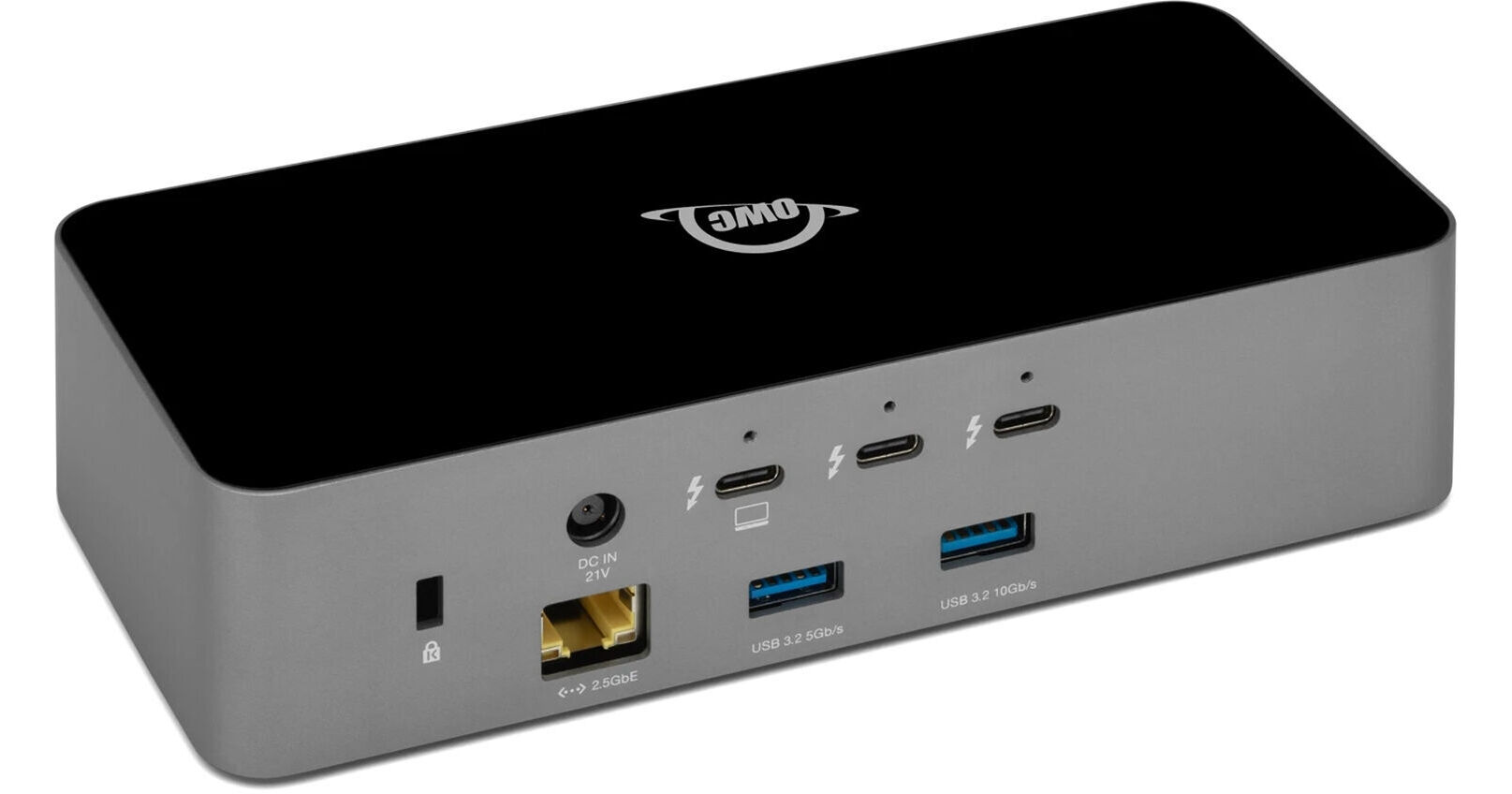
OWC 11-Port Thunderbolt 5 Dock with Thunderbolt Cable

BH #OWTB5DOCK11P • MFR #OWCTB5DOCK11P
Print
OWC 11-Port Thunderbolt 5 Dock with Thunderbolt Cable
Key Features
  • 1 x Thunderbolt 5 Host Port w/ 140 PD
  • Up to Three 8K Displays at 60 Hz
  • 3 x Thunderbolt 5 USB-C Ports
  • 2 x USB-A 3.2 Gen 2 Ports
Designed for tech enthusiasts, Mac users, and creators, the OWC 11-Port Thunderbolt 5 Dock maximizes productivity and unleashes incredible speeds for creating, editing, and producing. Connect your device using the Thunderbolt 5 USB-C host port which provides up to 80 Gb/s of bi-directional data speed, offers up to 140W power delivery, and supports up to three 8K (7680 x 4320) resolution displays at 60 Hz, two 8K displays at 120 Hz, or three 4K (3840 x 2160) resolution displays at 144 Hz.
More Details
In Stock
Free Expedited Shipping
Protect Your Gear
Add a protection plan from $53.99
Ask an Expert
800-606-6969

OWC OWCTB5DOCK11P Overview

Designed for tech enthusiasts, Mac users, and creators, the OWC 11-Port Thunderbolt 5 Dock maximizes productivity and unleashes incredible speeds for creating, editing, and producing. Connect your device using the Thunderbolt 5 USB-C host port which provides up to 80 Gb/s of bi-directional data speed, offers up to 140W power delivery, and supports up to three 8K (7680 x 4320) resolution displays at 60 Hz, two 8K displays at 120 Hz, or three 4K (3840 x 2160) resolution displays at 144 Hz.

The Thunderbolt 5 Dock includes three more Thunderbolt 5 USB-C ports that provide up to 15W of power delivery for high-speed data transfer. One USB-A 5 Gb/s port and two UBS-A 10 Gb/s ports are available for further connectivity. Connect to a high-speed wired network using the 2.5 GbE RJ45 port, and plug in headphones or a microphone through the 3.5mm TRRS audio port for listening and recording needs. The microSDXC and SDXC 4.0 UHS-II slots allow you to quickly and easily transfer large photo and video files from cameras. This device is compatible with Windows, macOS, Linux, and ChromeOS. To fully utilize Thunderbolt 5 capabilities, your device requires Windows 11 or later, or macOS 15.3.x or later.

UPC: 718122770014

OWC OWCTB5DOCK11P Specs

Key Specs
USB I/O
3x USB-C (Thunderbolt 5)
2x USB-A 3.1/3.2 Gen 2
1x USB-A 3.0 / 3.1/3.2 Gen 1
Max Resolution
3 Displays Supported:
7680 x 4320 at 120 Hz (Dual)
3840 x 2160 at 144 Hz (Triple)
Audio I/O
1/8" / 3.5 mm Headphone/Microphone Combo Jack
Network I/O
1x RJ45 (2.5 GbE)
Host Connection
USB-C (Thunderbolt 5) Supporting USB Power Delivery up to 140 W via Built-In Connector
USB I/O
3x USB-C (Thunderbolt 5)
2x USB-A 3.1/3.2 Gen 2
1x USB-A 3.0 / 3.1/3.2 Gen 1
Max Resolution
3 Displays Supported:
7680 x 4320 at 120 Hz (Dual)
3840 x 2160 at 144 Hz (Triple)
Audio I/O
1/8" / 3.5 mm Headphone/Microphone Combo Jack
Network I/O
1x RJ45 (2.5 GbE)
Media Card Reader
1x SDXC (UHS-II [312 MB/s])
1x microSDXC (UHS-II [312 MB/s])
Host Connection
USB-C (Thunderbolt 5) Supporting USB Power Delivery up to 140 W via Built-In Connector
Power Source
Included AC Adapter: 100 to 240 VAC, 50/60 Hz at 2.5 A
Wireless Charging
No
OS Compatibility
Computer: macOS 14 to 15 / Windows 10 to 11 / Windows Server 2022 Only / Linux / Chrome OS
Mobile: Android/iPadOS
Operating Conditions
32 to 86°F / 0 to 30°C at 5 to 90% Humidity
Storage Conditions
-4 to 140°F / -20 to 60°C
Enclosure Material
Aluminum, Plastic
Lock Slot
Yes
Certifications
CE, FCC, ICES, RCM, REACH, RoHS, UKCA, VCCI
Cable Length
3.3' / 1 m
Dimensions
7 x 3.1 x 1.7" / 17.8 x 7.8 x 4.2 cm
Weight
18.7 oz / 530 g
Packaging Info
Package Weight
3.18 lb
Box Dimensions (LxWxH)
9.8 x 6.4 x 3.9"

OWC OWCTB5DOCK11P Reviews

Very happy with this dock

By Michael B.
Rated 5 out of 5
Date: 2026-07-09

I bought this dock to use with a MacBook Pro M5 and am very pleased with it. It's got a good variety of ports that allow me to hook up everything I need. Used in conjunction with the MB Pro and an external monitor, it lets me hook up everything I need to the computer and makes it easy to use it as a portable computer by disconnecting the one cable. It's worked seamlessly and the speed of external USB hard drives attached to it is good. Highly recommended.

A great TB5 dock!

By Bob
Rated 5 out of 5
Date: 2025-12-18

I upgraded my Dock on my MAC Mini M4 Pro with the OWC Thunderbolt 5 Dock and I’m very happy with it. I have two Thunderbolt 5 4TB SSD’s and a Thunderbolt 3 4TB SSD connected. Plus a 24TB backup drive and a CFEXPRESS card reader. This dock is working great with all of those devices connected. It does not get too hot and I’ve had zero disconnects. Highly recommended.

See any errors on this page?

Will the bus powered TB5 OWC Envoy work at full ...

Will the bus powered TB5 OWC Envoy work at full speeds when connected to this dock that shows no power delivery on its TB ports?
Asked by: dan
Yes, the Thunderbolt 5 OWC Enjoy will work at full speed when connected to the OWC 11-Port Thunderbolt 5 Dock with Thunderbolt Cable when connected to its Thunderbolt port with no power delivery.
Answered by: JP A
Date published: 2025-12-09

Are the Thunderbolt 5 ports downward compatible ...

Are the Thunderbolt 5 ports downward compatible with Thunderbolt 3?
Asked by: William
Yes, the Thunderbolt 5 ports are fully backward compatible with Thunderbolt 3 on the OWC 11-Port Thunderbolt 5 Dock with Thunderbolt Cable.
Answered by: JP A
Date published: 2025-10-21

Will this dock support at least 5k 120Hz or at ...

Will this dock support at least 5k 120Hz or at least 6k 120Hz on macs through thunderbolt 5?
Asked by: dan
The OWC 11-Port Thunderbolt 5 Dock with Thunderbolt Cable supports up to three 8K monitors at 60 Hz, two 8K monitors up to 120 Hz, or up to three 4K monitors up to 144 Hz.
Answered by: Kenneth C
Date published: 2025-08-22
  • y_2026, m_10, d_4, h_12CST
  • bvseo_bulk, prod_bvqa, vn_bulk_3.0.48
  • cp_1, bvpage1
  • co_hasquestionsanswers, tq_3
  • loc_en_US, sid_1899506, prod, sort_[SortEntry(order=HAS_STAFF_ANSWERS, direction=DESCENDING)]
  • clientName_bhphotovideo
Whatever You Need, We've Got It