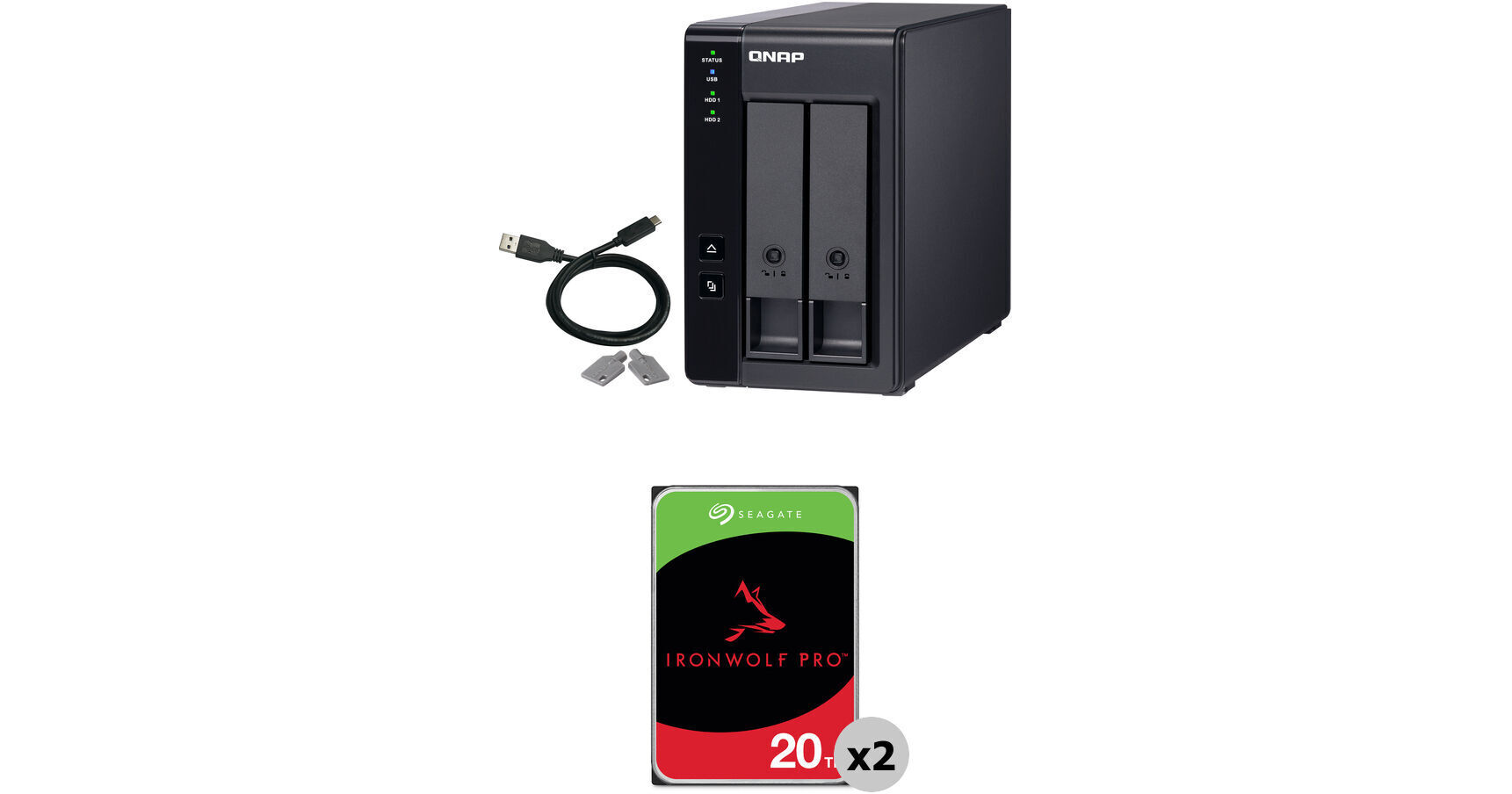
QNAP 40TB TR-002 2-Bay USB 3.2 Gen 2 RAID Expansion Enclosure Kit (2 x 20TB)

BH #QNTR002US40T (B&H Kit)
Print
QNAP 40TB TR-002 2-Bay USB 3.2 Gen 2 RAID Expansion Enclosure Kit (2 x 20TB)
Key Features
  • 40TB Storage Capacity
  • 2 x 20TB 7200 rpm SATA III 3.5" NAS HDDs
  • 2 x 3.5/2.5" SATA III Drive Bays
  • 1 x USB-C 3.2 Gen 2 Port
This B&H Kit combines the QNAP TR-002 2-Bay USB 3.2 Gen 2 RAID Expansion Enclosure with two Seagate 20TB IronWolf Pro 7200 rpm SATA III 3.5" Internal NAS HDDs for a storage capacity of 40TB.
More Details
Kit Contains:

From Manufacturer

This B&H Kit combines the QNAP TR-002 2-Bay USB 3.2 Gen 2 RAID Expansion Enclosure with two Seagate 20TB IronWolf Pro 7200 rpm SATA III 3.5" Internal NAS HDDs for a storage capacity of 40TB.

QNAP TR-002 2-Bay USB 3.2 Gen 2 RAID Expansion Enclosure

The TR-002 2-Bay USB 3.2 Gen 2 RAID Expansion Enclosure from QNAP is unique in that it allows you to expand the storage capacity of not only your QNAP NAS, but also your host Windows, Mac, or Linux system. Use it in this fashion as a DAS (Direct-attached Storage) and access its content simply by connecting it to your system using its integrated USB-C 3.2 Gen 2 port and the included USB-C to USB-A cable. The TR-002 features two hot-swappable 3.5" SATA drive bays that support 3.5 and 2.5" hard drives. The drive bays can be configured hardware- or software-controlled RAID 0 and 1 modes, each of which offers performance, data redundancy, or a combination of both. For those who do not require a RAID, Individual, and JBOD modes are also available. The enclosure keeps cool using a 70mm fan.

General Features
Effective Storage Expansion with RAID Support
The TR-002 is an ideal storage expansion solution, especially for laptops which lack the ability to install larger, higher-capacity drives. Featuring two 3.5" SATA drive bays and supporting multiple RAID configurations, the TR-002 provides the ability to store a vast number of files and data and to ensure protection against potential drive failure.
Supports Various RAID Levels
The TR-002 supports a various of RAID configurations. Depending on your requirements, you can switch between hardware- or software-controlled RAID modes. Move the DIP switches to corresponding positions for your desired RAID mode: Individual, JBOD, RAID 0, or RAID 1. You can also configure the RAID settings from your QNAP NAS, or by using the QNAP External RAID Manager utility on your computer.

Individual Mode treats every disk as separate storage, allowing you to independently access each one. In JBOD mode, all disks are recognized as a single drive, which allows maximum storage utilization, but provides no data protection. RAID 0 splits data among the drives and provides the fastest performance, but does not protect data against drive failures. RAID 1 mode uses half the total storage capacity to store data and the other half for 1:1 data redundancy. This provides high data protection at the cost of only being able to use half the installed storage space. All RAID modes are hardware controlled, but there is also a Software Control mode to configure the RAID from your NAS or computer.
Flexible Storage Configuration and Management
Compared with other RAID enclosures, the TR-002 provides software-controlled configurations for greater management flexibility. Users can configure RAID and monitor disk health using Storage & Snapshots Manager on a QNAP NAS, or by using the QNAP External RAID Manager utility on their computer.

Use Storage & Snapshots Manager to configure the TR-002 as a storage expansion unit for your QNAP NAS. In addition to RAID configuration, the NAS expansion storage mode supports various NAS functions, including storage pools and snapshots. By choosing external storage mode, you can use the TR-002 as a DAS.

The QNAP External RAID Manager is a utility for Windows and Mac users to set up, monitor, and view the status of the TR-002. Users can easily configure RAID groups on the TR-002 and quickly obtain the status of RAID performance and health at a glance.

Note: When connecting the TR-002 to a NAS, users can choose to use either the NAS expansion storage mode or the external storage mode.
Versatile Usage Scenarios to Meet Storage Expansion Needs
The TR-002 meets many storage expansion requirements for home and work use, including expanding the capacity of your NAS, serving as external storage for your NAS, expanding the storage space of your computer, and cross-platform file sharing.
Scenario 1: Expand the Capacity of Your NAS
The TR-002 provides an alternative method for users to expand their NAS storage capacity. By connecting the TR-002 to their NAS and using the Storage & Snapshots Manager, users can easily configure and manage their storage expansion. The TR-002 supports a variety of QNAP NAS storage and file management functions, allowing users to build storage pools, find files with Qsirch, and organize files with Qfiling.
Scenario 2: External Storage for Your NAS
Instead of using the TR-002 to expand the capacity of your QNAP NAS, you can use it as a complimentary storage unit for backing up or moving data. It also allows you to physically migrate huge data collections that would require significant network bandwidth. While connected to the NAS, you can monitor the health and status of the TR-002 by using the Storage & Snapshots Manager on the NAS.
Scenario 3: Expand the Storage Space of Your Computer
The TR-002 can quickly add storage space to your computer. You can use the DIP switch to configure a hardware RAID mode or manage it by using the QNAP External RAID Manager utility. The health and status of the TR-002 can also be monitored by using the QNAP External RAID Manager utility.
Scenario 4: Cross-Platform File Sharing
From your NAS to Windows, Mac, and Linux computers, the TR-002 is compatible with a wide range of devices. This is good for quickly moving large files between different devices. The TR-002 is even compatible with devices that use the exFAT file system, adding further convenience for accessing and sharing files from a wider range of devices.

Note: To access devices that use the exFAT file system, users must purchase a separate exFAT driver license.
An Alternative to Conventional NAS Expansion Enclosures
As an external hardware RAID device, the TR-002 operates independently and does not require additional NAS system resources.
UPC: 885022017249
Seagate 20TB IronWolf Pro 7200 rpm SATA III 3.5" Internal NAS HDD (CMR)

Designed to deliver performance, reliability, and dependability in multi-bay, multi-user RAID and NAS environments within commercial and enterprise settings, the 20TB IronWolf Pro 7200 rpm SATA III 3.5" Internal NAS HDD from Seagate is built to withstand 24/7 operation, or 8760 hours per year. This 20TB drive has been equipped with a SATA III 6 Gb/s interface, a rotational speed of 7200 rpm, a 3.5" form factor, and a 256MB cache, providing users with ample storage capacity with data transfer speeds of up to 285 MB/s. The IronWolf Pro also has an MTBF rating of 2.5 million hours and a workload rate of up to 550TB per year. Seagate's AgileArray technology provides dual-plane balancing, time-limited error recovery (TLER), and rotational vibration (RV) sensors to deliver enhanced RAID performance. Included is a limited 3-year Data Recovery Service that helps you retrieve damaged data in the event of a mechanical error, accident, or natural disaster, and overall protection is provided by a limited 5-year warranty.

High Performance
All-CMR (conventional magnetic recording) portfolio enables consistent, 24/7 performance, allowing users to access data virtually anytime, anywhere.
High Dependability
Up to a 550TB per year workload rating, a 2.5 million hours MTBF, and a limited 5-year warranty for a solid total cost of ownership (TCO).
Peace of Mind with Data Recovery
Seagate provides complimentary Rescue Data Recovery Services for three years, giving users a hassle-free, zero-cost data recovery experience.
IronWolf Health Management
Helps protect data with prevention, intervention, and recovery recommendations to ensure peak system health.
Optimized for NAS
Seagate's AgileArray technology provides dual-plane balancing, time-limited error recovery (TLER), and rotational vibration (RV) sensors to deliver top RAID performance in multi-bay environments.
UPC: 763649176252
Kit Contains:

QNAP TR-002 2-Bay USB 3.2 Gen 2 RAID Expansion Enclosure

Key Specs
RAID
Yes: Supported RAID Modes: 0 / 1
Number of Bays
2x 2.5"/3.5"
Inputs/Outputs
1x USB-C 3.1/3.2 Gen 2
Drives
RAID
Yes: Supported RAID Modes: 0 / 1
General
Number of Bays
2x 2.5"/3.5"
Inputs/Outputs
1x USB-C 3.1/3.2 Gen 2
PCI Expansion
No
Security
Encryption
No
Security Features
Kensington Security Slot
Electrical
Input Power
100 to 240 VAC, 50 / 60 Hz
Power Consumption
10.15 W
PSU
1 x 36 W
Physical
Operating Conditions
32 to 104°F / 0 to 40°C at 5 to 95% Humidity
Cooling
1x 70 mm Hot-Swappable Fan
Noise Level
17.8 dBA
Dimensions
8.62 x 6.65 x 4.02" / 218.95 x 168.91 x 102.11 mm
Weight
5.0 lb / 2.3 kg
Packaging Info
Package Weight
4.875 lb
Box Dimensions (LxWxH)
10.7 x 9.4 x 8.1"

QNAP TR-002 External HDD/SSD Reviews

Exactly what I needed

By Jessica
Rated 5 out of 5
Date: 2026-06-29

Very happy I got this. Does beep pretty loud when you turn it on so keep that in mind haha. OVerall very happy that I got it

excellent external drive

By Thomas
Rated 5 out of 5
Date: 2025-12-20

QNAP TR-002 is an excellent upgrade over the typical external drives. It's incredibly easy to set up, only taking a few minutes before it was ready to go. Unlike a RAID system, there's no need for any networking, configuration, or initialization. But unlike the typical external drives, you can choose the type and size of drives you want, and you get redundancy for greater reliability (if configured in RAID 1). It performs great -- no access slowdowns despite it writing concurrently to two drives. Put quality drives in there and there's hardly any noise. It just works.

See any errors on this page?

What is the maximum hard drive capacity this Raid ...

What is the maximum hard drive capacity this Raid enclosure will support?
Asked by: Michael
The highest capacity drive verified as compatible with the QNAP TR-002 2-Bay USB 3.1 GEN 2 RAID Expansion Enclosure is the WD 22TB Ultrastar 7200 rpm SATA 3.5" Internal Data Center HDD, B&H # WE0F48155.
Answered by: Kenneth C
Date published: 2025-12-31

Will this accept Seagate Barracuda XT 3.5" 2TB ...

Will this accept Seagate Barracuda XT 3.5" 2TB drives for mirrored RAID?
Asked by: Tony
Yes, this will accept any 3.5" drives.
Answered by: Nilson D
Date published: 2024-03-31

Is this hardware or software RAID?

Is this hardware or software RAID?
Asked by: George
The QNAP TR-002 2-Bay USB 3.2 Gen 2 RAID Expansion Enclosure is both hardware and software RAID.
Answered by: JP A
Date published: 2025-09-25

I see suggested drives if use as NAS... if used ...

I see suggested drives if use as NAS... if used DAS what drives are suggested?
Asked by: Susan
This is always used for NAS, it is an expansion unit and not the NAS itself. You need to use NAS rated hard drives.
Answered by: Sagi C
Date published: 2023-12-15

Is this QNAP 48TBTR-002 RAID Expansion Enclosure ...

Is this QNAP 48TBTR-002 RAID Expansion Enclosure Kit (2 X 24TV) compatible with Mac Studio Max with OS Sequoia?
Asked by: Cheryl
Yes, the QNAP 48TB TR-002 2-Bay USB 3.2 Gen 2 RAID Expansion Enclosure Kit (2 x 24TB) is compatible with a Mac Studio Max running macOS Sequoia.
Answered by: JP A
Date published: 2025-09-07

Will this unit work with Seagate 26TB drives?

Will this unit work with Seagate 26TB drives?
Asked by: Orville
The QNAP TR-002 2-Bay USB 3.2 Gen 2 RAID Expansion Enclosure, B&H # QNTR002US, supports 3.5'' SATA hard drives that are up to 32TB; a 26TB Seagate drive would work as long as it has a SATA connection.
Answered by: Miguel M
Date published: 2026-03-01

what is the maximum storage (TB) it supports?

what is the maximum storage (TB) it supports?
Asked by: Farid
Up to 16TB per bay, below the recommended HDD list https://www.qnap.com/en-us/compatibility/?model=388&category=1
Answered by: Daniel
Date published: 2025-12-31

Can I install two individual 16TB drives in the ...

Can I install two individual 16TB drives in the TR-002 and have them show up as separate drives on my macOS desktop?
Asked by: Ralph
The QNAP TR-002 2-Bay USB 3.1 GEN 2 RAID Expansion Enclosure, B&H # QNTR002US, is compatible with hard drives up to 24TB of capacity; if you install two 16TB hard drives, they will show up as separate drives on your Mac unless you set them to either RAID 1 or RAID 0.
Answered by: Miguel M
Date published: 2025-03-30
  • y_2026, m_7, d_10, h_8CST
  • bvseo_bulk, prod_bvqa, vn_bulk_3.0.47
  • cp_1, bvpage1
  • co_hasquestionsanswers, tq_9
  • loc_en_US, sid_1899736, prod, sort_[SortEntry(order=HAS_STAFF_ANSWERS, direction=DESCENDING)]
  • clientName_bhphotovideo
Whatever You Need, We've Got It