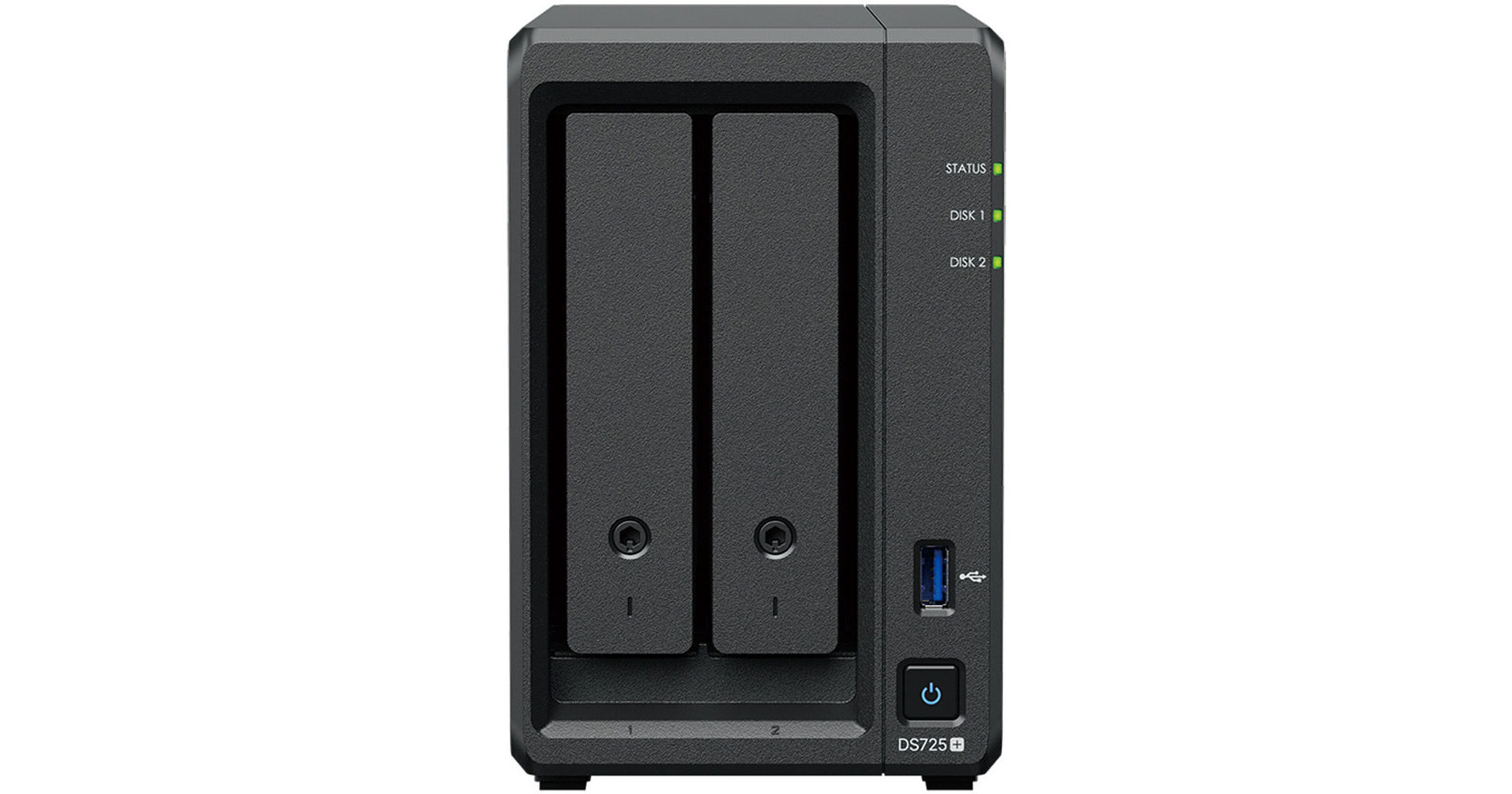
Synology DiskStation DS725+ 2-Bay NAS Enclosure

BH #SYDS725P • MFR #DS725+
Print
Synology DiskStation DS725+ 2-Bay NAS Enclosure
Key Features
  • 2 x 2.5"/3.5" SATA III Drive Bays
  • 2 x M.2 2280 NVMe SSD Slots
  • 2.6 GHz AMD Ryzen R1600 Dual-Core CPU
  • 4GB of DDR4 ECC RAM
The DiskStation DS725+ 2-Bay NAS Enclosure from Synology is a capable solution that can adapt to growing demands, with optional support for up to seven drives and two M.2 2280 NVMe slots for SSD caching. Powered by Synology DiskStation Manager (DSM), it offers a flexible all-in-one solution for data sharing, synchronization, backup, and surveillance. The DS725+ is equipped with two drive bays that are capable of natively supporting 3.5" SATA III hard drives, as well as 2.5" SATA III hard drives and SSDs. The DS725+ runs using a 2.6 GHz AMD Ryzen R1600 Dual-Core processor and its 4GB of DDR4 ECC RAM can be upgraded to 32GB. This NAS is capable of sequential read speeds up to 276 MB/s and sequential write speeds up to 224 MB/s.
More Details
In Stock
No Store Display
Free Expedited Shipping
Protect Your Gear
Add a protection plan from $44.99
Ask an Expert
800-606-6969

Synology DS725+ Overview

The DiskStation DS725+ 2-Bay NAS Enclosure from Synology is a capable solution that can adapt to growing demands, with optional support for up to seven drives and two M.2 2280 NVMe slots for SSD caching. Powered by Synology DiskStation Manager (DSM), it offers a flexible all-in-one solution for data sharing, synchronization, backup, and surveillance. The DS725+ is equipped with two drive bays that are capable of natively supporting 3.5" SATA III hard drives, as well as 2.5" SATA III hard drives and SSDs. The DS725+ runs using a 2.6 GHz AMD Ryzen R1600 Dual-Core processor and its 4GB of DDR4 ECC RAM can be upgraded to 32GB. This NAS is capable of sequential read speeds up to 276 MB/s and sequential write speeds up to 224 MB/s.

Also featured is one USB-A 3.2 Gen 1 port that allows it to be connected to external storage or other USB devices, a USB-C port for the DX525 expansion unit, and network connectivity is achieved via the 2.5GbE or 1GbE RJ45 ports that support link aggregation and failover, allowing your stored data to be shared with users throughout the network. For those who require RAID support, the DS725+ supports RAID 0, 1, Hybrid, and Basic, each of which offers performance, data redundancy, or a combination of both. For those who do not require a RAID, JBOD is also available, allowing each drive bay to be individually utilized. When paired with the optional DX525, RAID 5, 6, and 10 are also supported.

The DS725+ is engineered to be energy efficient and its 92 x 92mm fan to helps keep the system running cool at all times. The server supports numerous scheduled power on/off cycles and hard drive hibernation to further minimize power consumption and operation expenses.

The Synology DiskStation DS725+ operates on 100-240 VAC at 50/60 Hz and includes an AC power cord, an AC power adapter, two RJ45 LAN cables, two hard drive tray keys, and ten screws for 2.5" drives. It is protected by a limited 3-year warranty.

2.5GbE Connectivity and Diverse Storage Options
The DS725+ features built-in 2.5GbE networking and supports both SATA SSDs and HDDs in 2.5"/3.5" internal bays, as well as M.2 NVMe drives via M.2 slots for use as cache. Read speeds reach as high as 276 MB/s, while write speeds max out at 224 MB/s.
Expand Capacity for Evolving Needs
Consolidate your data with large amounts of raw storage across two bays. Need more space? Add extra capacity with the DX525 5-bay expansion unit.
Store, Share, and Protect
Manage all your documents, photos, and other files, back up applications and devices, and protect your assets with professional video surveillance.
Private Cloud for Seamless Data Access
Streamlined File Management and Collaboration
Store, sync, access, and share data from any device, wherever you are. Work seamlessly between different platforms and devices, and access your files through mobile apps, desktop clients, and a browser-based interface. Quickly and easily roll back files in case of accidental deletion, mistakes, malware, and more with versioning.

A Private Photo Storage and Management Solution
Effortlessly back up and organize photos, videos, and other visual assets using intuitive management tools. Automatically organize your content into albums and create secure share links for stakeholders and teammates.

Boost Team Productivity with Collaborative Tools
Enhance workplace collaboration with Synology's productivity solutions. Create, edit, and share documents across teams in real time. Host an on-premises mail server to provide web-based email access while maintaining full data ownership. Additionally, stay connected through secure one-on-one chats, public channels, encrypted private channels, and group conversations.
Multi-Site Synchronization to Empower Global Workflows
NAS-to-NAS Synchronization
Improve workflow efficiency and team alignment across data sites with automatic one- or two-way site-to-site syncing. Files and folders are kept up to date across sites, so everyone stays aligned, whether at home, in the office, or across different branches - all while maintaining full control of your data.

Cloud-Powered Multi-Site Syncing
Empower global workflows with high-speed access to data from anywhere in your network. Synology's hybrid cloud solution caches frequently used files locally for rapid access, while less frequently accessed data is stored in the cloud, reducing your on-site storage requirements.

Sync to Public Cloud Providers
Automatically keep data in sync between Synology NAS and major cloud providers, including BackBlaze B2, Dropbox, Google Drive, and Microsoft OneDrive. Multiple protocol support, client-side encryption, and customizable sync and bandwidth controls enable efficient storage management across various platforms.
Comprehensive Data Backup, Protection, and Recovery Solutions
Back up PCs, Smartphones, Cloud Apps, and More
Consolidate and automate backup tasks for PCs, file servers, VMs, SaaS applications, and more. Administer device backups remotely through a centralized portal and quickly restore specific files or entire devices to keep your business up and running. Take advantage of built-in backup solutions designed to protect your data with seamless 3-2-1 backup configurations.

Comprehensive and Flexible Synology System Backups
Protect all data, applications, and configurations on your Synology systems with comprehensive scheduled backups, including bare-metal backups, to local and remote servers, external drives, or cloud storage destinations, including Synology C2 Storage.

Tamper-Proof Protection with Immutable Snapshots
Safeguard critical LUNs and shared folders with automated immutable snapshots backed by custom retention policies. Built-in support for offsite replication further ensures robust business continuity.
Smart Surveillance
Synology Surveillance Station
Protecting your business has never been easier, with centralized management, support for over 8700 IP camera models, and remote monitoring and playback. Synology's scalable video management system provides all the tools you need for live monitoring, investigation, management, and backup.

Dual Recording to the Cloud
Secure your surveillance footage with robust cloud backup that supports end-to-end encryption. Synology's cloud-based surveillance backup solution safeguards your Surveillance Station recordings, allowing you to access, view, share, and download footage through a convenient web portal. Ensure your data remains available even if your on-premises system is compromised.
Centralized Monitoring and Management
Monitor and manage your Synology fleet from a central interface, on-prem or in the cloud.
Central Management System
Manage Synology servers from a central console using group policies, task delegation, batch updates, and more.
Active Insight
Monitor your global Synology fleet's performance, backup status, login activity, and more with the power of the cloud.
UPC: 846504006038

Synology DS725+ Specs

Key Specs
RAID
Yes: Supported RAID Modes: 0 / 1 / JBOD / Basic / Hybrid
Number of Bays
2x 2.5"/3.5" SATA III (Hot-Swap)
2x M.2 (2280) NVMe
Inputs/Outputs
1x RJ45 2.5GbE
1x RJ45 Gigabit Ethernet
1x USB-A 3.0 / 3.1/3.2 Gen 1
1x USB-C
Computing
CPU
Dual-Core: 2.6 to 3.1 GHz
Processor
AMD Ryzen R1600
Memory
4 GB ECC DDR4
RAM Configuration / Capacity
1x User-Replaceable 4 GB Module / 2 Slots Supporting up to 32 GB (SO-DIMM)
Drives
RAID
Yes: Supported RAID Modes: 0 / 1 / JBOD / Basic / Hybrid
Transfer Rates
276 MB/s (Read)
224 MB/s (Write)
General
Number of Bays
2x 2.5"/3.5" SATA III (Hot-Swap)
2x M.2 (2280) NVMe
Inputs/Outputs
1x RJ45 2.5GbE
1x RJ45 Gigabit Ethernet
1x USB-A 3.0 / 3.1/3.2 Gen 1
1x USB-C
Media Card Slots
No
PCI Expansion
No
Networking
Link Aggregation and Failover Support
Yes
iSCSI Support
Yes: 2 LUN / 2 Target
Software
Installed Operating System
No
OS Compatibility
Windows
macOS
Linux
Mobile App Compatible
No
Security
Encryption
Yes, AES-NI (Hardware-Based)
Security Features
Kensington Security Slot, Lockable Bay Door
VPN Connections
4 (Server)
Electrical
Input Power
100 to 240 VAC, 50 / 60 Hz
Power Consumption
20.41 W (Typical)
7.87 W (Standby)
PSU
1 x 65 W
Physical
Operating Conditions
32 to 104°F / 0 to 40°C at 8 to 80% Humidity
Storage Conditions
-5 to 140°F / -20 to 60°C at 5 to 95% Humidity
Certifications
BIS, BSMI, CCC, CE, EAC, FCC, KC, RCM, RoHS, UKCA, VCCI
Cooling
1x 92 mm Fan
Noise Level
17.9 dBA
Dimensions
8.8 x 6.5 x 4.2" / 223 x 166 x 106 mm
Weight
3.3 lb / 1.5 kg
Packaging Info
Package Weight
5.265 lb
Box Dimensions (LxWxH)
11.6 x 11.4 x 4.8"

Synology DS725+ Reviews

DS725+ 2-8GB HDD Mirrored

By Alan
Rated 5 out of 5
Date: 2026-05-01

It was easy to install DS725+. I didn't buy M.2 2280 NVMe SSDs for cache, as I had previously purchased 2-SSDs for my DS720+ and did not see a R/W performance increase and one of the high-end/pricey SSDs failed after a month. I used the Btrfs file system and Hybrid RAID (SHR-1) instead of standard Raid-1. My UPS is connected to my DS720+. I configured my DS720+ to be a network UPS server and signal the DS725+ during a UPS event. I configured the rsync service to immediately copy data written to my DS720+ to my DS725+. This works much better than a scheduled backup. I tried hibernation, but found that too many things wake up the NAS and also Synology doesn't recommend hibernation due to spin-up wear and tear on the HDDs. Instead I am using a Power schedule to shut-off the NASes at night for 12-hours. This works well, with only 1 spin-up per day. I bought an extra HDD in case of a failure. I was a little miffed that Synology only supports their branded HDDs for the DS725+; they supported other vendor HDDs for the DS720+. Hopefully their branded HDDs are as good as popular vendor HDDs. I was surprised that I couldn't purchase a package of the DS725+ enclosure and HDDs, but buying a la carte was ok, but you do need to check out the different HDD specs before purchasing. All-in-all, the DS720+ and DS725+ are good stable products.

Amazing NAS

By Chad
Rated 5 out of 5
Date: 2025-09-16

This is the very best 2 bay NAS. I specifically purchased it because it's compact, quiet, and highly reliable with ECC memory. I maxed it out with dual M.2 cache drives, 8GB RAM, and 2x16TB spinning drives. Yes you must use official Synology parts, but it's well worth it for reliability and compatibility. I use this system to store important client work and I have zero desire to deal with 3rd party parts. Some people will prefer older model Synology systems that allow 3rd party parts.

See any errors on this page?

Do the M.2 slots also support SATA (M+K) drives, ...

Do the M.2 slots also support SATA (M+K) drives, or is it NVMe only?
Asked by: John
The M.2 slots in the Synology DiskStation DS725+ 2-Bay NAS Enclosure, BH # SYDS725P, only support NVMe drives, not B & M or any other.
Answered by: Elliot A
Date published: 2026-01-26
  • y_2026, m_5, d_31, h_13CST
  • bvseo_bulk, prod_bvqa, vn_bulk_3.0.46
  • cp_1, bvpage1
  • co_hasquestionsanswers, tq_1
  • loc_en_US, sid_1906938, prod, sort_[SortEntry(order=HAS_STAFF_ANSWERS, direction=DESCENDING)]
  • clientName_bhphotovideo
Whatever You Need, We've Got It