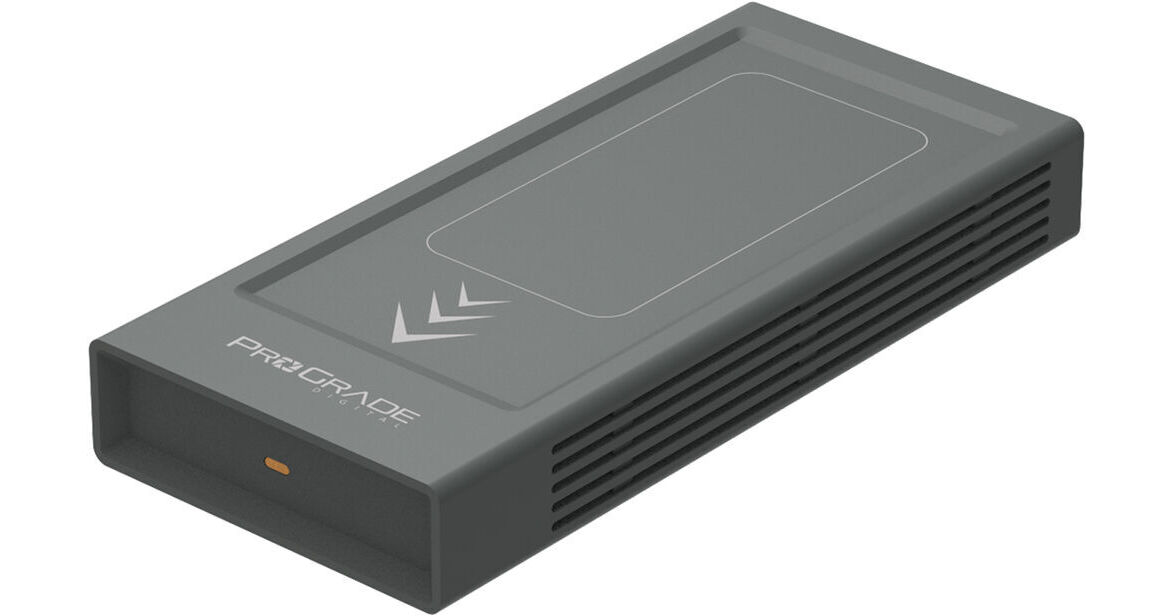
ProGrade Digital 16TB PG10 USB4 External SSD

BH #PRPG1016TSWD • MFR #PGWFD16TBANA
Print
ProGrade Digital 16TB PG10 USB4 External SSD
Key Features
  • 16TB Storage Capacity
  • 40 Gb/s USB-C Interface (USB4)
  • Max Read Speed: 2500 MB/s
  • Max Write Speed: 2500 MB/s
The 16TB PG10 USB4 External SSD from ProGrade Digital creates a professional workflow for photographers, videographers, and digital imaging technicians. Equipped with a USB-C interface that uses the 40 Gb/s USB4 standard, this SSD delivers maximum read speeds of up to 2500 MB/s, maximum write speeds of 2500 MB/s, and sustained write speeds of 2000 MB/s. It is also compatible with Thunderbolt 4, Thunderbolt 3, and other USB-C ports that operate using the 10 Gb/s USB 3.2 Gen 2 (3.1 Gen 2/3.1) and 5 Gb/s 3.2 Gen 1 (3.1 Gen 1/3.0) standards.
More Details
In Stock
No Store Display
$4,199.99
Calculate Shipping
Protect Your Gear
Add a protection plan from $529.99

Business Financing Options

Ask an Expert
212-444-6615

ProGrade Digital PG10 Overview

From Manufacturer

The 16TB PG10 USB4 External SSD from ProGrade Digital creates a professional workflow for photographers, videographers, and digital imaging technicians. Equipped with a USB-C interface that uses the 40 Gb/s USB4 standard, this SSD delivers maximum read speeds of up to 2500 MB/s, maximum write speeds of 2500 MB/s, and sustained write speeds of 2000 MB/s. It is also compatible with Thunderbolt 4, Thunderbolt 3, and other USB-C ports that operate using the 10 Gb/s USB 3.2 Gen 2 (3.1 Gen 2/3.1) and 5 Gb/s 3.2 Gen 1 (3.1 Gen 1/3.0) standards.

This SSD operates using bus power and features a dual heatsink design for improved cooling with no throttling, a writable label area for Avery labels, and uses an LED to confirm the drive is receiving 15W of power. Thanks to Refresh Pro, users will be able to monitor the drive's health, restore lost performance, and update firmware. For added security, the serial number on the drive matches the serial number on the carrying case.

  • Read speeds up to 2500 MB/s
  • Write speeds up to 2500 MB/s
  • Sustained write speeds of 2000 MB/s
  • USB4 interface provides transfer rates of up to 40 Gb/s (5 GB/s)
  • Compatible with Thunderbolt 4, Thunderbolt 3, USB-C 3.2 Gen 2, and USB-C 3.2 Gen 1 ports
  • Dual heatsink design delivers superior cooling with no throttling
  • Writable label area supports Avery labels for easy drive content identification
  • Refresh Pro enabled for monitoring drive health, restoring lost performance, and updating firmware
  • USB4 certified high-speed cable included
  • Power-sensing LED indicator lets you know the SSD is receiving 15W of power
UPC: 810188400734

ProGrade Digital PG10 Specs

Key Specs
Total Capacity
16 TB
Drive Type
Unspecified SSD
System Connection
USB-C (USB4)
Total Capacity
16 TB
Drive Type
Unspecified SSD
Performance
Read Speed
Maximum: 2500 MB/s
Write Speed
Maximum: 2500 MB/s
Sustained: 2000 MB/s
Encryption Support
No
External Enclosure
System Connection
USB-C (USB4)
Fan Cooled
No
Electrical
Power Source
Bus Powered
General
Operating Conditions
14 to 95°F / -10 to 35°C
Storage Conditions
-13 to 140°F / -25 to 60°C
Dimensions
5.72 x 2.6 x 0.83" / 145.25 x 65 x 21.05 mm
Packaging Info
Package Weight
1.235 lb
Box Dimensions (LxWxH)
7.2 x 4.5 x 1.6"

ProGrade Digital PG10 Reviews

Amazing Drive!

By William
Rated 5 out of 5
Date: 2026-02-24

Absolutely perfect drive. Works as advertised. Super fast and easy to use.

FAST, COOL & SLEEK

By David
Rated 5 out of 5
Date: 2026-01-29

I've been using USB hard drives for several years to store my 8TB photo archive and related data. I thought of the HDs as storage and used Backblaze.com for cold storage and cloud backup. I seldom worked from the external HD. If I needed to rework an image, I'd search on the external HD and then copy the file to my laptop's SSD for speedy work and interface. When the rework was complete, I needed to put copies in the old Files to facilitate future usage and backup. Recently, I needed to search for several files on the external HD and was frustrated by the long search times, followed by the need to copy to the laptop's SSD and then move copies to the SSD. With this new external SSD my searches are very quick, finding several files going back to 2008 in less than 5-seconds, instead of 5-minutes. That's in a database of over 500,000 files. Once located, I can right-click the files to open it in my image processing software and work on it as quickly, as if it were on my laptop's SSD. I should have done this years ago. With my newfound quickness, I'm thinking more freely about digging up some old files for a new look. Using my laptop as a bridge from the old HD to the SSD, it took only a couple of hours to copy the 8TBs to the new drive. The SSD only got a little warm to the touch. It took around five-hours to compare the files to the files already on Backblaze, with the limiting factor being slow internet speeds at my office. Keep in mind that I wasn't uploading all of the files again, but Backblaze compared the files to the backup that it already had (probably date, type and size, but I"m not sure). It's not cheap, but there was a point where the old HD just wasn't fast enough in search mode. Also, if I tried working with a file while it was on the HD, the system was waiting on the drive too often and too long to use the HD. Now, with the SSD, I can search for and work with the files while they're on the external SSD. FYI, my laptop has 64GB of RAM and a very fast processor, designed for graphics processing. YMMV in a non-graphics workspace.

See any errors on this page?

I want to move my Lightroom Classic images and ...

I want to move my Lightroom Classic images and catalog to this drive. will this work?
Asked by: James
Yes, the ProGrade Digital 16TB PG10 USB4 External SSD will work to move Lightroom Classic images and catalogs.
Answered by: JP A
Date published: 2026-02-08
  • y_2026, m_8, d_6, h_10CST
  • bvseo_bulk, prod_bvqa, vn_bulk_3.0.48
  • cp_1, bvpage1
  • co_hasquestionsanswers, tq_1
  • loc_en_US, sid_1908958, prod, sort_[SortEntry(order=HAS_STAFF_ANSWERS, direction=DESCENDING)]
  • clientName_bhphotovideo
Whatever You Need, We've Got It