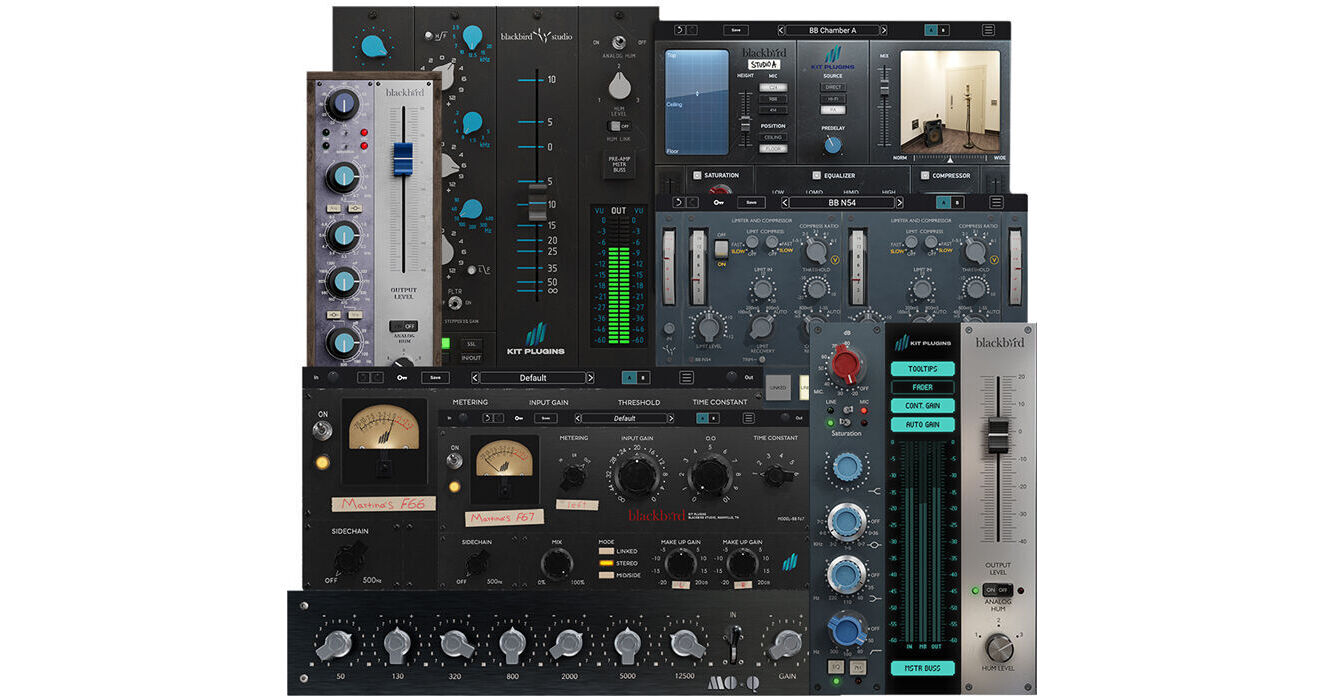


The Blackbird Everything Plug-In Bundle by KIT PLUGINS assembles all of the plug-ins inspired by the legendary consoles at Nashville's iconic Blackbird Studio. Take advantage of compression, reverb, and EQ, controls to fine tune your audio.
Create an authentic '60s sound for your next track with the Blackbird Mo-Q EQ Plug-In by KIT PLUGINS. It emulates retro '60s analog EQs for an authentic Motown sound. Get started quickly with more than 100 included presets.
- A highly-coveted boutique EQ: From John McBride's personal collection
- 7 highly musical EQ bands: Modeled from an original black-faced Motown EQ at Blackbird Studio in Nashville
- Frequency bands: 50, 130, 320, 800, 2000, 5000, and 12,500 Hz
- Modeling: Modeled using KIT's proprietary Gen 2 Full Range Modeling method, from 10 Hz to 96 kHz
- Oversampling: 3 selectable oversampling modes are available (2x, 4x, 8x), with the higher setting offering maximum quality for EQ filters
- Includes: 100+ Custom Pro Presets across a variety of musical genres. Great for both individual tracks and master bus processing
The Blackbird N73 Channel Strip Plug-In by KIT PLUGINS emulates the iconic Blackbird Studio's 8058 console. Combine three-band EQ, 1073 preamp, and compression to sculpt the perfect audio track. Get started quickly with more than 70 presets.
- Console Frequency Response: Accurately sampled from 10 Hz to 96 kHz using KIT's proprietary Full Range Modeling Technology (FRM)
- Auto-Gain: Enhances usability as you add gain on the mic pre. The fader level will adjust the output automatically to maintain dB level
- Continuous Gain: Optionally removes the notched movement of the mic pre gain, giving you more control of gain level
- Master Bus: Replicates the unique tone and effect of a Neve master bus amp, inspired by Blackbird's 8058 console master channel
- Analog Hum: Sets the level of ~60 Hz noise applied to the signal
- Oversampling: Adjust oversampling from low, medium, or high, for higher definition or to relieve CPU of intensive processing and aliasing
- Tool tips: Displays the amount of gain (+/-) on each EQ band (to the nearest tenth of a dB), and percentage for the mic pre
- Resizable 3D GUI: You can click and drag the bottom right corner to change the size of the plug-in, or select set sizes from the options menu
- Fader Color: You can change the color of the fader between black, silver, red, blue, and teal
- Includes: Custom Pro Presets
- Compatibility: Windows and macOS with Full M-Series (ARM) support for all plug-in formats
The Blackbird N105 Channel Strip V2 Plug-In by KIT PLUGINS emulates the iconic Blackbird Studio's Neve 8078 console. It adds depth, detail, and clarity to your audio track. Get started quickly with over 100 presets.
- Console Frequency Response: Accurately sampled from 10 Hz to 96 kHz using KIT's proprietary Full Range Modeling Technology (FRM)
- Auto-Gain: Enhances usability as you add gain on the mic pre. The fader level will adjust the output automatically to maintain dB level
- Continuous Gain: Optionally removes the notched movement of the mic pre gain, giving you more control of gain level
- Analog Hum: Sets the level of ~60 Hz noise applied to the signal
- Oversampling: Adjust oversampling from x4, x8, or x16, for higher definition or to relieve CPU of intensive processing and aliasing
- Tool tips: Displays the amount of gain (+/-) on each EQ band to the nearest tenth of a dB, and percentage for the Mic Pre
- Resizable 3D GUI: You can click and drag the bottom right corner to change the size of the plug-in, or select set sizes from the options menu
- Fader Color: You can change the color of the fader between black, silver, red, blue, and teal
- Includes: 100+ custom pro presets
The Blackbird A5 Channel Strip EQ Plug-In by KIT PLUGINS is a digital recreation of Blackbird Studio's iconic Studio D API console. Take advantage of the BB A5 preamp, master fader, analog hum, and master bus, combined with the 55A, 55L, and 56L EQs for a fine-tuned sound.
- Console Frequency Response: Accurately sampled from 10 Hz to 96 kHz using KIT's proprietary Full Range Modeling Technology (FRM)
- Auto-Gain: Enhances usability as you add gain on the mic pre. The fader level will adjust the output automatically to maintain dB level
- Continuous Gain: Optionally removes the notched movement of the mic pre gain, giving you more control of gain level
- EQ Selection: Choose between 3 different EQ's available on the API Legacy Console
- Master Bus: Replicates the unique tone and effect of an API master bus amp, inspired by Blackbird's API Legacy console master channel
- Analog Hum: Sets the level of ~60 Hz noise applied to the signal
- Oversampling: Adjust oversampling from Low, Medium, or High, for higher definition or to relieve CPU of intensive processing and aliasing
- Tooltips: Displays the amount of gain (+/-) on each EQ band (to the nearest tenth of a dB), and percentage for the Mic Pre
- Resizable 3D GUI: You can click and drag the bottom right corner to change the size of the plug-in, or select set sizes from the options menu
- Fader Color: You can change the color of the fader between black, silver, red, blue, and teal
- Includes: 100+ custom pro presets
The Blackbird Chamber A Reverb Plug-In by KIT PLUGINS emulates the iconic Blackbird Studio's Chamber A. It adds clarity, sheen, and versatility to your audio track. Get started quickly with over 90 presets.
- Preset Manager: Allows you to load Factory, Collaborator, or User presets
- Microphone Adjustments: Choose which microphone you'd like to place in the chamber, be it a C24, R88, or a pair of 414s
- Position: Choose whether the mic's are placed in stands on the floor or affixed to the movable ceiling
- Height adjustment: Raise or lower the ceiling to change the decay
- Width control: Adjust the stereo spread of the reverb
- Hi-fi speaker: Resembles many high-end studio monitors
- PA speaker: Modelled after the PA speaker that John McBride uses in the chamber
- Direct: As if the source is inside the chamber itself with no speaker emulation
- Predelay: Change the onset timing of the reverb effect
- Saturation and compression: Add Neve flavored saturation to your signal post chamber
- Filters: HPF and LPF can be activated pre and post chamber for greater control over your sound
- Compressor: A simple one-knob compressor resembling many program-dependant hardware compressors
- Ducker: Change the inherent compressor characteristics for a more subtle effect (great for vocals, strings, and less transient-rich sounds)
- EQ: Made to resemble the console in Blackbird's Studio A, which is also the EQ section from KIT PLUGINS BB N105
The Blackbird F66 and F67 Compressor Plug-In by KIT PLUGINS emulates the iconic Blackbird Studio's Fairchild 600 compressor's warm and rich tone. Take advantage of linked, stereo, mid, and side processing. Get started quickly with over 130 presets.
- Input and output trims with +/-36 dB Gain
- External side-chain support
- Frequency-driven side-chain detector circuit (Off > 5500 Hz)
- Controls: Input gain, threshold, make-up gain, mix (for NYC-style parallel compression), time constants (sets predetermined attack and release times—peak and program dependant)
- Selectable VU metering: input, output, and gain reduction
- A/B Selection: For quick audition and manipulation of two preset/user derived settings states
- Preset Management System: Allowing you to save and recall presets, and load factory and collaborator presets curated by the KIT PLUGINS team and notable Grammy winning engineers
- Undo/redo
- Fully resizable UI: Drag the bottom corner of the interface to resize, or select from size settings via the Options menu
- Options menu: includes—UI Size (preset size options), Link UI Size (to conform all instances to a UI window size), and access to the Manual, About window (detailing plug-in information), Support, and more
The Blackbird N54 Plug-In by KIT PLUGINS emulates the iconic Blackbird Studio's Neve 2254 compressor. It adds rich, analog warmth and dynamic control to your audio tracks. Take advantage of dual-stage compression. Get started quickly with over 130 presets.
- BB N54 comes available as two separate plug-ins, Dual and Single, for instantiation and use within your DAW
- Dual provides stereo linked/unlinked and mid/side processing
- Single provides stereo or mono-compatible processing
Common Controls:
- Input, output trim, and meters: Input and Output trim controls provide ( +/-36 dB ) gain staging in and out of the plug-in. The output trim also acts as your make-up gain control, should only the compressor be engaged
- Gain Reduction Meter: This meter displays applied gain reduction from processing, coupled for both compression and limiting
- On/Off: Enables or bypasses the plug-in
- Side-chain filter: Allows a select frequency range to be removed from the process detection circuit. (Off, 20 Hz to 5 kHz)
- Mix: Sets the Dry/Wet balance between unprocessed and processed audio (0 to 100%)
- Linked: When in Linked mode, controls and processing are mirrored between stereo left and right channels
- Unlinked: Provides independent control for each left/right channel. An additional Trim (screw) control is exposed in this and Mid-Side mode to adjust the output volume (+/-20 dB) independently for each channel for monitor and process balancing
- Mid-Side: Enables Mid-Side processing (Left=Mid, Right=Side), with the Trim control exposed for independent channel monitor and process balancing
- Mid and Side Solo: Click to listen to either Mid or Side processing in isolation to dial in your desired sound
- A/B Selection: For quick audition and manipulation of two preset / user-derived settings/states
- Preset Management System: Allowing the user to save and recall presets, load Factory and Collaborator presets curated by the KIT PLUGINS team and notable Grammy winning engineers
- Undo/Redo: Does exactly as it says on the tin
- Fully Resizable UI: Drag the bottom corner of the interface to resize, or select from set size settings via the Options Menu
- Options Menu: includes UI Size (preset size options), Link UI Size (to conform all instances to a UI window size), Display Tooltips to access the manual, About window (detailing plug-in information), Support, and more