Video Chat with a Pro Audio Expert - Live

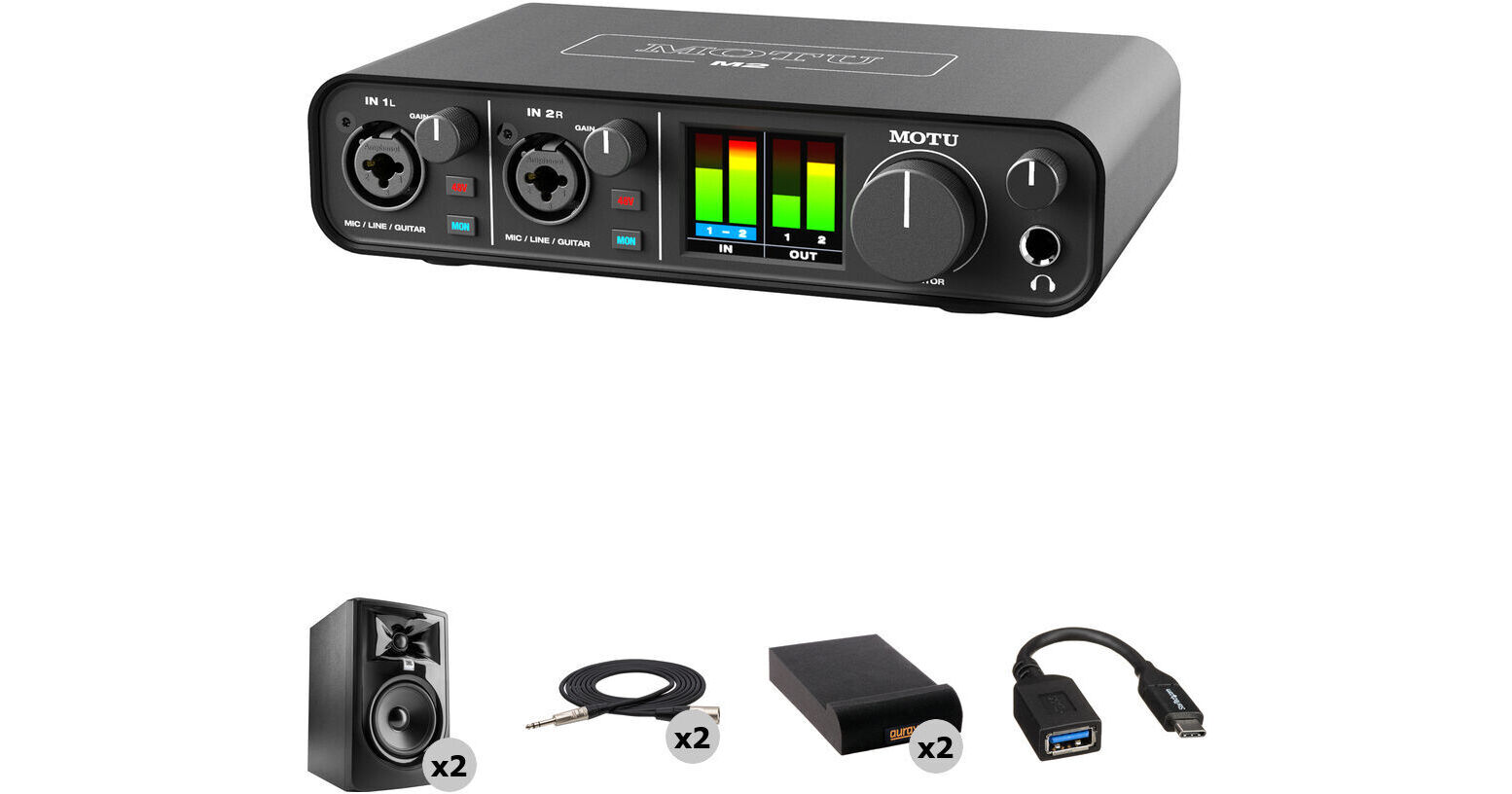
MOTU M2 USB-C Audio Interface with Mixing Kit

BH #MAM2MK (B&H Kit)
Print
MOTU M2 USB-C Audio Interface with Mixing Kit
Key Features
  • Ideal Kit for Learning to Mix Audio
  • Studio Monitors for Accurate Playback
  • Specialized Multimedia Creation Tools
  • Bus Powered / Mac, Windows, iOS
Get started mixing music right away with this B&H Kit that combines a MOTU M2 USB-C Audio Interface with two studio monitor speakers, two XLR cables, a USB-C to USB-A adapter cable, and two isolation pads designed to reduce vibration transfer from your speakers for clearer, distortion-free audio reproduction.
More Details
In Stock
Free 2-Day Shipping
Protect Your Gear
Add a protection plan from $49.99
Ask an Expert
800-606-6969
Kit Contains:

From Manufacturer

Get started mixing music right away with this B&H Kit that combines a MOTU M2 USB-C Audio Interface with two studio monitor speakers, two XLR cables, a USB-C to USB-A adapter cable, and two isolation pads designed to reduce vibration transfer from your speakers for clearer, distortion-free audio reproduction.

MOTU M2 USB-C Audio/MIDI Interface

Pristine, versatile, and portable, the MOTU M2 desktop 2x2 USB-C audio-MIDI interface combines high-class audio performance, a robust bundle of DAWs, virtual instruments, loops, and samples, and a feature set that makes it equally powerful and user-friendly for musicians, podcasters, and producers, all at a highly affordable price point.

With its two front-panel mic/line/instrument preamps, the M2 can record anything from dynamic and condenser microphones to electric guitars and drum machines in distortion-free, sparkling clarity. Equipped with top-notch ESS digital-to-analog converters that drive the main outs and the headphone jack, the M2 lets you monitor through your speakers and headphones with the dynamic range normally found only on much more expensive interfaces.

Use the M2's digital loopback channels to easily route audio from your computer directly into your host software—record remote podcast guests from Skype or any other VoIP software without incurring horrible feedback, or livestream a mix of live inputs and the computer's output.

The M2 is equally suitable for producers, thanks to its MIDI 5-pin I/O. Plug in a MIDI keyboard to control virtual instruments such as the selection of over 100 VIs included with the M2. Or, run MIDI from the M2 to your favorite hardware synth to capture its glorious tones through the M2's pristine analog preamps.

No matter what you do, the M2's specially engineered drivers ensure ultralow-latency monitoring, so you can rehearse and record in real time without hearing any distracting echo. And with the full-color LCD screen, you can view high-resolution metering for all inputs and outputs at all times. Take the M2 anywhere you need to work; it is bus-powered and compatible with Mac/Windows computers and iOS mobile devices.

Professional-Level Audio Quality
Equipped with the same ESS Sabre32 Ultra DAC technology found in audio interfaces the pros use, the M2 delivers 120 dB of dynamic range on its main outputs. ESS converters also drive the headphone output. Ultraclean preamp circuits produce a measured -129 dBu EIN on the mic inputs; this means while recording, you'll only hear the mic, not the mic pre.
Mirrored Monitoring
The M2 has balanced 1/4" outputs for professional-level monitoring, and also features mirrored RCA outputs for feeding receivers and other unbalanced gear. With a 1/4" headphone output, you can also monitor your work privately.
Loopback Channels for Podcast Recording and Live Streaming
The M2's included driver provides convenient loopback channels to your host computer, so you can easily capture your computer's output. Combine computer audio with live mics while recording in your DAW, allowing you to capture guests over Skype or other VoIP programs. You can also use the loopback function while streaming live to sites like Twitch.
Low Latency
The M2 provides ultralow latency for monitoring live inputs through your computer, thanks to MOTU's expertly engineered USB drivers. These deliver 2.5 ms of round-trip latency, measured with a 32-sample buffer at 96 kHz.
Hardware Monitoring and Input Mix Knob
The M2 gives you one-touch hardware monitoring for both inputs. You'll also note the mix knob for balancing live inputs with computer playback; this lets you secure your perfect monitor mix, so you can hear your playing without latency, as well as any playback tracks, all at the same time.
Integrates with MIDI Gear and Analog Synths
The M2 includes traditional 5-pin MIDI input and output ports, so you can connect a MIDI controller, a sound module, or even a keyboard workstation without having to get a separate MIDI interface. The 1/4" outputs on the M2 are DC-coupled, allowing you to send MIDI data from your DAW as CV to hardware analog synthesizers, Eurorack modules, and sequencers.
Audio Interface or Standalone Operation
The unit is bus-powered over USB for optimal portability and convenience. It includes a USB Type-C to Type-A cable for compatibility with most computers. If your computer has USB Type-C ports, simply use a USB Type-C cable (available separately) to connect the two.

Alternatively, by using a USB Type-C power adapter, the M2 can be used as a standalone preamp and basic mixer, no host computer required. Simply engage the monitor button for each input (and 48V phantom power, if needed), and adjust the preamp gain. Connect the main outs to any line-level destination, such as a PA or patch bay.
Software Included
The M2 includes Ableton Live Lite and MOTU Performer Lite, popular and capable DAWs geared for music recording and production. Also included are over 100 instruments for Performer Lite, as well as 6GB of loops, sounds, and one-shot samples for either DAW.
Key Features at a Glance
  • USB Type-C audio interface with professional-level sound, two inputs, and two outputs
  • Easy-to-read metering for all inputs/outputs, with a full-color LCD
  • Two XLR-1/4" mic/line/Hi-Z guitar inputs
  • Individual preamp gain and 48V phantom power for each input
  • Two balanced, DC-coupled 1/4" TRS outputs for feeding monitors, outboard gear, or even hardware synthesizers and sequencers
  • Two mirrored RCA unbalanced outputs
  • One stereo headphone output, driven by ESS converters, with independent volume control
  • Supports resolutions up to 24-bit / 192 kHz
  • USB audio class compliant for plug-and-play operation on Mac or iOS (driver required for Windows)
  • Driver loopback for capturing host output, live streaming, and podcasting
  • MIDI I/O on 5-pin DIN jacks
  • Rugged metal construction
  • Kensington security slot
UPC: 839128006119
JBL 305P MkII Powered 5" Two-Way Studio Monitor

Audio engineers, producers, and musicians looking for a high-quality monitoring solution will be impressed with the  JBL 305P MkII - Powered 5" Two-Way Studio Monitor, a bi-amplified reference monitor with next-generation drivers, offering high detail, precise imaging, a wide sweet spot, and a remarkable dynamic range to enhance the mix capabilities of any modern workspace. The magnetically-shielded 305P MkII features dual 41W Class-D amplifiers, which power the 5" low frequency woofer and woven-composite 1" neodymium tweeter. The combined output of the woofer and tweeter offer a frequency response of 49 Hz to 20 kHz with a peak SPL of 108 dB.

The monitor features JBL's Image Control Waveguide technology for accurate audio reproduction and JBL's Slip Stream port design for improved bass response. The 305P MkII is equipped with a boundary EQ for controlling the low frequency response when placed near a wall, as well as a 3-position HF trim switch. To ensure flexible connectivity, JBL included a balanced XLR input and a balanced 1/4" TRS input, both of which feature dented level control. Other features include a selectable input sensitivity switch that ensures compatibility with a range of signal sources. The JBL 305P MkII ships with a power cord.

  • Patented Image Control Waveguide for detailed imaging and a broad, room-friendly sweet spot
  • High-quality JBL transducers for optimized transient response and improved linearity
  • Patented Slip Stream low-frequency port for superior bass performance at all playback levels
  • Dual integrated, custom Class-D amplifiers provide 112W of power for high output and dynamic range
  • Boundary EQ settings compensate for low-frequency variants introduced by the environment
  • HF Trim switch adjusts high-frequency output to room acoustics or personal preferences
  • Flexible connectivity with balanced XLR and 1/4" TRS inputs, +4 dBu / -10 dBV input-sensitivity switch and adjustable volume control
  • Engineered to JBL Linear Spatial Reference design criteria for outstanding accuracy in any working space
  • Strenuous JBL 100-hour full-power test ensures years of reliability
  • Sleek, modern design provides a visual upgrade to any studio
UPC: 691991007705
Hosa Technology Balanced 1/4" TRS Male to 3-Pin XLR Male Audio Cable (5')

The 5' Balanced 1/4" TRS Male to 3-Pin XLR Male Audio Cable from Hosa Technology is a professional audio cable that's perfect for touring and live sound applications where a device with a balanced 1/4" phone output needs to be connected to a device with an XLR input. The cable has top-quality REAN connectors for excellent durability and superior signal transfer.

The conductors are made from 24 AWG oxygen-free copper to maintain a clear signal path. The cable also has 90% OFC spiral shielding for terrific flexibility and effective EMI and RFI rejection. The cable is 5' long and has a 1/4" TRS phone connector at one end and a 3-pin XLR male connector at the other.

Ideal for professional touring and live sound applications where a device with a balanced 1/4" phone output needs to be connected to a device with an XLR input
The REAN connectors provide excellent durability and superior signal transfer
The conductors are made from 24 AWG oxygen-free copper to maintain a clear signal path
90% OFC spiral shielding provides terrific flexibility and effective EMI and RFI rejection
The cable is 5' long and has a 1/4" TRS phone connector at one end and a 3-pin XLR male connector at the other
UPC: 728736051461
Auray IP-S Isolation Pad for Studio Monitor (Small, Single)

The small IP-S Isolation Pad from Auray is a monitor speaker isolation pad made from high-density acoustic foam. It is designed to decouple your monitor speakers from its resting surface by absorbing the monitor's vibrations. This stops reverberation through the desk or speaker stands, therefore preventing unwanted resonance. Removing these unwelcome vibrations results in greater depth of field, tighter low end and transient response, and a higher level of detail across the frequency spectrum.

Set at Three Different Angles
Up position: Angle your speakers up for desktop use
Down position: Angle your speakers down for use on a monitor bridge or shelf
Flat position: Flip the pads upside down to set your speakers flat on adjustable speaker stands
UPC: 847628564152
StarTech USB Type-C Male to USB Type-A Female Adapter Cable (6")

Convert your USB Type-C port into a USB Type-A port using this 6" USB Type-C Male to USB Type-A Female Adapter Cable from StarTech. This adapter allows you to use legacy USB Type-A cables or flash drives with your USB Type-C device. This USB 3.0 cable supports transfer rates up to 5 Gbps, making it up to 10x faster than USB 2.0, and is compatible with Thunderbolt 3 ports.

UPC: 065030860789
Kit Contains:

MOTU M2 USB-C Audio/MIDI Interface

Key Specs
Channels of I/O
Analog:
2 Inputs / 2 Outputs
Maximum Sampling Rate
192 kHz / 24-Bit
Number of Microphone Inputs
2
Analog Audio I/O
2x Combo XLR-1/4" TRS Mic/Line/Hi-Z Input
2x 1/4" TRS Line Output
1x 1/4" TRS Headphone Output
1x Stereo RCA Line Output
Digital Audio I/O
No
Host Connection
1x USB-C
Power Requirements
USB Bus Power
General
Display
Color LCD
Channels of I/O
Analog:
2 Inputs / 2 Outputs
Built-In DSP
No
Maximum Sampling Rate
192 kHz / 24-Bit
Number of Microphone Inputs
2
Built-In Microphone
No
Input Level Adjustment
2x Knob
Signal Processing
Pad
No
Gain/Trim Range
Mic Inputs:
0 dB to +60 dB
Line/Hi-Z Inputs:
0 dB to +57 dB
High-Pass Filter
No
Solo/Mute
No
Connectivity
Analog Audio I/O
2x Combo XLR-1/4" TRS Balanced/Unbalanced Mic/Line/Hi-Z Input
2x 1/4" TRS Balanced Line Output
1x 1/4" TRS Unbalanced Headphone Output
1x Stereo RCA Unbalanced Line Output
Phantom Power
48 V, Selectable On/Off (Selectable on Individual Inputs)
Digital Audio I/O
No
Host Connection / USB
1x USB-C
Host Connection Protocol
USB 2.0
USB (Non-Host)
No
Sync I/O
No
Network I/O
No
MIDI I/O
1x DIN 5-Pin Input
1x DIN 5-Pin Output
Expansion Slots
No
Wireless
No
Performance
Frequency Response
Mic Inputs:
20 Hz to 20 kHz +0/-0.1 dB
Line, Hi-Z Inputs:
20 Hz to 20 kHz ±0.15 dB
Line Outputs:
20 Hz to 20 kHz +0/-0.1 dB
Maximum Input Level
Mic Inputs:
+10 dBu (Min Gain)
Line/Hi-Z Inputs:
+16 dBu (Min Gain)
Maximum Output Level
Line Outputs:
+16 dBu (Balanced)
Line Outputs:
+9.5 dBu (Unbalanced)
Headphone Outputs:
+12.5 dBu
Impedance
Mic Inputs:
2.65 Kilohms
Line Inputs:
2 Megohms
Line Outputs:
100 Ohms
Hi-Z Inputs:
1 Megohm
Dynamic Range
Line/Hi-Z Inputs:
114 dBA
Mic Inputs:
115 dBA
Headphone Outputs:
115 dBA
1/4" Line/Monitor Outputs:
120 dBA
RCA Line Outputs:
119 dBA
THD+N
Mic Inputs:
< -97 dB / < 0.0014%
Line/Hi-Z Inputs:
< -100 dB / < 0.001%
1/4" Line/Monitor Outputs:
< -110 dB / < 0.00032%
RCA Line Outputs:
< -105 dB / < 0.00056%
Headphone Outputs:
< -110 dB / < 0.0003%
EIN
Mic Inputs:
-129 dB A-Weighted (150-Ohm Source, Max Gain)
Digital Audio
Sample Rates
Up to 192 kHz
Sample Rate Conversion
No
Bit Depths
24-Bit
Latency
Zero-Latency Direct Monitoring2.5 ms at 96 kHz (Dependent on Buffer Size, Input to Output)
Sync Sources
Internal
Audio Storage & Playback
Media/Memory Card Slot
No
Compatibility
OS Compatibility
macOS 10.11 or Later / Windows 7 or Later / or Later
Processor Requirement
Mac:
1 GHz Intel
PC:
1 GHz Intel Pentium
RAM Requirements
2 GB, 4 GB Recommended
Required Hardware
Available USB 2.0 Port
USB Cable (Included)
Power
Power Requirements
USB Bus Power
Physical
Dimensions
7.5 x 4.25 x 1.75" / 19.1 x 10.79 x 4.45 cm (Chassis Only)
Weight
1.4 lb / 0.6 kg
Packaging Info
Package Weight
1.8 lb
Box Dimensions (LxWxH)
10 x 7.45 x 2.75"

MOTU M2 Reviews

See any errors on this page?

I'm using these with Genelec 8010 monitors. Can I ...

I'm using these with Genelec 8010 monitors. Can I add a Genelec 5040 subwoofer to the red/white RCA outputs simultaneously?
Asked by: Paul
Hi you connect the motu first to the sub and from sub out front you connect your 8010
Answered by: KONSTANTINOS
Date published: 2022-08-06

Will this work on a 2015 iMac?

Will this work on a 2015 iMac?
Asked by: Twain
This should connect to a 2015 iMac via the included USB C to A cable. Your macOS will need to be 10.11 or higher in order for this unit to operate.
Answered by: Daniel
Date published: 2020-09-24

Is this the new 2021 version with the new DAC ...

Is this the new 2021 version with the new DAC converter and the extra fixing screws in the front?
Asked by: Adam
Yes, we are currently carrying the most recent version of the MOTU M2.
Answered by: Calvin M
Date published: 2023-03-13

Does this transmit both MIDI and audio over the ...

Does this transmit both MIDI and audio over the USB-C cable, or do you have to use the 5-pin DINs?
Asked by: Nick
The back of the M2 interface has 2 normal 5 pin DINs on the back, one marked IN the other OUT. As far as I know that's the only way it deals with MIDI devices.
Answered by: James
Date published: 2021-03-25

The specs say this has 32 bit. How would that ...

The specs say this has 32 bit. How would that compare to the 32 bit in the Zoom F6?
Asked by: Elazar
The Motu M2 records in 24-bit.
Answered by: David M
Date published: 2022-11-02

I noticed that the front connectors say ...

I noticed that the front connectors say XLR/LINE/Guitar yet I dont see a switch to change it from line to instrument. How does this work?
Asked by: Leonil
The interface adjusts automatically based on what input connection is used. Please note, the XLR connection is only meant for mic level sources, any +4 line level input should be connected to the TRS input of the interface.
Answered by: Daniel
Date published: 2020-10-15

Have the drivers been updated to work correctly ...

Have the drivers been updated to work correctly with Apple Silicon M1 and M2?
Asked by: Christian
Yes, the MOTU M2 USB Audio-MIDI Interface drivers are now compatible for use with Apple silicon M1 and M2 computers.
Answered by: Lisa S
Date published: 2023-05-07

Does this come with any software?

Does this come with any software?
Asked by: Pete
This interface includes Ableton Live Lite, MOTU Performer Lite, over 100 instruments for Performer Lite, as well as 6 GB of loops and one-shot samples.
Answered by: Daniel
Date published: 2020-09-17
  • y_2026, m_6, d_1, h_13CST
  • bvseo_bulk, prod_bvqa, vn_bulk_3.0.46
  • cp_1, bvpage1
  • co_hasquestionsanswers, tq_36
  • loc_en_US, sid_1909567, prod, sort_[SortEntry(order=HAS_STAFF_ANSWERS, direction=DESCENDING)]
  • clientName_bhphotovideo
Whatever You Need, We've Got It