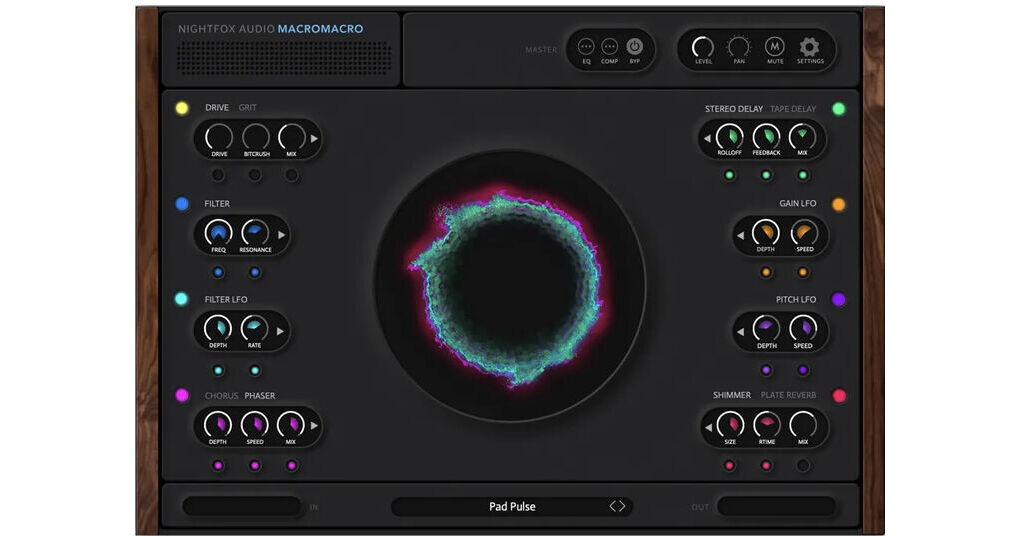
MacroMacro Multi-Effects Engine from Nightfox Audio is a multi-effects plug-in based on the effects found in Nifghtfox Audio's Layered virtual instrument. Featuring eight effects modules, one central control knob, and MIDI controller support, the plug-in allows you to shape sound, add movement, and control multiple parameters. Compatible with Windows and Mac systems.
Eight Effects Modules
- Drive and Grit
- Drive
- Adds harmonic saturation and overdrive
- Drive knob controls the amount
- Bitcrush reduces bit depth up to 14-bit for lo-fi textures
- Mix blends the processed signal with the dry signal
- Grit
- A different overdrive character focused on high-frequency texture
- Drive sets the amount
- Character adjusts the tonal emphasis in the highs
- Mix blends effect and dry signal
- Drive
- Filter
- Freq sets the cutoff frequency
- Resonance boosts the area around the cutoff
- Click the arrow to choose filter type: low-pass, high-pass, or other available shapes
- Filter can be modulated by Filter LFO
- Filter LFO
- Depth sets how far the filter frequency moves
- Rate sets how fast it moves
- Choose shapes such as Sine, Triangle, Saw, Square, or draw a custom shape
- You can also enable Step mode to make the LFO act like a step sequencer for rhythmic modulation
- Chorus or Phaser
- Chorus
- Rate—speed of modulation
- Depth—amount of pitch modulation
- Mix—dry/wet balance
- Spread (in the pop-out) adjusts stereo width
- FX Gain boosts the processed signal; extreme values can add mild distortion
- Phaser
- Depth—intensity of the phase sweep
- Speed—how fast it sweeps
- Mix—dry/wet balance
- Frequency 1 and Frequency 2—start and end points of the sweep
- Chorus
- Stereo Delay or Tape Delay
- Tape Delay
- Roll-off—cuts high frequencies from the repeats
- Feedback—number and intensity of repeats
- Mix—dry/wet balance
- Tempo—delay time in milliseconds (not DAW-synced), lets you create off-grid echoes
- Tape Wow—simulates tape speed fluctuation
- Speed—adds slight overdrive and pitch bend to the repeats
- Stereo Delay
- Roll-off—cuts high frequencies from the repeats
- Feedback—number and intensity of repeats
- Mix—dry/wet balance
- Tempo—delay time in milliseconds (not DAW-synced), lets you create off-grid echoes
- Tape Wow—simulates tape speed fluctuation
- Speed—adds slight overdrive and pitch bend to the repeats
- Rate Left and Rate Right—set different DAW-synced note values for each side (e.g., dotted eighths left, quarters right) for ping-pong effects
- Tape Delay
- Gain LFOA tremolo-style amplitude modulator
- Depth—how much volume change
- Speed—how fast the change
- Choose shapes such as Sine, Triangle, Saw, Square, or draw a custom waveform in the pop-out
- Increase Smooth (in the pop-out) to make transitions less abrupt
- Enable Step mode for rhythmic, sequenced tremolo effects
- Syncs to your DAW from a full bar down to triplet 64ths
- Pitch LFO—Creates pitch modulation and tape-like warble
- Depth—how far the pitch moves
- Speed—how fast it moves
- Same waveform options as Gain LFO (Sine, Triangle, Saw, Square, Custom)
- Use odd step counts and shallow depth for subtle, non-repeating drift
- Roll the dice button for random shapes or draw your own
- Reverb—Shimmer or Plate
- Shimmer Reverb
- Size—reverb length
- RTime—modulation rate/time
- Mix—dry/wet balance
- Additional internal controls (Mod Depth, High-frequency Damp, Diffusion) shape the reverb and can be partially exposed to the Big Knob
- Plate Reverb
- Damping—high-frequency roll-off
- Decay—reverb tail length
- Mix—dry/wet balance