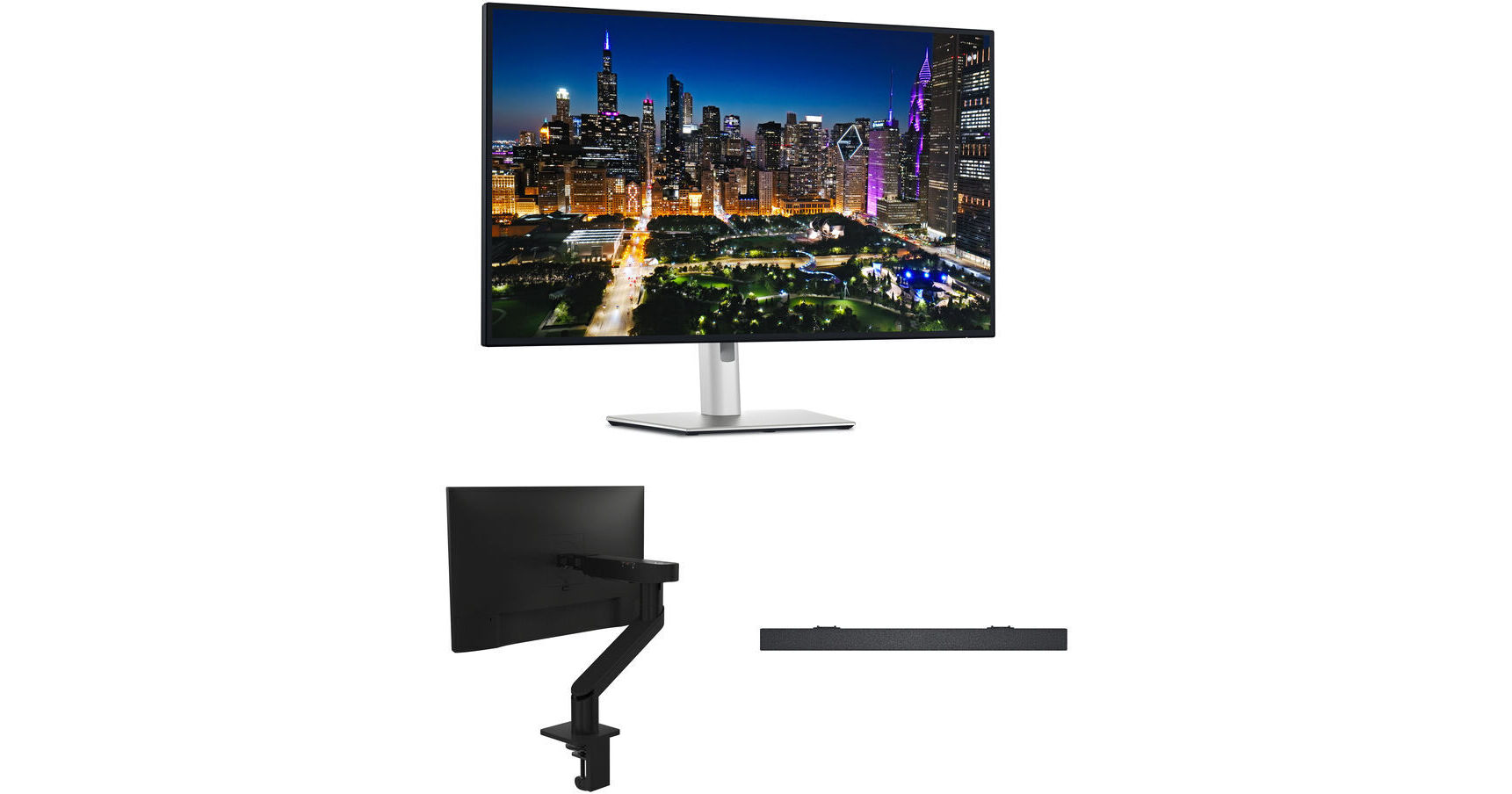
Dell UltraSharp 31.5" 4K HDR 120 Hz Monitor with Slim Soundbar & Monitor Arm Kit

BH #DEU3225QSABK (B&H Kit)
Print
Dell UltraSharp 31.5" 4K HDR 120 Hz Monitor with Slim Soundbar & Monitor Arm Kit
Key Features
  • 31.5" 16:9 IPS Panel
  • 4K UHD 3840 x 2160 at 120 Hz
  • Dell Slim Soundbar
  • Dell MSA20 Single Monitor Arm
Enhance your workflow with this Dell UltraSharp 31.5" 4K HDR 120 Hz Monitor with Slim Soundbar and Monitor Arm Kit from B&H. It pairs the Dell UltraSharp U3225QE display with a slim sound bar to deliver rich 4K visuals and powerful audio while the MSA20 Single Monitor Arm provides a full range of motion and minimizes desktop clutter.
More Details
Kit Contains:

Enhance your workflow with this Dell UltraSharp 31.5" 4K HDR 120 Hz Monitor with Slim Soundbar and Monitor Arm Kit from B&H. It pairs the Dell UltraSharp U3225QE display with a slim sound bar to deliver rich 4K visuals and powerful audio while the MSA20 Single Monitor Arm provides a full range of motion and minimizes desktop clutter.

Dell UltraSharp U3225QE 31.5" 4K HDR 120 Hz Monitor

Enhance your workflow with the Dell UltraSharp U3225QE 31.5" 4K HDR 120 Hz Monitor, which delivers rich color and extensive connectivity.

With a 120 Hz refresh rate and 5 ms response time, this UHD 4K 3840 x 2160 resolution display provides smooth visuals while you quickly scroll through text and watch videos. Thunderbolt 4 connectivity allows you to transfer video, data, and up to 140W of power over a single cable with compatible devices. HDMI 2.1 and DisplayPort 1.4 ports are also available. A pop-out USB hub provides easy access to two front-facing 10 Gb/s USB-C 3.2 Gen 2 ports and one USB-A port. In addition to a 15W Thunderbolt 4 output port, the rear ports include one USB-C 3.2 Gen 2 and four USB-A ports that work with up to 10 Gb/s devices. There is also an RJ45 port that can transfer up to 2.5 Gb/s with compatible wired network devices. Plug a pair of headphones into the 3.5mm jack for listening privacy.

Deep Color
Housed inside a slim frame, the 31.5" IPS Black panel delivers cinematic visuals with a 3000:1 contrast ratio and 600 nits brightness. It's also factory calibrated for Delta E <1.5 accuracy with 99% DCI-P3 coverage.
Adapts to Your Environment
An integrated ambient light sensor intelligently optimizes the brightness and color temperature of settings to match your environment.
ComfortView Plus
This monitor reduces blue light emissions to about 35%, which helps to reduce eyestrain without sacrificing color accuracy.
Expand Your Perspective
Daisy-chain up to two 4K displays by using the DisplayPort out port. Or you can use the Thunderbolt passthrough port with Windows and macOS systems.
Enhanced Multitasking
You can view content from multiple connected devices simultaneously in picture-by-picture or picture-in-picture mode.
Ergonomic Design
Pivot the screen 90° in either direction to view content in portrait mode. You can optimize your view by adjusting the height, tilt, and swivel. The 178° horizontal and vertical viewing angles allow you to see the screen clearly from almost any position. Use the 100 x 100mm VESA mounting pattern to place the display onto a wall, swivel arm, or multi-monitor stand.
UPC: 884116484561
Dell MSA20 Single Monitor Arm

Add fluid adjustment to your workstation with the MSA20 Single Monitor Arm from Dell. It supports a single 19-40" LCD display weighing up to 22 pounds. The 100 x 100mm VESA mount is easy to install, and the arm allows 180° rotation and -35° to 80° tilt of your display for finding the perfect viewing angle. You can also raise or lower the display up to 10.5". Integrated cable management keeps cables organized and the grommet and desk clamp facilitate easy deployment.

Easy to Install
Breeze through installation with a Quick Release mechanism that lets you snap a Dell UltraSharp or P-series monitor onto the arm without any tools. Plus, streamline your setup and free up desk space with complete mounting options for select Dell OptiPlex Micro, Ultra, and Wyse systems, available separately.
Rapid Deployment
Using a standard 100 x 100mm VESA mount, this monitor arm allows for easy deployment with the Dell E-Series and other monitors across a range of brands. A counterbalance indicator on the side of the arm enables precise deployment, allowing identical tension settings to be set across numerous similar monitors.
Integrated Cable Management
The cable management slot comes with cable clips and can hold up to 10 cables, delivering maximum tidiness. Even the included Allen key can be tucked away under the cover so that you always have it ready.
Compact Footprint
A flexible design minimizes this monitor arm's footprint. Attach it to your desk via a 2" grommet hole or convenient C-clamp.
Smart Swivel Adjustment
Quickly adjust your monitor for maximum productivity and comfort with the flip of a switch. The Dell swivel switch prevents overhang or over-rotation, letting you change the angle of the arm to 180° or 360° without having to remove it from the base.
Flexible Adjustment
Rotate, tilt, swivel, and adjust the height and depth to ensure the perfect view.
Wide Compatibility
This arm is compatible with most 19 to 40" monitors weighing up to 22 pounds.
UPC: 884116352143
Dell Slim Soundbar

Designed for select models of their display lineup, the Slim Soundbar from Dell mounts magnetically underneath your display and connects to one of its USB-A ports. The speakers deliver rich, clear, and powerful audio with 3.6W RMS speakers and a frequency range of 180 Hz to 20 kHz. Setup is completely plug-and-play as no additional software, power cords, or batteries are required. For added security, use the included security chain, which may also be paired with a separately sold external lock.

General Features
Superior Audio Clarity
With this slim and light soundbar, you get to enjoy rich and crystal-clear audio with powerful 3.6W RMS speakers, offering a wide frequency range of 180 Hz to 20 kHz, perfect for use with a separately available sub woofer. Stay productive and never miss a call or an alert again.
A Neat Audio Solution for Your Monitor
The soundbar magnetically snaps on to your Dell monitor, allowing you to tilt, swivel, and pivot your monitor in any direction, without getting in the way. The soundbar's USB cable plugs neatly to the USB Type-A port at the back of the monitor, so it's hidden from view.
Easy to Set Up and Secure
The Dell Slim Soundbar offers easy installation, requiring no software, power cord, or batteries. Simply plug in the soundbar cable to your monitor's USB Type-A port. Safeguard your soundbar by locking it with the included security chain and an external lock (lock not included). A limited 3-year warranty offers you added peace of mind.
P-Series Monitor Compatibility
  • P2222H
  • P2223HC
  • P2422H
  • P2422HA
  • P2422HE
  • P2423
  • P2423D
  • P2423DE
  • P2721Q
  • P2722H
  • P2722HE
  • P2723D
  • P2723DE
  • P2723QE
  • P3221D
  • P3222QE
  • P3223DE
  • P3223QE
  • P3421W
  • P3421WM
  • P3424WE
U-Series Monitor Compatibility
  • U2421E
  • U2422H
  • U2422HE
  • U2422HX
  • U2424H
  • U2424HE
  • U2722D
  • U2722DE
  • U2722DX
  • U2723QE
  • U2723QX
  • U2724D
  • U2724DE
  • U3023E
  • U3223QE
UPC: 884116375661
Kit Contains:

Dell UltraSharp U3225QE 31.5" 4K HDR 120 Hz Monitor

Key Specs
Display Size
31.5"
Panel Type
IPS-Type LCD
Native Resolution
3840 x 2160
Maximum Brightness
600 nits / cd/m2
HDR Support
Yes
Color Support
1.07 Billion Colors
Color Gamut
99% DCI-P3
100% sRGB
Finish
Anti-Glare
Touchscreen
No
A/V Inputs
DisplayPort 1.4 / HDMI 2.1
A/V Outputs
3.5 mm (Analog Audio) / DisplayPort 1.4
USB I/O
USB-A 3.2 Gen 2 / USB-C 3.2 Gen 2 / Thunderbolt 4
Built-In Speakers
No
Display
Size
31.5"
Panel Type
IPS-Type LCD
Aspect Ratio
16:9
Native Resolution
3840 x 2160
Maximum Brightness
600 nits / cd/m2
HDR Support
Yes
Contrast Ratio
3000:1
Response Time
5 ms (Overdrive)
8 ms (GtG)
Refresh Rate
120 Hz
Variable Refresh Technology
No
Color Support
1.07 Billion Colors
Color Gamut
99% DCI-P3
100% sRGB
Viewing Angle (H x V)
178 x 178°
Curved Display
No
Finish
Anti-Glare
Surface
Touchscreen
No
Connectivity
A/V Inputs
1x DisplayPort 1.4
1x HDMI 2.1
A/V Outputs
1x DisplayPort 1.4
1x 1/8" / 3.5 mm (Headphone)
HDCP Support
Yes
USB I/O
1x USB-C (Thunderbolt 4) with USB PD 140 W
1x USB-C (Thunderbolt 4) with USB PD 15 W
3x USB-C 3.1/3.2 Gen 2
6x USB-A 3.1/3.2 Gen 2
Ethernet I/O
1x RJ45 2.5GbE
Multi-Input Support (PIP/PBP)
Yes: Picture-in-Picture (PIP), Picture-by-Picture (PBP)
Speaker
Built-In Speakers
No
Electrical
Power Consumption
Operational: 30.5 W
Maximum: 335.0 W
Standby: 0.5 W
Input Power
100 to 240 VAC, 50 / 60 Hz
Power Adapter Type
Internal
General
Operating Conditions
32 to 104°F / 0 to 40°C at 5 to 90% Humidity
Storage Conditions
-4 to 140°F / -20 to 60°C
Certifications
ENERGY STAR, TCO Certified
Adjustments
Rotation: 180° (-90 to 90°)
Swivel: 60° (-30 to 30°)
Tilt: 26° (-5 to 21°)
Height: Up to 5.91" / 150.11 mm
VESA Mounting-Hole Pattern
100 x 100 mm
Lock Slot
Yes
Packaging Info
Package Weight
30.09 lb
Box Dimensions (LxWxH)
36.6 x 20 x 6.7"

Dell U3225QE Reviews

Difficult to calibrate

By Gregory
Rated 2 out of 5
Date: 2026-06-22

Dell Color Management software only works with a very limited number of calibrators. Several listed as useable by Dell are obsolete and no longer available. The remaining units are outrageously expensive and beyond the reach of most. I have not yet found a suitable calibration unit yet. In retrospect, I would consider other display options.

Fantastic Monitor

By Robert
Rated 5 out of 5
Date: 2026-06-11

Upgrade from U2723QE which I also found to be a great monitor - the build, display, and IO have all been refined in the 25 series. I am enjoying the larger size. Happy with my purchase.

See any errors on this page?

First time buying, does this have full warranty?

First time buying, does this have full warranty?
Asked by: Luis
Yes, the Dell Dual UltraSharp 31.5" 4K HDR 120 Hz Monitor Kit will come with a Limited 3-Year Manufacturer Warranty.
Answered by: Alex D
Date published: 2026-01-29

What is the function of the ethernet port?

What is the function of the ethernet port?
Asked by: Shabbir
When using the Dell UltraSharp U3225QE 31.5" 4K HDR 120 Hz Monitor, B&H # DEU3225QE, over Thunderbolt or when you connect the USB upstream cable to your system, the Ethernet port would give you a way to connect to a wired network.
Answered by: Miguel M
Date published: 2025-11-14

Does this product support HW calibration ?

Does this product support HW calibration ?
Asked by: Byungwoo
The Dell UltraSharp U3225QE 31.5" 4K HDR 120 Hz Monitor, B&H # DEU3225QE, can be calibrated via software (colorimeter sold separately); however, it does not support true hardware calibration. Once you calibrate the monitor, the ICC profile will be stored in your computer, not in the monitor.
Answered by: Miguel M
Date published: 2025-12-01

Does this monitor support 10-bit color depth?

Does this monitor support 10-bit color depth?
Asked by: Gabriel
Yes, the Dell UltraSharp U3225QE 31.5" 4K HDR 120 Hz Monitor does support 10-bit color depth.
Answered by: JP A
Date published: 2025-11-16

Does this product support hardware calibration ?

Does this product support hardware calibration ?
Asked by: Byungwoo
IT is good for photoshop?
Answered by: Anonymous
Date published: 2025-11-04

I just bought this for color grading in Davinci ...

I just bought this for color grading in Davinci Resolve. Where are the gamma options on this monitor?
Asked by: Corey
After looking over the manual for the Dell UltraSharp U3225QE 31.5" 4K HDR 120 Hz Monitor, it does not appear to have any gamma adjustment settings available via the OSD menu.
Answered by: Alex D
Date published: 2025-12-05

Does this product have a camera?

Does this product have a camera?
Asked by: Marlayne
The Dell UltraSharp U3225QE 31.5" 4K HDR 120 Hz Monitor, B&H # DEU3225QE, does not have a built-in webcam.
Answered by: Miguel M
Date published: 2026-05-04
  • y_2026, m_7, d_31, h_7CST
  • bvseo_bulk, prod_bvqa, vn_bulk_3.0.48
  • cp_1, bvpage1
  • co_hasquestionsanswers, tq_7
  • loc_en_US, sid_1926790, prod, sort_[SortEntry(order=HAS_STAFF_ANSWERS, direction=DESCENDING)]
  • clientName_bhphotovideo
Whatever You Need, We've Got It