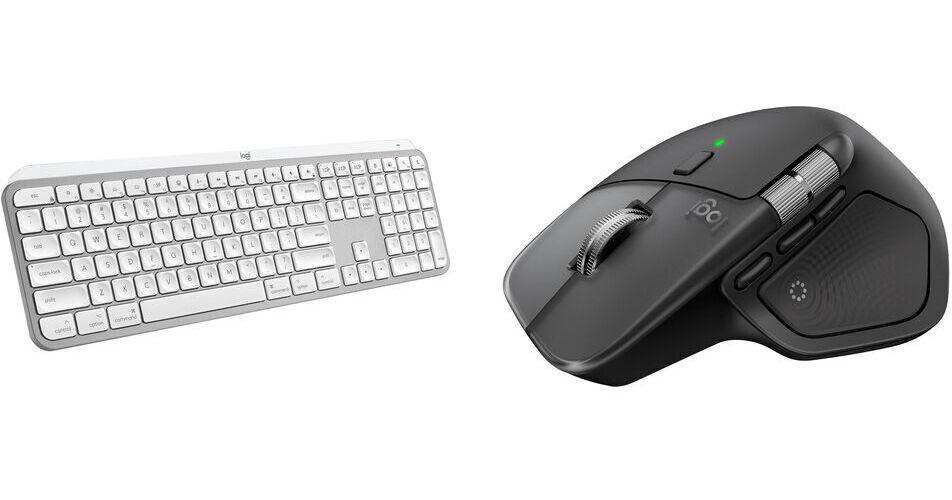
Logitech MX Master 4 Mouse & MX Keys S Wireless Keyboard for Mac Combo Kit (Space Black)

BH #LOMXM4MSBKGK (B&H Kit)
Print
Logitech MX Master 4 Mouse & MX Keys S Wireless Keyboard for Mac Combo Kit (Space Black)
Key Features
  • 2.4 GHz RF & Bluetooth LE Connectivity
  • 8000 dpi Darkfield Optical Sensor
  • Quiet Click Mouse Buttons
  • MagSpeed Electromagnetic Scrolling
This B&H Kit features the Logitech MX Master 4 Wireless Mouse for Mac and MX Keys S Wireless Keyboard for Mac with tactile quiet switches. Perfect for office workers, these quiet, yet highly reliable peripherals minimize noise and use tactile or haptic feedback to ensure precise inputs.
More Details
In Stock
No Store Display
Free 2-Day Shipping
Protect Your Gear
Add a protection plan from $53.99
Ask an Expert
800-606-6969
Kit Contains:

From Manufacturer

This B&H Kit features the Logitech MX Master 4 Wireless Mouse for Mac and MX Keys S Wireless Keyboard for Mac with tactile quiet switches. Perfect for office workers, these quiet, yet highly reliable peripherals minimize noise and use tactile or haptic feedback to ensure precise inputs.

Logitech MX Master 4 Wireless Mouse for Mac (Space Black)

Stay comfortable and productive with precision you can feel using the Logitech MX Master 4 Wireless Mouse for Mac. Equipped with an 8000 dpi Darkfield optical sensor, this versatile mouse is designed to provide precise tracking on almost any surface, including glass. At the same time, its Quiet Click buttons provide a satisfying feel while producing 90% less noise than the original MX Master, and the MagSpeed scroll wheel provides fast yet precise scrolling at up to 1000 lines per second. Now included with the MX Master 4 is the haptic sense panel, which gives haptic feedback to your hand when performing specific actions. Its ergonomic design fits most hands and keeps controls accessible with its natural tilt, intuitive buttons, and thumb scroll wheel. Enhance your workflow by using the Logi Options+ software for Windows and macOS to customize the MX Master 4 buttons with different functions.

Switch between up to three compatible devices using the Actions Ring, which also lets you access tools and filters through your cursor, reducing repetitive movements and saving you time. This mouse is compatible with macOS and iPadOS.

Optimized for Mac
Speed up and customize your workflow with predefined macOS and app-specific profiles.
Long Lasting Battery
The MX Master 4's integrated battery is rated to last up to 70 days on a full charge.

Note: A charging cable is not included.

Logi Options+
The Logi Options+ software lets you manage and customize your supported mice and keyboards through an easy-to-use interface. Reassign your device's buttons and keys to perform your common and repetitive tasks, so you can save time and get more done. Flow technology allows you to seamlessly control multiple computers and transfer text, images, and files between computers by copying on one and pasting to the other. You can also use the software to see your assigned mouse gestures, configure the pointing speed, and tune the scrolling speed and scrolling direction in addition to checking the battery level.
Complimentary 1-Month Adobe Creative Cloud
Your purchase of the MX Master 4 includes a complimentary 1-month subscription to Adobe Creative Cloud.
Sustainable Design
The plastic parts in the MX Master 4 include 54% certified post-consumer recycled plastic, and 100% recycled cobalt in the battery.
UPC: 097855205933
Logitech MX Keys S Wireless Keyboard for Mac (Pale Gray)

Enhance your workflow with the pale gray Logitech MX Keys S Wireless Keyboard for Mac. Featuring laptop-like spherically-dished keys in a Mac layout, this wireless low-profile keyboard is designed to deliver fast, precise, and quiet typing experiences. Additionally, its Smart Illumination backlighting adapts to your environment and automatically turns on as your hands approach. Pair the MX Keys S for Mac with up to three Bluetooth compatible macOS and iPadOS devices. Then optimize your experience with the Logi Options+ software to add shortcuts, adjust the backlighting preferences, and smoothly transfer text and files between devices.

On a normal use basis, the MX Keys for Mac can last up to 10 days; however, with backlight off, it's rated to last up to 5 months. Please note that actual battery life will depend on usage.

MX Keys S for Mac Wireless Keyboard
Made for Mac
With its pale gray color and Mac key layout, the MX Keys S for Mac wireless keyboard is designed to enhance productivity on macOS and iPadOS devices.
Smart Illumination
Smart Illumination enables this keyboard's backlight to automatically turn on once your hands are near. It can also automatically adjust brightness to fit your ambient lighting conditions.
Ergonomic Keys
The spherically-dished keys are shaped to your fingertips to deliver a fast, fluid, precise, and quiet typing experience.
Multi-Device Connectivity
Users can pair this keyboard with up to three devices via Bluetooth.
Ergonomic Design
The low-profile design and an optimum keyboard angle provide better wrist posture, allowing you to comfortably work for long periods of time.
Battery
The built-in battery is rated for up to 10 days of use or up to 5 months with backlighting off. When power is low, plug in the included USB-A to USB-C cable to your system to recharge it.
Compatibility
With Bluetooth connectivity, the MX Keys S for Mac Wireless Keyboard works with macOS and iPadOS devices.
Logi Options+
Streamline Your Workflow
Customize your keyboard to fit your needs by configuring Smart Action shortcuts to multiple actions with a single keystroke. Use the predefined settings or define your own for the apps you often use.
Work Across Computers
Use the Options+ Flow feature to transfer text, images, and files between computers by simply copying on one and pasting to the other. You can even use Flow between Windows and macOS computers.
Stay Informed
Get full, always-on control of device status. Stay informed on low battery levels, get notifications if Caps Lock is on, and check which computers are paired with your keyboard.
UPC: 097855189530
Kit Contains:

Logitech MX Master 4 Wireless Mouse for Mac (Space Black)

Key Specs
Sensor Type
Optical
Number of Buttons
8
Mouse Hand Orientation
Right
Wireless
Bluetooth LE / 2.4 GHz Radio/RF
Battery
500 mAh Lithium-Ion Polymer
Mouse
Sensor Type
Optical
dpi
200 to 8000
Scroll Type
Scroll Wheel
Number of Buttons
8
Mouse Hand Orientation
Right
Connectivity
Wireless
Bluetooth LE / 2.4 GHz Radio/RF
Host Connection
USB-C
Full-Functionality OS Support
Mac, Windows, iPadOS
Battery
Battery
500 mAh Lithium-Ion Polymer
Maximum Battery Life
70 Days
General
Color
Space Black
Dimensions
5 x 3.5 x 2" / 128.2 x 88.4 x 50.8 mm
Weight
5.3 oz / 150 g
Packaging Info
Package Weight
0.64 lb
Box Dimensions (LxWxH)
6.7 x 5.6 x 2.35"

Logitech MX Master 4 Reviews

Happy with this Mouse

By Devin
Rated 5 out of 5
Date: 2026-05-28

I've been using this mouse for a week now and I am liking it a lot. I had the MX Master 3 and the main mouse clicking buttons stopped working. So I ordered this with the 4 year warranty plan (I'm expecting it to stop working at some point). I really like the thumb button and use it for Mission Control to see what apps/windows I have open and select a different one. The LogiOptions+ software is nice with all the settings and customization. I have read bad reviews but so far I am liking it.

I have been using this for 5 months and love it

By Neal
Rated 5 out of 5
Date: 2026-03-22

Pros - The Logi software allows for unlimited customizations of buttons etc. - I have a button that allows for speeding up or slowing down the cursor speed which makes it easy to make very small masks in Lightroom and Photoshop - The second scroll wheel is great for using in Photoshop and Lightroom for different actions - The battery seems to last forever - Can be charged while using as usb port is on front of it unlike some of the Apple mice Cons - A bit heavy but this doesn't matter in the scheme of things - I don't find the left side large bottom button very useful, it's hard to get my thumb to press it and I will find I accidentally press it a lot. I usually leave it disabled - A bit expensive

See any errors on this page?
Whatever You Need, We've Got It