Video Chat with a Pro Video Expert - Live

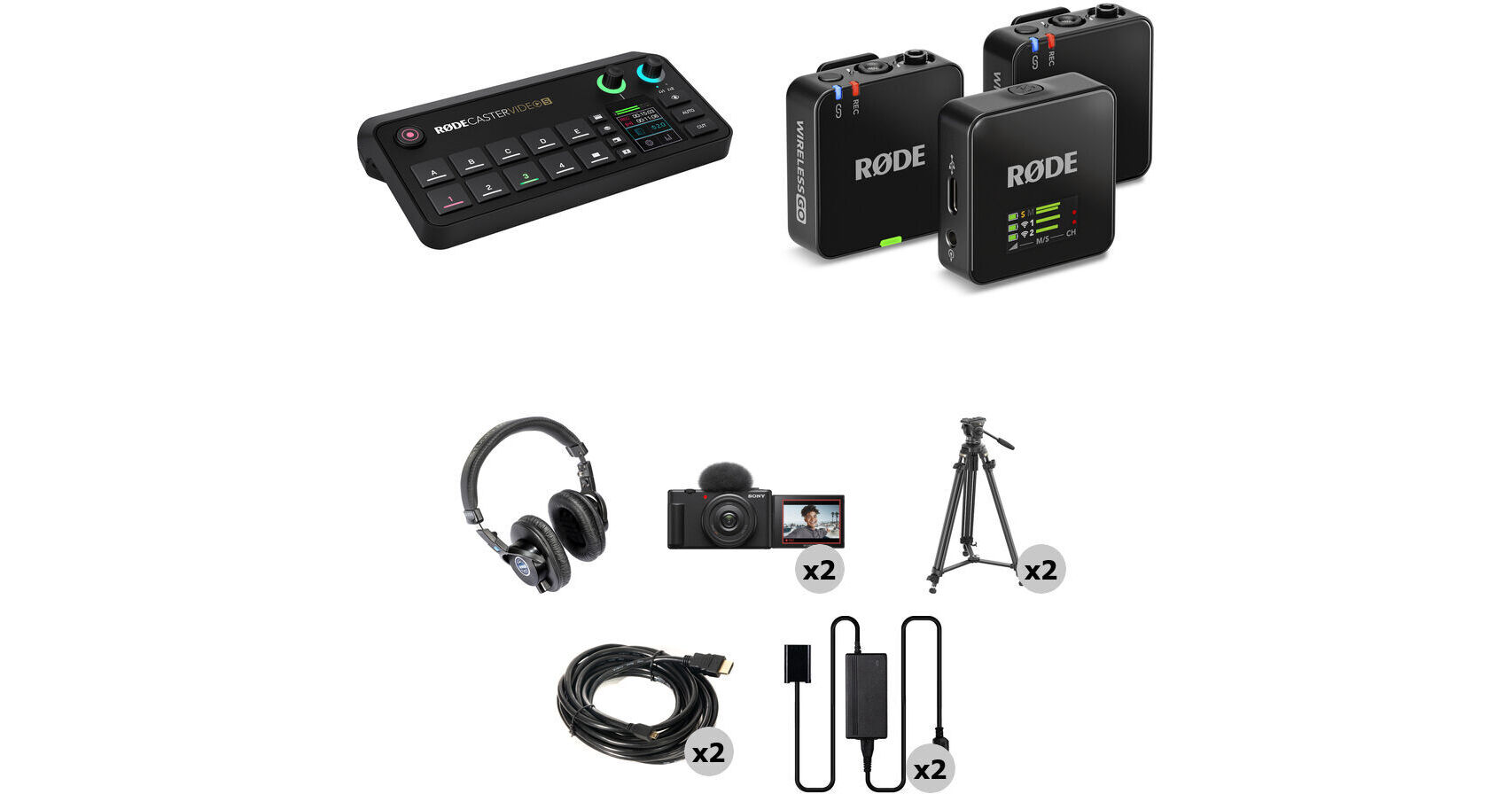
RODE RODECaster Video S All-in-One Production Console 2-Camera Creator Kit

BH #RORCVDS2CCK (B&H Kit)
Print
RODE RODECaster Video S All-in-One Production Console 2-Camera Creator Kit
90-Second Intro
Key Features
  • RODECaster Video S Production Console
  • Wireless GO 2-Person Mic/Recorder System
  • Two Sony ZV-1F Cameras, Tripods
  • Monitor Headphones, HDMI Cables
The RODE RODECaster Video S All-in-One Production Console 2-Camera Creator Kit from B&H outfits you with the production tools necessary to record your social content with improved lighting. Included in the kit are the RODECaster Video S all-in-one console, wireless microphone system, and two Sony ZV-1F cameras with mounting and cabling accessories.
More Details
In Stock
Free Expedited Shipping
Protect Your Gear
Add a protection plan from $109.99
Ask an Expert
800-606-6969
Kit Contains:
RODE RODECaster Video S All-in-One Audio/Video Console
Designed as a streamlined version of its predecessor the RODECaster Video, the RODECaster Video S All-in-One Audio/Video Console offers the same powerful video switching and recording as well as studio-grade audio control for podcasters, streamers, and solo creators. The console offers intuitive control over both video and audio sources with its onboard controls, 2" touchscreen display, and rotary encoder. A variety of connectivity options, including HDMI and USB-C ports, NDI inputs, and both wired and wireless network connections. Add the RODECaster Video S to your preexisting RODE audio ecosystem using the USB-C audio ports or RODE Central software for advanced device configuration.
Video Interface
  • The RODECaster Video S features nine mix-effect layers that can simultaneously display in both preview and program views. Two downstream keyers toggle overlays and logo, two chroma-keyers toggle different backgrounds, and one luma keyer and two media players can play simultaneous MP4 video, PNG/JPG photos, or WAV audio from a USB SSD or flash drive.
  • Multiview allows you to visualize the program and preview, all the live inputs with scene and media thumbnails, the audio mixer and channel status, and recording/network/storage status, as well as runtime, date, and time information. Nondestructive setup means the process can be done live or configured as a saved scene without interrupting the flow of your production.
  • Switch between four 1080p60 video sources (three HDMI and one USB-C) and create complex scenes with multiple layers of video, media, and graphics. Save these scenes and recall them with the touch of a button.
  • You can also input up to four NDI streams such as PTZ cameras for streaming output.
  • Configure the single HDMI output to connect displays and view preview, program, and multiview feeds. Use the program feed to see what is being streamed/recorded and the preview feed to view inputs, scenes, graphics, or media sources before they go live.
USB Microphone and Webcam Support
The USB 4 port on the RODECaster support select RODE USB microphones including the RODECaster Pro II and Duo, as well as a compatible webcam for direct video input.
Audio Sources
  • Two studio-grade combo XLR-1/4" jacks on the console are equipped with low-noise, high-gain Revolution Preamps with phantom power to ensure pristine audio capture from XLR microphones and instruments.
  • Use digital USB-C ports to connect RODE USB microphones, the RODECaster Pro II, or Duo Audio Production Studios. Other USB-C ports support 2-in / 2-out multichannel outputs, mix-minus, and MFi protocols.
  • Internal wireless receivers can connect RODE series IV wireless microphones to the console, like the Wireless GO II and Wireless PRO.
  • Aphex VoxLab audio processing equips the RODECaster Video S with EQ, compressor, noise gate, high-pass filter, de-esser, Aural Exciter, Big Bottom, and Compellor effects per channel. Integrated preamps provide up to 75 dB input gain and -131.5 dBV equivalent input noise.
  • Mix and process audio onboard using the touchscreen and rotary encoder or the software mixer in RODE Central.
Intuitive Controls
  • The RODECaster Video S prioritizes scene-based switching with an intuitive control layout. This gives users quicker access to the tools they need to create dynamic content without needing to access complicated settings. The front panel of the device includes a wide variety of controls specific to certain features.
  • Automatic chroma keying makes replacing backgrounds with media or live video inputs a breeze. Apply transparency to use the input in scenes or with various backgrounds. Choose between blue and green screen with advanced controls.
  • Media buttons load video clips, images, and sounds onto a USB drive for use in your production. Two internal video players allow you to transition from one to another in your scene compositions.
  • Graphic buttons load images with transparency. Dynamically trigger graphics to transition over an input or scene.
Intelligent Auto-Switching
Intelligent auto-switching provides seamless and creative hands-free switching between video sources. Any audio input can be linked to any video source, allowing intelligent level detection to automatically trigger switching when your talent is speaking to follow the conversation. Switching priorities and screen time algorithms provides a natural feel, as if a producer or technical director were calling the shots.
Intuitive Streaming and Recording
Stream up to 100 Mb/s directly using RTMP/RTMPS to major platforms like YouTube, Twitch, and Facebook Live via integrated Wi-Fi 6 or Ethernet connection. Real-time signal health reporting is displayed via multiview. Up to four NDI sources, such as PTZ cameras, can be input with a single NDI output via Ethernet streaming. The Video S can also utilize dual-cam streaming using the free RODE Capture app for iOS.

Record directly to an external USB storage device or the internal 24GB media storage, including isolated (ISO) recording for more flexible postproduction workflows. You can record your program feed as an H.264/AVC MP4 file with embedded AAC stereo mix in up to 1080p30 resolution. Multiple audio tracks can be recorded as nine independent stereo WAV files.

RODE Central
Use the RODE Central companion software when connected to a computer to adjust more advanced features of the RODECaster Video S. Construct scenes using remote control, configure automatic switching based on audio inputs, mix audio, and configure streaming settings and profiles as well as adjust advanced settings and customizations. The software supports macOS and Windows operating systems.
Custom Scene Builder
The scene builder in RODE Central allows you to create a completely customized scene from scratch. Select a RODE preset with default layouts and themes for your keying backgrounds or video borders. A live RTMP feed will update to show your changes in real-time. You can save up to five scenes and switch between them instantly at the press of a button.
Wireless Remote Control
For setups where you can't be close to the console, the RODECaster Video S boasts complete wireless remote control via the RODECaster App, allowing you to switch inputs, adjust settings and configure complex scenes from your computer.
UPC: 698813017393
RODE Wireless GO (Gen 3) 2-Person Compact Digital Wireless Microphone System/Recorder (2.4 GHz, Black)
With more powerful features that are easier to use than ever before, the black RODE Wireless GO (Gen 3) system lets videographers, vloggers, and mobile journalists quickly and confidently record two on-camera personalities to a mobile device or camera and get professional sounding, broadcast-ready results.

Boasting secure Series IV 2.4 GHz digital transmission, easy operability, transmitters with built-in mics (lavalier mics available separately), and a dual-channel receiver, the system is ready to go at the press of a button; you can focus on getting the shot knowing that the Wireless GO is delivering quality audio at a range of up to 853 feet. What's more, the addition of 32-bit float backup recording eliminates digital clipping, providing an extra layer of security. There are no menus and no finicky dials, just simple power-on-and-go functionality and a bright, informative LCD screen, showing you what you need to see. When you're ready for more, use the Rode Central companion app to access a powerful feature set and extended customization of settings.
Third-Generation Upgrades
32-bit float recording: the enormous dynamic range provided by the 32-bit float backup recording on the transmitters means you never have to worry about digital clipping. As long as the signal isn't coming in too loud for the microphone, you can rest assured that the transmitter's digital recording will be pristine. In addition, low-level recordings can be normalized to usable levels without adding noise.

Longer recording time: with 32GB of memory, each transmitter is capable of up to 40 hours of 32-bit float backup recording.

Upgraded mics: the built-in mics on the transmitters have been upgraded and now feature the same ones as the Wireless PRO models for improved clarity and intelligibility with less risk of overloading at the capsule, helping to ensure the cleanest possible audio at the point of capture.

Locking 3.5mm mic inputs: the transmitters now sport locking 3.5mm input jacks for extra security when using external lavalier mics (external mics available separately).

Intelligent GainAssist: RODE's intelligent GainAssist technology automatically sets the receiver's output levels to your camera based on how loud your subject is, eliminating the guesswork and freeing you up to focus on making great content.  Of course, you can choose to manually adjust the output levels with a 30 dB range at your disposal. Gain presets for various cameras are also available.

Extended range: the third-generation Wireless GO features updated Series IV wireless technology, providing a whopping 853' wireless transmission range from the transmitters to the receiver compared to the 656' maximum range of the Wireless GO II. It also offers increased signal strength in crowded wireless environments. Plus, the system is designed to run both transmitters without affecting the range performance.

Headphone monitoring: with a high-power headphone amp built into the receiver, you can connect a pair of headphones to the 3.5mm output jack and monitor both of your transmitters as they record.

3.5mm TRRS output jack: the receiver's TRRS output jack means you can connect a third mic via this jack when using the system's USB output for recording. The additional mic could be a headset mic or a lavalier that supports TRRS connectivity.

Improved display: enjoy improved clarity and definition from the receiver's upgraded display. This makes it easier than ever to check your levels and see the recording status and other key information immediately.

Dedicated recording buttons: each transmitter offers a dedicated recording button, giving you complete control over when recording starts and stops.

Powerful Features
Clip each miniature transmitter to clothing, attach it to a belt, or slide it in a pocket; use it as a lavalier mic (no need for a separate mic), or operate it as a traditional bodypack transmitter with an external lav mic such as the Rode Lavalier II (available separately).

Thanks to the receiver's minute form factor and integrated clip, it provides the flexibility to be easily mounted on a camera, in a sound bag, or to a mobile device. Its bright, high-contrast display shows battery status for the receiver and transmitter, audio level, signal strength, and more.

Use the Rode Central companion app (Mac, Windows, iOS, and Android compatible) to unlock powerful features and device customization—onboard transmitter recording, configurable safety track recording in dual mono mode, file playback and export, and more.

Since the Wireless GO can handle two transmitters at once, it features the ability to switch between stereo or dual-mono output modes. This enables each transmitter, and therefore each subject, to be recorded to a separate channel. Alternatively, signal from both transmitters can be mixed together and recorded identically to left and right channels. Use the app to activate safety track recording (-10 dB on the right channel).

In addition to the traditional 3.5mm TRRS analog output for headphone monitoring or camera connection via the included SC2 TRS to TRS cable, the Wireless GO receiver has a USB-C digital audio output for operation as a digital audio interface. This can be connected to a computer or mobile device with the supplied SC22 USB-C to USB-C cable or to the Lightning port of an iOS mobile device via the supplied SC21 Lightning cable.

Extensive Customization Options
Always recording mode: when this mode is activated, the transmitter will start recording audio as soon as it is switched on. It will continue recording until it is switched off, regardless of the status of the receiver. This means that you will have a continuous recording from the moment the transmitter is switched on, making this mode suitable for using the Wireless GO as a standalone field recorder.

Manual recording mode: in this mode, on-board recordings are started and stopped when you press the record button on the transmitter.

Off: switching off the recording function means the transmitter will not record any audio. Existing recordings will remain on the unit until manually deleted using Rode Central.

Activatable input pads on the transmitters engage low-sensitivity mode to avoid distortion when dealing with loud talkers.

LED brightness adjustment for the transmitters allows optimal visibility in any shooting environment.

True Wireless Microphone Ready for Run-and-Gun
Equipped with a high-caliber, pre-polarized, omnidirectional lavalier built into the transmitter's compact housing, the Wireless GO (Gen 3) delivers quality audio without demanding a separate microphone (external lavalier mics optional).

The internal capsule's omnidirectional polar pattern ensures reliable audio pickup, even if mic placement is less than ideal; your subject's voice will be captured with clarity, intelligibility, and consistency.

Already have an external lav? The transmitter packs in a 3.5mm TRS input with plug-in power, so you can connect most lavalier mics equipped with a locking 3.5mm TRS mini plug (such as Rode's own Lavalier II, available separately), and still enjoy the convenience of the Wireless GO.

The 3.5mm TRS external mic input passes wideband audio along to the internal mic preamp, which provides requires no manipulation of settings.

Sonically Solid and Secure
Like Rode's popular RODELink wireless systems, the Wireless GO system utilizes the 2.4 GHz frequency band to get you away from the confusing and often congested UHF spectrum. Forget about scanning for channels and dialing in squelch to get a strong signal; the Wireless GO just works!

Courtesy of Rode's optimized transmission algorithm, the Wireless GO (Gen 3) empowers you with a line-of-sight range of up to 853 feet, and it bolsters signal dependability to mitigate drop-outs in crowded short-range environments such as retail stores, malls, office buildings, and hotels.

Rode's Series IV 2.4 GHz digital transmission incorporates 128-bit encryption for security, stability, and hassle-free operation while bypassing the frustration of dealing with licenses and frequency mandates. Go anywhere in the world with the Wireless GO; it automatically gives you a strong signal no matter the scenario.

Note: For optimal performance from this 2.4 GHz system, users are encouraged to maintain as direct a line of sight as possible between the transmitter and receiver.

Works with Rode Connect
The Wireless GO can be fully integrated with Rode Connect software, allowing you to capture broadcast-grade sound for your content with more freedom and flexibility than ever before, perfect for IRL streaming, recording presentations or classes, and more.

Using the Wireless GO with Rode Connect is also ideal for podcasting applications where you require the freedom of wireless audio, from recording interviews to casual podcasting setups.

Rode Connect allows two Wireless GOs to be connected to a single computer. Each transmitter can be allocated to its own channel for a total of four separate wireless audio streams, each with an individual level meter as well as solo and mute buttons. The Wireless GO III can also be used in conjunction with the NT-USB Mini within Rode Connect.

Additional Features
  • The receiver's 3.5mm TRS output sends a mic-level signal, making it compatible with an array of devices such as DSLRs and portable audio recorders.
  • A 3-stage level control (0, -12, or -24 dB) on the receiver allows simple and effective optimization of signal levels. Use the app to adjust the level in 3 dB increments from 0 to -30 dB.
  • View transmitter and receiver battery levels on the receiver's bright, high-contrast display.
  • Internal lithium-ion polymer batteries offer up to seven hours of battery life to handle long shoots.
  • The receiver features plug-in power detection. If your camera offers plug-in power, the receiver will automatically switch to it and conserve battery life. The receiver will automatically power on/off with your camera.
  • USB-C ports for battery recharging, powering via external USB battery packs (available separately), and firmware updates.
  • Easily recharge over lunch and dinner breaks—go from empty to a full charge in just two hours.
  • Includes an SC33 charging hub for simultaneously charging the transmitters and receiver.
  • Includes three furry windshields to minimize noise from wind and rustling clothes. These feature a secure screw-lock bayonet attachment method to eliminate slippage.
  • Add on-the-go powering with the Charge Case+ (available separately) which provides two full system recharges for a total of 21 hours of use without AC power.
UPC: 698813010462
Senal SMH-1000-MK2 Professional Field and Studio Monitor Headphones

A valuable tool for any audio professional who requires critical monitoring, the Senal SMH-1000-MK2 Professional Studio Monitor Headphones are designed for high-quality audio in a variety of settings including studios, the field, and on sets. They offer accurate sound reproduction, making them ideal for checking audio for clarity, monitoring dialog, or quickly checking levels.

The headphones feature a closed-back over-the-ear design that blocks out ambient noise, so you can focus on your audio. The 40mm neodymium drivers and frequency curve tailored for speech intelligibility deliver clear and detailed sound ideal for dialog, vocals, voiceovers, news production, podcasts, and music.

The SMH-1000-MK2 headphones are lightweight and durable with a comfortable padded design that makes them ideal for extended use in demanding professional environments. The interchangeable cable design with twist-locking jack prevents accidental disconnects, and the collapsible construction makes them easy to store and transport.

Closed-Back, Circumaural Design
  • The closed-back over-the-ear design and padded ear cushions are ideal for recording and field applications because they provide superb isolation from external noise. The SMH-1000-MK2's design helps to reduce bleed, preserve bass response, and minimize unwanted sounds of a noisy studio, set, or ambient noise.
40mm Neodymium Drivers
  • The large 40mm neodymium drivers deliver a wide frequency response with minimal distortion for natural sound reproduction.
Ideal for Dialog
  • The SMH-1000-MK2 headphones have a tailored frequency curve that makes them ideal for monitoring vocals, dialog, news, and podcasts. A small peak in the high frequencies ensures dialog cuts through clearly and naturally without coloration or unnatural highs or lows.
Swiveling Ear Cups
  • The earcups swivel ±90°, great for quick over-the-shoulder monitoring, while you’re checking audio levels or cueing up the next track.
Interchangeable Locking Cables
  • Senal’s unique locking jack makes it easy to swap and replace cables, and it provides a secure connection that doesn't detach from an accidental tug or pull.
  • The included coiled cable stretches to 10' and is ideal for studio use, so you can move freely while you’re singing, narrating, or monitoring.
  • The included 3' straight cable is perfect for boom pole operators who need to plug into a field mixer or receiver and don’t want to trail lots of extra cable behind them.
  • Both cables terminate with a 3.5mm mini plug that’s compatible with computer and mobile devices. The included 1/4" adapter lets you connect the headphones to professional gear such as headphone amplifiers, video switchers, audio interfaces, and mixing consoles.
Lightweight, Durable Comfort
  • The SMH-1000-MK2 features earcups and a headband with thick padding for comfortable long wearing. But don't mistake the lightweight build. The headphones are durable and rugged, and made for extended use in exacting professional environments.
Embedded Cables
  • The SMH-1000-MK2 is carefully designed with embedded, unexposed cables to help prevent snags, crimps, and breaks that can bring your session to a halt.
UPC: 847628057456
Sony ZV-1F Vlogging Camera (Black)

Specifically designed for vloggers and online content creators, the Sony ZV-1F Vlogging Camera is a pocket-sized camera with a large 1" sensor and a 20mm-equivalent wide-angle lens. The camera allows you to snap a group selfie with an expansive view of the background scenery and get everything in the frame, even at arm's length. The lens captures a wider field of view than the human eye, enabling you to take images with eye-popping depth and perspective both indoors and outdoors. Small and lightweight, the camera is meant to be taken out and about so you can capture everyday life with ease and grab content on the go. Featuring a flip-out 3.0" touchscreen and a directional 3-capsule microphone perfect for front-facing recording, the ZV-1F also caters to those who appreciate the camera's unique Product Showcase setting, background Defocus function, real-time Eye AF (autofocus), Face Priority AE (auto-exposure), plus a new touchscreen interface, making it easier to use.

Fast and Intelligent Autofocus
Offering 425 contrast detection AF points to cover a wide area of the captured image, the ZV-1F provides high precision focusing to make sure your footage stays razor sharp. And with Eye AF mode, the camera automatically recognizes human faces and eyes, making sure your subject stays in focus in front of the lens. And switching the focus to another focal point is as easy as touching the screen. There's no need to worry about lighting either, as Face Priority AE will automatically brighten you or your subject's face.
Easy Bokeh at the Touch of a Button
With just a press of the bokeh switch, the ZV-1F lets you get beautiful defocused backgrounds like a pro. The camera's large 1" image sensor and wide f/2 aperture lens allows for true optical bokeh. Select defocus to make the main subject stand out against the defocused background bokeh, or select clear to keep the entire image in focus.
Impressive Colors to Match Your Style
Capture beautiful images to match your personal style. Choose from one of 10 available creative style presets for pro-level footage without worrying about complicated editing. Creative styles can instantly enhance contrast, highlights, shadows, saturation, sharpness, and clarity.
Beautiful Skin Tones for Everyone
Look your best any time you're shooting. Without any special settings, the camera accurately captures skin tones, ensuring a healthy and natural look. There's also a Soft Skin Effect mode to adjust skin smoothness.
Steady Footage While Walking
Showing your viewers the world around you makes for engaging content, but shaky footage can be distracting. The ZV-1F allows you to capture video clearly even while walking. Active Mode image stabilization helps to minimize image blur from handheld shooting for steadier shots.
Slow Motion & Speed
Capture touching moments in slow motion or ramp up the energy for dramatic scenes without any editing. With the ZV-1F you can easily adjust the footage speed just by pressing the Slow and Quick button. Shoot smooth video at speeds up to 5x slower, or use hyperlapse shooting to make the video up to 60x faster and bring your vision to life.
Product Showcase Setting
Put your products center stage with a single touch. Just activate the Product Showcase setting, and simply hold a product in the center of the frame. The camera will automatically focus on it with no additional gestures needed, letting your viewers concentrate on what counts.
Select the Best Scenes
The ZV-1F lets you transfer the scenes you need, saving time and storage space. By adding a Shot Mark while shooting or replaying a video, you can cut out a 15, 30, or 60 second clip to send straight to your smartphone. Shot Marks also allow you to easily find the scenes you want to use, cutting down on time searching through footage later.
Vertical Video Made Simple
Shoot vertical videos for social media just like you do on your smartphone. The ZV-1F also gives you the option of rotating horizontal video in-camera with no extra editing required. What's more, vertical videos are automatically tagged so you can transfer them straight to your smartphone, letting you get your content out to the world quickly.
Clear Voice Recording
Indoors or outdoors, the ZV-1F is designed to capture your voice clearly no matter where you're shooting. The built-in directional 3-capsule microphone collects sound from the front of the camera, giving you high-quality audio, so you can put your energy into creativity instead of worrying about the sound while recording. Additionally, when shooting outdoors and battling the wind, the camera can still record your voice clearly thanks to the supplied wind screen that drastically reduces wind noise.
Easy Smartphone Connectivity
Transfer all your recorded images and videos to your smartphone over Wi-Fi through the Imaging Edge Mobile Plus app. The app also turns your phone into a remote control for remote shooting.
Intuitive Controls
First-time camera users can easily jump straight into shooting. Control icons are displayed on the screen and are easily adjustable with just a touch, so there's no need to study complex settings.
Simple Streaming
Transform the ZV-1F into a high-quality web camera by simply connecting a compatible device via USB. The 1" image sensor and Creative Look mode ensure vibrant visuals, while the directional 3-capsule microphone gives you excellent audio.
Low Light Performance
The ZV-1F lets you capture clear video with little noise even when shooting in dimly-lit locations. While shooting in Intelligent Auto mode, you can now shoot video with the background blurred to the maximum possible extent, allowing the main subject to be captured more clearly and giving your videos extra impact.
Step-Controlled Step Zoom
With just a touch of the LCD panel, you can easily zoom into your preferred view. You can select from 1x, 1.5x, 2x, and 4x to quickly change the angle of view to make sure you capture your best side.
Recording Lamp
Say goodbye to accidentally missing the action. When you press record, the recording lamp glows red and a red frame appears on the screen, letting you instantly know that you're capturing what counts.
Self-Timer Countdown
From dance videos to action shots, the ZV-1F lets you start shooting when you're ready without a panic. The large self-timer countdown appears in the center of the screen so you can clearly see when it's time to begin.
Long Battery Life
With the ZV-1F you can enjoy shooting on the go without worrying about running out of battery power. The camera includes a rechargeable battery that can be charged via the camera's USB-C port, giving you plenty of options for powering on through a shoot.
Optional Shooting Grip
Compatible with the optional GP-VPT2BT shooting grip, this device enables you to grab more stable shots and also doubles as a tripod. The grip easily rotates to have the zoom lever and recording button on either side, so you don't have to stretch around the camera body to reach key buttons.
Optional External Microphones
Raise your audio quality even further through connecting external microphones. Compatible with the ECM-G1 vlogger microphone, this mic captures sound directly in the front of the camera and minimizes unwanted noise from elsewhere. You can also record your voice from a distance with the optional ECM-W2BT wireless microphone.
UPC: 027242926288
SmallRig AD-50Lite Lightweight Aluminum Alloy Video Tripod System

Designed for run-and-gun videographers with lightweight camera rigs, the AD-50Lite Lightweight Aluminum Alloy Video Tripod System from SmallRig includes aluminum alloy tripod legs and a video head for a durable and portable tripod support system. Altogether, the system has an 13.2 lb load capacity suited for smaller camera builds. The tripod features three leg sections with a height adjustment range of 29.5 to 62.2". It folds down to 31.1" for simplified transport in the included carrying case.

A center quick-lift rope design allows you to reduce the space taken up by the tripod for shooting in tight areas. The video head has a Manfrotto-style quick release plate with integrated mounting screws. Fixed damping and counterbalance systems ensure smooth pan and tilt movements. A 1/4"-20 accessory thread allows you to integrate an articulating arm, secondary monitor, or image transmitter.

ProAm USA ProCinema Micro-HDMI to HDMI Cable (15')

Connect your 4K camera to your recorder or monitor with the 15' ProAm USA ProCinema Micro-HDMI to HDMI Cable. It supports resolutions up to 4K UHD, and features gold-plated connectors for enhanced connectivity and aluminum shielding to minimize interference.

  • Supports resolutions up to 4K UHD
  • Gold plated
  • Aluminum shielded
  • Works with Atomos recorders and other devices
UPC: 608011869137
IndiPRO Tools AC Power Supply with Sony NP-BX1-Type Dummy Battery (8')

The AC Power Supply with NP-BX1-Type Dummy Battery from IndiPRO Tools comes with a standard U.S. prong that plugs directly into an AC wall outlet to provide a continuous power supply to your camera over an extended period of use. The power supply converts 100-240 VAC to approximately up to 7.4 VDC, and it is compatible with Sony cameras that take the NP-BX1-type battery. With a multi-voltage power supply, it can be used worldwide with optional plug adapters. To give you enough room to move around while connected to an outlet, the AC adapter is supplied with an 8' cord.

UPC: 729105922610
Kit Contains:

RODE RODECaster Video S All-in-One Audio/Video Console

Mix Effects
Available M/E Layers
9 M/E
Effect Types
2x Graphic, Chroma Key
Graphics Memory
24 GB
Downstream Keys
2x Overlay
Generators
1x Pattern
Audio Mixing
9-Channel Mixing
Processing
Switching Type
Pushbutton, Software
Processing Resolution
1080p at 60
Color Processing
8-Bit, 10-Bit, 12-Bit 4:4:4 RGB
8-Bit, 10-Bit, 12-Bit 4:4:4 YUV
8-Bit, 10-Bit, 12-Bit 4:2:2 YUV
8-Bit 4:2:0 YUV
Audio Processing
48 kHz / 32-Bit
Input
Number of Video Input Sources
4
Video Inputs
3x HDMI (1.4b) Female
1x USB-C (UVC) Female
Input Video Format
HDMI / USB-C
1080p at 23.98/24/25/29.97/30/50/59.94/60 fps

HDMI
1080i at 25/29.97/30 fps
Audio Inputs
2x Combo XLR-1/4" TRS Mic/Line Female
2x USB-C Female
Input Audio Format
Analog: 48 kHz / 24-Bit
Embedded Audio Input
HDMI
USB-C
Output
Video Output Channels
1
Video Outputs
1x HDMI (1.4b) Female (Program)
Output Video Format
HDMI / RJ45
1080p at 24/25/30/50/60 fps
Audio Outputs
2x 1/4" TRS Analog Female
Output Audio Format
Analog
Embedded Audio Output
HDMI
RJ45
Multiview Output
4-Way Multiview via HDMI
Monitor Output
1x HDMI
Connectivity
Other I/O
1x RJ45 Control, LAN, NDI Input/Output
Digital Audio Decoding
LPCM
IP Encoding/Decoding
IP Video
H.264/H.265:
1920 x 1080 at 23.98p, 24p, 25p, 29.97p, 30p, 60p Encoding
IP Audio
AAC-LC: Encoding
Transport Protocols
NDI/HX2, NDI/HX3, RTMP, RTMPS
Simultaneous Streams
1 Streams
Compatible Services
Facebook Live, Twitch, YouTube Live
Internal Recording
Recording Media
1x USB-A 2.0 (External Drives)
Internal Storage
24 GB
Recording Modes
1920 x 1080p at 30 fps (MP4 via H.264/AVC)
Display
Display Size
2"
Hardware
OS Compatibility
macOS 11 or Later / Windows 10 or Later / Windows 11 or Later
Processor
Not Specified by Manufacturer
Wireless
Wi-Fi 6 (802.11ax) / Bluetooth 5.3
*Built-In
Power
Power I/O
1x USB-C (20 VDC at 2.2 A) Input
General
Dimensions
10 x 5.1 x 2.4" / 253.5 x 128.4 x 60.2 mm
Weight
1.9 lb / 875 g
Packaging Info
Package Weight
3.685 lb
Box Dimensions (LxWxH)
11.4 x 6.5 x 5"

RODE RODECaster Video S Reviews

See any errors on this page?

Can I send a UVC Program output (over USB-C 1 & ...

Can I send a UVC Program output (over USB-C 1 & 2) to 2 separate computers with this?
Asked by: Phillip
No, the RODE RODECaster Video S All-In-One Audio/Video Console only has one USB-C port that would serve as UVC output for streaming over USB.
Answered by: Chris H
Date published: 2025-11-12

Can I setup an scene with 3 live inputs ?

Can I setup an scene with 3 live inputs ?
Asked by: Hernan
Yes, you can set up a scene with three live inputs on the RODE RODECaster Video S All-in-One Audio/Video Console.
Answered by: Elliot A
Date published: 2026-02-13

How does it connect to a computer to use the ...

How does it connect to a computer to use the GUI/multiview? The only output is a single HDMI?
Asked by: charles
You can use HDMI A, USB 1 and NDI on the RODE Rodecaster Video S to send a multiview output feed to a computer.
Answered by: Nick Y
Date published: 2025-11-11

Would it be possible to connect an OBSBOT Tiny 2 ...

Would it be possible to connect an OBSBOT Tiny 2 webcam to one of the HDMI inputs if I use a USB-C-to-HDMI adapter?
Asked by: David
Yes, to connect the OBSBOT Tiny 2 Webcam to the RODECaster Video S's HDMI port, you will need to use the OBSBOT UVC to HDMI Adapter.
Answered by: Nick Y
Date published: 2026-01-25

ISO recorder?

ISO recorder?
Asked by: cory
It needs to be enabled in the VIDEO menu (via software) or on the unit's touchscreen go into VIDEO and click on MULTITRACK to select PROGRAM or ISO video.
Answered by: Martin
Date published: 2025-11-14

will this accept the original wireless go ...

will this accept the original wireless go transmitters as well?
Asked by: cory
Yes, the Rode wireless Go transmitters are supported when using the RODE RODECaster Video S All-in-One Audio/Video Console. Wireless Go II, III, and Rode Wireless Pro mics are also supported.
Answered by: Chris H
Date published: 2026-01-27

Can the Rodecaster video S make lower thirds?

Can the Rodecaster video S make lower thirds?
Asked by: Armando
Yes, the RODE RODECaster Video S All-in-One Audio/Video Console supports the creation of lower thirds.
Answered by: Jonathan S
Date published: 2025-12-14

Can I trigger stream/recording from a remote ...

Can I trigger stream/recording from a remote location?
Asked by: Jorge
If you have some savvy, you can use a Streamdeck (or other control surface) along with Companion/Companion Satellite to trigger events remotely. Not super hard to do, but if first time using Companion (free) give yourself a few hours to figure it all out.
Answered by: Brett
Date published: 2025-12-31
  • y_2026, m_7, d_23, h_8CST
  • bvseo_bulk, prod_bvqa, vn_bulk_3.0.48
  • cp_1, bvpage1
  • co_hasquestionsanswers, tq_14
  • loc_en_US, sid_1931605, prod, sort_[SortEntry(order=HAS_STAFF_ANSWERS, direction=DESCENDING)]
  • clientName_bhphotovideo
Whatever You Need, We've Got It