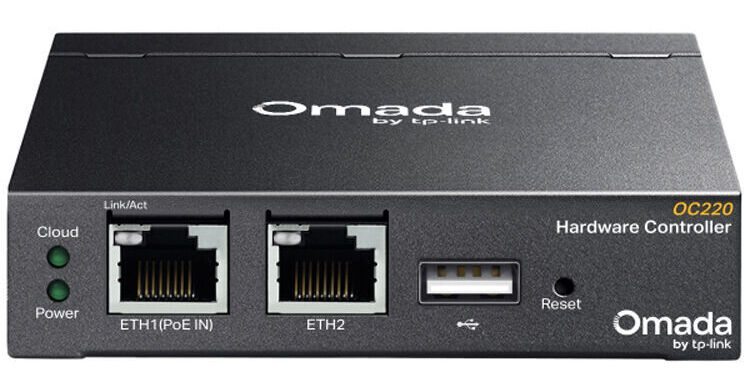
TP-Link OC220 Omada Hardware Controller

BH #TPOC220 • MFR #OC220
Print
TP-Link OC220 Omada Hardware Controller
Key Features
  • 2 x Gigabit Ethernet Ports
  • 1 x PoE-In Port
  • Manage up to 130 Omada Devices
  • Direct Access, Cloud Portal & Mobile App
Manage all of your business' switches, access points, gateways, and other network devices from one centralized cloud solution with the OC220 Omada Hardware Controller from TP-Link. Ideal for hospitality, education, retail, and office environments, the OC220 allows you to manage up to 130 Omada devices across multiple sites from almost anywhere, at any time, using the Omada App or web-based cloud portal.
More Details
In Stock
No Store Display
Free 2-Day Shipping
Protect Your Gear
Add a protection plan from $8.99
Ask an Expert
800-606-6969

TP-Link OC220 Overview

Manage all of your business' switches, access points, gateways, and other network devices from one centralized cloud solution with the OC220 Omada Hardware Controller from TP-Link. Ideal for hospitality, education, retail, and office environments, the OC220 allows you to manage up to 130 Omada devices across multiple sites from almost anywhere, at any time, using the Omada App or web-based cloud portal.

In addition to the app, you can use direct access to manage devices privately. The controller integrates into your network through its two Gigabit speed Ethernet ports, one of which supports 802.3af PoE in to transfer data and power over a single cable while the controller is mounted onto a desktop or wall. Alternatively, you can use a separately purchased 5V/1A micro-USB power adapter. The convenient USB-A 2.0 port allows you to automatically back up your configuration to a flash drive for added peace of mind. With its metal housing and fanless design, the OC220 operates silently in the background of your office.

Centralized Management
This controller supports up to 100 Omada access points, 10 Omada gateways, a maximum of 20 Omada switches, and a maximum of two DeltaStream GPON OLTs. Please note that the number of supported switches decreases by five for each DeltaStream GPON OLT.
Omada App
Using the Omada mobile app you can remotely access and configure your OC220 from your phone from anywhere in the world at any time.
Management Features
  • Automatic device discovery
  • Batch configuration
  • Batch firmware upgrading
  • Intelligent network monitoring
  • Event logs and notifications
  • Unified configuration
  • Reboot schedule
  • Captive portal authentication
UPC: 840460601115

TP-Link OC220 Specs

General
Compatibility
TP-Link Omada
Inputs/Outputs
USB I/O
1 x USB-A 2.0 Female Input/Output
1 x Micro-USB (Power Only) Female Input
Network I/O
2 x RJ45 Gigabit Ethernet
CPU
2 GHz A53 Quad-Core
RAM
2 GB DDR4
Storage
4 MB Flash; 8 GB eMMC
Wireless
Mobile App Compatible
Yes: Android & iOS
App Name: Omada
Power
Power Source
PoE, USB
DC Input Power
5 VDC at 1 A
Physical
Mounting
1x Desk; Wall
Color
Black
Material of Construction
Metal
Certifications
CE, FCC, RoHS
Operating Conditions
23 to 122°F / -5 to 50°C at 10 to 90% Humidity
Storage Conditions
-40 to 158°F / -40 to 70°C at 5 to 90% Humidity
Dimensions
3.9 x 3.9 x 1" / 100 x 98 x 25 mm
Packaging Info
Package Weight
1.005 lb
Box Dimensions (LxWxH)
5.4 x 5.1 x 2.8"

TP-Link OC220 Reviews

See any errors on this page?
Whatever You Need, We've Got It