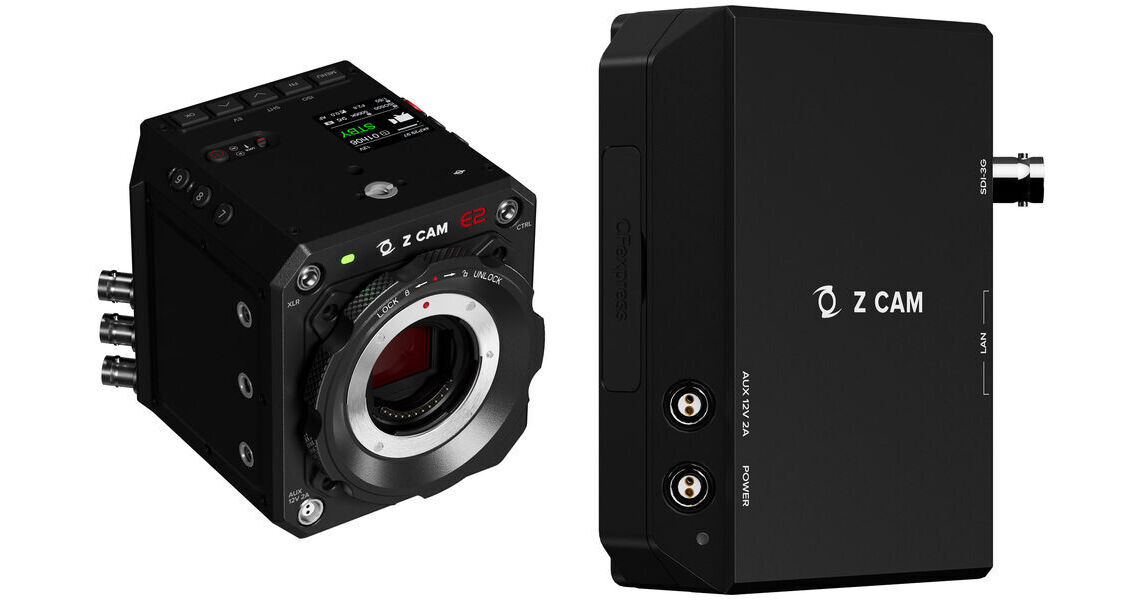
Kit Contains:


Z CAM E2-M4 Mark II Professional 4K Cinema Camera (Micro Four Thirds)
The Z CAM E2-M4 Mark II Professional 4K Cinema Camera adds connectivity and stabilization improvements to the previous camera model while maintaining its interchangeable Micro Four Thirds lens mount, Flagship Series housing, and the ability to record ProRes RAW to select Atomos recorder/monitors. The camera records DCI and UHD 4K at up to 160 fps, as well as HD to 240 fps, all to a CFexpress Type B card (not included). Live stream RTSP, RTMP, and SRT protocols directly from the camera via a Gigabit Ethernet connection. The camera features a 4/3" sensor with 10-bit color support and a nominal 13 stops of dynamic range with 16 stops when set to WDR. ISO settings include 500 and 2500 in native mode and a total manual range of 500 to 102,400.
Expanded Interfaces
The E2-M4 Mark II features both HDMI and 3G-SDI output ports for expanded connectivity in comparison to its predecessor. On top of this, Timecode and Genlock BNC inputs are built-in, allowing you to forgo additional adapters. Use the USB-C, 2.5mm LANC, and Serial CTRL ports to facilitate camera control with compatible ecosystems. A Gigabit Ethernet port also helps control the camera and live stream, and it even supports PoE+. Audio connectivity includes a 3.5mm stereo jack input, 5-pin LEMO input, and 3.5mm stereo jack output.
Built-In Gyroscopic Sensor
New to the second-generation camera is a built-in gyroscopic sensor. This improves the stabilization of your footage.
4K Capture and Recording
- 12-bit ProRes RAW via HDMI to Atomos Ninja V
- Records DCI/UHD 4K up to 160 fps or 1080p up to 240 fps, to the limit of your recording media's capacity
- Native ISO: 500 and 2500
- 13-15 stops of dynamic range using Z-Log2; 16 stops of dynamic range in WDR mode
- Built-in multi-frame noise reduction technology to produce clean footage
- H.265 (10-bit color) internal recording on CFexpress Type-B card
- 10-bit ProRes recording in 422 HQ, 422, 422 LT, and 422 Proxy is supported
- Aluminum alloy housing for efficient heat dissipation
Multicamera Synchronization
Using high sync precision and open API technology, multiple Z CAM units can sync together for live event applications. Connect the units to a network switch to activate EzLink Sync. Designate Master and Remote units by daisy-chaining the cameras via Z CAM sync cables. Cat 6 Ethernet cables interconnect the wireless signals for precise sync at a latency of 0.5 ms.
iOS App
Z Camera is a mobile application that allows camera live preview and control through a Wi-Fi/USB cable connection. It allows you to start/stop recording and adjust the camera settings remotely, and it has advanced features such as on-camera live preview. It can be downloaded from the Apple App Store.
Camera Body
- Made from aluminum for strength and heat dissipation
- Nine threaded mounting holes around the outside chassis
- Sensor plane marking for accurate distance measurements
- Powers from separately available AC/DC adapter, PoE+, or mini V-mount batteries
- Active, interchangeable MFT mount
UPC: 841687100177
Z CAM EzPlay Auxiliary Streaming Module
Add live streaming and slow-motion output to your E2 or E2 Mark II series camera with the Z CAM EzPlay Auxiliary Streaming Module. This modular unit can mount onto your camera to provide connectivity for simultaneous live streaming and output for slow-motion replay.
Connectivity and Recording
The EzPlay connects to the camera via one Gigabit Ethernet port to enable video to stream from the camera through the unit. A second Gigabit Ethernet port provides remote API control. You can also simultaneously output video via the 3G-SDI port for various applications such as slow-motion sports replay.
You can also record your camera output through the EzPlay via the built-in CFexpress Type B slot on the side of the unit.
Power Options
The compact EzPlay is powered via a 12V 2-pin power input using an optional power adapter.
It can also be powered directly from the camera using the unit's 12V 2-pin AUX port. A power button on the top of the unit provides direct on/off power.
V-Lock Mounting
The unit can mount directly onto the E2 Mark II using the integrated V-lock plate on the back, or it can mount onto a separately available standard V-lock receiver on a cage or rig.
Control
The EzPlay can be controlled via HTTP using API commands to control such as start recording, stop recording, switch modes, start playback, and stop playback as well as other more advanced E2 controls.
There is also a record button on the unit to directly start and stop recording.
UPC: 841687101136