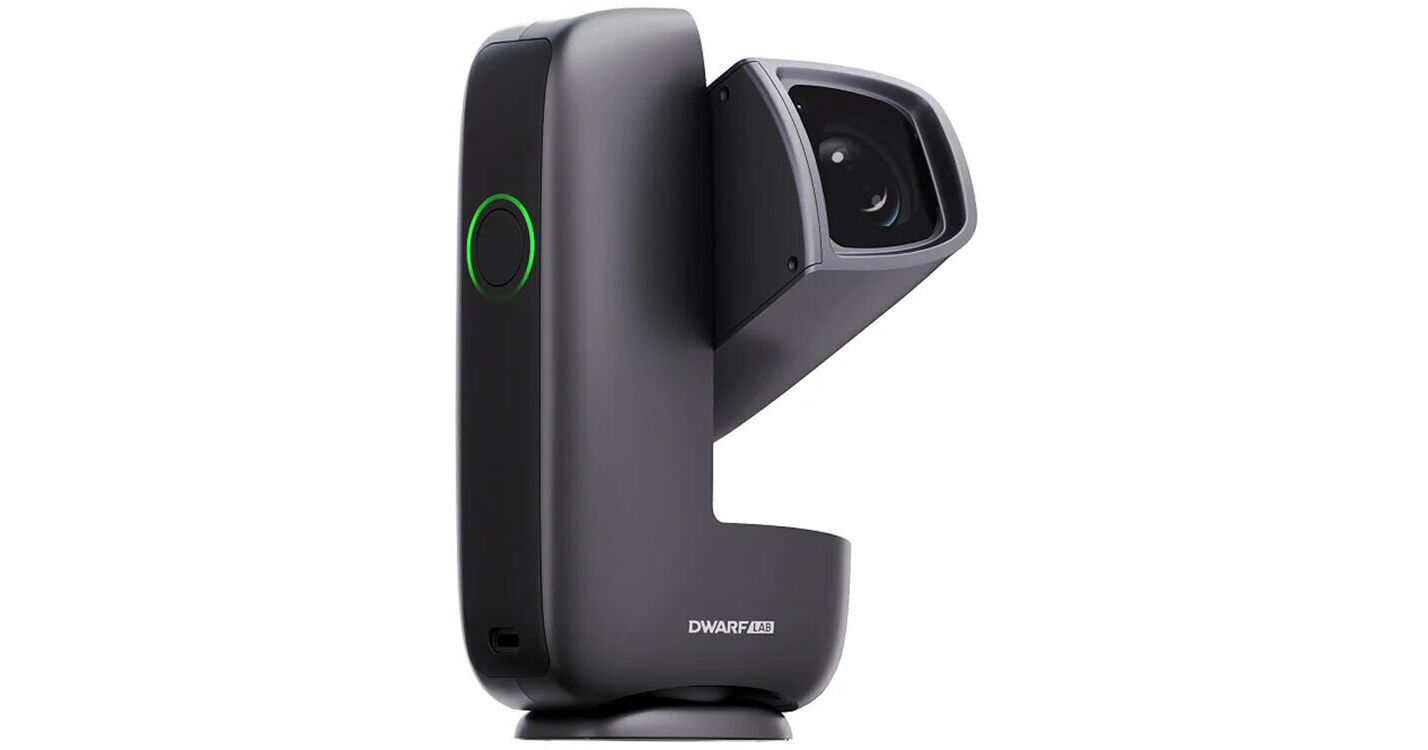
DwarfLab DWARF mini Smart Telescope

BH #DWARFMINI • MFR #DWARF MINI
Print
DwarfLab DWARF mini Smart Telescope
Key Features
  • Fully Automated GoTo Telescope/Camera
  • View Imagery on Phone or Tablet
  • Up to 90-Second Exposures
  • Wide-Angle & Telephoto Lenses
The DWARF mini Smart Telescope from DwarfLab captures beautiful photos of galaxies, nebulae, and planets—but unlike traditional astrophotography, it uses no bulky, expensive optical tubes and mounts. This rechargeable, book-sized, 2-pound device automatically finds and photographs celestial objects of your choosing, showing the image on your phone or tablet. It offers the same kinds of tracking, editing, and image-stacking the pros use, with exposures of up to 90 seconds for the faintest subjects and specialized filters to capture the most dramatic sights.
More Details
Top Seller
In Stock
No Store Display
Free Expedited Shipping
Protect Your Gear
Add a protection plan from $58.99
Ask an Expert
800-606-6969

DwarfLab DWARF mini Overview

From Manufacturer

The DWARF mini Smart Telescope from DwarfLab captures beautiful photos of galaxies, nebulae, and planets—but unlike traditional astrophotography, it uses no bulky, expensive optical tubes and mounts. This rechargeable, book-sized, 2-pound device automatically finds and photographs celestial objects of your choosing, showing the image on your phone or tablet. It offers the same kinds of tracking, editing, and image-stacking the pros use, with exposures of up to 90 seconds for the faintest subjects and specialized filters to capture the most dramatic sights.

Tracking and Capturing
  • Precise, fully automated equatorial go-to telescope
  • Telephoto lens: 30mm aperture, 150mm focal length (1016mm optical telescope equivalent)
  • Wide-angle lens: 30mm aperture, 6.7mm focal length (45mm optical telescope equivalent)
  • Sony IMX662 and Omnivision OS02K10 1/2.8" CMOS sensors
  • Exposures up to 90 seconds to gather light from faint deep-sky objects
  • Base rotates 360°, camera arm tilts 220°
  • Modes for deep sky, solar system, Milky Way, star trails, and daytime terrestrial use
  • Filters to cut light pollution, enhance nebulae, and isolate hydrogen alpha, hydrogen beta, and oxygen III bandwidths
Use and Handling
  • App on smartphone or tablet controls finding and tracking celestial objects and displays imagery
  • 1920 x 1080 image resolution
  • Live-stacking capability for images with enhanced color and detail
  • Frame-by-frame filtering inspects and removes unwanted frames
  • Program unattended overnight photography
  • Use images from multiple nights in stacking
  • Customized calibration for darks, bias, and flats
  • Stellar Studio auto-correct for 3-second upgrade
  • Export RAW files to Photoshop, Siril, or PixInsight to unlock full potential
  • Rechargeable battery, 4-hour runtime
  • Tripod mountable
EAN: 6977252010054

DwarfLab DWARF mini Specs

Key Specs
Aperture
0.1" / 3 mm
Eyepiece
No, Supports Cameras/Smartphones Only
GoTo Capability
Yes
Optical Design
Refractor
Aperture
0.1" / 3 mm
Focal Length
150 mm
Focuser
Internal
Eyepiece
No, Supports Cameras/Smartphones Only
Finderscope
No
Mount
Type
Alt-Azimuth
GoTo Capability
Yes
General
Battery
Rechargeable (Built-In)
GPS
No
Wireless
Wi-Fi 5 (802.11ac) / Bluetooth 5.0
Weight
1.85 lb / 0.84 kg
Packaging Info
Package Weight
3.245 lb
Box Dimensions (LxWxH)
9.3 x 6.8 x 5.8"

DwarfLab DWARF mini Reviews

The Travel Smartscope You NEED

By Patrick
Rated 5 out of 5
Date: 2026-10-22

I happen to own a SeeStar S30, but even this fine compact telescope can take up some room in a backpack. I wanted something small, really small, that could go in my personal bag on flights, or in a backpack for a quick overnight. Yet something that could take a solid image of the night and allow for some impromptu advocacy and outreach work. The Dwarf Mini appears to be the perfect option. Solid app and interface, excellent performance under light polluted conditions in high bortle areas, and yes, it can go anywhere. I have only imaged twice so far, both short 30ish minute exposures, one of Andromeda and one of the Wizard Nebula. And DANG, excellent from bottle 8.5. They are shared in this review, with the only processing work being done in the app.

Unbelievable for the price

By Cyril
Rated 5 out of 5
Date: 2026-07-12

After watching tons of YouTube reviews and videos about this smart telescope I pulled the trigger during a promotion. To date, this smart telescope has exceeded all of my expectations and I love it. It is actually very easy to use, although watching some videos will be more clear than reading through the documentation. I got the hang of EQ mode right away, it is a bit of a fiddle when using a regular pan and tilt tripod, so you will probably eventually want a better mount, but to get started you can use almost any tripod and run in Alt/Azimuth mode - or fiddle until you get an EQ alignment that works. I am so impressed at what you get with this device. It really has everything you need to take some spectacular astro-photos. It really is easy and it seems almost unbelievable that this is a telescope, star atlas, star tracker, image processor, includes tons of storage, has a reasonable learning curve, gives you enough battery to get some great shots. My typical process has been, get the tripod and scope set up outside (2 minutes). Calibrate the scope by pointing at some stars in the sky and letting the software plate solve (2 minutes). Switch to EQ mode, and calibrate (about 6 minutes with some adjusting). Picking a target from the built in catalog, I love how easy it is to find something in the sky that I know is visible. So far I have gotten several galaxies, a nebula, and star cluster. It takes about 3 minutes to pick something and have the Dwarf mini start tracking it. After that I adjust my focus using auto-focus and then set my exposure and gain settings (2 minutes). I can then start the capture and I will let it run for a few hours overnight. I have the app set up on a Samsung tablet and I can watch the image appear and then wait till morning to see what I got. It really is magical to see an image after hundreds of frames have stacked. I use the built in processing to refine the image, and then download a PNG file which I filter with the tablet.

See any errors on this page?
Whatever You Need, We've Got It