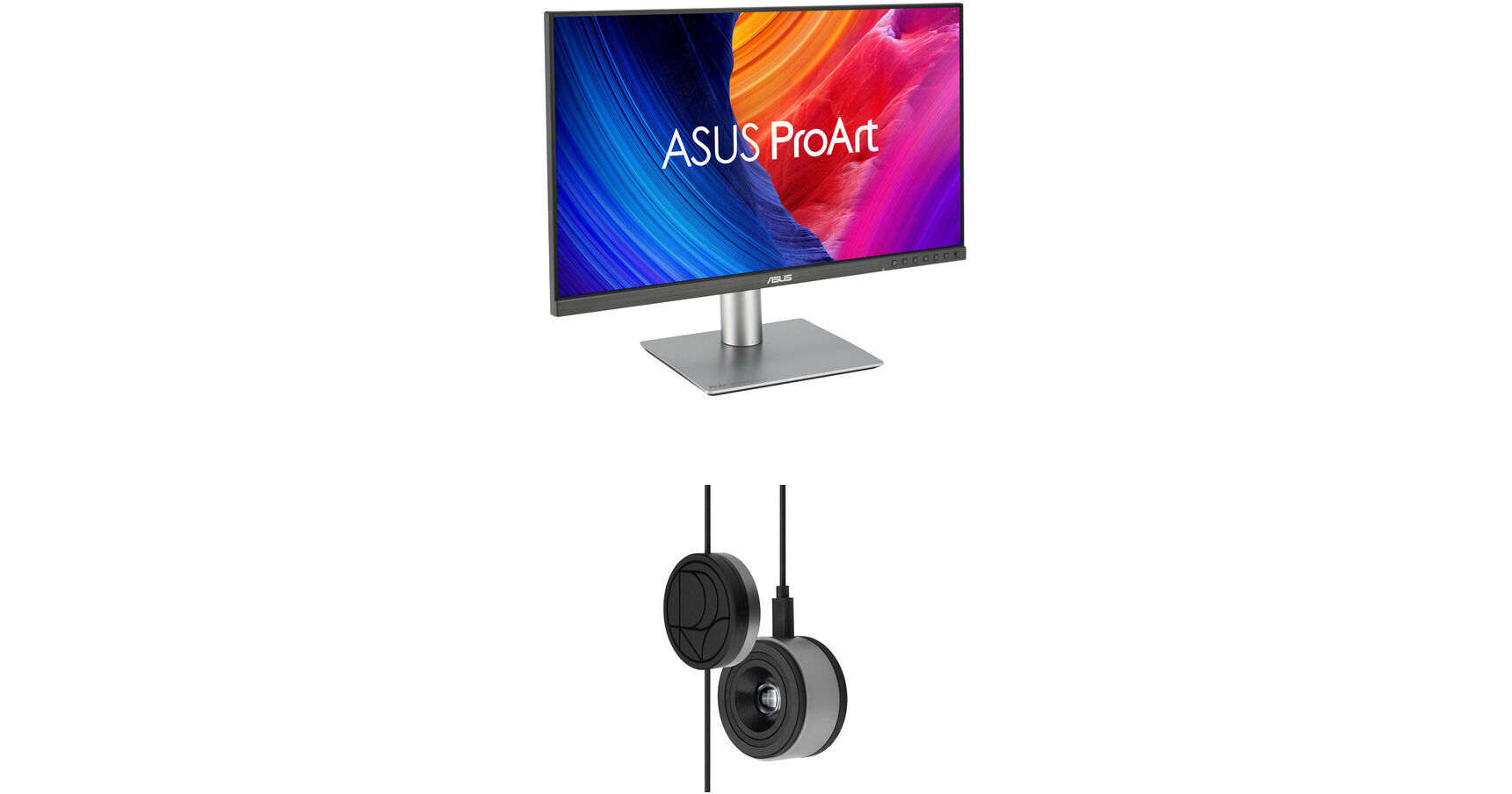
ASUS ProArt PA27JCV 27" 5K HDR Monitor Kit with ProArt CaliContrO 3-in-1 Colorimeter

BH #ASPA27JCVCK (B&H Kit)
Print
ASUS ProArt PA27JCV 27" 5K HDR Monitor Kit with ProArt CaliContrO 3-in-1 Colorimeter
Key Features
  • 27" 16:9 IPS Panel
  • HDMI | DisplayPort | USB-C (96W)
  • UHD 5K 5120 x 2880 at 60 Hz
  • 5 ms (GtG) Response Time
This B&H Kit bundles an ASUS ProArt PA27JCV 27" 5K HDR Monitor with an ASUS ProArt CaliContrO 3-in-1 Colorimeter. Combining a monitor with a colorimeter helps enable consistent color management across a wide range of devices, with support for up to 10,000 nits of brightness and HDR, plus LED, OLED, and Mini-LED panels.
More Details
In Stock
$848.00
$1,048.00
Save $200.00
Calculate Shipping
Protect Your Gear
Add a protection plan from $64.99
Savings Available:
Save Up to $5.00
Ask an Expert
212-444-6615
Kit Contains:
ASUS ProArt PA27JCV 27" 5K HDR Monitor
Designed for creative professionals, the ASUS ProArt PA27JCV 27" 5K HDR Monitor delivers a sharp UHD 5K 5120 x 2880 resolution with rich color and high-dynamic range. Expansive connectivity, a KVM, and other features help to streamline your workflow.
Photorealistic Color
Featuring a Calman verified 27" IPS panel, this monitor is factory calibrated for Delta E <2 accuracy, providing 10-bit, 1.07 billion colors with 99% DCI-P3 and 100% sRGB coverage. VESA DisplayHDR 500 certified high-dynamic range with a 3000:1 max contrast ratio provides realistically bright highlights and deeps shadows to videos and photos.

The ProArt Display PA27JCV also includes 10 presets that let you quickly switch between Native, sRGB, Adobe RGB, Rec. 2020, DCI-P3, Rec. 709, HDR, and DICOM color modes. You can program up to two custom color profiles to fit your workflow.

Clear Imagery with LuxPixel Technology
The LuxPixel anti-glare, low-reflection (AGLR) coating provides a paper-like screen effect by minimizing reflections while maintaining accurate colors and sharp details.
Light Sync Solutions
Built-in sensors help you to jump straight into your creative projects with bright, reliable color performance. A backlight sensor eliminates warmup time and brightens the screen on startup by detecting the backlight brightness color temperature to compensate the deviation. Additionally, the front-facing ambient light sensor synchronizes the display's color gamut to match with your environment. Use the ASUS DisplayWidget Center app to fine-tune your screen's settings using a mouse instead of the monitor buttons.
Enhanced Multitasking
In addition to the HDMI 2.1 and DisplayPort inputs, the USB-C port can transfer video, data, and up to 96W of power over a single cable with compatible laptops. A second USB-C port links devices with the built-in USB 3.2 Gen 1 hub, which includes one USB-C and three USB-A downlink ports.

With an integrated KVM switch, you can control up to two devices simultaneously in Picture-by-Picture (PbP) or Picture-in-Picture (PiP) modes using a single mouse and keyboard connected through the monitor. Plug your favorite headphones into the 3.5mm jack for listening privacy.

Space-Saving and Ergonomic Design
The ASUS ProArt Display PA27JCV's base is about 33% smaller than its predecessor with a 30% slimmer profile. It measures 8mm at its thinnest point, providing you with more desktop space.

Rotate the screen in either direction to view content in portrait mode. Then adjust the height, tilt, and swivel to your preferences. Integrated ASUS Eye Care features such as a blue light filter and flicker-free technology helps to reduce eyestrain and maintain comfort during extended viewing periods.

UPC: 197105628984
ASUS ProArt CaliContrO 3-in-1 Colorimeter

Designed for use with ASUS-exclusive apps, the ProArt CaliContrO 3-in-1 Colorimeter from ASUS for hardware and software calibration of monitors and laptop displays through the generation of ICC profiles, enabling comprehensive color management across a wide range of devices. With support for up to 10,000 nits of brightness and HDR, you'll be able to use this with LED, OLED, Mini-LED, and other types of displays. On-Screen Display (OSD) control enables quick adjustments when connected to a compatible monitor, with vibration feedback for enhanced usability. The built-in ASUS Dial offers instant and precise control for Adobe apps and other applications by enabling customized shortcuts. Compatible with Windows and Mac, a USB-C cable with a counterweight is included.

Color Calibration
Keep long-term color accuracy conveniently within reach via hardware and software calibration.
OSD Control
Enjoy effortless control with a 5-way navigator and shortcut keys at your fingertips with vibration feedback.
ASUS Dial Features
Creativity with a spin - fully customizable and seamlessly compatible with creative software.
Professional Color Accuracy
The ProArt CaliContrO MCA02 offers industry-leading precision and is designed specifically for professional display needs.

High Brightness Measurement
Supports up to 10,000 nits, ensuring precise calibration for HDR displays without compromise.

Seamless ProArt Display Integration
With built-in ProArt Display color profile support, it works seamlessly with ProArt monitors to deliver optimized and more accurate calibration.

Broad Panel Compatibility
Works flawlessly with multiple display technologies including LED, OLED, Mini-LED, and more.
Keep Long-Term Color Accuracy
The ProArt CaliContrO is a high-precision color colorimeter that can be used with monitors/laptops for software color calibration to generate an ICC Profile and also be matched with a ProArt Display which supports hardware calibration feature via ProArt calibration software. ASUS-exclusive ProArt calibration software supports Windows and macOS, ensuring compatibility and seamless integration across different platforms.
Software Calibration
The ProArt CaliContrO MCA02 can do software calibration via ProArt calibration software to generate an ICC Profile. An ICC Profile is a file that contains color management information, which can be used by the operating system and other applications to ensure consistent color output across different devices. By creating an ICC Profile, users can ensure that the colors displayed on their ASUS monitor are true to life and match the intended output.
Hardware Calibration
The ProArt CaliContrO MCA02 also work seamlessly with ASUS ProArt calibration software. Each ProArt display can be calibrated and the 3D LUT (Look-up Table) subsequently rewritten. It can write back and save color parameter profiles on the ProArt display's internal scaler IC chip, instead of on the PC, allowing users to connect it to devices with different operating systems or applications without needing to adjust settings. The saved profiles can be easily activated via the hotkey on the monitor.
Versatile Display Control
ProArt CaliContrO features On-Screen Display (OSD) control, ASUS Dial, and Microsoft Surface Dial integration, providing users with versatile and intuitive ways to adjust display settings for optimal performance. You can switch these three functions via ASUS DisplayWidget Center.
Instant & Effortless Access
The ProArt CaliContrO can be connected to a compatible monitor to provide direct access to the On-Screen Display (OSD) for quick adjustments with vibration feedback. Featuring 5-way navigator and 5 button shortcut keys including input select, shortcut 1, shortcut 2, exit, and vibration switch, it delivers intuitive control, so you no longer need to reach your hand to the monitor.
Creativity with a Spin
In addition to OSD control for ProArt displays, the virtual ASUS Dial on ProArt CaliContrO offers seamless integration with creative software and Microsoft Surface Dial controls, empowering creators with intuitive adjustments and streamlined workflows. Seamless switching between functions is enabled via ASUS DisplayWidget Center, further enhancing usability and customization.
Supports Windows Surface Dial
ASUS Dial works seamlessly with Microsoft Surface Dial features. Simply turn ASUS Dial to adjust volume, scroll through web pages, or to perform other functions.
Exquisite Design
The ProArt CaliContrO MCA02 combines sleek industrial aesthetics with intuitive interaction, giving creators a natural control experience.
UPC: 199291216648
Kit Contains:

ASUS ProArt PA27JCV 27" 5K HDR Monitor

Key Specs
Display Size
27"
Panel Type
IPS-Type LCD
Native Resolution
5120 x 2880
Maximum Brightness
500 nits / cd/m2 (HDR Mode)
HDR Support
Yes: HDR10
Color Support
1.07 Billion Colors (10-Bit)
Color Gamut
100% sRGB
100% Rec. 709
99% DCI-P3
95% Adobe RGB
Finish
Anti-Glare
Touchscreen
No
A/V Inputs
DisplayPort 1.4 / HDMI 2.1
A/V Outputs
3.5 mm (Analog Audio)
USB I/O
USB-A 3.2 Gen 1 / USB-C 3.2 Gen 1
Built-In Speakers
Yes: 2x 2 W
Display
Size
27"
Panel Type
IPS-Type LCD
Aspect Ratio
16:9
Native Resolution
5120 x 2880
Maximum Brightness
500 nits / cd/m2 (HDR Mode)
HDR Support
Yes: HDR10
Contrast Ratio
3000:1
Response Time
5 ms (GtG)
Refresh Rate
60 Hz
Variable Refresh Technology
Adaptive-Sync
Color Support
1.07 Billion Colors (10-Bit)
Color Gamut
100% sRGB
100% Rec. 709
99% DCI-P3
95% Adobe RGB
Viewing Angle (H x V)
178 x 178°
Curved Display
No
Finish
Anti-Glare
Surface
Touchscreen
No
Connectivity
A/V Inputs
1x DisplayPort 1.4
1x HDMI 2.1
A/V Outputs
1x 1/8" / 3.5 mm (Headphone)
HDCP Support
Yes: Version 2.2
USB I/O
2x USB-C 3.0 / 3.1/3.2 Gen 1 with USB PD 96 W
3x USB-A 3.0 / 3.1/3.2 Gen 1
Multi-Input Support (PIP/PBP)
Yes: Picture-in-Picture (PIP), Picture-by-Picture (PBP)
Speaker
Built-In Speakers
Yes: 2x 2 W
Electrical
Power Consumption
Typical: 26.1 W
Input Power
100 to 240 VAC, 50 / 60 Hz
Power Adapter Type
Internal
General
Certifications
CEC, ENERGY STAR, EPEAT, FCC, cTUVus
Adjustments
Rotation: 90°
Swivel: 60° (-30 to 30°)
Tilt: 28° (-5 to 23°)
Height Up to 5.1" / 130 mm
VESA Mounting-Hole Pattern
100 x 100 mm
Lock Slot
Yes: Kensington
Dimensions
24.1 x 21.1 x 8.4" / 612.1 x 535.9 x 213.4 mm (with Stand)
21.1 x 14.2 x 1.7" / 535.9 x 360.7 x 43.2 mm (without Stand)
Weight
13.03 lb / 5.91 kg (with Stand)
9.12 lb / 4.14 kg (without Stand)
Packaging Info
Package Weight
18.735 lb
Box Dimensions (LxWxH)
27.1 x 17.7 x 5.5"

ASUS PA27JCV Reviews

See any errors on this page?
Whatever You Need, We've Got It