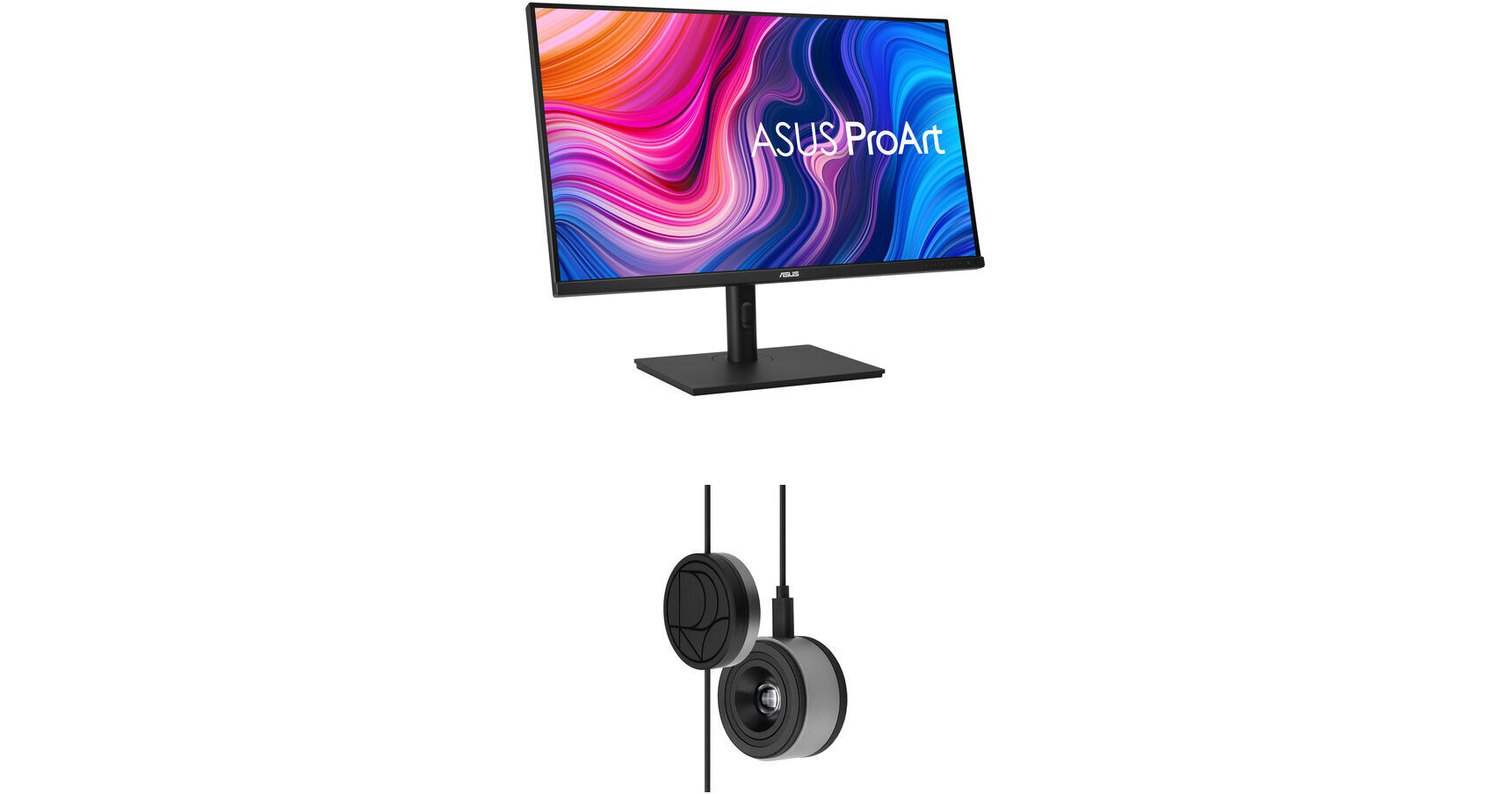
ASUS ProArt PA329CV 32" 4K HDR Monitor Kit with ProArt CaliContrO 3-in-1 Colorimeter

BH #ASPA329CVCK (B&H Kit)
Print
ASUS ProArt PA329CV 32" 4K HDR Monitor Kit with ProArt CaliContrO 3-in-1 Colorimeter
Key Features
  • 32" In-Plane Switching (IPS) Panel
  • HDMI | DisplayPort | USB-C
  • 3840 x 2160 4K Resolution @ 60 Hz
  • 1000:1 Static Contrast Ratio
This B&H Kit bundles an ASUS ProArt PA329CV 32" 4K HDR Monitor with an ASUS ProArt CaliContrO 3-in-1 Colorimeter. Combining a monitor with a colorimeter helps enable consistent color management across a wide range of devices, with support for up to 10,000 nits of brightness and HDR, plus LED, OLED, and Mini-LED panels.
More Details
In Stock
No Store Display
$848.00
Free Expedited Shipping
Protect Your Gear
Add a protection plan from $64.99
Ask an Expert
800-606-6969
Kit Contains:
ASUS ProArt PA329CV 32" 4K HDR Monitor
Designed for creative professionals, the ASUS ProArt PA329CV 32" 4K HDR Monitor is factory calibrated and Calman-certified to deliver ΔE <2 color accuracy rating. This 3840 x 2160 resolution 4K monitor also helps to streamline color-sensitive workflows with 100% coverage of the sRGB and Rec.709 color spectrums with DCI-P3 support. VESA DisplayHDR 400 certified high-dynamic range provides realistic images with bright highlights and deep shadows. Quickly switch between different color settings to fit your photo, video, or design project. The PA329CV connects to your system through the HDMI and DisplayPort inputs, and a convenient desk C-clamp mounting bracket is included to help save desktop space. You can also transfer video, audio, data, and up to 90W of power over a single USB Type-C cable with compatible laptops to help reduce desktop clutter. Other convenient features include integrated 2W stereo speakers and a four-port USB 3.1 Gen 1 hub.
Color Accuracy
Designed for creative professionals, the ProArt Display PA329CV's 3840 x 2160 4K resolution 32" In-Plane Switching (IPS) panel is factory calibrated and Calman-verified for a color accuracy average of ΔE <2. The screen also supports 1.07 billion colors, covering 100% of the sRGB and Rec.709 color spectrums with support for DCI-P3. VESA DisplayHDR 400 certified high-dynamic range provides realistic images with bright highlights and deep shadows.
Adaptive-Sync
Adaptive-Sync technology syncs the display's refresh rate with your compatible graphics card's frame rate to reduce screen tearing, stuttering, and other artifacts for a smooth viewing experience.
VESA DisplayHDR 400
The VESA DisplayHDR 400 certification is an industry standard that ensures this display has a minimum peak 400 cd/m² level of brightness alongside a specific color gamut, bit depth, and rise time values for high color accuracy and contrast.
Engineered for Creativity
The ASUS ProArt Display PA329CV features a 1000:1 static contrast ratio, 400 cd/m² brightness, and 5 ms response time.

Plus, customize your display with a variety of adjustments, including color hue, temperature, and gamma configurations, using an onscreen menu.

Integrated ProArt Presets allow you to switch between multiple color settings that include sRGB, Rec.709, DCI-P3, Reading, Darkroom, and Rapid Rendering modes.

The ASUS QuickFit Virtual Scale adds an onscreen overlay onto your projects, allowing you to preview and align documents before printing them. Presets include A4, B5, Ruler, and Alignment Grid.

ASUS Eye Care
ASUS Ultra-Low Blue Light and Flicker-Free technologies help to reduce eyestrain for comfortable viewing over extended periods of time.
Ergonomics
Rotate the screen 90° in either direction to view documents in portrait mode and adjust the monitor's height, tilt, and swivel to match your preferences. The 178° horizontal and vertical viewing angles allow you to see the screen clearly from almost any position.
Versatile Connectivity and Power Delivery for Unfettered Productivity
  • The ASUS ProArt Display PA329CV includes two HDMI 2.0 ports alongside a DisplayPort 1.2 input
  • Compatible computers can be connected through the USB Type-C port, which enables the integrated 4-port 5 Gb/s USB 3.1 Gen 1 hub
  • A 3.5mm headphone jack is also available for listening privacy
  • Transfer video, audio, data, and up to 90W of power over a single USB Type-C cable with compatible laptops
Desktop C-Clamp
The desk C-clamp bracket attaches to the edge of almost any flat work surface. Slip the PA329CV's mounting arm into it to free up desktop space.
UPC: 195553009713
ASUS ProArt CaliContrO 3-in-1 Colorimeter

Designed for use with ASUS-exclusive apps, the ProArt CaliContrO 3-in-1 Colorimeter from ASUS for hardware and software calibration of monitors and laptop displays through the generation of ICC profiles, enabling comprehensive color management across a wide range of devices. With support for up to 10,000 nits of brightness and HDR, you'll be able to use this with LED, OLED, Mini-LED, and other types of displays. On-Screen Display (OSD) control enables quick adjustments when connected to a compatible monitor, with vibration feedback for enhanced usability. The built-in ASUS Dial offers instant and precise control for Adobe apps and other applications by enabling customized shortcuts. Compatible with Windows and Mac, a USB-C cable with a counterweight is included.

Color Calibration
Keep long-term color accuracy conveniently within reach via hardware and software calibration.
OSD Control
Enjoy effortless control with a 5-way navigator and shortcut keys at your fingertips with vibration feedback.
ASUS Dial Features
Creativity with a spin - fully customizable and seamlessly compatible with creative software.
Professional Color Accuracy
The ProArt CaliContrO MCA02 offers industry-leading precision and is designed specifically for professional display needs.

High Brightness Measurement
Supports up to 10,000 nits, ensuring precise calibration for HDR displays without compromise.

Seamless ProArt Display Integration
With built-in ProArt Display color profile support, it works seamlessly with ProArt monitors to deliver optimized and more accurate calibration.

Broad Panel Compatibility
Works flawlessly with multiple display technologies including LED, OLED, Mini-LED, and more.
Keep Long-Term Color Accuracy
The ProArt CaliContrO is a high-precision color colorimeter that can be used with monitors/laptops for software color calibration to generate an ICC Profile and also be matched with a ProArt Display which supports hardware calibration feature via ProArt calibration software. ASUS-exclusive ProArt calibration software supports Windows and macOS, ensuring compatibility and seamless integration across different platforms.
Software Calibration
The ProArt CaliContrO MCA02 can do software calibration via ProArt calibration software to generate an ICC Profile. An ICC Profile is a file that contains color management information, which can be used by the operating system and other applications to ensure consistent color output across different devices. By creating an ICC Profile, users can ensure that the colors displayed on their ASUS monitor are true to life and match the intended output.
Hardware Calibration
The ProArt CaliContrO MCA02 also work seamlessly with ASUS ProArt calibration software. Each ProArt display can be calibrated and the 3D LUT (Look-up Table) subsequently rewritten. It can write back and save color parameter profiles on the ProArt display's internal scaler IC chip, instead of on the PC, allowing users to connect it to devices with different operating systems or applications without needing to adjust settings. The saved profiles can be easily activated via the hotkey on the monitor.
Versatile Display Control
ProArt CaliContrO features On-Screen Display (OSD) control, ASUS Dial, and Microsoft Surface Dial integration, providing users with versatile and intuitive ways to adjust display settings for optimal performance. You can switch these three functions via ASUS DisplayWidget Center.
Instant & Effortless Access
The ProArt CaliContrO can be connected to a compatible monitor to provide direct access to the On-Screen Display (OSD) for quick adjustments with vibration feedback. Featuring 5-way navigator and 5 button shortcut keys including input select, shortcut 1, shortcut 2, exit, and vibration switch, it delivers intuitive control, so you no longer need to reach your hand to the monitor.
Creativity with a Spin
In addition to OSD control for ProArt displays, the virtual ASUS Dial on ProArt CaliContrO offers seamless integration with creative software and Microsoft Surface Dial controls, empowering creators with intuitive adjustments and streamlined workflows. Seamless switching between functions is enabled via ASUS DisplayWidget Center, further enhancing usability and customization.
Supports Windows Surface Dial
ASUS Dial works seamlessly with Microsoft Surface Dial features. Simply turn ASUS Dial to adjust volume, scroll through web pages, or to perform other functions.
Exquisite Design
The ProArt CaliContrO MCA02 combines sleek industrial aesthetics with intuitive interaction, giving creators a natural control experience.
UPC: 199291216648
Kit Contains:

ASUS ProArt PA329CV 32" 4K HDR Monitor

Key Specs
Display Size
32"
Panel Type
IPS-Type LCD
Native Resolution
3840 x 2160
Maximum Brightness
400 nits / cd/m2 (Peak in HDR Mode)
HDR Support
Yes: HDR10
Color Support
1.07 Billion Colors (10-Bit)
Color Gamut
100% sRGB
100% Rec. 709
Finish
Anti-Glare
Touchscreen
No
A/V Inputs
DisplayPort 1.2 / HDMI 2.0
A/V Outputs
3.5 mm
USB I/O
USB-A 3.2 Gen 1 / USB-C 3.2 Gen 1
Built-In Speakers
Yes: 2x 2 W
Display
Size
32"
Panel Type
IPS-Type LCD
Aspect Ratio
16:9
Native Resolution
3840 x 2160
Maximum Brightness
400 nits / cd/m2 (Peak in HDR Mode)
HDR Support
Yes: HDR10
Contrast Ratio
1000:1
Response Time
5 ms (GtG)
Refresh Rate
60 Hz
Variable Refresh Technology
Adaptive-Sync
Color Support
1.07 Billion Colors (10-Bit)
Color Gamut
100% sRGB
100% Rec. 709
Viewing Angle (H x V)
178 x 178°
Curved Display
No
Finish
Anti-Glare
Surface
Touchscreen
No
Connectivity
A/V Inputs
1x DisplayPort 1.2
2x HDMI 2.0
A/V Outputs
1x 1/8" / 3.5 mm
HDCP Support
No
USB I/O
1x USB-C 3.0 / 3.1/3.2 Gen 1 with USB PD 90 W
4x USB-A 3.0 / 3.1/3.2 Gen 1
Multi-Input Support (PIP/PBP)
No
Speaker
Built-In Speakers
Yes: 2x 2 W
Electrical
Power Consumption
Standby: 0.5 W
Typical: 36.0 W
Input Power
100 to 240 VAC, 50 / 60 Hz
Power Adapter Type
Internal
General
Operating Conditions
32 to 104°F / 0 to 40°C
Storage Conditions
-4 to 140°F / -20 to 60°C
Adjustments
Adjustable
Rotation: 180° (-90 to 90°)
Swivel: 60° (-30 to 30°)
Tilt: 28° (-5 to 23°)
Height: Up to 5.1" / 129.5 mm
VESA Mounting-Hole Pattern
100 x 100 mm
Lock Slot
Yes: Kensington
Dimensions
28.6 x 23.7 x 9.6" / 726.4 x 602 x 243.8 mm (with Stand)
28.6 x 16.9 x 2.7" / 726.4 x 429.3 x 68.6 mm (without Stand)
Weight
27.8 lb / 12.6 kg (with Stand)
17.7 lb / 8 kg (without Stand)
Packaging Info
Package Weight
37.31 lb
Box Dimensions (LxWxH)
32.8 x 20 x 10.9"

ASUS PA329CV Reviews

A fine display for editing and general work.

By Peter
Rated 5 out of 5
Date: 2025-07-01

This was a replacement for one of my old ASUS ProArt PA329C 32 16:9 4K HDR IPS Displays. Quality, seems as good as the old display, but I really appreciate the controls on the front bezel and NOT on the back side like the old PA329C models. (if you have multiple displays next to each other, you know my frustration!) The monitor has very little glare, and is plenty bright in a room with a lot of natural light. This is my primary work and photo editing monitory, and it does the job well.

Work OK. But has disappointments.

By David
Rated 2 out of 5
Date: 2024-02-11

I had an asus 27 inch similar to this that worked awesome. But as my eyes get older I wanted some thing larger. So I bought this one thinking it would be great since my 27 was wonderful. This monitor not so great. I have it connected to MacBook Pro via usb c. Connection was easy and the built in hub on the monitor works great. So I only have to connect one usb cord. But the brightness in this monitor is very weak. The words to the describe the brightness are OK but not quite enough. The color clarity and dpi are decent. But even on the best setting the brightness seems weak. I tried customizing the settings but even at 100% still weak. I did a little more research. I thought this was a 400 nit brightness monitor. It’s not. Its peak brightness is 400 nits. That’s not sustained. I did not watch that in the description. I used it for a couple days. But at almost $600 it’s just a hit too much money to keep something that isn’t quite good enough. So I sent it back and am awaiting the next asus model up which has 400 nits continuous. Hopefully that one will meet my needs. I would love the Apple 32 inch monitor but at $6000 that’s not something I can justify. So hopefully the $1200 asus will meet my needs. I do love that this raises and lowers. And it has a good solid heavy base. The controls on the monitor are easy to use. And ports are laid out for reasonably easy access. But in the end the brightness is just a little weaker than I need. I found I was struggling to see it.

See any errors on this page?

I see that the resolution is 3840 x 2160 UHD ...

I see that the resolution is 3840 x 2160 UHD Resolution @ 60 Hz. Does that mean it's 4K?
Asked by: Daniel
Yes, the ASUS ProArt Display PA329CV 32" 16:9 Adaptive-Sync UHD HDR IPS Monitor is classified as a 4K capable screen.
Answered by: Michael M
Date published: 2021-12-01

What is the refresh rate on this monitor?

What is the refresh rate on this monitor?
Asked by: James
The ASUS ProArt Display PA329CV supports 3840 x 2160 UHD Resolution @ 60 Hz.
Answered by: Michael M
Date published: 2021-11-02

Is the Pro Art PA278cv compatible to Apple M4 Mac ...

Is the Pro Art PA278cv compatible to Apple M4 Mac mini with OS 15 Sequoia?
Asked by: Gerald
Yes, the ASUS ProArt Display PA329CV 32" 16:9 Adaptive-Sync UHD HDR IPS Monitor can be used with Mac computers.
Answered by: Calvin M
Date published: 2024-10-25

Has the usb-c issue some people have mentioned in ...

Has the usb-c issue some people have mentioned in the reviews been resolved?
Asked by: Joel
According to Asus support, a firmware update is required to fix this issue. Instructions can be found here: https://www.asus.com/us/support/FAQ/1045839
Answered by: Calvin M
Date published: 2023-02-13

How does this differ from the PA32UC and the ...

How does this differ from the PA32UC and the PA329C? Looking for color critical photography work connected to the new 14" MacBook Pro with TB4
Asked by: Eyal
The PA329CV will have 90w dedicated to USB-C charging, and has calman color verification with 400 cd/m2. However the PA329C supports 84% Rec. 2020 and 600 cd/m2.
Answered by: dariusb
Date published: 2021-10-21

What is the Adobe RGB%?

What is the Adobe RGB%?
Asked by: Julie
The ASUS ProArt Display PA329CV 32" Monitor supports 100% sRGB and 100% Rec. 709 wide color gamut. AdobeRGB is not listed for this model.
Answered by: Michael M
Date published: 2022-02-17

I always used Eizo (CS) for photo editing and ...

I always used Eizo (CS) for photo editing and color grading. Could this Asus be a replacement?
Asked by: Alexandr
To compare two monitors, it would be necessary to know the exact models in question. The ASUS PA329CV is a good choice for an entry-level photo editing monitor for someone working primarily with digital media. It has 100% sRGB and Rec. 709 color accuracy, although it is not rated for Adobe RGB or DCI-P3 accuracy.
Answered by: Calvin M
Date published: 2023-08-17

What is the difference between the PA329CV and ...

What is the difference between the PA329CV and the PA329C? Can't seem to find what the V stands for or why this one is $200 cheaper.
Asked by: Paul
The previous statement by B&H is false. Going direct to Asus's website for each the PA329CV & PA329C, both monitors support 100% sRGB and both are geared towards photographers. The reason for the extra cost of the PA329C is around the extra features; 100% AdobeRGB, hardware 14bit LUT table, & perhaps the slightly elevated HDR certification of HDR600. I would say the biggest reason to go for the PA329C over the PA329CV is if you care about hardware calibration.
Answered by: David
Date published: 2024-05-24
  • y_2026, m_7, d_7, h_13CST
  • bvseo_bulk, prod_bvqa, vn_bulk_3.0.46
  • cp_1, bvpage1
  • co_hasquestionsanswers, tq_19
  • loc_en_US, sid_1945254, prod, sort_[SortEntry(order=HAS_STAFF_ANSWERS, direction=DESCENDING)]
  • clientName_bhphotovideo
Whatever You Need, We've Got It