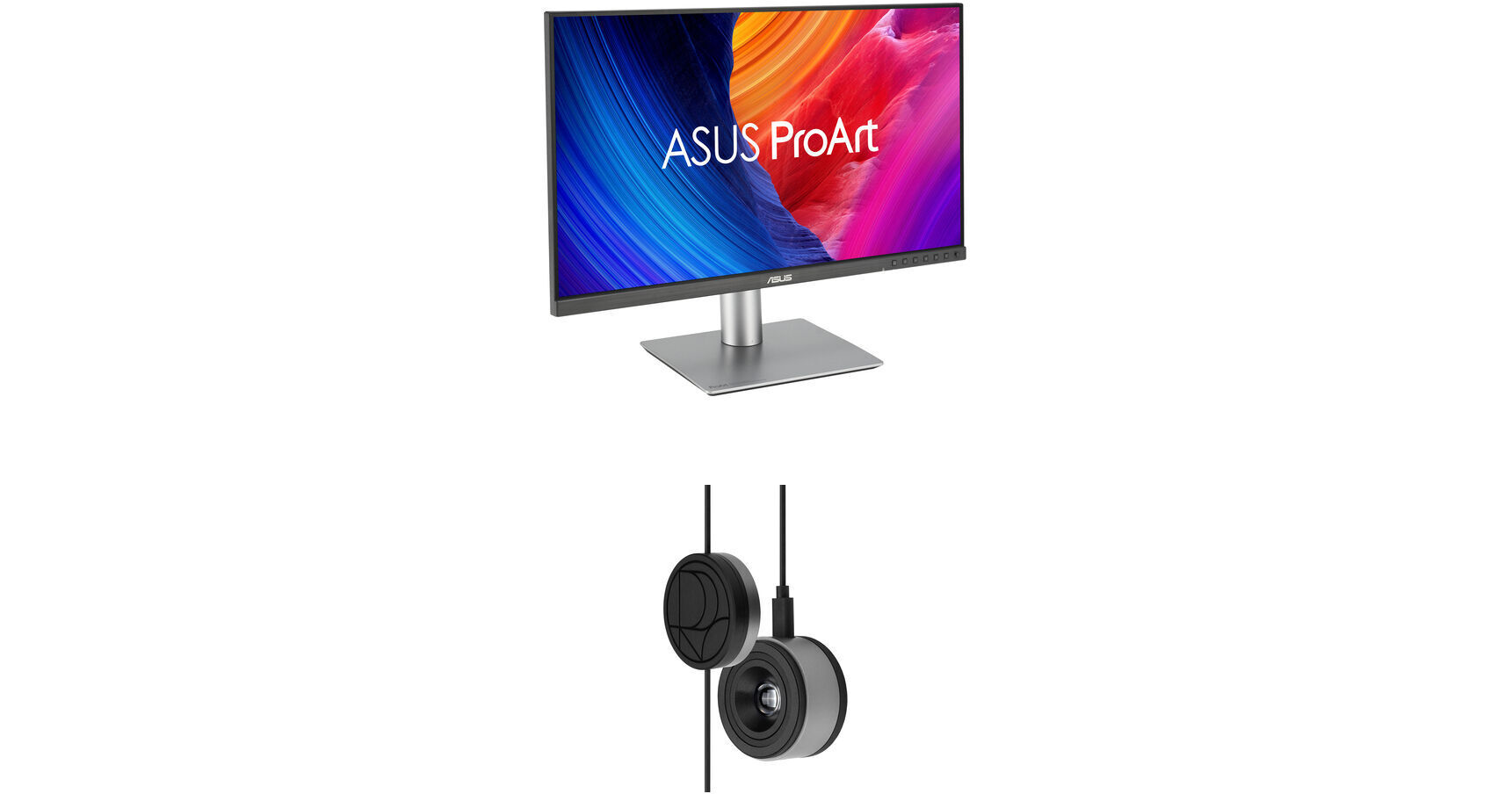
ASUS ProArt PA32QCV 31.5" 6K HDR Monitor Kit with ProArt CaliContrO 3-in-1 Colorimeter

BH #ASPA32QCVCK (B&H Kit)
Print
ASUS ProArt PA32QCV 31.5" 6K HDR Monitor Kit with ProArt CaliContrO 3-in-1 Colorimeter
Key Features
  • 31.5" 16:9 IPS Panel
  • HDMI | DisplayPort | Thunderbolt 4 (96W)
  • UHD 6K 6016 x 3384 at 60 Hz
  • 5 ms (GtG) Response Time
This B&H Kit bundles an ASUS ProArt PA32QCV 31.5" 6K HDR Monitor with an ASUS ProArt CaliContrO 3-in-1 Colorimeter. Combining a monitor with a colorimeter helps enable consistent color management across a wide range of devices, with support for up to 10,000 nits of brightness and HDR, plus LED, OLED, and Mini-LED panels.
More Details
In Stock
Free 2-Day Shipping
Protect Your Gear
Add a protection plan from $89.99
Savings Available:
Save Up to $5.00
Ask an Expert
800-606-6969
Kit Contains:

This B&H Kit bundles an ASUS ProArt PA32QCV 31.5" 6K HDR Monitor with an ASUS ProArt CaliContrO 3-in-1 Colorimeter. Combining a monitor with a colorimeter helps enable consistent color management across a wide range of devices, with support for up to 10,000 nits of brightness and HDR, plus LED, OLED, and Mini-LED panels.

ASUS ProArt PA32QCV 31.5" 6K HDR Monitor

Designed primarily for professional video editors, colorists, and artists, the ASUS ProArt PA32QCV 31.5" 6K HDR Monitor delivers exceptionally sharp 6016 x 3384 resolution visuals with vivid color and high-dynamic range on both Windows and Mac computers. Additionally, Thunderbolt 4 connectivity, a KVM, and other features help to streamline your workflow.

LuxPixel anti-glare technology minimizes reflections for a paper-like viewing experience while built-in sensors let you to jump straight into your creative projects with bright, reliable color performance. The Thunderbolt 4 port allows you to transfer video, data, and up to 96W of power over a single cable with compatible laptops. A secondary 15W Thunderbolt 4 port lets you daisy chain additional devices. An HDMI 2.1 port is also available alongside one DisplayPort 1.4 input. The integrated USB 3.2 Gen 1 hub includes one USB-C and two USB-A downlink ports. There is also a USB-C 3.2 Gen 1 upstream port that lets you take advantage of the built-in KVM.

6K Visuals
Boasting a 218 ppi pixel density, the 6016 x 3384 resolution screen offers sharp text and enhanced clarity for fine details. It also provides 145% more workspace than 4K displays.
True-to-Life Color Fidelity
Featuring a Calman verified 31.5" IPS panel, this monitor is factory calibrated for Delta E <2 accuracy, providing 10-bit, 1.07 billion colors with 98% DCI-P3 and 100% sRGB coverage. VESA DisplayHDR 600 certified high-dynamic range with a 3000:1 max contrast ratio and 600 nits peak brightness enhances visuals with realistically bright highlights and deep shadows.
Consistent Color Across Devices
Integrated modes offer multiple color gamut presets. The M Model-P3 preset is specifically designed to match the color performance with macOS devices.
MacBook Ready
Adjust the ProArt PA32QCV's brightness using your MacBook's brightness buttons. Further adjustments can be configured easily through the ASUS DisplayWidget Center software.
LuxPixel Clarity
The LuxPixel anti-glare, low-reflection (AGLR) coating provides a paper-like screen effect by minimizing reflections while maintaining accurate colors and sharp details.
Photo Realistic Colors
A backlight sensor eliminates warmup time and brightens the screen on startup by detecting the backlight brightness color temperature to compensate the deviation. Additionally, the front-facing ambient light sensor synchronizes the display's color gamut to match with your environment. Use the ASUS DisplayWidget Center app to fine-tune your screen's settings using a mouse instead of the monitor buttons.
Enhanced Multitasking
With an integrated KVM switch, you can control up to two devices simultaneously in Picture-by-Picture (PbP) or Picture-in-Picture (PiP) modes using a single mouse and keyboard connected through the monitor.
Daisy-Chaining
Streamline your workflow with a multi-monitor configuration by using the second Thunderbolt 4 connector to daisy-chain compatible devices.
Built-In Speakers
Enjoy music and videos with the integrated 2W stereo speaker system. Plug your favorite headphones into the 3.5mm jack for listening privacy.
Ergonomic Design
Rotate the screen in either direction to view content in portrait mode. Then adjust the height, tilt, and swivel to your preferences. The 100 x 100mm VESA mounting pattern allows you to attach the display to a swivel arm or multi-monitor stand.
UPC: 197105849952
ASUS ProArt CaliContrO 3-in-1 Colorimeter

Designed for use with ASUS-exclusive apps, the ProArt CaliContrO 3-in-1 Colorimeter from ASUS for hardware and software calibration of monitors and laptop displays through the generation of ICC profiles, enabling comprehensive color management across a wide range of devices. With support for up to 10,000 nits of brightness and HDR, you'll be able to use this with LED, OLED, Mini-LED, and other types of displays. On-Screen Display (OSD) control enables quick adjustments when connected to a compatible monitor, with vibration feedback for enhanced usability. The built-in ASUS Dial offers instant and precise control for Adobe apps and other applications by enabling customized shortcuts. Compatible with Windows and Mac, a USB-C cable with a counterweight is included.

Color Calibration
Keep long-term color accuracy conveniently within reach via hardware and software calibration.
OSD Control
Enjoy effortless control with a 5-way navigator and shortcut keys at your fingertips with vibration feedback.
ASUS Dial Features
Creativity with a spin - fully customizable and seamlessly compatible with creative software.
Professional Color Accuracy
The ProArt CaliContrO MCA02 offers industry-leading precision and is designed specifically for professional display needs.

High Brightness Measurement
Supports up to 10,000 nits, ensuring precise calibration for HDR displays without compromise.

Seamless ProArt Display Integration
With built-in ProArt Display color profile support, it works seamlessly with ProArt monitors to deliver optimized and more accurate calibration.

Broad Panel Compatibility
Works flawlessly with multiple display technologies including LED, OLED, Mini-LED, and more.
Keep Long-Term Color Accuracy
The ProArt CaliContrO is a high-precision color colorimeter that can be used with monitors/laptops for software color calibration to generate an ICC Profile and also be matched with a ProArt Display which supports hardware calibration feature via ProArt calibration software. ASUS-exclusive ProArt calibration software supports Windows and macOS, ensuring compatibility and seamless integration across different platforms.
Software Calibration
The ProArt CaliContrO MCA02 can do software calibration via ProArt calibration software to generate an ICC Profile. An ICC Profile is a file that contains color management information, which can be used by the operating system and other applications to ensure consistent color output across different devices. By creating an ICC Profile, users can ensure that the colors displayed on their ASUS monitor are true to life and match the intended output.
Hardware Calibration
The ProArt CaliContrO MCA02 also work seamlessly with ASUS ProArt calibration software. Each ProArt display can be calibrated and the 3D LUT (Look-up Table) subsequently rewritten. It can write back and save color parameter profiles on the ProArt display's internal scaler IC chip, instead of on the PC, allowing users to connect it to devices with different operating systems or applications without needing to adjust settings. The saved profiles can be easily activated via the hotkey on the monitor.
Versatile Display Control
ProArt CaliContrO features On-Screen Display (OSD) control, ASUS Dial, and Microsoft Surface Dial integration, providing users with versatile and intuitive ways to adjust display settings for optimal performance. You can switch these three functions via ASUS DisplayWidget Center.
Instant & Effortless Access
The ProArt CaliContrO can be connected to a compatible monitor to provide direct access to the On-Screen Display (OSD) for quick adjustments with vibration feedback. Featuring 5-way navigator and 5 button shortcut keys including input select, shortcut 1, shortcut 2, exit, and vibration switch, it delivers intuitive control, so you no longer need to reach your hand to the monitor.
Creativity with a Spin
In addition to OSD control for ProArt displays, the virtual ASUS Dial on ProArt CaliContrO offers seamless integration with creative software and Microsoft Surface Dial controls, empowering creators with intuitive adjustments and streamlined workflows. Seamless switching between functions is enabled via ASUS DisplayWidget Center, further enhancing usability and customization.
Supports Windows Surface Dial
ASUS Dial works seamlessly with Microsoft Surface Dial features. Simply turn ASUS Dial to adjust volume, scroll through web pages, or to perform other functions.
Exquisite Design
The ProArt CaliContrO MCA02 combines sleek industrial aesthetics with intuitive interaction, giving creators a natural control experience.
UPC: 199291216648
Kit Contains:

ASUS ProArt PA32QCV 31.5" 6K HDR Monitor

Key Specs
Display Size
31.5"
Panel Type
IPS-Type LCD
Native Resolution
6016 x 3384
Maximum Brightness
600 nits / cd/m2 (Peak in HDR Mode)
400 nits / cd/m2 (Sustained)
HDR Support
Yes: HDR10
Color Support
1.07 Billion Colors (10-Bit)
Color Gamut
100% sRGB
98% DCI-P3
Finish
Anti-Glare
Touchscreen
No
A/V Inputs
DisplayPort 1.4 / HDMI 2.1
A/V Outputs
3.5 mm (Analog Audio)
USB I/O
USB-A 3.2 Gen 1 / USB-C 3.2 Gen 1 / Thunderbolt 4
Built-In Speakers
Yes: 2x 2 W
Display
Size
31.5"
Panel Type
IPS-Type LCD
Aspect Ratio
16:9
Native Resolution
6016 x 3384
Maximum Brightness
600 nits / cd/m2 (Peak in HDR Mode)
400 nits / cd/m2 (Sustained)
HDR Support
Yes: HDR10
Contrast Ratio
3000:1
Response Time
5 ms (GtG)
Refresh Rate
60 Hz
Variable Refresh Technology
Adaptive-Sync
Color Support
1.07 Billion Colors (10-Bit)
Color Gamut
100% sRGB
98% DCI-P3
Viewing Angle (H x V)
178 x 178°
Curved Display
No
Finish
Anti-Glare
Surface
Touchscreen
No
Connectivity
A/V Inputs
1x DisplayPort 1.4
1x HDMI 2.1
A/V Outputs
1x 1/8" / 3.5 mm (Headphone)
HDCP Support
Yes: Version 2.2
USB I/O
2x USB-C (Thunderbolt 4) with USB PD 96 W
2x USB-A 3.0 / 3.1/3.2 Gen 1
1x USB-C 3.0 / 3.1/3.2 Gen 1
1x USB-C 3.0 / 3.1/3.2 Gen 1 [Control]
Multi-Input Support (PIP/PBP)
Yes: Picture-in-Picture (PIP), Picture-by-Picture (PBP)
Speaker
Built-In Speakers
Yes: 2x 2 W
Electrical
Power Consumption
Maximum: 49.4 W
Standby: 0.5 W
Input Power
100 to 240 VAC, 50 / 60 Hz
Power Adapter Type
Internal
General
Operating Conditions
32 to 104°F / 0 to 40°C
Storage Conditions
-4 to 140°F / -20 to 60°C
Certifications
ENERGY STAR, EPEAT, TCO Certified, TUV
Adjustments
Rotation: 180° (-90 to 90°)
Swivel: 60° (-30 to 30°)
Tilt: 28° (-5 to 23°)
Height: Up to 5.1" / 13 cm
VESA Mounting-Hole Pattern
100 x 100 mm
Lock Slot
Yes: Kensington
Dimensions
28.1 x 16.5 x 1.9" / 71.4 x 41.9 x 4.8 cm
28.1 x 24.3 x 9.4" / 71.4 x 61.7 x 23.9 cm (with Stand)
Weight
20.5 lb / 9.3 kg (with Stand)
13.9 lb / 6.3 kg (without Stand)
Packaging Info
Package Weight
29.425 lb
Box Dimensions (LxWxH)
32.2 x 19.9 x 5.5"

ASUS PA32QCV Reviews

Stunning Display with difficult controls

By Gary
Rated 2 out of 5
Date: 2026-08-16

The 6K display is excellent, but the monitor is difficult to use because of a strange arrangement of buttons, and other problems. There is a button to set input, but it only appears after many clicks of the toggle switch. And then it disappears just as quickly before I have a chance to change the input. With many many tries one can change the input from HDMI to Thunderbolt and back. It did work reliably with my Macbook Air. Although, there was often a little fiddling needed to get the monitor to wake up. Things like plugging and unplugging the thunderbolt cable and closing and opening the Macbook were sometime necessary. Now I have a new Macbook Pro, and I can tell you that it has worked once, but the rest of the time all I get is a Thunderbolt No Signal message on the monitor. Because this accepts HDMI input, I thought I would be able to plug an Apple TV box into it. But I have only ever gotten a No HDMI Signal message. I would like to get rid of this and purchase something that will work consistently with my Mac.

Great monitor for MacBook Pro

By Niko
Rated 5 out of 5
Date: 2026-06-09

I appreciate the matte display, which eliminates reflections and maintains brightness. The high resolution ensures that text appears remarkably crisp. A convenient feature is the ability to adjust the brightness directly from your Mac keyboard. However, the built-in speakers are essentially useless; you can basically only play system sounds through them. Setting up the monitors was straightforward. I have two of these monitors and daisy chained them using the included Thunderbolt cable. Initially, I encountered connectivity issues between my Mac and the monitor. However, switching the included Thunderbolt cable with Apple’s cable resolved the problem.

See any errors on this page?
Whatever You Need, We've Got It