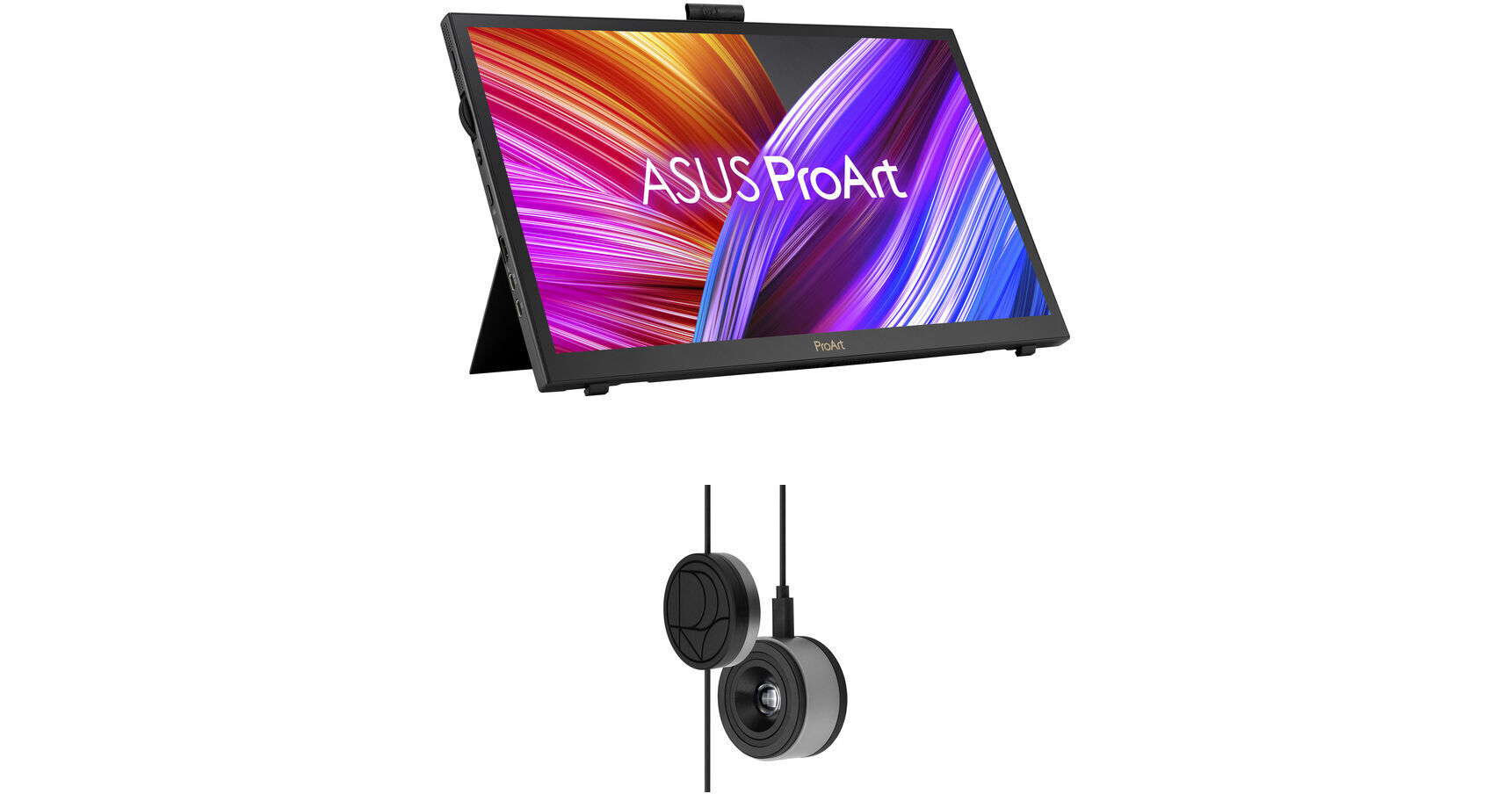
ASUS ProArt PA169CDV 15.6" Multi-Touch 4K HDR Portable Monitor & Pen Display Kit with ProArt CaliContrO 3-in-1 Colorimeter

BH #ASPA169CDVCK (B&H Kit)
Print
ASUS ProArt PA169CDV 15.6" Multi-Touch 4K HDR Portable Monitor & Pen Display Kit with ProArt CaliContrO 3-in-1 Colorimeter
Key Features
  • 15.6" 16:9 IPS Panel
  • HDMI | USB-C (15W)
  • 4K UHD 3840 x 2160 Touchscreen at 60 Hz
  • 29 ms (GtG) Response Time
This B&H Kit bundles an ASUS ProArt PA169CDV 15.6" Multi-Touch 4K HDR Portable Monitor & Pen Display with an ASUS ProArt CaliContrO 3-in-1 Colorimeter. Combining a monitor with a colorimeter helps enable consistent color management across a wide range of devices, with support for up to 10,000 nits of brightness and HDR, plus LED, OLED, and Mini-LED panels.
More Details
In Stock
No Store Display
Free 2-Day Shipping
Protect Your Gear
Add a protection plan from $109.99
Savings Available:
Save Up to $5.00
Ask an Expert
800-606-6969
Kit Contains:

From Manufacturer

This B&H Kit bundles an ASUS ProArt PA169CDV 15.6" Multi-Touch 4K HDR Portable Monitor & Pen Display with an ASUS ProArt CaliContrO 3-in-1 Colorimeter. Combining a monitor with a colorimeter helps enable consistent color management across a wide range of devices, with support for up to 10,000 nits of brightness and HDR, plus LED, OLED, and Mini-LED panels.

ASUS ProArt PA169CDV 15.6" Multi-Touch 4K HDR Portable Monitor & Pen Display

Take your creative workflow to the next level with the ASUS ProArt PA169CDV 15.6" Multi-Touch 4K HDR Portable Monitor & Pen Display. Designed for professionals, this portable 3840 x 2160 resolution UHD 4K display is factory calibrated for Delta E<2 10-bit color accuracy, covering 100% of the sRGB and Rec. 709 gamut. It also doubles as a pen display and includes a battery-free stylus that allows you to naturally draw detailed illustrations and make precise edits.

A dual adjustable kickstand system allows you to position the display for viewing or drawing. The ASUS dial, located on the side of the display, may be customized with functions such as zoom and brush size adjustments to streamline your workflow. Similarly, the ASUS Control Panel software turns the touchscreen into a dedicated controller with supported applications. With its slim, lightweight design, the ProArt PA169CDV is ready to go with you on your travels while stored in the included carrying bag.

Natural Drawing
The ASUS ProArt Pen uses Wacom electromagnetic resonance (EMR) technology, meaning that it's battery-free and accurately detects your hand movements. Support for 4096 pressure levels and a 40° tilt allow you to naturally draw thick, thin, and angled lines. Two interchangeable pen nibs are also included to change the frictional feel between a pen or brush. There are also two customizable side buttons and a digital eraser.
Precise Color
Featuring a 15.6" IPS panel, this PANTONE Validated and Calman Verified portable display is designed to provide 1.07 billion colors with a 1200:1 static (15,000:1 HDR) contrast ratio and 500 nit peak brightness that delivers true-to-life visuals.
Built-in Adjustable Kickstands
The ProArt Display PA169CDV features two built-in ergonomic kickstands. The lower kickstand provides the ideal viewing angle for everyday productivity, while engaging the upper prop tilts the display at a shallow 17° angle for comfortable creativity.
Creativity with a Spin
An integrated ASUS Dial provides precise fingertip control over different parameters in creative apps. A switch by the dial allows you to select either stepped or stepless mode for intuitive control. Customized shortcuts enable you to zoom in and out of images or adjust brush size by simply turning the ASUS Dial.
Intuitive Control at Your Fingertips
ASUS Control Panel software provides a virtual interface that's designed to give you intuitive, precise control over creative apps such as Adobe software, DaVinci Resolve, Clip Studio Paint, and more. With the fully customizable dial, slider, button, and scroll touch controls, you can assign controls to change brush size or saturation. There's also a Color Management function to optimize color tools.
UPC: 195553593410
ASUS ProArt CaliContrO 3-in-1 Colorimeter

Designed for use with ASUS-exclusive apps, the ProArt CaliContrO 3-in-1 Colorimeter from ASUS for hardware and software calibration of monitors and laptop displays through the generation of ICC profiles, enabling comprehensive color management across a wide range of devices. With support for up to 10,000 nits of brightness and HDR, you'll be able to use this with LED, OLED, Mini-LED, and other types of displays. On-Screen Display (OSD) control enables quick adjustments when connected to a compatible monitor, with vibration feedback for enhanced usability. The built-in ASUS Dial offers instant and precise control for Adobe apps and other applications by enabling customized shortcuts. Compatible with Windows and Mac, a USB-C cable with a counterweight is included.

Color Calibration
Keep long-term color accuracy conveniently within reach via hardware and software calibration.
OSD Control
Enjoy effortless control with a 5-way navigator and shortcut keys at your fingertips with vibration feedback.
ASUS Dial Features
Creativity with a spin - fully customizable and seamlessly compatible with creative software.
Professional Color Accuracy
The ProArt CaliContrO MCA02 offers industry-leading precision and is designed specifically for professional display needs.

High Brightness Measurement
Supports up to 10,000 nits, ensuring precise calibration for HDR displays without compromise.

Seamless ProArt Display Integration
With built-in ProArt Display color profile support, it works seamlessly with ProArt monitors to deliver optimized and more accurate calibration.

Broad Panel Compatibility
Works flawlessly with multiple display technologies including LED, OLED, Mini-LED, and more.
Keep Long-Term Color Accuracy
The ProArt CaliContrO is a high-precision color colorimeter that can be used with monitors/laptops for software color calibration to generate an ICC Profile and also be matched with a ProArt Display which supports hardware calibration feature via ProArt calibration software. ASUS-exclusive ProArt calibration software supports Windows and macOS, ensuring compatibility and seamless integration across different platforms.
Software Calibration
The ProArt CaliContrO MCA02 can do software calibration via ProArt calibration software to generate an ICC Profile. An ICC Profile is a file that contains color management information, which can be used by the operating system and other applications to ensure consistent color output across different devices. By creating an ICC Profile, users can ensure that the colors displayed on their ASUS monitor are true to life and match the intended output.
Hardware Calibration
The ProArt CaliContrO MCA02 also work seamlessly with ASUS ProArt calibration software. Each ProArt display can be calibrated and the 3D LUT (Look-up Table) subsequently rewritten. It can write back and save color parameter profiles on the ProArt display's internal scaler IC chip, instead of on the PC, allowing users to connect it to devices with different operating systems or applications without needing to adjust settings. The saved profiles can be easily activated via the hotkey on the monitor.
Versatile Display Control
ProArt CaliContrO features On-Screen Display (OSD) control, ASUS Dial, and Microsoft Surface Dial integration, providing users with versatile and intuitive ways to adjust display settings for optimal performance. You can switch these three functions via ASUS DisplayWidget Center.
Instant & Effortless Access
The ProArt CaliContrO can be connected to a compatible monitor to provide direct access to the On-Screen Display (OSD) for quick adjustments with vibration feedback. Featuring 5-way navigator and 5 button shortcut keys including input select, shortcut 1, shortcut 2, exit, and vibration switch, it delivers intuitive control, so you no longer need to reach your hand to the monitor.
Creativity with a Spin
In addition to OSD control for ProArt displays, the virtual ASUS Dial on ProArt CaliContrO offers seamless integration with creative software and Microsoft Surface Dial controls, empowering creators with intuitive adjustments and streamlined workflows. Seamless switching between functions is enabled via ASUS DisplayWidget Center, further enhancing usability and customization.
Supports Windows Surface Dial
ASUS Dial works seamlessly with Microsoft Surface Dial features. Simply turn ASUS Dial to adjust volume, scroll through web pages, or to perform other functions.
Exquisite Design
The ProArt CaliContrO MCA02 combines sleek industrial aesthetics with intuitive interaction, giving creators a natural control experience.
UPC: 199291216648
Kit Contains:

ASUS ProArt PA169CDV 15.6" Multi-Touch 4K HDR Portable Monitor & Pen Display

Key Specs
Display Size
15.6"
Panel Type
IPS-Type LCD
Native Resolution
3840 x 2160
Maximum Brightness
500 nits / cd/m2 (Peak in HDR Mode)
450 nits / cd/m2 (Sustained)
HDR Support
Yes: HDR10
Finish
Glossy
Touchscreen
Yes: Capacitive
A/V Inputs
HDMI 2.0
USB I/O
USB-C
Built-In Speakers
Yes: 2x 1 W
Display
Size
15.6"
Panel Type
IPS-Type LCD
Aspect Ratio
16:9
Native Resolution
3840 x 2160
Maximum Brightness
500 nits / cd/m2 (Peak in HDR Mode)
450 nits / cd/m2 (Sustained)
HDR Support
Yes: HDR10
Contrast Ratio
1200:1
Response Time
29 ms
Refresh Rate
60 Hz
Variable Refresh Technology
No
Color Support
1.07 Billion Colors (10-Bit)
Color Gamut
100% sRGB
100% Rec. 709
Viewing Angle (H x V)
178 x 178°
Finish
Glossy
Surface
Touchscreen
Yes: Capacitive
Connectivity
A/V Inputs
1x HDMI 2.0
HDCP Support
Yes: Version 2.2
USB I/O
1x USB-C DP Alt Mode (Video Only)
1x USB-C Power Only (No Data) with USB PD 15 W
Ethernet I/O
No
Speaker
Built-In Speakers
Yes: 2x 1 W
Electrical
Power Consumption
Typical: 15.0 W
Standby: 0.5 W
Input Power
100 to 240 VAC, 50 / 60 Hz
Power Adapter Type
External
General
Adjustments
Adjustable
Rotation: 90°
Tilt: 91° (-17 to 74°)
Lock Slot
No
Packaging Info
Package Weight
6.715 lb
Box Dimensions (LxWxH)
21 x 12.6 x 4.2"

ASUS PA169CDV Reviews

See any errors on this page?
Whatever You Need, We've Got It