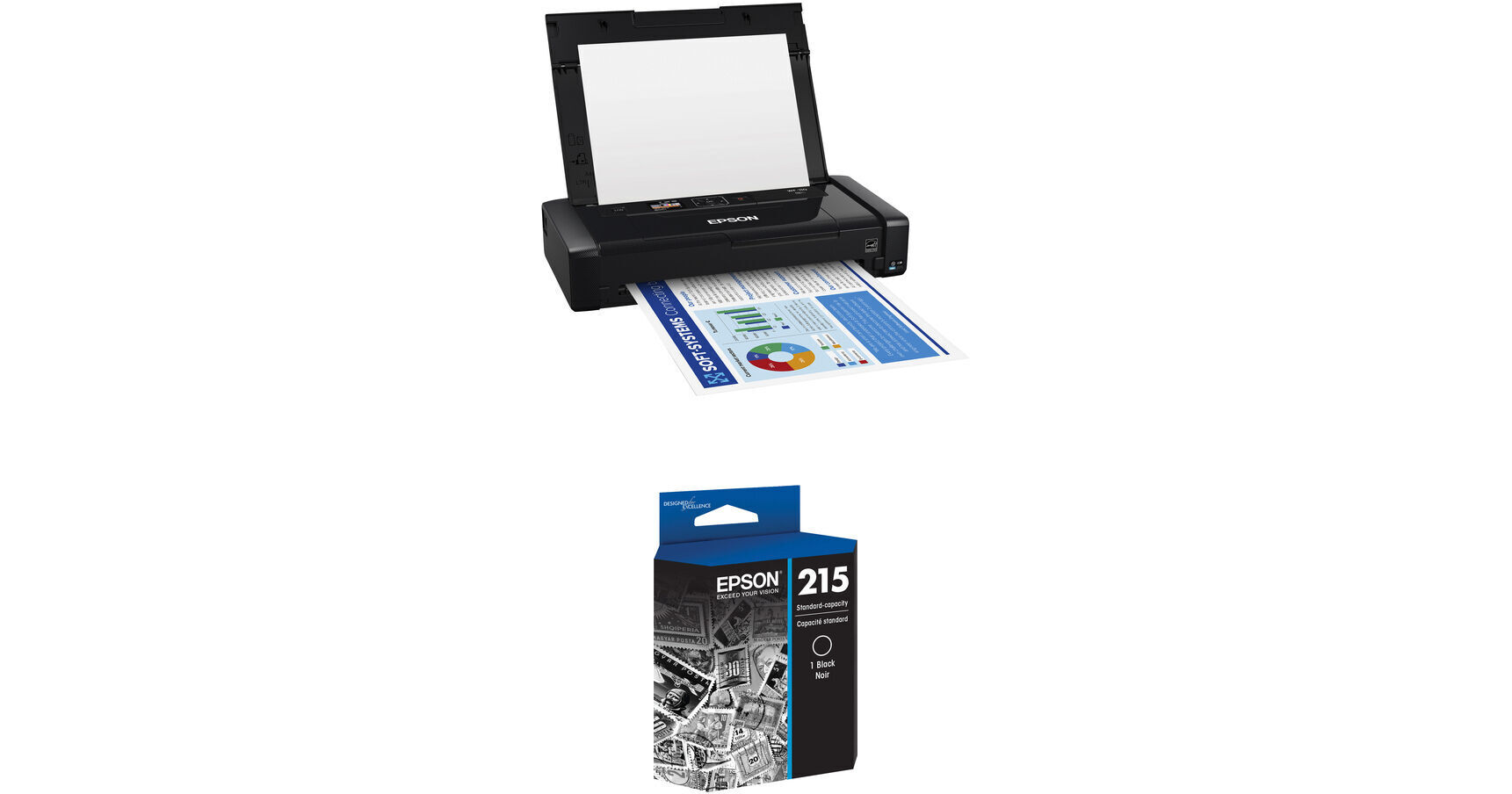
Epson WorkForce WF-110 Wireless Mobile Inkjet Printer with T215 DuraBrite Ultra Black Standard Capacity Ink Cartridge Kit

BH #EPWF110INKT2 (B&H Kit)
Print
Epson WorkForce WF-110 Wireless Mobile Inkjet Printer with T215 DuraBrite Ultra Black Standard Capacity Ink Cartridge Kit
Key Features
  • Max Resolution: 5760 x 1440 dpi
  • Max Document Size: 8.5 x 14"
  • Print Speed: 6.7 ppm Black/3.8 ppm Color
  • Borderless 4 x 6" Photo in 77 Seconds
Print with the Epson WorkForce WF-110 Wireless Mobile Inkjet Printer with T215 DuraBrite Ultra Black Standard Capacity Ink Cartridge Kit from B&H. Print via USB or Wi-Fi. This kit includes one T215 DuraBrite Ultra black standard capacity ink cartridge.
More Details
In Stock
No Store Display
Free 2-Day Shipping
Protect Your Gear
Add a protection plan from $26.00
Ask an Expert
800-606-6969
Kit Contains:

From Manufacturer

Print with the Epson WorkForce WF-110 Wireless Mobile Inkjet Printer with T215 DuraBrite Ultra Black Standard Capacity Ink Cartridge Kit from B&H. Print via USB or Wi-Fi. This kit includes one T215 DuraBrite Ultra black standard capacity ink cartridge.

Epson WorkForce WF-110 Wireless Mobile Inkjet Printer

For those in need of a compact, portable printing solution, the WorkForce WF-110 Wireless Mobile Inkjet Printer from Epson provides a battery-powered option with a maximum resolution of 5760 x 1440 dpi for detailed photos and documents. The unit handles media through a folding 20-sheet automatic document feeder, allowing for paper as large as 8.5 x 14". The printer can also handle documents in black & white at a rate of 6.7 ppm or in color at 3.8 ppm. Additionally, borderless 4 x 6" photos can be printed in about 77 seconds.

The four-color ink palette is pigment-based for fade- and water-resistance as well as crisp, vivid text and imagery. A 1.4" color LCD display is available for viewing and changing settings while on-the-go. Also, it has the ability to run on AC or battery power, with a battery life of about 100 black & white or 50 color prints. The WF-110 has USB 2.0 and Wi-Fi connectivity for convenience, and hands-free, voice-activated printing is available as well.

The Ultimate in Portability
Ultra lightweight and compact, even with the external accessory battery.
Flexible Battery Charging
Choose from a variety of charging options, including via USB and AC adapter, or print on AC power.
Built-In Battery
A rechargeable lithium-ion battery offers dependable performance in a small package.
External Accessory Battery Available
An external accessory battery is available for even greater print volumes.
Wireless Connectivity, Plus Wi-Fi Direct
With Wi-Fi 5 (802.11ac), easily print from your iPad, iPhone, tablet, smartphone, or laptop.
Designed for Productivity and Efficiency
Print professional-quality business documents and borderless 4 x 6" photos; save battery life with the automatic power-off feature.
Powered by MicroPiezo Heat-Free
Get performance beyond laser.
Easy, Intuitive Operation
A bright 1.4" color LCD and control panel allow for simple setup and operation
Fast Print Speeds
Print at speeds up to 6.7 ISO ppm (black) and 3.8 ISO ppm (color).
Durable, Instant-Dry Inks
Durable, instant-dry inks allow for professional-quality prints.
UPC: 010343947771
Epson T215 DuraBrite Ultra Black Standard Capacity Ink Cartridge

The pigment-based T215 DuraBrite Ultra Black Standard Capacity Ink Cartridge is designed for use with the WorkForce WF-100 Wireless Mobile Printer.

Compatible Printers
WorkForce WF-100 Wireless Mobile Inkjet Printer
UPC: 010343916340
Kit Contains:

Epson WorkForce WF-110 Wireless Mobile Inkjet Printer

Key Specs
Functions
Print
Printing Technology
Inkjet
Color Type
Color
Configuration
2x Individual Cartridge
Ink Type
Pigment-Based
Ink Color
1x Tri-Color
1x Black
Print Resolution
5760 x 1440 dpi (Optimized)
Media Sizes
Input Tray 1
Maximum: 8.5 x 14" / 21.59 x 35.56 cm
Wireless
Wi-Fi 5 (802.11ac)
Power Source
AC Power (Cable Built-In/Included)
Functions
Print
Printer
Printing Technology
Inkjet
Color Type
Color
Configuration
2x Individual Cartridge
Ink Type
Pigment-Based
Ink Color
1x Tri-Color
1x Black
Compatible Cartridges
Epson 215
Print Resolution
5760 x 1440 dpi (Optimized)
Borderless Printing
Yes: Up to 4 x 6" / 10.16 x 15.24 cm
Duplex Printing
No
Printer Language
ESC/P-R
Print Speed (By Time)
6.7 ppm (Black)
3.8 ppm (Color)
Printer Media Handling
Media Handling
1 x Input Tray
Media Sizes
Input Tray 1
Minimum: 3.5 x 5" / 8.9 x 12.7 cm
Maximum: 8.5 x 14" / 21.59 x 35.56 cm
Paper Capacity
Input Tray 1: 20 x Sheet / 1 x Envelope
Special Media Support
Envelopes
Connectivity
Data I/O
1x Micro-USB 2.0 Input
Wireless
Wi-Fi 5 (802.11ac)
Direct Printing
Android, Apple AirPrint, Epson Email Print, Epson iPrint Mobile, Epson Remote Print, Google Cloud Print, Mopria, USB Port, Wi-Fi Direct
Media/Memory Card Slot
Single Slot: SD/SDHC/SDXC
OS Compatibility
Computer: Windows / macOS
Mobile: Android/iOS
General
Display Size
1.4"
Display Type
Color LCD
Power Source
AC Power (Cable Built-In/Included)
Battery
1x Rechargeable Lithium-Ion (Built-In)
 • Charges via Printer's AC Cable/Micro-USB Port
 • Up to 100 Prints per Charge
 • 2.5-Hour Charge Time
Input Power
100 to 240 VAC, 50 / 60 Hz at 0.3 to 0.6
Power Consumption
14 W (Maximum)
1.3 W (Sleep)
0.4 W (Off)
Max Acoustic Noise
6.3 BA (Power)
49 dBA (Pressure)
Operating Conditions
32 to 104°F / 0 to 40°C at 20 to 80% Humidity
Storage Conditions
-22 to 140°F / -30 to 60°C at 20 to 90% Humidity
Certifications
CAN/CSA-CEI/IEC, CISPR 22 Class B, CSA C22.2 No. 60950, ENERGY STAR, FCC Part 15 Subpart B Class B, RoHS, UL60950
Dimensions (W x H x D)
12.2 x 8.5 x 9.3" / 31 x 21.6 x 23.6 cm12.2 x 2.4 x 6.3" / 31 x 6.1 x 16 cm (Storage)
Weight
3.5 lb / 1.6 kg
Packaging Info
Package Weight
5.7 lb
Box Dimensions (LxWxH)
15 x 10 x 5"

Epson WF-110 Reviews

Best Option for Portable Printer

By Ioana
Rated 5 out of 5
Date: 2026-01-28

I first tried the Canon Pixma TR-160, because reviewers said it prints faster and doesn't use as much ink. I know, having had many Epson printers in the past, that the ink is expensive and goes fast with the head cleaning required. Nozzles getting clogged otherwise. It's a pain. However, I had so much trouble and wasted so many hours trying to get the Canon to print, connect to WiFi, be found "online," etc. that I decided to also test out the Epson. The other choice for a portable printer was the HP, but that included scanning I didn't need (already have the Epson ES-65WR). And it was heavier. CONNECTING Canon was a nightmare. First setup was fine actually, but when I needed to print another day, it didn't work. It got stuck communicating, couldn't connect to WiFi for whatever reason. Was worse on phone. Almost impossible to print from phone. And I print things like return labels from the phone. Canon also required downloading a bunch of software, both on phone, and on the desktop, some of which I realized was totally unnecessary, and didn't help print. I wasted so much time with their software thinking it would help print. Epson printed right out of the box. No software needed at all on desktop (PC). Just turn the printer on and be on the same WiFi. It will be found. Same on phone. Very easy. It took me like 1 minute. PRINT QUALITY Canon has strong visible streaks. This is after a head cleaning which looked good. Also, or worse, letters print crooked. See attached, though photo hides a bit of it. Canon prints darker, but not sure that is correct. Epson letters are very straight. It does seem to have some vague muffled streaking, but much less and not very noticeable. This is without a head cleaning. Epson prints lighter, but not sure if that is wrong or correct. This test was on a standard copy sheet. I know Epsons print better on photo paper. But then they use a lot of ink. For my portable printer use, I need the prints to be correct (no angled letters or lines). But I am not printing photos or art for sale (maybe general test prints), so don't care about archival quality. WEIGHT Epson is half the weight of the Canon. It actually doesn't matter much to me, because I'm not constantly carrying it back and forth, but might to someone who does. Both of them seem light enough to be comfortably portable DIMENSIONS The Epson is a tiny bit smaller than the Canon. OVERALL Based on all this, I think the Epson is the best option for a portable printer. I never write long reviews because I'm busy, but I feel the need to because based on the all the reviews I read, Canon was the best option. And I don't think that's true.

Excelente compra

By Gilberto
Rated 5 out of 5
Date: 2024-03-04

Se que es solo impresora y cumple, si satisface mis necesidades con los trabajos con mis clientes y no veo complicada la configuración.

See any errors on this page?

Can this Epson WF-110 be directly connected to my ...

Can this Epson WF-110 be directly connected to my MacBook Pro when WIFI is unavailable?
Asked by: Joanne
Yes, you can connect this Epson WorkForce WF-110 Wireless Mobile Inkjet Printer to your MacBook Pro via a USB cable.
Answered by: Sagi C
Date published: 2023-11-14

will wifi connect at 5ghz?

will wifi connect at 5ghz?
Asked by: Gary
Yes, the Epson WorkForce WF-110 Wireless Mobile Inkjet Printer can support a 5GHz connection.
Answered by: Michael S
Date published: 2025-02-17

How many color or b&w pages is a set of ...

How many color or b&w pages is a set of cartridges good for?
Asked by: Morris
The number of pages you can print from an ink cartridge can vary depending on what's being printed, but the Epson T215 ink cartridges for the Epson WorkForce WF-110 Wireless Mobile Inkjet Printer are rated for about 200 pages.
Answered by: Kenneth C
Date published: 2023-11-21

Where does the maintenance Box go with the wf ...

Where does the maintenance Box go with the wf -110 ?
Asked by: Steven
The maintenance Box on this Epson WorkForce WF-110 Wireless Mobile Inkjet Printer BH #EPWF110 • MFR #C11CH25201 would be on the bottom of the unit.
Answered by: Moe
Date published: 2022-12-15

where does the Maintenance box go on the wf -110 ...

where does the Maintenance box go on the wf -110 ?
Asked by: Steven
The Epson T2950 Ink Maintenance Box for WorkForce WF-100 Printer is installed on the underside of the Epson WorkForce WF-110 Wireless Mobile Inkjet Printer. Please check the manual linked here starting the bottom of page 127 for instructions on how to install this. https://bhpho.to/3WamTBg
Answered by: Yaakov
Date published: 2022-12-14

Is the battery included?

Is the battery included?
Asked by: VILIAM
The Epson WorkForce WF-110 Wireless Mobile Inkjet Printer BH #EPWF110 comes with the battery.
Answered by: Reuben K
Date published: 2023-12-10

Will the wf110 scan documents?

Will the wf110 scan documents?
Asked by: Craig
No, it only prints documents and photographs.
Answered by: Marlon
Date published: 2022-05-24

What different brands or types of ink cartridges ...

What different brands or types of ink cartridges are compatible with this Workforce 110 series mobile printer
Asked by: Seth
This printer would use the Epson T215 Black and the T215 Color cartridges
Answered by: Moe
Date published: 2020-09-15
  • y_2026, m_6, d_3, h_11CST
  • bvseo_bulk, prod_bvqa, vn_bulk_3.0.46
  • cp_1, bvpage1
  • co_hasquestionsanswers, tq_10
  • loc_en_US, sid_1948287, prod, sort_[SortEntry(order=HAS_STAFF_ANSWERS, direction=DESCENDING)]
  • clientName_bhphotovideo
Whatever You Need, We've Got It