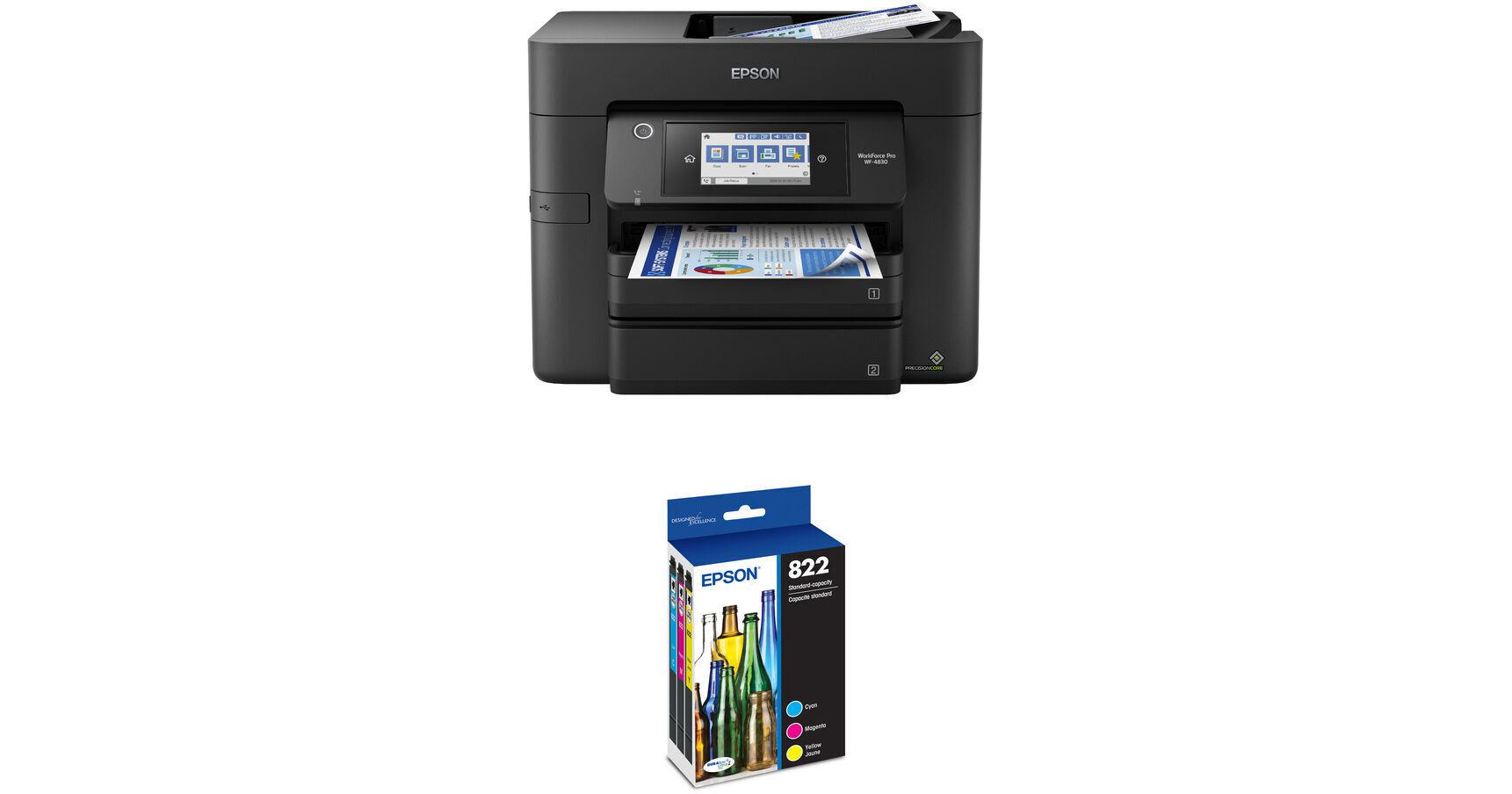
Epson WorkForce Pro WF-4830 All-in-One Inkjet Printer with T822 Standard Capacity Color Combo Pack Kit

BH #EPWFP4830KT3 (B&H Kit)
Print
Epson WorkForce Pro WF-4830 All-in-One Inkjet Printer with T822 Standard Capacity Color Combo Pack Kit
Key Features
  • Print, Scan, Copy, Fax
  • PrecisionCore Heat-Free Technology
  • Max Print Resolution: 4800 x 2400 dpi
  • Max Print Size: 8.5 x 47.2"
Print, scan, copy, and fax with the Epson WorkForce Pro WF-4830 All-in-One Inkjet Printer with T822 Standard Capacity Color Combo Pack Kit from B&H. This printer features dual 250-sheet input trays and a 35-sheet ADF. This kit includes three T822 standard capacity ink cartridges in cyan, magenta, and yellow.
More Details
In Stock
No Store Display
$193.44
$323.44
Save $130.00
Free 2-Day Shipping
Protect Your Gear
Add a protection plan from $17.00
Ask an Expert
866-264-7509
Kit Contains:

From Manufacturer

Print, scan, copy, and fax with the Epson WorkForce Pro WF-4830 All-in-One Inkjet Printer with T822 Standard Capacity Color Combo Pack Kit from B&H. This printer features dual 250-sheet input trays and a 35-sheet ADF. This kit includes three T822 standard capacity ink cartridges in cyan, magenta, and yellow.

Epson WorkForce Pro WF-4830 All-in-One Inkjet Printer

A fast, all-in-one solution for professional quality, high-volume business printing, the WorkForce Pro WF-4830 All-in-One Inkjet Printer from Epson provides you with the essential functions of printing, scanning, copying, and faxing. Using PrecisionCore Heat-Free Technology, users will enjoy sharp prints with a 4800 x 2400 dpi resolution and excellent speeds of up to 25 ppm in black and 12 ppm in color. A variety of different document sizes are easily handled from small 3.5 x 5" cards to large 8.5 x 47.2" banners, and DURABrite Ultra instant-dry pigment inks enable professional-quality prints in borderless sizes up to A4 and 8.5 x 11". The printer is also capable of automatic duplex printing and features built-in Wi-Fi for wireless connections to mobile devices where users can connect using the Epson Smart Panel app, Apple AirPrint, Mopria, and more.

For handling media, the WorkForce Pro WF-4830 offers two 250-sheet input trays for a total printing capacity of 500 sheets, and a 35-sheet ADF is provided for scanning and copying. An 8.5 x 11.7" flatbed scanner features an optical resolution of 1200 dpi, ensuring crisp images and copies are produced, and the unit can scan and copy legal size documents up to 8.5 x 14". A 4.3" color touchscreen is provided for quick navigation and control, and comprehensive security features include secure wireless and Secure Data Erase to safeguard your documents.

  • PrecisionCore Heat-Free Technology for finely detailed images with vivid colors.
  • Able to work at resolutions up to 4800 x 2400 dpi and create ink droplets as small as 3.8pL
  • DURABrite Ultra instant-dry pigment inks for professional-quality prints
  • ISO print speeds of up to 25 ppm in black and 12 ppm in color as well as duplex print speeds of 16 ppm in black and 9 ppm in color
  • 2-sided printing, scanning, copying, and faxing
  • Wireless connectivity options allow for printing and scanning from mobile devices via numerous protocols, including Epson Smart Panel app, Epson Creative Print app, Epson Email Print, Epson Remote Print, Epson iPrint, Scan to Cloud, Apple AirPrint, and Mopria
  • Flatbed scanner works with media up to 8.5 x 11.7" while the 35-sheet ADF can handle documents up to 8.5 x 14"
  • Optical scan resolution of 1200 dpi and hardware resolution of 1200 x 2400 dpi can be interpolated up to 9600 dpi
  • Scan features include scan to computer, scan to cloud, scan to email, scan to network folder, scan to memory device, and remove shadows/punch holes
  • Copy speeds up to 22 ppm in black and 10 ppm in color
  • Copy features include automatic 1-sided to 2-sided, fit to page, automatic reduction and enlargement, ID copy, adjustable copy density, and collate
  • Fax modem with a speed of 33.6 kbps and memory up to 100 pages
  • 2 x 250-sheet input tray and 35-sheet ADF for quickly loading media
  • 4.3" color touchscreen for quick navigation and control
  • High-volume reliability for heavy workloads
  • PrecisionCore Heat-Free Technology lowers energy consumption
  • ENERGY STAR qualified and RoHS compliant
UPC: 010343954434
Epson T822 Standard Capacity Color Combo Pack

The T822 Standard Capacity Color Combo Pack from Epson provides you with three standard capacity ink cartridges for cyan, magenta, yellow. They are compatible with the WorkForce Pro WF-3820, WF-4820, and WF-4839 Printers. The cyan, magenta, and yellow cartridges are rated to yield approximately 240 pages. Additionally, these cartridges feature DURABrite Ultra instant-dry pigment ink for professional-quality prints.

Compatible Printers
  • WorkForce Pro WF-3820 All-in-One Inkjet Printer
  • WorkForce Pro WF-4820 All-in-One Inkjet Printer
  • WorkForce Pro WF-4830 All-in-One Inkjet Printer
UPC: 010343958920
Kit Contains:

Epson WorkForce Pro WF-4830 All-in-One Inkjet Printer

Key Specs
Functions
Print, Scan, Copy, Fax
Printing Technology
Inkjet
Color Type
Color
Configuration
4x Individual Cartridge
Ink Type
Pigment-Based
Ink Color
1x Cyan
1x Magenta
1x Yellow
1x Black
Print Resolution
4800 x 2400 dpi
Media Sizes
Input Tray 1 / Input Tray 2
Maximum: 8.5 x 47.2" / 21.59 x 119.89 cm
Scanner Type
Flatbed Scanner with Automatic Document Feeder (ADF)
Scanner Maximum Resolution
ADF/Flatbed
1200 dpi (Optical)
9600 dpi (Interpolated)
Scanner Color Depth
48-Bit (Internal)
24-Bit (External)
Wireless
Wi-Fi / Bluetooth
Functions
Print, Scan, Copy, Fax
Printer
Printing Technology
Inkjet
Color Type
Color
Configuration
4x Individual Cartridge
Ink Type
Pigment-Based
Ink Color
1x Cyan
1x Magenta
1x Yellow
1x Black
Compatible Cartridges
Epson T822
Print Resolution
4800 x 2400 dpi
Borderless Printing
Yes: Up to 8.5 x 11" / 21.59 x 27.94 cm
Duplex Printing
Yes
Printer Language
ESC/P-R
Print Speed (By Time)
25 ppm (Black)
12 ppm (Color)
16 ppm (Black Duplex)
9 ppm (Color Duplex)
Monthly Duty Cycle
33,000 Pages
Printer Media Handling
Media Handling
2 x Input Tray
Media Sizes
Input Tray 1 / Input Tray 2
Minimum: 3.5 x 5" / 8.89 x 12.7 cm
Maximum: 8.5 x 47.2" / 21.59 x 119.89 cm
Media Weight
Input Tray 1: 50 to 80 gsm / 16 to 28 lb
Paper Capacity
Input Tray 1: 250 x Sheet
Input Tray 2: 250 x Sheet
Special Media Support
Envelopes
Scanner
Type
Flatbed Scanner with Automatic Document Feeder (ADF)
Maximum Resolution
ADF/Flatbed
1200 dpi (Optical)
9600 dpi (Interpolated)
Scan Modes
Color, Grayscale, Monochrome
Color Depth
48-Bit (Internal)
24-Bit (External)
Image Sensor
1x Contact Image Sensor (CIS)
Duplex Scanning
Yes
File Formats
BMP, JPEG, Multi-Page TIFF, PDF, PNG, TIFF
Scanner Media Handling
Scan Sizes
Flatbed
Maximum: 8.5 x 11.7" / 21.59 x 29.72 cm

ADF
Maximum: 8.5 x 14" / 21.59 x 35.56 cm
Paper Capacity
ADF: 35x Sheet
Copier
Number of Copies
Up to 999 Copies
Reduction/Enlargement
25 to 400%
Copy Speed
22 cpm (Black)
10 cpm (Color)
Duplex Copying
Yes
Fax
Modem Transmission Speed
33.6 kb/s
Duplex Support
Yes
Fax Memory
180 Pages
Speed Dial Capacity
100 Numbers
Connectivity
Data I/O
1x USB-B 2.0 Input
1x USB-A Input (Flash Drive Only)
1x RJ45 Input
1x RJ11 Input
1x RJ11 Output
Wireless
Wi-Fi / Bluetooth
Direct Printing
Android, Apple AirPrint, Bluetooth, Epson Connect, Epson Email Print, Epson iPrint Mobile, Epson Remote Print, Mopria, Wi-Fi Direct
OS Compatibility
Windows / macOS
General
Display Size
4.3"
Display Type
Touchscreen
Battery
No
Input Power
100 VAC, 60 Hz
Power Consumption
22 W (Maximum)
0.2 W (Off)
Max Acoustic Noise
48 dBA (Pressure)
6.2 BA (Power)
Operating Conditions
50 to 95°F / 10 to 35°C at 20 to 80% Humidity
Storage Conditions
-4 to 104°F / -20 to 40°C at 5 to 85% Humidity
Dimensions (W x H x D)
19.8 x 16.7 x 13" / 50.3 x 42.4 x 33 cm (Maximum)
Weight
26.2 lb / 11.88 kg
Packaging Info
Package Weight
31.25 lb
Box Dimensions (LxWxH)
18.7 x 17 x 15.5"

Epson WF-4830 Reviews

Great printer but it makes clicking noises

By Teresa
Rated 3 out of 5
Date: 2021-07-06

This is a great printer and saves a lot of space for all the features. But it makes a clicking sound when the print head slides back and forth. I can't figure out if this is a problem or not, and support is iffy. But the printer works fine. When I first set it up it was printing really faintly, I had to calibrate the print heads and print a bit before it began printing clear.

Great so far

By Bruce
Rated 5 out of 5
Date: 2020-10-12

Got the printer quickly, loaded it up, and seems like a great printer. The wireless setup went fairly well however I was not able to download the firmware updates but it seems to work very well so not sure it is required. Se

See any errors on this page?

Does it support duplex scan?

Does it support duplex scan?
Asked by: David
Yes, the Epson WorkForce Pro WF-4830 All-in-One Inkjet Printer does have Duplex Scanning.
Answered by: Yaakov
Date published: 2023-11-06

What is the warranty on this used item?

What is the warranty on this used item?
Asked by: Michael
The warranty on a used printer is a 3 months B&H warranty. https://www.bhphotovideo.com/find/HelpCenter/Used.jsp#usedReturnWarranty
Answered by: Sagi C
Date published: 2023-09-19

Does this model handle #10 envelopes well?

Does this model handle #10 envelopes well?
Asked by: V.C.
Yes, up to 10 at one time.
Answered by: Daniel
Date published: 2021-05-30

Does this allow scan to USB Thumb drive?

Does this allow scan to USB Thumb drive?
Asked by: Robert
Yes you can. Per the user manual/guide, "You can scan an original and save the scanned image to a memory card or external USB device."
Answered by: Gregorio M.
Date published: 2021-06-16

What is the difference between the WF-4830 and ...

What is the difference between the WF-4830 and the WF-7820?
Asked by: Steve
The 7820 is the newer more efficient model in this model line. The major difference is the 7820 can accept larger paper sizes and has a higher duty cycle.
Answered by: Michael M
Date published: 2021-01-05

Does this model allow scan to USB thumb drive?

Does this model allow scan to USB thumb drive?
Asked by: Robert
No, it cannot scan through a thumb drive.
Answered by: Nilson D
Date published: 2021-06-16
  • y_2026, m_6, d_7, h_12CST
  • bvseo_bulk, prod_bvqa, vn_bulk_3.0.46
  • cp_1, bvpage1
  • co_hasquestionsanswers, tq_6
  • loc_en_US, sid_1948768, prod, sort_[SortEntry(order=HAS_STAFF_ANSWERS, direction=DESCENDING)]
  • clientName_bhphotovideo
Whatever You Need, We've Got It