Video Chat with a Pro Audio Expert - Live

Muse Sessions Muse Collaborative Music Production Software (Pro Flex Annual License)

BH #MUSESPF1Y • MFR #11-44406
Print
Muse Sessions Muse Collaborative Music Production Software (Pro Flex Annual License)
Key Features
  • Record, Mix, and Master Together Online
  • Use any DAW for Collaboration
  • Up to 4 Collaborators per Session
  • Share Mics, Instruments & MIDI Devices
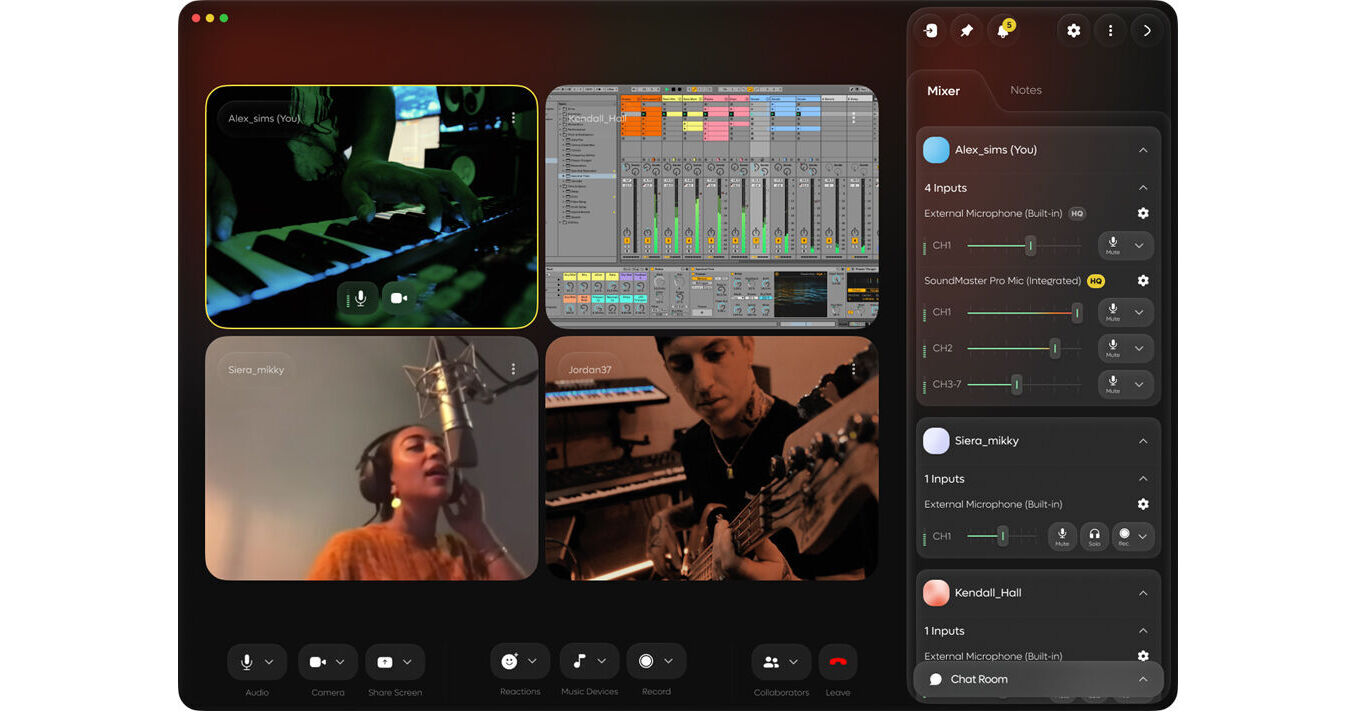
Ever wish you could collaborate with friends on music anywhere without sharing a studio? Now you can with Muse from Muse Sessions, music production software that lets you collaborate with up to four others over the internet. With Muse, you can record, produce, mix, and master together while sharing the same DAW, instruments, mics, and MIDI devices.
More Details
Digital
Electronic Download
No Store Display
This item cannot be returned.
Emailed within 1-3 Business Days
Ask an Expert
800-606-6969

Muse Sessions Muse Sessions Overview

Ever wish you could collaborate with friends on music anywhere without sharing a studio? Now you can with Muse from Muse Sessions, music production software that lets you collaborate with up to four others over the internet. With Muse, you can record, produce, mix, and master together while sharing the same DAW, instruments, mics, and MIDI devices.

Each collaborator gets their own audio stream where they can share audio devices, mute, solo, and adjust volume for their own individual stream. You can record directly into your shared DAW or into the Muse app. With simplified file sharing via the Muse chat, you can exchange ideas in real time no matter where you are. When you're feeling adventurous and want to invite members of the Muse community to collaborate, you can use the integrated community search function and filter by genre, instrument, or studio role. The various plug-in modules for Muse are available in VST3, AU, and AAX formats and support macOS and Windows computers.

Pro Flex Plan
This license provides an annual subscription for the Pro Flex plan, which offers the following app features:

  • Unlimited sessions time
  • Unlimited DAW audio streaming
  • 4 collaborators per session
  • Standard high-quality audio
  • Maximum of 2 audio devices
  • Channels 1 and 2 only
  • 1GB of storage per session
  • Optional add ons
Make Music Online Together
Audio-based workflows require multiple tools for collaboration. Muse is a central hub that streamlines your workflow and brings everything into one app, without needing to abandon your favorite audio editing software.
Connect and Record any Instrument in Your Studio
The Muse app makes it easy to share and record any device connected to your computer. Share a microphone, instrument, or MIDI device, and easily mute, solo, and adjust the volume of each audio stream.
Stream High-Quality Audio from Anywhere
Muse simplifies audio routing and allows you to stream high quality audio from anywhere on your computer. Play a file on your desktop, a song on a website, or audio from your DAW, so everyone can hear what you're playing like they're right next to you.
Work with All DAWs
The Muse app was built with your workflow in mind. Use the Muse plug-ins to share DAW audio or record audio directly into your DAW from collaborators.
Simple Audio Recording
Record any device shared with Muse to a file or directly into your DAW. Use the Muse Recording plug-in, or select the Muse Recording device as an input. Whether you use Windows, macOS, Pro Tools, or Ableton, there's a method that works for everyone.
File Sharing
Quickly exchange ideas by dragging files into Muse's chat box, or from the chat box into your DAW. Depending on your software, you can drag files directly from your DAW, into Muse.
Find Collaborators in the Muse Community
Join our growing community and start connecting with people that are just like you. Search by genre, instrument, or studio role and invite them to your session directly in the Muse app.
Remotely Track, Mix, and Master, with Screen Control
Let collaborators run the session while you focus on what you do best. With high-quality audio and screen control, you can work from home without compromise.

Muse Sessions Muse Sessions Specs

Delivery Format
Download
License Type
Standard: Year Subscription
User Support
1 User
Standalone Operation
Yes
System Compatibility/Requirements
Operating System: Windows/macOS
Plug In Formats: AAX (Native) / AU / VST3

Muse Sessions Muse Sessions Reviews

See any errors on this page?
Whatever You Need, We've Got It