
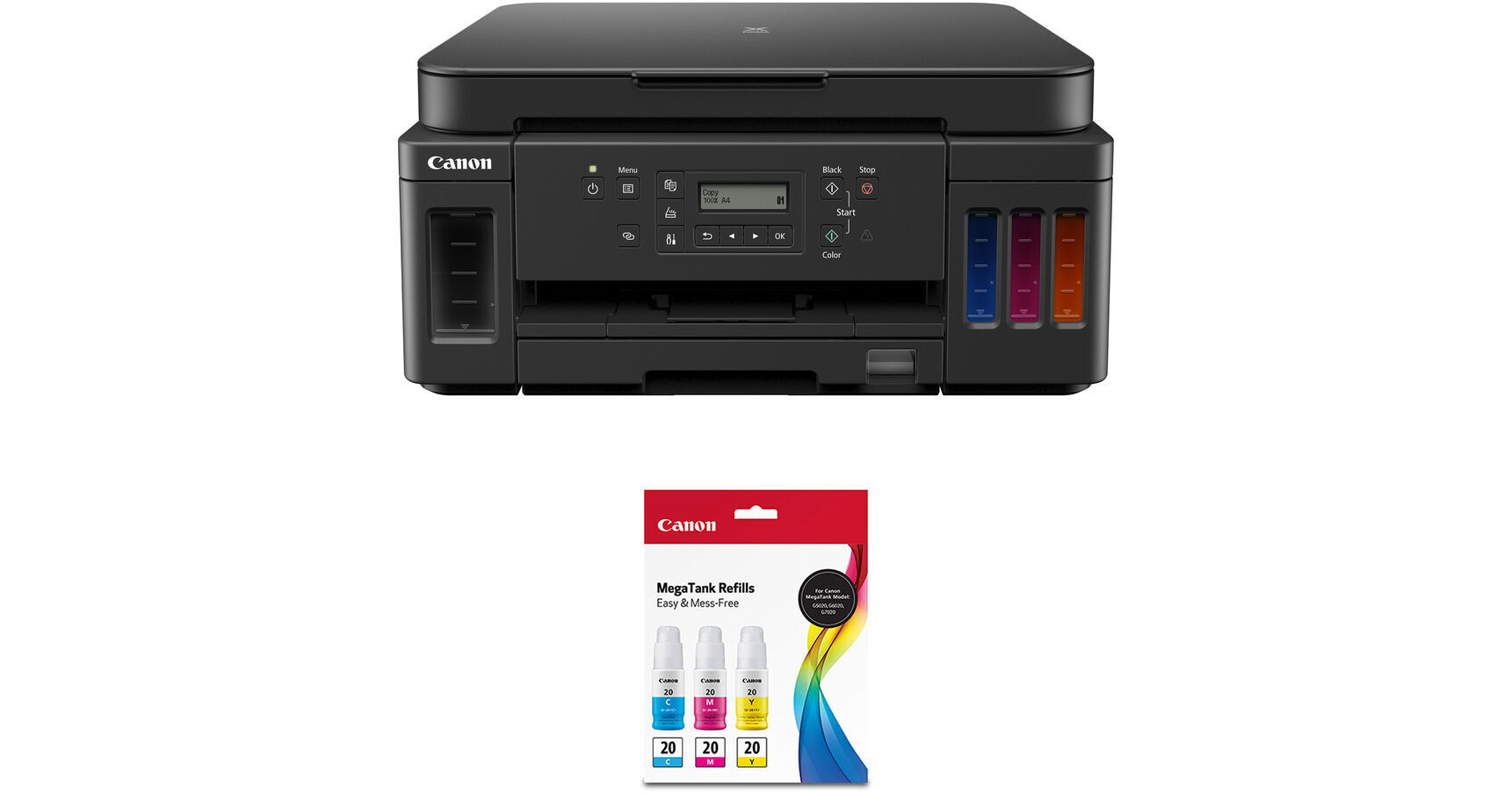
Canon PIXMA G6020 Wireless MegaTank All-in-One Printer with GI-20 Ink Bottle Kit

BH #CAPIXMAG60KT (B&H Kit)
Print
Canon PIXMA G6020 Wireless MegaTank All-in-One Printer with GI-20 Ink Bottle Kit
Key Features
  • Print, Copy, Scan
  • 350-Sheet Capacity
  • AirPrint for iPhone, iPad, and Mac
  • Mopria Print for Android
Print, copy, and scan via USB, Wi-Fi, or Ethernet using the PIXMA G6020 Wireless MegaTank All-in-One Printer with GI-20 Ink Bottle Kit from B&H. The included GI-20 inks are cyan, magenta, and yellow.
More Details
In Stock
Free 2-Day Shipping
Protect Your Gear
Add a protection plan from $26.00
Ask an Expert
800-606-6969
Kit Contains:

Print, copy, and scan via USB, Wi-Fi, or Ethernet using the PIXMA G6020 Wireless MegaTank All-in-One Printer with GI-20 Ink Bottle Kit from B&H. The included GI-20 inks are cyan, magenta, and yellow.

Canon PIXMA G6020 Wireless MegaTank All-in-One Printer

Effectively eliminating the need for stacks of ink cartridges, the PIXMA G6020 Wireless MegaTank All-in-One Inkjet Printer from Canon uses an integrated ink tank system that makes refilling much simpler and provides an astounding 6000 black or 7700 color prints on a single set of fresh ink bottles. Also, this model comes with a full set of inks as well as an extra pair of black ink bottles for getting another 12,000 black prints. The ink reservoirs are easy to see, having been placed at the front of the G6020 so that you can make sure you never run low. That, of course, isn't everything this wireless-capable all-in-one can do as it packs in impressive printing, scanning, and copying functions as well.

For printing, the G6020 uses a reliable inkjet system with a resolution of 4800 x 1200 dpi that will deliver sharp text and vivid images. The system also works quickly, with rated speeds of 13 ipm in black and 6.8 ipm in color. Featuring a 250-sheet input tray and a 100-sheet rear paper tray, the printer is ready to take on your large print jobs. Users can also create borderless photos with ease and work with a variety of standard media sizes from 3.5 x 3.5" to 8.5 x 14". Scanning and copying are made possible by the unit's flatbed scanner featuring an optical resolution of 1200 x 2400 dpi for sharp, detailed images. Built-in Wi-Fi connectivity in addition to USB 2.0 furthers the potential for the printer by supporting various mobile printing protocols, including Apple AirPrint, Google Cloud Print, Mopria, and Canon's own PRINT app.

Printing
  • MegaTank integrated ink tank system eliminates the cartridge and holds enough ink for up to 6000 black and 7700 color prints. It even comes with a full set of inks as well as two extra black ink bottles, enough for another 12,000 black prints.
  • A print resolution of 4800 x 1200 dpi is used to create sharp black documents and vivid, detailed full color images.
  • Print speeds of up to 13 ipm in black and 6.8 ipm in color are available.
  • 4 x 6" borderless photo printing in approximately 37 seconds.
  • Mobile printing support includes Apple AirPrint, Google Cloud Print, Mopria Device Printing, and the Canon PRINT app.
Scan
  • Flatbed scanner featuring 1200 x 2400 dpi resolution scans documents up to 8.5 x 11.7"
  • Scan features include an Auto Scan Mode, Document Removal Reminder, network scan, wireless scanning, scan to PC, scan to Canon PRINT app, and Multi-Page PDF.
Copy
  • First copy out time of 20 seconds.
  • Up to 99 copies can be produced at a single time.
  • Copy features include 4-on-1/2-on-1 copy, borderless copy, duplex 2-sided copy, Document Removal Reminder, ID Card Copy, and standard copy.
UPC: 013803317824
Canon GI-20 Ink Bottle Value Pack (Cyan, Magenta, Yellow)

Produce approximately 7700 full-color prints with your select PIXMA Wireless MegaTank printer by picking up a GI-20 Ink Bottle Value Pack from Canon, which includes replacement cyan, magenta, and yellow ink bottles. Each 70mL bottle features a specialized nozzle to easily pour into the printer without spills or messes, and the dye-based inks are formulated for long lasting and colorful graphics and images.

Compatible Printers
  • PIXMA G5020 Wireless MegaTank Printer
  • PIXMA G6020 Wireless MegaTank Printer
  • PIXMA G7020 Wireless MegaTank Printer
UPC: 660685205451
Kit Contains:

Canon PIXMA G6020 Wireless MegaTank All-in-One Printer

Key Specs
Functions
Print, Scan, Copy
Printing Technology
Inkjet
Color Type
Color
Configuration
4x Built-In Tank
Ink Type
Pigment-Based (Black)
Dye-Based (Cyan, Magenta, Yellow)
Ink Color
1x Cyan
1x Magenta
1x Yellow
1x Black
Print Resolution
4800 x 1200 dpi
Media Sizes
Input Tray 1 / Input Tray 2
Maximum: 8.5 x 14" / 21.59 x 35.56 cm
Scanner Type
Flatbed Scanner
Scanner Maximum Resolution
Flatbed
1200 x 2400 dpi (Hardware)
Scanner Color Depth
16-Bit (Internal)
8-Bit (External)
Wireless
Wi-Fi
Power Source
AC Power (Cable Built-In/Included)
Functions
Print, Scan, Copy
Printer
Printing Technology
Inkjet
Color Type
Color
Configuration
4x Built-In Tank
Ink Type
Pigment-Based (Black)
Dye-Based (Cyan, Magenta, Yellow)
Ink Color
1x Cyan
1x Magenta
1x Yellow
1x Black
Compatible Cartridges
Canon GI-20
Print Resolution
4800 x 1200 dpi
Borderless Printing
Yes: Up to 8.5 x 11" / 21.59 x 27.94 cm
Duplex Printing
Yes
Print Speed (By Time)
13 ipm (Black)
6.8 ipm (Color)
First Print Out Time
9 Seconds (Black)
14 Seconds (Color)
Monthly Duty Cycle
5000 Pages
Printer Media Handling
Media Handling
2 x Input Tray
Media Sizes
Input Tray 1 / Input Tray 2
Minimum: 3.5 x 3.5" / 8.89 x 8.89 cm
Maximum: 8.5 x 14" / 21.59 x 35.56 cm
Paper Capacity
Input Tray 1: 250 x Sheet
Input Tray 2: 100 x Sheet
Special Media Support
Envelopes
Scanner
Type
Flatbed Scanner
Maximum Resolution
Flatbed
1200 x 2400 dpi (Hardware)
Scan Modes
Color, Grayscale
Color Depth
16-Bit (Internal)
8-Bit (External)
Image Sensor
1x Contact Image Sensor (CIS)
Scanner Media Handling
Scan Sizes
Flatbed
Maximum: 8.5 x 11.7"
Copier
Number of Copies
Up to 99 Copies
Copy Speed
20 cpm (Color)
Duplex Copying
Yes
Connectivity
Data I/O
1x USB-B Input
1x RJ45 Input
Wireless
Wi-Fi
Direct Printing
Android, Apple AirPrint, Canon PRINT, Google Cloud Print, Mopria, PictBridge, USB Port, Wi-Fi Direct
OS Compatibility
Windows / macOS
General
Power Source
AC Power (Cable Built-In/Included)
Battery
No
Dimensions (W x H x D)
15.9 x 14.6 x 7.7" / 40.4 x 37.1 x 19.6 cm
26.5 x 15.9 x 12.1" / 67.3 x 40.4 x 30.7 cm (Maximum)
Weight
17.8 lb / 8.07 kg
Packaging Info
Package Weight
24.5 lb
Box Dimensions (LxWxH)
21.1 x 19.4 x 10.9"

Canon G6020 Reviews

my 3rd canon g6020

By Wesley Jamin
Rated 5 out of 5
Date: 2026-02-13

The first one I simply wore out, thousands of copies. I also have a Canon PRO-100, all are trouble free. As I am printing with 2 printers at least at a time, I only use hardwired connections, it simplifies things. I am also running 3 HP lasers, also good printers. The Canon printer driver download is better to work with.

Works well, but difficult to set up.

By Glenn
Rated 2 out of 5
Date: 2025-10-16

I found it very difficult to set up. I had to call in a technician to assist in the set up. I never had this problem with previous printers. Now that it's set up it seems to be working very well. Attractive machine.

See any errors on this page?

Is the print quality for Photos equal to that of ...

Is the print quality for Photos equal to that of the Pixma Printers having regular ink cartridges, and not MegaTanks?
Asked by: Thomas
The quality of color on the Canon PIXMA G6020 Wireless MegaTank All-in-One Printer is comparable to the other 4 color printers. The Canon PIXMA G620 Printer ia a photo Megatank printer and copier uses 6 colors and is superior for photo quality printing.
Answered by: roman
Date published: 2022-11-28

Paper size?

Paper size?
Asked by: Marquerite
The Canon PIXMA G6020 can print up to 8.5x14 inches. The scanner bed can scan up to 8.5x11 inches.
Answered by: Dan W
Date published: 2021-12-22

So this printer will indeed print on both sides ...

So this printer will indeed print on both sides automatically without having to flip the paper by hand?
Asked by: Austin
Yes, this printer supports duplex printing.
Answered by: Nilson D
Date published: 2021-09-02

What is the quality of photo printing? - I assume ...

What is the quality of photo printing? - I assume it would be okay-good for non-photo graphics?
Asked by: Elizabeth
It is okay for photo printing but I prefer using printers with 6 inks or more for high quality photo printing such as the Epson 8500. Please take a look at the following link: https://bhpho.to/2MZFnEn
Answered by: Dan W
Date published: 2021-06-30

Comparable with Big Sur?

Comparable with Big Sur?
Asked by: Dave
Yes, the Canon PIXMA G6020 Wireless MegaTank All-in-One Printer BH #CAPIXMAG6020 is compatible with Big Sur.
Answered by: Miguel M
Date published: 2020-12-14

does this printer have an auto document feeder?

does this printer have an auto document feeder?
Asked by: Anne
No, unfortunately it only contains a blank paper holder. With a capacity Front Paper Cassette: 250 Sheets of Plain Paper Rear Paper Tray: 100 Sheets of Plain Paper OR 20 Sheets of 4 x 6 / 10 Sheets of 5 x 7 Photo Paper.
Answered by: Darius
Date published: 2021-02-04

can the copy function reduce or enlarge image ...

can the copy function reduce or enlarge image size?
Asked by: Pam
It is not entirely clear in the user manual that enlargement/reduction is available during scanning with the Canon PIXMA G6020 Wireless MegaTank All-in-One Printer but the standard procedure would be to "capture large, work small." In other words, if needing an enlarged scan, always set the scanner for the highest possible resolution during capture to ensure that when outputting to a larger print size, you retain as much detail as possible for the original image.
Answered by: Gregorio M.
Date published: 2021-08-20

Is this Energy Star compliant?

Is this Energy Star compliant?
Asked by: Valerie
I'm not sure but it is a printer how much energy could it use???????
Answered by: THOMAS
Date published: 2021-03-07
  • y_2026, m_8, d_4, h_10CST
  • bvseo_bulk, prod_bvqa, vn_bulk_3.0.48
  • cp_1, bvpage1
  • co_hasquestionsanswers, tq_28
  • loc_en_US, sid_1952567, prod, sort_[SortEntry(order=HAS_STAFF_ANSWERS, direction=DESCENDING)]
  • clientName_bhphotovideo
Whatever You Need, We've Got It