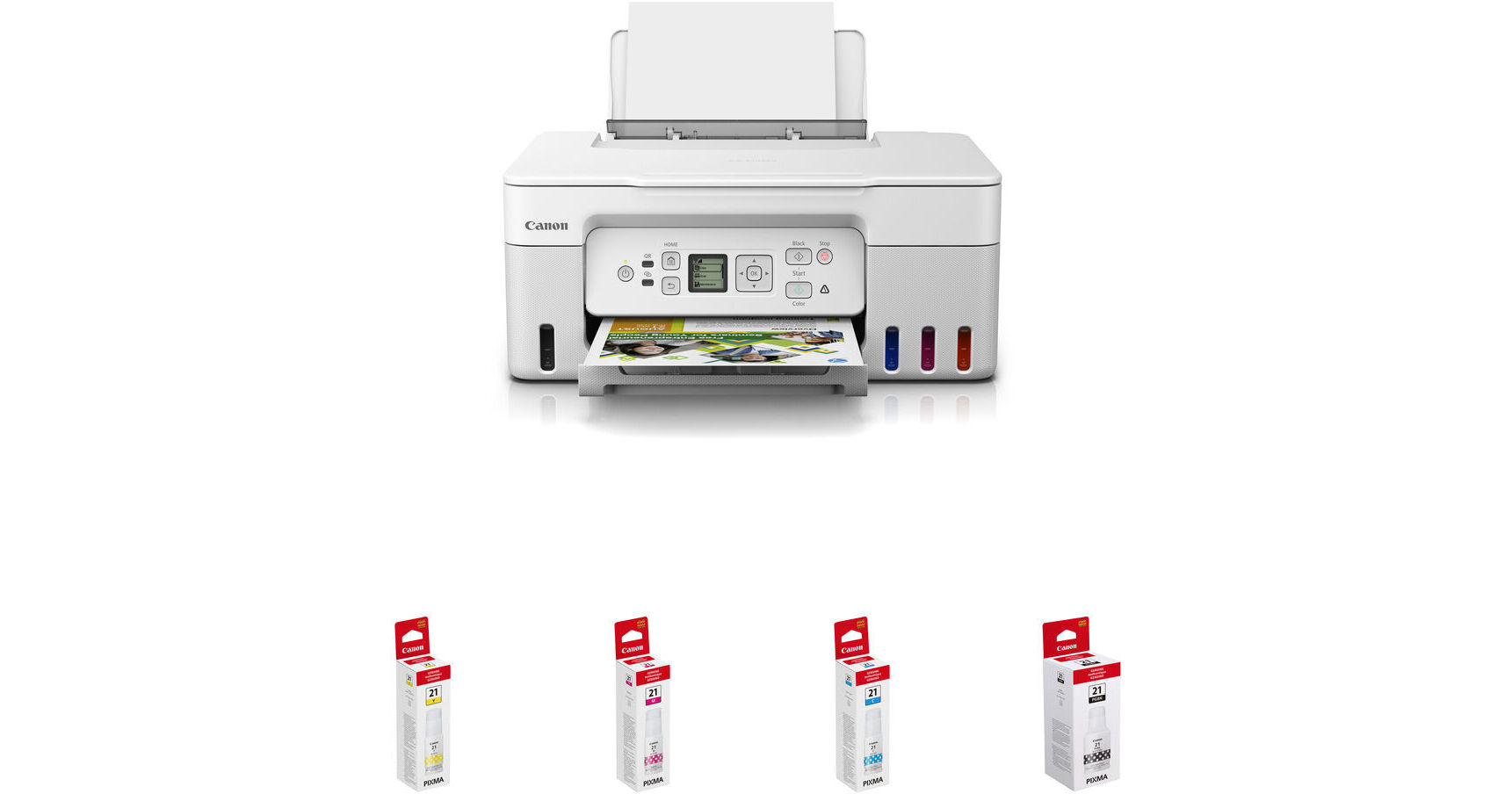
Canon PIXMA G3270 MegaTank All-in-One Wireless Inkjet Color Printer with GI-21 Ink Bottle Kit (White)

BH #CAPG3270WHKT (B&H Kit)
Print
Canon PIXMA G3270 MegaTank All-in-One Wireless Inkjet Color Printer with GI-21 Ink Bottle Kit (White)
Key Features
  • Print, Scan & Copy Functions
  • Compact Design for Home or Small Office
  • 8.5 x 14" Legal-Size 100-Sheet Rear Tray
  • Print up to 8.5 x 11" Borderless Photos
Print, scan, and copy with the white Canon PIXMA G3270 MegaTank All-in-One Wireless Inkjet Color Printer with GI-21 Ink Bottle Kit from B&H. The included GI-21 inks are yellow, magenta, cyan, and black.
More Details
In Stock
No Store Display
Free 2-Day Shipping
Protect Your Gear
Add a protection plan from $26.00
Ask an Expert
800-606-6969
Kit Contains:

Print, scan, and copy with the white Canon PIXMA G3270 MegaTank All-in-One Wireless Inkjet Color Printer with GI-21 Ink Bottle Kit from B&H. The included GI-21 inks are yellow, magenta, cyan, and black.

Canon PIXMA G3270 MegaTank All-in-One Wireless Inkjet Color Printer (White)

A compact solution for the home or small office, the Canon PIXMA G3270 MegaTank is a Wi-Fi enabled all-in-one color inkjet printer with print, scan, and copy functions. For printing, it features a rear paper tray that supports various types of paper as well as labels, envelopes, cards, and other media in up to 8.5 x 14" legal size. The tray holds 100 sheets of plain paper (up to 105 gsm) or 20 sheets of 4 x 6" cards (Canon 4 x 6" cards up to approximately 265 gsm are supported). The G3270 delivers single-sided prints in up to 4800 x 1200 dpi resolution and allows you to print borderless photos and marketing material in a variety of sizes up to 8.5 x 11" letter-size. The average print speed is 11 ipm for letter-size black printouts and 6 ipm for color printouts.

For scanning and copying, the MegaTank has an 8.5 x 11.7" flatbed that supports up to letter-size paper. It allows single-sided scanning and copying and is capable of making up to 99 copies.

Featuring built-in Wi-Fi and a USB interface, the PIXMA G3270 can be used wirelessly or connected directly to a computer. Wi-Fi allows using the Canon PRINT Business mobile app or the AirPrint or Mopria mobile print services to wirelessly control the printer. You can send print commands from your smartphone or tablet and print material that you have on your mobile device. For navigation, the MegaTank has an easy-to-use 1.35" square LCD screen. Along with the printer, you also get access to the Web version of the PosterArtist software, which is designed for users of all levels to create professional posters, banners, and signage.

Scan Features
Single-sided document scanning, photo scanning, wireless scanning, scan to Canon PRINT app, attach to email, scan multi-page PDFs, save to computer
Copy Features
Single-sided copying, 4-on-1 / 2-on-1 copy, borderless copy, document copy, fit-to-page, frame erase copy, ID card copy, auto exposure copy, multiple copies up to 99 pages, photo copy, preset copy ratios, 25-400% reduction/zoom copy, standard copy
Wi-Fi Security
WPA-PSK (TKIP/AES), WPA2-PSK (TKIP/AES), WPA3-SAE (AES)
Supported Paper / Media Sizes
3.5 x 3.5" (square), 4 x 6", 5 x 5" (square), 5 x 7", 7 x 10", 8 x 10", 8.5 x 11" (letter), A4, A5, A6, B5, 8.5 x 14" (legal), U.S. #10 envelopes, and cards measuring approximately 3.6 x 2.2", custom sizes up to 47" in length are also supported for special application uses
Supported Borderless Printing
3.5 x 3.5" (square), 4 x 6", 5 x 5" (square), 5 x 7", 7 x 10", 8 x 10", 8.5 x 11" (letter), A4, B5, and cards measuring approximately 3.6 x 2.2"
32 Supported Languages
Japanese, English, German, French, Italian, Spanish, Dutch, Portuguese, Norwegian, Swedish, Danish, Finnish, Russian, Czech, Hungarian, Polish, Slovene, Turkish, Greek, Simplified Chinese, Traditional Chinese, Korean, Indonesian, Slovakian, Estonian, Latvian, Lithuanian, Ukrainian, Romanian, Bulgarian, Croatian, Vietnamese
Provided Software
PIXMA G3270 driver, Easy-PhotoPrint Editor, PosterArtist Web version
UPC: 013803351538
Canon GI-21 Yellow Ink Bottle (70mL)

Fill up your PIXMA G1220, G2260, or G3260 MegaTank Printer with this 70mL GI-21 Yellow Ink Bottle from Canon. The bottle is rated to produce approximately 7700 prints, and it features a specialized design to easily fit and fill compatible MegaTank printers.

Compatible Printers
  • PIXMA G1220 MegaTank Inkjet Printer
  • PIXMA G2260 MegaTank All-in-One Printer
  • PIXMA G3260 Wireless MegaTank All-in-One Printer
UPC: 013803331059
Canon GI-21 Magenta Ink Bottle (70mL)

Fill up your PIXMA G1220, G2260, or G3260 MegaTank Printer with this 70mL GI-21 Magenta Ink Bottle from Canon. The bottle is rated to produce approximately 7700 prints, and it features a specialized design to easily fit and fill compatible MegaTank printers.

Compatible Printers
  • PIXMA G1220 MegaTank Inkjet Printer
  • PIXMA G2260 MegaTank All-in-One Printer
  • PIXMA G3260 Wireless MegaTank All-in-One Printer
UPC: 013803331035
Canon GI-21 Cyan Ink Bottle (70mL)

Fill up your PIXMA G1220, G2260, or G3260 MegaTank Printer with this 70mL GI-21 Cyan Ink Bottle from Canon. The bottle is rated to produce approximately 7700 prints, and it features a specialized design to easily fit and fill compatible MegaTank printers.

Compatible Printers
  • PIXMA G1220 MegaTank Inkjet Printer
  • PIXMA G2260 MegaTank All-in-One Printer
  • PIXMA G3260 Wireless MegaTank All-in-One Printer
UPC: 013803331011
Canon GI-21 Pigment Black Ink Bottle (170mL)

Fill up your PIXMA G1220, G2260, or G3260 MegaTank Printer with this 170mL GI-21 Pigment Black Ink Bottle from Canon. The bottle is rated to produce approximately 6000 prints, and it features a specialized design to easily fit and fill compatible MegaTank printers.

Compatible Printers
  • PIXMA G1220 MegaTank Inkjet Printer
  • PIXMA G2260 MegaTank All-in-One Printer
  • PIXMA G3260 Wireless MegaTank All-in-One Printer
UPC: 013803330939
Kit Contains:

Canon PIXMA G3270 MegaTank All-in-One Wireless Inkjet Color Printer (White)

Key Specs
Functions
Print, Scan, Copy
Printing Technology
Inkjet
Color Type
Color
Configuration
4x Built-In Tank
Ink Type
Pigment-Based (Black)
Dye-Based (Cyan)
Dye-Based (Magenta)
Dye-Based (Yellow)
Ink Color
1x Black
1x Cyan
1x Magenta
1x Yellow
Print Resolution
4800 x 1200 dpi
Media Sizes
Input Tray 1
Maximum: 8.5 x 47.2" / 21.6 x 119.9 cm
Scanner Type
Flatbed Scanner
Scanner Maximum Resolution
Flatbed
600 x 1200 dpi (Hardware)
Scanner Color Depth
16-Bit (Internal)
Wireless
802.11b/g Wi-Fi
Power Source
AC Power (Cable Built-In/Included)
Functions
Print, Scan, Copy
Printer
Printing Technology
Inkjet
Color Type
Color
Configuration
4x Built-In Tank
Ink Type
Pigment-Based (Black)
Dye-Based (Cyan)
Dye-Based (Magenta)
Dye-Based (Yellow)
Ink Color
1x Black
1x Cyan
1x Magenta
1x Yellow
Compatible Cartridges
Canon GI-21
Number of Nozzles
1792 Nozzles (Total)
Print Resolution
4800 x 1200 dpi
Borderless Printing
Yes: Up to 8.5 x 11" / 21.6 x 27.9 cm
Duplex Printing
No
Print Speed (By Time)
Letter: 11 ipm (Black)
Letter: 6 ipm (Color)
Monthly Duty Cycle
3000 Pages (Recommended)
Printer Media Handling
Media Handling
1 x Input Tray
Media Sizes
Input Tray 1
Minimum: 2.1 x 3.5" / 5.3 x 8.9 cm
Maximum: 8.5 x 47.2" / 21.6 x 119.9 cm
Media Weight
Input Tray 1: 64 to 105 gsm
Paper Capacity
Input Tray 1: 100 x Sheet
Scanner
Type
Flatbed Scanner
Maximum Resolution
Flatbed
600 x 1200 dpi (Hardware)
Scan Modes
Color, Grayscale, Monochrome
Color Depth
16-Bit (Internal)
Grayscale Depth
16-Bit (Internal)
Image Sensor
1x Contact Image Sensor (CIS)
Scanner Media Handling
Scan Sizes
Flatbed
Maximum: 8.5 x 11.7" / 21.6 x 29.7 cm
Copier
Number of Copies
Up to 99 Copies
Reduction/Enlargement
25 to 400%
Duplex Copying
No
Connectivity
Data I/O
1x USB-B 2.0 Input
Wireless
802.11b/g Wi-Fi
Direct Printing
Apple AirPrint, Canon PRINT Business, Mopria
OS Compatibility
Windows 7 or Later / macOS 10.14 or Later / Windows Server 2008 or Later / Chrome OS
General
Display Size
1.35"
Display Type
LCD
Power Source
AC Power (Cable Built-In/Included)
Battery
No
Input Power
100 to 240 VAC, 50 / 60 Hz
Power Consumption
16 W (Maximum)
0.6 W (Standby)
0.1 W (Off)
Max Acoustic Noise
48.5 dBA
Operating Conditions
41 to 95°F / 5 to 35°C at 10 to 90% Humidity
Certifications
ENERGY STAR, EPEAT Silver
Dimensions (W x H x D)
16.4 x 13.3 x 7" / 41.7 x 33.8 x 17.8 cm (Storage)
21.9 x 16.4 x 10.6" / 55.6 x 41.7 x 26.9 cm (Maximum)
Weight
13.2 lb / 6 kg
Packaging Info
Package Weight
20.5 lb
Box Dimensions (LxWxH)
19.5 x 19.25 x 10"

Canon G3270 Reviews

Works as expected

By Russell
Rated 4 out of 5
Date: 2026-04-30

I read the various reviews about this printer before purchasing it. I noted comments concerning the setup procedure. I found it to be fairly easy and didn't have must trouble. It worked well and I am happy with the output and love the fact that I can print remotely. My only complaint is the same as mentioned by others, which is the 'options screen' is too small and it hard to read. I do like the online manual and find it easy to navigate. I see why it is not included in print form since it is so large. I like the fact that it gives detailed instructions for its may possible printing tasks. I would give this printer a 5 if the screen was btter.

Reliable performance

By Gerard
Rated 5 out of 5
Date: 2026-02-25

The printer embodies improvements on previous models. The prompts are easier to read and user friendly. Prints and scans great!

See any errors on this page?

will it work with Linux operating system ?

will it work with Linux operating system ?
Asked by: William
Yes, the Canon PIXMA G3270 MegaTank All-in-One Wireless Inkjet Color Printer (White) can work with Linux.
Answered by: Michael S
Date published: 2025-08-11

Do I have to use CANON photo paper or can I use ...

Do I have to use CANON photo paper or can I use the HP paper that I have left from my previous printer?
Asked by: Jan
The Canon PIXMA G3270 MegaTank All-in-One Wireless Inkjet Color Printer (White), B&H # CAPG3270WH, can use different branded paper that are within the rated thickness. The prints may not look as expected since there may be no ICC profile for the paper.
Answered by: Luis F
Date published: 2025-11-16
  • y_2026, m_5, d_23, h_13CST
  • bvseo_bulk, prod_bvqa, vn_bulk_3.0.46
  • cp_1, bvpage1
  • co_hasquestionsanswers, tq_2
  • loc_en_US, sid_1952602, prod, sort_[SortEntry(order=HAS_STAFF_ANSWERS, direction=DESCENDING)]
  • clientName_bhphotovideo
Whatever You Need, We've Got It