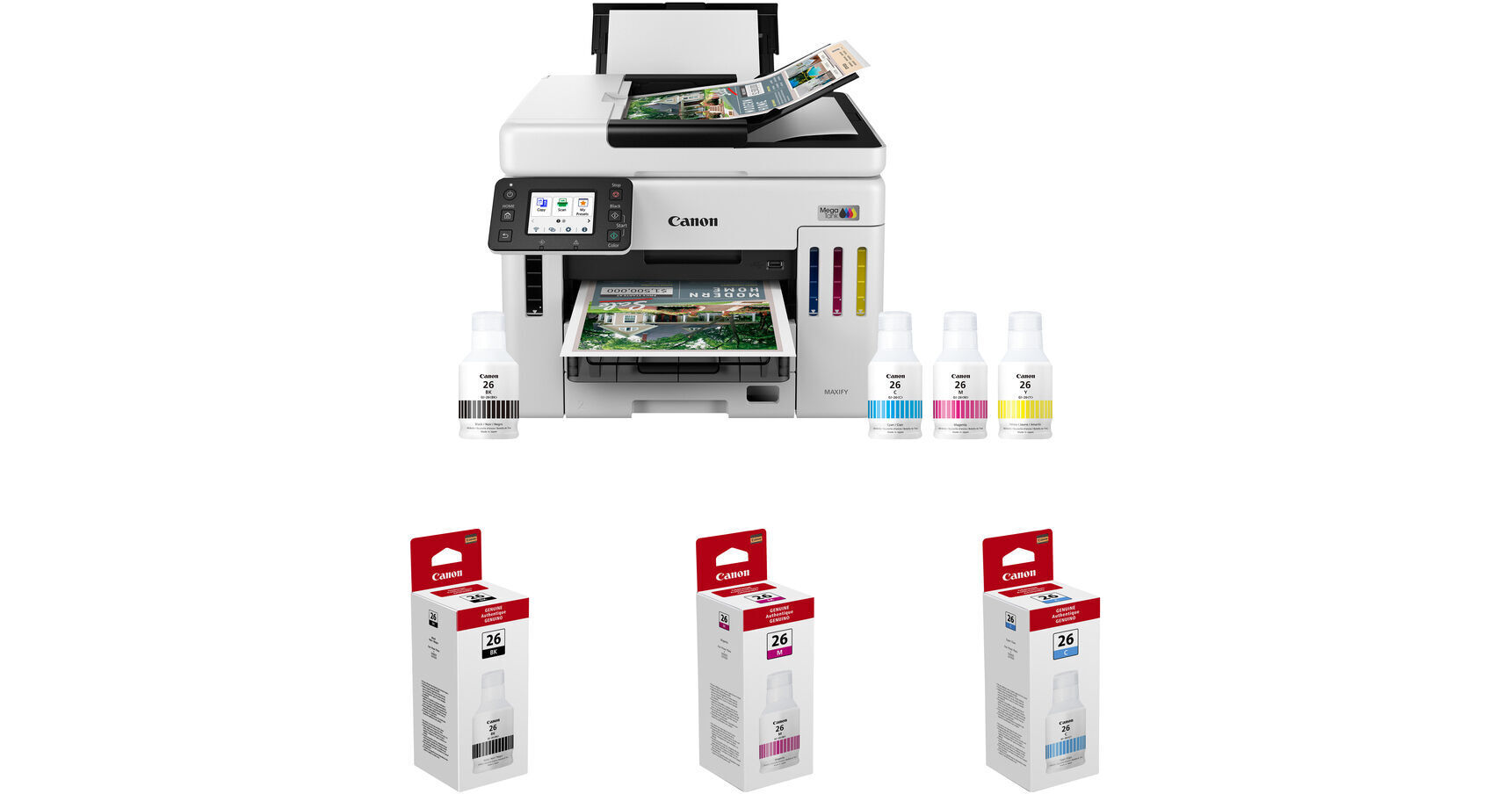
Canon MAXIFY GX7120 Wireless MegaTank All-in-One Color Printer with Three GI-26 Ink Bottles Kit

BH #CAMGX7120K (B&H Kit)
Print
Canon MAXIFY GX7120 Wireless MegaTank All-in-One Color Printer with Three GI-26 Ink Bottles Kit
Key Features
  • Print, Copy, Scan & Fax Functions
  • Two 250-Sheet Paper Trays
  • Automatic 2-Sided Printing
  • Up to 24 ipm in Black/15.5 ipm in Color
Print, scan, copy, and fax with the Canon MAXIFY GX7120 Wireless MegaTank All-in-One Color Printer with Three GI-26 Ink Bottles Kit from B&H. This printer features two 250-sheet paper trays and automatic duplex printing. This kit includes three GI-26 ink bottles (black, cyan, magenta).
More Details
Temporarily Out of Stock
Expected availability: 7-14 Business Days
No Store Display
Free 2-Day Shipping
Ask an Expert
800-606-6969
Kit Contains:

Print, scan, copy, and fax with the Canon MAXIFY GX7120 Wireless MegaTank All-in-One Color Printer with Three GI-26 Ink Bottles Kit from B&H. This printer features two 250-sheet paper trays and automatic duplex printing. This kit includes three GI-26 ink bottles (black, cyan, magenta).

Canon MAXIFY GX7120 Wireless MegaTank All-in-One Color Printer

The Canon MAXIFY GX7120 Wireless MegaTank All-in-One Color Printer is designed for small businesses and home offices that demand dependable high volume, low-cost printing. Supporting a variety of media types and sizes, the MAXIFY GX7120 prints up to 47" in length. You can print on plain, glossy, or thick paper, as well as on envelopes, labels, business cards, and more. The included inks deliver crisp prints with sharp, highlighter-resistant text. Copy and scan multipage documents quickly and easily with the auto document feeder. You can also scan documents and upload them to the cloud in seconds. The MAXIFY GX7120 lets you work over Ethernet, Wi-Fi, or directly from a USB flash drive. Operate the printer with the easy to use, intuitive user interface on the 2.7" color touchscreen LCD.

Connect to Wi-Fi without the need for a computer
Two separate 250-sheet bottom cassettes hold up to 500 sheets of plain paper
Copy multi-page documents with ease using the 50-sheet Automatic Document Feeder
Easily load envelopes, labels, business cards, high-resolution paper, and more in the rear tray
Print on envelopes, business cards, high resolution paper, banners, and more
High page yield of up to 6000 black & white / 14,000 color pages per full ink bottle set and a low cost per print. Up to 2 years' supply of ink included.
Get the job done with a monthly duty cycle of up to 45,000 pages
Print directly from a USB flash drive with the built-in USB reader
The 4-color pigment ink system offers sharp and highlighter-resistant text
Built-in Ethernet connection for wired LAN support
Create 2-sided documents in just one pass with the auto document feeder and save a ton of time
Print from your favorite mobile devices using the free Canon PRINT app, Apple AirPrint, or Mopria Print Service
Ink bottles have a keyed nozzle design to fit and fill the correct color ink tank
Intuitive and easy to use 2.7" touchscreen LCD
UPC: 013803381221
Canon GI-26 Black Ink for MAXIFY 6020 and 7020 Printers

The GI-26 Black Ink for MAXIFY 6020 and 7020 Printers from Canon comes in an easy-to-use specialized keyed bottle shape to fit and fill the correct ink tank exclusively.

UPC: 013803330816
Canon GI-26 Magenta Ink for MAXIFY 6020 and 7020 Printers

The GI-26 Magenta Ink for MAXIFY 6020 and 7020 Printers from Canon comes in an easy-to-use specialized keyed bottle shape to fit and fill the correct ink tank exclusively.

UPC: 013803330854
Canon GI-26 Cyan Ink for MAXIFY 6020 and 7020 Printers

The GI-26 Cyan Ink for MAXIFY 6020 and 7020 Printers from Canon comes in an easy-to-use specialized keyed bottle shape to fit and fill the correct ink tank exclusively.

UPC: 013803330830
Kit Contains:

Canon MAXIFY GX7120 Wireless MegaTank All-in-One Color Printer

Key Specs
Functions
Print, Scan, Copy, Fax
Printing Technology
Inkjet
Color Type
Color
Configuration
4x Individual Cartridge
Ink Type
Pigment-Based (Black, Cyan, Magenta, Yellow)
Ink Color
1x Black
1x Cyan
1x Magenta
1x Yellow
Print Resolution
1200 x 600 dpi
Media Sizes
Input Tray 1
Maximum: 8.5 x 14" / 21.6 x 35.6 cm
Scanner Type
Flatbed Scanner with Automatic Document Feeder (ADF)
Scanner Maximum Resolution
1200 x 1200 dpi (Hardware)
Scanner Color Depth
8-Bit (External)
Wireless
802.11a/b/g Wi-Fi / Wi-Fi 5 (802.11ac) / Wi-Fi 4 (802.11n)
Power Source
AC Power (Cable Built-In/Included)
Functions
Print, Scan, Copy, Fax
Printer
Printing Technology
Inkjet
Color Type
Color
Configuration
4x Individual Cartridge
Ink Type
Pigment-Based (Black, Cyan, Magenta, Yellow)
Ink Color
1x Black
1x Cyan
1x Magenta
1x Yellow
Compatible Cartridges
Canon GI-26
Number of Nozzles
4352 Nozzles (Total)
1280 Nozzles (Matte Black)
1024 Nozzles (Per Other Color)
Print Resolution
1200 x 600 dpi
Borderless Printing
No
Duplex Printing
Yes
Print Speed (By Time)
24 ipm (Black)
15.5 ipm (Color)
First Print Out Time
8 Seconds
Monthly Duty Cycle
45,000 Pages
Printer Media Handling
Media Handling
1 x Input Tray, 2 x Input Tray, 3 x Input Tray
Media Sizes
Input Tray 1
Minimum: 4 x 6" / 10.2 x 15.2 cm
Maximum: 8.5 x 14" / 21.6 x 35.6 cm
Media Weight
Input Tray 1: 64 to 105 gsm / 17 to 28 lb
Margins
No
Paper Capacity
Input Tray 1: 250 x Sheet
Input Tray 2: 250 x Sheet
Input Tray 3: 100 x Sheet
Special Media Support
Envelopes, Cards
Scanner
Type
Flatbed Scanner with Automatic Document Feeder (ADF)
Maximum Resolution
1200 x 1200 dpi (Hardware)
Scan Modes
Color, Grayscale
Color Depth
8-Bit (External)
Grayscale Depth
8-Bit (External)
Image Sensor
1x Contact Image Sensor (CIS)
Scan Speed
22.2 ipm in Black & White
12.2 ipm in Color
Automatic Image Corrections
No
Scanner Media Handling
Scan Sizes
Flatbed
Maximum: 8.5 x 11.7" / 21.6 x 29.7 cm

ADF
Maximum: 8.5 x 14" / 21.6 x 35.6 cm
Copier
Number of Copies
Up to 99 Copies
Reduction/Enlargement
25 to 400%
Duplex Copying
Yes
Fax
Modem Transmission Speed
33.6 kb/s
Fax Resolution
300 x 300 dpi
Fax Memory
250 Pages
Speed Dial Capacity
99 Numbers
Connectivity
Data I/O
1x USB-B Input
1x RJ45 Input
Wireless
802.11a/b/g Wi-Fi / Wi-Fi 5 (802.11ac) / Wi-Fi 4 (802.11n)
Direct Printing
Apple AirPrint, Canon PRINT, MAXIFY Printing Solutions, Mopria, PIXMA Printing Solutions
Scanner Drivers
TWAIN, WIA
OS Compatibility
Computer: Windows 7 to 11 / macOS 11 to 14
Mobile: Android/iPadOS
General
Display Size
2.7"
Display Type
Color Touchscreen LCD
Power Source
AC Power (Cable Built-In/Included)
Battery
No
Input Power
100 to 240 VAC, 50 / 60 Hz
Power Consumption
21 W (Maximum)
0.9 W (Standby)
0.6 W (Off)
Max Acoustic Noise
49 dBA
Operating Conditions
41 to 95°F / 5 to 35°C up to 90% Humidity
Certifications
ENERGY STARCertified
Dimensions (W x H x D)
16.2 x 12.4 x 15.8" / 41.1 x 31.5 x 40.1 cm (with Paper Tray Closed)
25.4 x 15.3 x 15.8" / 64.5 x 38.9 x 40.1 cm (with Paper Tray Extended)
Weight
28.6 lb / 13 kg
Packaging Info
Package Weight
37.8 lb
Box Dimensions (LxWxH)
21.5 x 19 x 16.25"

Canon GX7120 Reviews

Printing double sided and spreads

By John
Rated 5 out of 5
Date: 2026-04-25

I have been working on a few projects requiring duplex printing for books and project reports. I needed quality printing of photos and the ability to print 11x17 spreads for a letter sized book. The cassettes will take a high quality copy paper with no coating and be able to print photos double sided without jamming and perform it in one pass. Coated paper requires rear tray with manual duplex printing but will print on matte paper and the quality is excellent for a 4 color inkjet. This requires printing odd and even pages separately and then flipping them to complete. Sounds easy but when I tried to print my 300 page photo book, it was challenging as anything interfering with one page printing - sticking, skipping, etc - will change the page order of the printing. I compared the quality to my Canon 4100 11 ink professional printer and it is quite close as long as its coated paper. I found that HP Premium 32 wgt uncoated will go through the cassette but it's not quite as sharp and then tonality is not as rich. However, for drafts, brochures, project reports it's excellent. If you did not do an A-B comparison, you would not know it was an office printer. It's fast, small and ink lasts forever and you do not need to buy refills with chips. Great printer. Should have bought it years ago. Now I can print spreads, sort them out for comparison for layout and then bind them with coil binder and have them lay perfectly flat. Great for layouts and book planning. Almost impossible to do on the computer even with apple's freeform as the longer the book, the smaller the images are, requiring scrolling. Also, I compared the quality to my epson eco tank consumer multi office printer, and the GX7120 was like comparing an amateur to a professional.

Great Printer

By Jill
Rated 5 out of 5
Date: 2025-09-07

I got this for my artwork and although it does not have a full color spectrum of inks, it is perfect for my use. I did find a way to tweak the colors in photoshop so it is perfect for prints up to 12 x 14, for the artwork that I do its enough. The inks were so easy to use and the set up was simple.

See any errors on this page?

Is there any way the Canon GX7120 can print ...

Is there any way the Canon GX7120 can print directly on printable DVD discs?
Asked by: Joseph
No, the Canon MAXIFY GX7120 Wireless MegaTank All-in-One Color Printer does not support direct printing on printable DVDs. An alternative that can print on printable DVD discs is the Primera Bravo SE-3 AutoPrinter BH #PRBSE3AP.
Answered by: JP A
Date published: 2025-06-23
  • y_2026, m_8, d_16, h_4CST
  • bvseo_bulk, prod_bvqa, vn_bulk_3.0.48
  • cp_1, bvpage1
  • co_hasquestionsanswers, tq_1
  • loc_en_US, sid_1953170, prod, sort_[SortEntry(order=HAS_STAFF_ANSWERS, direction=DESCENDING)]
  • clientName_bhphotovideo
Whatever You Need, We've Got It