Mobile Pixels Trio 3.0 Pro 14.1" Portable Laptop Monitors

BH #MOTRIO3142K • MFR #101-1004P06
Print
Mobile Pixels Trio 3.0 Pro 14.1" Portable Laptop Monitors
Key Features
  • Dual 14.1" 16:10 IPS Panels
  • Dual USB-C Ports with 65W Charging
  • 2240 x 1400 Resolution
  • 300 nits Brightness
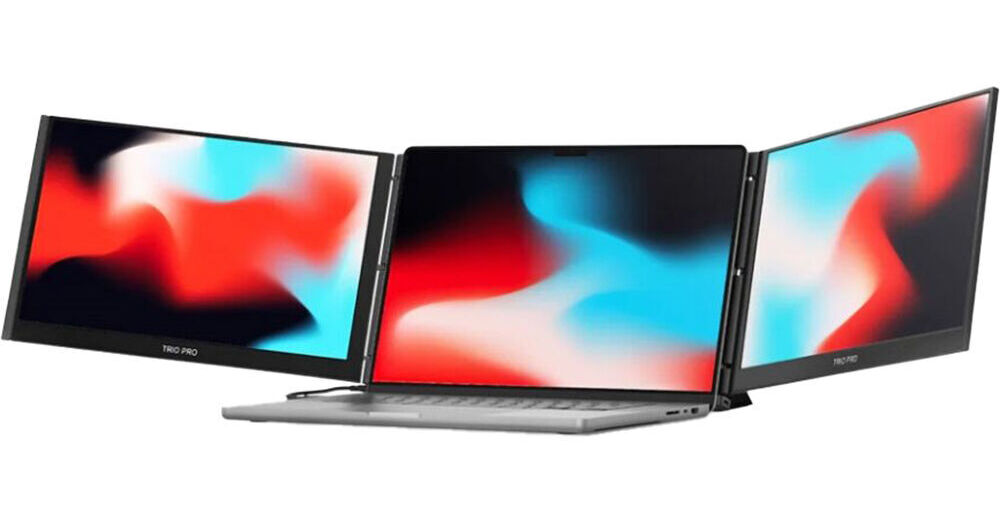
Add two extra screens to your laptop with a single USB-C cable with the Trio 3.0 Pro 14" Portable Laptop Monitors from Mobile Pixels. Attach it to your laptop or use the integrated kickstand to adjust the displays, which fold out on the left and right sides of your system's display and may be configured in four different modes. Use Landscape Mode to manage multiple tasks simultaneously, while Collaboration Mode rotates both screens outward for meetings. Portrait Mode is made for those who need a vertical screen and Presentation Mode flips the screen 180° to the front so it is visible to those sitting across from you.
More Details
In Stock
No Store Display
$429.99
Calculate Shipping
Protect Your Gear
Add a protection plan from $59.99
Ask an Expert
212-444-6615

Mobile Pixel Trio 3 Pro Overview

Add two extra screens to your laptop with a single USB-C cable with the Trio 3.0 Pro 14" Portable Laptop Monitors from Mobile Pixels. Attach it to your laptop or use the integrated kickstand to adjust the displays, which fold out on the left and right sides of your system's display and may be configured in four different modes. Use Landscape Mode to manage multiple tasks simultaneously, while Collaboration Mode rotates both screens outward for meetings. Portrait Mode is made for those who need a vertical screen and Presentation Mode flips the screen 180° to the front so it is visible to those sitting across from you.

Technically, these 14.1" displays feature a 2240 x 1400 resolution with IPS panels, a 16:10 aspect ratio, 300 nits of brightness, and support for 100% of the sRGB and 72% of the NTSC color gamuts. Compatible with Windows and Mac, host connectivity is established using dual USB-C ports which allow for 65W of pass-through charging. Included are two USB-C cables with a USB-A adapter and four laptop magnets.

Triple Your Laptop's Screen Space
End your tab-switching nightmare with a pair of attachable, high res screens to get more done, faster.
Efficiency Unbound
Light to carry, quick to set up. Your full workspace, anywhere.
Triple the Screen
Switch less, see more, and get more done. Focus, create, and collaborate with ease.
Single Cable Setup
Finish your work faster with two extra screens, all by connecting a single USB-C cable.
Bold Design
Every detail has been redesigned, so the Trio 3 Pro is lighter and more stable than the previous model.
True Portability
Built to go. It's easy to pack up and ready to travel wherever work takes you.
Widely Compatible
Works with macOS and Windows with no drivers needed.
Landscape Mode
In landscape mode, you can manage multiple tasks simultaneously without constantly switching between tabs or windows with. Studies have shown that multi-monitor setups can increase productivity by up to 50%.
Collaboration Mode
Rotate both screens outward and enter collaboration mode, a new way to connect and create together. It's great for meetings, presentations, or quick creative reviews.
Portrait Mode
Ideal for programmers, writers, and lawyers, a vertical screen allows viewing significantly more lines of code or text simultaneously.
Presentation Mode
You can flip the screen 180° to the front of your laptop and present the screen to anyone sitting across from you.
3-Screen Productivity - More Space, More Done
With triple the screens, multitasking becomes effortless. You can write, design, and communicate all at once without switching tabs or breaking focus. Whether you're editing on the go or managing projects remotely, this setup brings desktop-level efficiency wherever work happens.
Integrated Kickstand - A Smarter Way to Stand
Mobile Pixels has been looking for ways to more stably support the weight of 3 screens, so they redesigned the integrated kickstand of the Trio 3 Pro, which can stability support the monitor while protecting your screens as a cover when putting into your backpack on the go. It combines simplicity and strength in balance, supporting all three displays without a hint of shake.
Instant Setup, Effortless Start
Your workspace is ready in seconds. Fold open the dual screens. Connect it to your laptop. Attach or use the built-in kickstand to adjust the displays. You now have a triple-screen workstation ready for anything.
Eye-Care Mode for Optimal Eye Comfort
Experience optimal color temperature and brightness that minimizes the emission of blue light from your displays. Work comfortably with less eye fatigue while reading, word processing, and more in low light environments.
UPC: 810130760763

Mobile Pixel Trio 3 Pro Specs

Key Specs
Display Size
14.1"
Panel Type
IPS-Type LCD
Native Resolution
2240 x 1400
Maximum Brightness
300 nits / cd/m2
HDR Support
No
Touchscreen
No
USB I/O
USB-C
Built-In Speakers
No
Display
Size
14.1"
Panel Type
IPS-Type LCD
Aspect Ratio
16:10
Native Resolution
2240 x 1400
Maximum Brightness
300 nits / cd/m2
HDR Support
No
Variable Refresh Technology
No
Color Gamut
100% sRGB
72% NTSC
Surface
Touchscreen
No
Connectivity
HDCP Support
Yes
USB I/O
2x USB-C (Unspecified Version) with USB PD 65 W
Ethernet I/O
No
Speaker
Built-In Speakers
No
General
Adjustments
Fixed
Lock Slot
No
Dimensions
13.4 x 8.8 x 0.9" / 34 x 22.4 x 2.3 cm (Folded)
40.3 x 8.8 x 0.9" / 102.4 x 22.4 x 2.3 cm (Unfolded)
Weight
4.13 lb / 1.87 kg
Packaging Info
Package Weight
6.17 lb
Box Dimensions (LxWxH)
15.9 x 10.8 x 2.8"

Mobile Pixel Trio 3 Pro Reviews

Read all the reviews, first

By David
Rated 3 out of 5
Date: 2026-08-05

The quality of the displays exceed the Xebec now that it's set up, but it took over an hour with ChapGPT to get Windows to align the displays as 1-2-3 with mouse transfer properly. Once that was set up, I was very happy until the magnets detached every I moved anything. I basically have it supported not to move now. I will NEVER consider traveling with it! It is too heavy, cumbersome and the magnets are sure to detach again. Even though only the right screen of my Xebec is clear and the resolution is small, I will keep it for traveling purposes. I wanted so badly to be able to give it 5 stars, given how much it costs, but I just can't.

Perfect if your job benefits from multiple screens at the same time

By Jonathan D.
Rated 5 out of 5
Date: 2026-07-01

[This review was collected as part of a promotion.] Fantastic for mobile work. Good form factor, works perfectly so far

See any errors on this page?
Whatever You Need, We've Got It