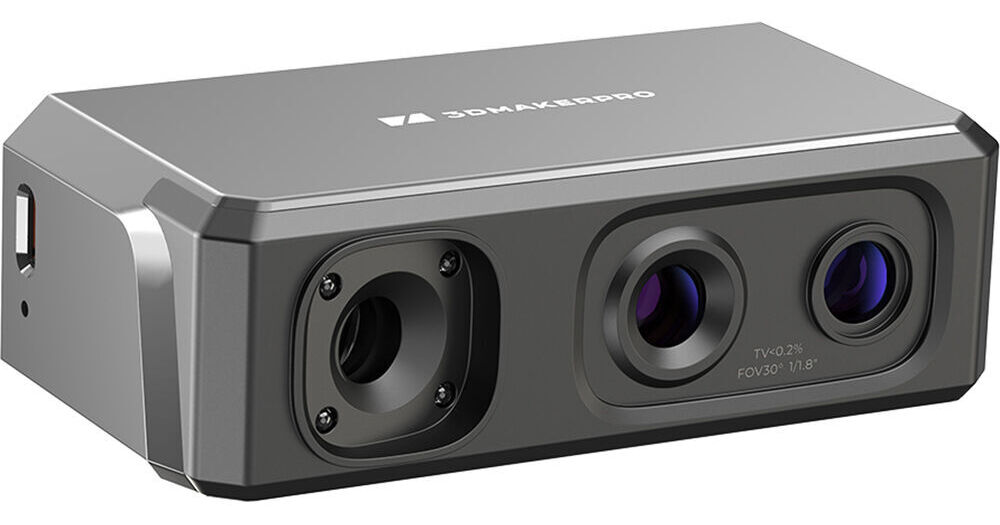
3DMakerPro Seal Lite 3D Scanner

BH #3DSEALLTE3DS • MFR #SEAL LITE
Print
3DMakerPro Seal Lite 3D Scanner
Key Features
  • Up to 10 fps Scanning Speed
  • 0.02mm Accuracy
  • 0.07mm Resolution
  • 0.4 to 11.8" Scan Range
Digitally capture figurines, product ideas, and more with the Seal Lite 3D Scanner from 3DMAKERPRO. Built for easy and accurate scanning, this unit has a scanning speed of 10 fps, a scan range of 0.4 to 11.8", and collects 100,000 points per second. Its lightweight and portable form factor allows you to take your work on the go.
More Details
In Stock
No Store Display
Free 2-Day Shipping
Protect Your Gear
Add a protection plan from $42.99
Ask an Expert
800-606-6969

3DMakerPro Seal Lite Overview

Digitally capture figurines, product ideas, and more with the Seal Lite 3D Scanner from 3DMAKERPRO. Built for easy and accurate scanning, this unit has a scanning speed of 10 fps, a scan range of 0.4 to 11.8", and collects 100,000 points per second. Its lightweight and portable form factor allows you to take your work on the go.

Blue light technology empowers the Seal Lite to reach an accuracy of 0.02mm, and a resolution of 0.07mm helps you faithfully replicate target objects. Visual tracking technology and anti-shaking lenses provide optical stabilization to ensure a smooth scan. The scanner also boasts nine levels of light adjustment for the capturing of subjects in varying colors, materials, and lighting conditions.

JMStudio Software
The Seal Lite 3D scanner comes with access to 3DMAKERPRO's JMStudio scanning software. There, you can seamlessly scan, edit, and optimize your projects in the same place. Features of JMStudio include multi-mode data acquisition, high-definition real-time previews and texture mapping, as well as auto-align. The software is compatible with Windows, macOS, iOS, and Android.
Software System Requirements
  • Compatible system: Windows 10/11 64-bit, macOS 12/13/14
  • Compatible mobile: Android 10.0 or later, iOS 15.0 or later
  • Minimum computer requirements: 8th Generation Intel Core i5, 16GB RAM, MX250 GPU with 2GB VRAM
  • Recommended computer requirements: 8th Generation Intel Core i7, 16GB RAM, NVDIA 3060 GPU with 4GB VRAM

3DMakerPro Seal Lite Specs

Key Specs
Scan Speed
10 fps
Scan
Volume:
Minimum: 0.4 x 0.4 x 0.4" / 10 x 10 x 10 mm
Maximum: 11.8 x 11.8 x 11.8" / 300 x 300 x 300 mm
Accuracy
0.02 mm
Working Distance
7.1 to 11" / 180 to 280 mm
File Formats
ASC, OBJ, PLY, STL
Scan Speed
10 fps
Scan
Volume:
Minimum: 0.4 x 0.4 x 0.4" / 10 x 10 x 10 mm
Maximum: 11.8 x 11.8 x 11.8" / 300 x 300 x 300 mm
Light Source
LED
Accuracy
0.02 mm
Working Distance
7.1 to 11" / 180 to 280 mm
Point Distance
2.76 mil / 0.07 mm
File Formats
ASC, OBJ, PLY, STL
System Connection
USB-C 2.0
USB-A 2.0
Display
No
OS Compatibility
Computer: Windows 10 or Later / macOS 12 or Later
Mobile: Android/iOS
Memory Requirement
16 GB
VRAM Requirement
2 GB (Minimum)
4 GB (Recommended)
Dimensions
4.3 x 2.4 x 1.4" / 110 x 60 x 35 mm
Weight
8 oz / 226 g
Packaging Info
Package Weight
1.55 lb
Box Dimensions (LxWxH)
8.9 x 6.1 x 2.9"

3DMakerPro Seal Lite Reviews

Disappointed: 3D Scan and Print has a ways to go

By chris
Rated 2 out of 5
Date: 2026-07-07

Numerous times tried scanning a 1" x 3" black part in various lighting, settings, angles and 3D scanning 'blue' and 'white' spray rotating slowly on a round table. Results were not acceptable for printing. I rate "2" as it could scan larger, less intricate, not black items. So frustrating and disappointing, but glad B&H has a fair return policy

See any errors on this page?

Is this markerless?

Is this markerless?
Asked by: Elliot
Yes, the 3DMAKERPRO Seal Lite 3D Scanner is a makerless scanner. Designed for beginners, the 3DMAKERPRO Seal Lite 3D Scanner can scan any object within a range of 0.4 to 11.8" without makers or stickers.
Answered by: Brendan C
Date published: 2026-05-18
  • y_2026, m_8, d_2, h_9CST
  • bvseo_bulk, prod_bvqa, vn_bulk_3.0.48
  • cp_1, bvpage1
  • co_hasquestionsanswers, tq_1
  • loc_en_US, sid_1959167, prod, sort_[SortEntry(order=HAS_STAFF_ANSWERS, direction=DESCENDING)]
  • clientName_bhphotovideo
Whatever You Need, We've Got It