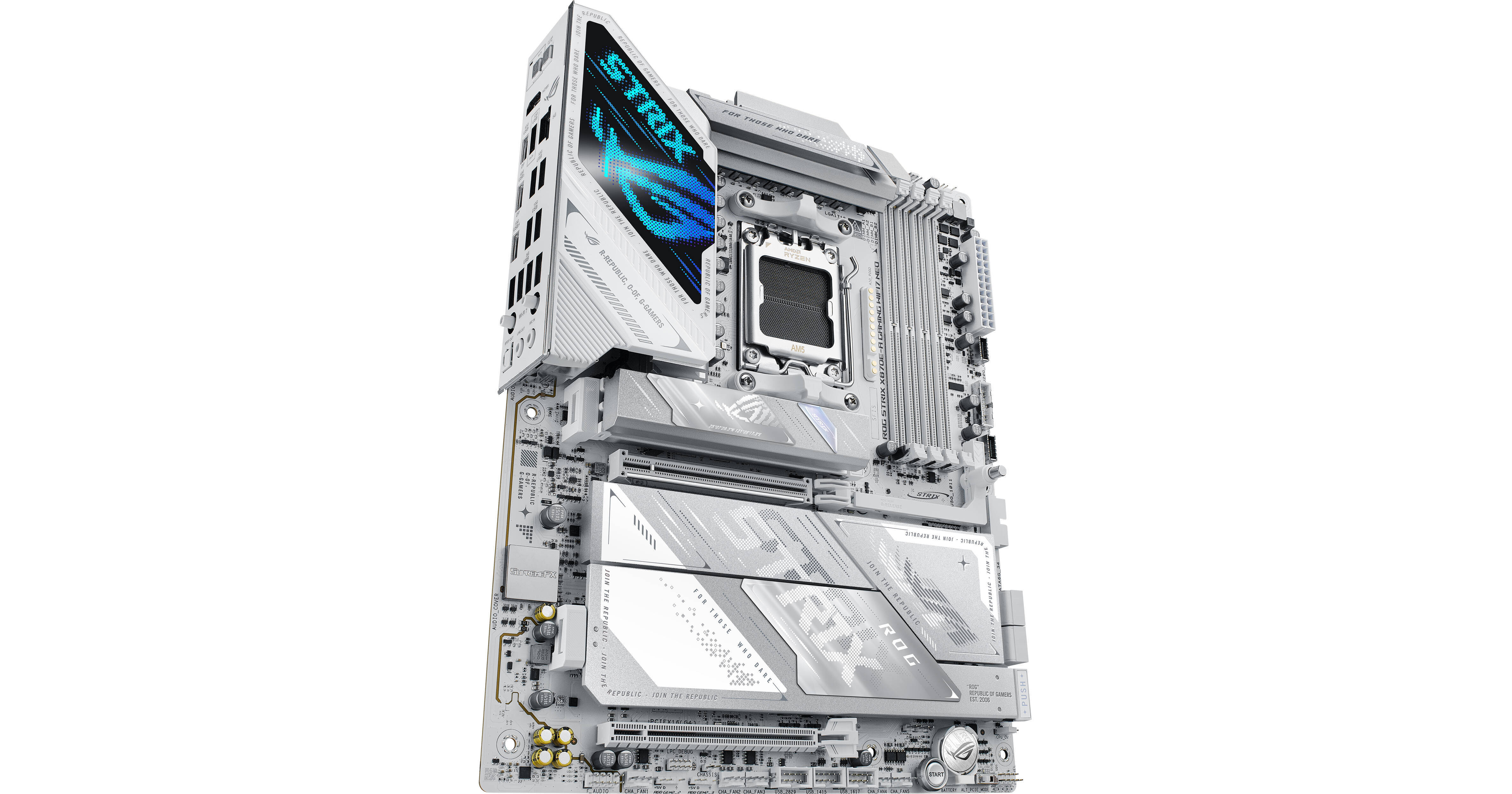
ASUS Republic of Gamers STRIX X870E-A GAMING WIFI7 NEO AM5 ATX Motherboard

BH #ASX870EAGW7N • MFR #ROG STRIX X870E-A GAMING WIFI7 NEO
Print
ASUS Republic of Gamers STRIX X870E-A GAMING WIFI7 NEO AM5 ATX Motherboard
Key Features
  • ATX Form Factor
  • AMD X870E Chipset
  • AM5 Socket
  • 4 x Dual-Channel DDR5 Slots
Designed for high performance and style, the ASUS ROG STRIX X870E-A GAMING WIFI7 NEO AM5 ATX Motherboard serves as a powerful foundation for gaming and creative PC builds. Supporting AMD 7000, 8000, and 9000 series processors and expansive connectivity, this socket AM5 motherboard is ready for overclocked components and demanding AI workloads.
More Details
In Stock
No Store Display
Free Expedited Shipping
Protect Your Gear
Add a protection plan from $38.99
Ask an Expert
800-606-6969

ASUS X870E-A Neo Overview

Designed for high performance and style, the ASUS ROG STRIX X870E-A GAMING WIFI7 NEO AM5 ATX Motherboard serves as a powerful foundation for gaming and creative PC builds. Supporting AMD 7000, 8000, and 9000 series processors and expansive connectivity, this socket AM5 motherboard is ready for overclocked components and demanding AI workloads.

Four DDR5 DIMM slots are available, supporting up to 256GB of 8600 MT/s overclocked memory for smooth multitasking, large projects, and demanding applications. For storage, you can install up to two M.2 PCIe 5.0 SSDs alongside two PCIe 4.0 drives to store your games library and important files. There are also four SATA III connectors. A PCIe 5.0 x16 slot is available for powerful graphics cards while the PCIe 4.0 x16 (x4 mode) slot supports compatible expansions.

With two USB4 ports on the rear panel, you can connect 40 Gb/s compatible devices or USB-C compatible 4K displays. They are complemented by one USB-C and five USB-A 3.2 Gen 2 ports that work with up to 10 Gb/s devices. The four USB-A 3.2 Gen 1 ports may be used with 5 Gb/s peripherals. Built-in Wi-Fi 7 (802.11be) support and a 5 Gb/s Ethernet port provide you with fast connections to compatible network devices. Windows 11 is required to take advantage of all the motherboard's features.

ASUS AI Intelligence
AI Cache Boost
Boost your large language model (LLM) workflows with AI Cache Boost. Enabling this feature in the BIOS settings optimizes the CPU cache and memory pathways to deliver fast local LLM performance.
AI Overclocking
Maximize CPU performance with predictions for ideal CPU and cooling settings, pushing your system to its limits.
AI Cooling II
Maintain optimal thermals and reduced noise with dynamic fan speed adjustments based on CPU temperatures.
AI Networking II
AI Networking II combines intelligent technologies to continuously optimize network performance, providing trustworthy and seamless connectivity while unleashing Wi-Fi 7 speeds.
AI Advisor
AI-powered technology allows you to ask natural language questions to explore the functionality and advanced features of your motherboard.
Performance Overclocking
Dynamic OC Switcher
The Dynamic OC Switcher maximizes CPU performance by letting you set current and temperature thresholds to automatically switch between a manual overlock for heavy multithreaded workloads and Precision Boost Overdrive for single-threaded tasks. The Overclocking Load Guard has an enhanced current protection mechanism to help prevent users from experiencing system crashes during overclocking.
Asynchronous Clock
The ROG STRIX features a built-in clock generator that isolates CPU base clock from memory, PCIe, and the Infinity Fabric speed to drive peak CPU performance while maintaining the stability of related clock domains.
Core Flex
Core Flex empowers you to smash limits further than ever before by letting you control power and thermals in creative new ways. In its simplest form, you can set breakpoints to gradually reduce CPU core frequency as temperature or current increases. But the system is extremely adaptable, supporting multiple user-controlled functions that can manipulate power, current, and temperature limits independently so that you can bend CPU performance to your will.
Precision Boost Overdrive Enhancement
AMD Precision Boost Overdrive (PBO) pushes the CPU current and voltage budget to opportunistically increase performance. By aggressively tuning the PBO parameters, AMD's algorithm can leverage the motherboard's robust power solution to ramp up performance even higher.
Performance
DIMM Fit / DIMM Fit Pro
The DIMM Fit BIOS feature analyzes individual memory modules to optimize their performance and pinpoint potential issues. DIMM Fit Pro is an advanced option with more extensive customization for memory optimization.
NitroPath DRAM Technology
NitroPath DRAM Technology provides enhanced DDR5 memory performance. Shorter gold finger pins and optimized signal pathways ensure faster data transfers between your DRAM and CPU, allowing for greater memory overclocking headroom and stability. These reinformed DRAM slots are also better prepared to withstand the wear and tear of the RAM installation process than traditional slot designs, perfect for enthusiasts who keep their system upgraded with the fastest kits available.
AEMP
ASUS Enhanced Memory Profile (AEMP) is an exclusive firmware feature for PMIC-restricted memory modules.
Power Design
Sporting 16(90A)+2(90A)+2(90A) power stages with dual ProCool II power connectors, the motherboard delivers reliable and stable performance with high-core count CPUs, graphics cards, and other power-intensive components. Alloy chokes and durable capacitors quickly dissipate heat around voltage regulators and offer greater overclocking headroom.
Advanced Cooling
Designed for overclocking, this motherboard features M.2 heatsinks and a backplate that help to maintain SSD performance. There are also dedicated heatsinks for the VRM and chipset.
Connectivity
Wi-Fi 7
Wi-Fi 7 supports 160 MHz channels and 4096 QAM. Multi-Link Operation (MLO) ensures stable connections and low latency, supporting 2.4, 5, and 6 GHz bands for enhanced coverage and throughput.
5G Ethernet
An onboard 5G Ethernet port provides fast and stable connectivity to compatible wired devices.
Dual USB4 Connectivity
Transfer massive project files with 40 Gb/s compatible storage drives. The USB4 ports also allow you to connect 4K displays for enhanced multitasking.
Front 20G USB-C
This motherboard features a USB-C front panel connector for speedy data transfers with up to 20 Gb/s devices.
USB Wattage Watcher
An integrated USB Wattage Watcher allows you to monitor the current wattage delivered to a device connected to the rear USB-C 3.2 Gen 2 port. With it, you can monitor your connected device's fast charging status at a glance.
Easy DIY
AIO Q-Connector
The ASUS AIO Q-Connector features a cable-less link between the motherboard and compatible AIO cooler, which enables smoother installation by eliminating the need for pump, fan, and LCD cables.
Easy M.2 Installation
ASUS M.2 Q-Release, Q-Slide, and Q-Latch technologies allow you to quickly install or remove M.2 SSDs without the need for tools or screws.
PCIe Slot Q-Release
A physical lever unlocks the first PCIe slot's security latch with one tap.
Q-Antenna
With Q-Antenna, attaching a Wi-Fi antenna to your PC is a snap. Instead of slowly rotating two fasteners until they finally lock in, they just snap into place.
Q-LED
The on-board LED troubleshooting lights give PC builders a quick indicator to confirm that key components are functioning normally during startup. It can also alert them when memory modules have not been properly installed.
Troubleshooting
A built-in start button and Q-Code LEDs help you quickly identify problems.
Clear CMOS and BIOS FlashBack
Clear the CMOS at the touch of a button to help remove data corruption from the chip. BIOS FlashBack makes BIOS updates easy. Just load the BIOS file onto a FAT32 USB stick, insert it into the BIOS FlashBack port, and press a button. No CPU or memory needed.
Software Utilities
TURBOV Core
Intuitive overclocking within Windows. No BIOS interface or reboots required.
ASUS GlideX
Using this app enables smooth screen sharing and control across PCs, tablets, and smartphones via wired or wireless connections, across multiple platforms.
HWINFO
This comprehensive diagnostic tool provides detailed information about hardware components and real-time system monitoring.
AIDA64 Extreme
The AIDA64 Extreme tool provides detailed information about the hardware components and software, performs benchmark tests, and helps prevent possible hardware issues. A 1-year trial subscription is included.
ASUS DriverHub
Simplify driver management with automatic detection, one-click installation and update for smooth, efficient system performance.
ASUS MB Manager
Use the ASUS MB Manager for fast, intuitive control over key system settings.
Armoury Crate
Armoury Crate is a software utility designed to give you centralized control of supported gaming products, making it easy to tune the look and feel of your system. From a single intuitive interface, Armoury Crate helps you customize RGB lighting and effects for compatible devices and synchronize them with Aura Sync to create a unified lighting scheme across your system. In addition, Armoury Crate's Fan Xpert4 tool provides comprehensive control over fans, water pumps, and all-in-one (AIO) coolers.
Play in Style
Aura Sync
Enhance your immersion with RGB lighting effects, including modes that adapt to the on-screen action. Then synchronize them with Aura Sync compatible peripherals such as keyboards, mice, and monitors.
Polymo Lighting
The Polymo Lighting panel, located next to the rear I/O area, may be customized with RGB lighting effects.
Addressable Gen 2 RGB Headers
The three addressable Gen 2 headers automatically optimize lighting effects for the number of LEDs present on compatible ARGB gear.
UPC: 199291491618

ASUS X870E-A Neo Specs

Key Specs
Chipset
AMD X870E
CPU Socket
AM5
Memory Slots
4x 288-Pin
Memory Type Support
DDR5
M.2 Slots
22110 / 2280
Expansion Slots
1x PCIe 5.0 x16
1x PCIe 4.0 x16
Wi-Fi
Wi-Fi 7 (802.11be)
Form Factor
ATX
CPU
Chipset
AMD X870E
CPU Socket
AM5
Back Panel I/O
USB
2x USB-C (USB4)
1x USB-C (USB 3.1/3.2 Gen 2)
5x USB-A (USB 3.1/3.2 Gen 2)
4x USB-A (USB 3.0 / 3.1/3.2 Gen 1)
Thunderbolt
No
Display
1x HDMI
Audio
2x 1/8" / 3.5 mm
Ethernet / Controller
1x Realtek 5GbE
Wi-Fi Antenna
2x Connector
Buttons
BIOS Flashback, Clear CMOS
Memory
Memory Slots
4x 288-Pin
Memory Type Support
DDR5
Maximum Capacity
256 GB
Channel Architecture
Dual Channel
ECC Support
Non-ECC, ECC Unbuffered
Storage Expansion
SATA
4x SATA III
M.2 Slots
1x M.2 (M Key) 2280/2260/2242 (PCIe 5.0 x4)
1x M.2 (M Key) 22110/2280 (PCIe 5.0 x4)
2x M.2 (M Key) 2280 (PCIe 4.0 x4)
Optane Memory Support
No
RAID Support
RAID 0, 1, 5, 10
Internal I/O
Expansion Slots
1x PCIe 5.0 x16
1x PCIe 4.0 x16
USB
2x USB 3.0 / 3.1/3.2 Gen 1 Header (Supports 4 USB-A Port)
3x USB 2.0 Header (Supports 6 USB-A Port)
1x USB 3.2 Gen 2x2 Header (Supports 1 USB-C Port)
1x USB 3.0 / 3.1/3.2 Gen 1 Header (Supports 1 USB-C Port)
Air Cooling
2x 4-Pin CPU
5x 4-Pin System
Liquid Cooling
1x 4-Pin Pump
Power Connectors
1x 24-Pin Mainboard
1x 8-Pin CPU
Security
Chassis Intrusion
BIOS
ROM
512 Mb
Front Panel I/O
Front Panel I/O
AAFP
Audio
Audio Codec
ASUS (7.1-Channel)
DAC
No
Wireless
Wi-Fi
Wi-Fi 7 (802.11be): Tri-Band (2.4, 5, & 6 GHz) with MU-MIMO Support (2 x 2)
Bluetooth
Bluetooth 5.4
Software
OS Compatibility
Windows
Physical
Form Factor
ATX
Dimensions
12 x 9.6" / 30.5 x 24.4 cm
Packaging Info
Package Weight
5.67 lb
Box Dimensions (LxWxH)
14 x 10.8 x 2.8"

ASUS X870E-A Neo Reviews

See any errors on this page?
Whatever You Need, We've Got It