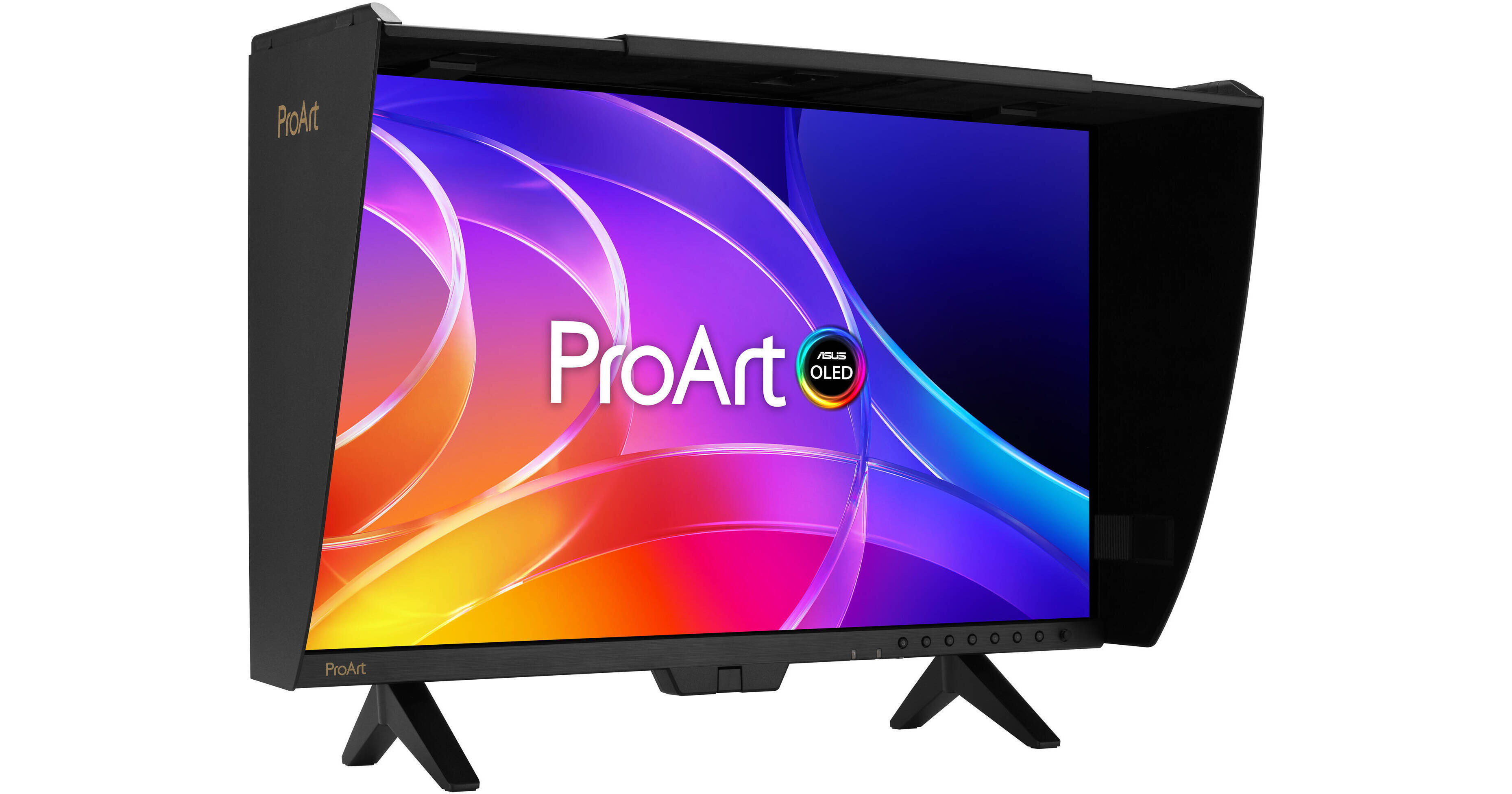
ASUS ProArt Display OLED PA32USD 31.5" 4K HDR 240 Hz Monitor

BH #ASPA32USD • MFR #PA32USD
Print
ASUS ProArt Display OLED PA32USD 31.5" 4K HDR 240 Hz Monitor
Key Features
  • 31.5" 16:9 QD-OLED Panel
  • Thunderbolt 4 | HDMI | DisplayPort | SDI
  • 4K UHD 3840 x 2160 at 240 Hz
  • 0.1 ms (GtG) Response Time
Streamline your professional photography, video editing, and color workflow with the ASUS ProArt OLED PA32USD 32" 4K HDR 240 Hz Monitor. Designed to deliver exceptional 10-bit color, this Calman-ready 3840 x 2160 resolution 4K UHD monitor's OLED panel is factory calibrated for ΔE <1 accuracy, covering 99% of the DCI-P3 and 100% sRGB gamut. It also supports HDR10, HLG, and Dolby Vision high-dynamic range formats with a 1.5 million:1 static contrast ratio, allowing you to tailor content to multiple regions. The integrated motorized flip colorimeter helps to ensure accuracy while enhancing your workflow.
More Details
In Stock
No Store Display
Free 2-Day Shipping
Protect Your Gear
Add a protection plan from $139.99
Ask an Expert
800-606-6969

ASUS OLED PA32USD Overview

Streamline your professional photography, video editing, and color workflow with the ASUS ProArt OLED PA32USD 32" 4K HDR 240 Hz Monitor. Designed to deliver exceptional 10-bit color, this Calman-ready 3840 x 2160 resolution 4K UHD monitor's OLED panel is factory calibrated for ΔE <1 accuracy, covering 99% of the DCI-P3 and 100% sRGB gamut. It also supports HDR10, HLG, and Dolby Vision high-dynamic range formats with a 1.5 million:1 static contrast ratio, allowing you to tailor content to multiple regions. The integrated motorized flip colorimeter helps to ensure accuracy while enhancing your workflow.

The ambient light sensor helps to ensure an optimal viewing experience throughout the day. With Thunderbolt 4 connectivity, you can transfer video, data, and 96W of power over a single cable with compatible laptops. The second Thunderbolt 4 port lets you daisy chain an additional display or other devices. Dual 12G-SDI connectors allow you to monitor uncompressed 4K, 60 Hz playback. One HDMI 2.1 port is also available alongside a DisplayPort 2.1 input. A USB-C and two USB-A 3.2 Gen 2 ports allow you to connect up to 10 Gb/s compatible peripherals to your system. A monitor hood is included to help reduce reflections. You can use the fully adjustable desk stand when you're at your workstation, or attach the mini stand and carry it by its metal handle when on-location. This OLED display is protected by a 3-year warranty that covers burn-in.

Color and Performance
Professional Color
The 31.5" QD-OLED panel delivers true 10-bit color, factory calibrated for Delta E <1 accuracy, covering 99% of the DCI-P3 and 100% sRGB gamut. It also has a 0.1 ms GtG response time with a 1.5 million:1 static contrast ratio and 1000 nits peak brightness in HDR mode for realistically deep shadows and bright highlights.
Ideal for Game Development and Editing
A 240 Hz refresh rate and variable-refresh-rate (VRR) technology allows creators to work on fast-rendering visuals and conduct quality checks-all on a single display.
ProArt Hardware Calibration
The built-in colorimeter supports self-calibration and is designed to work with most operating systems without additional calibration software. Users may run the calibration process at any time, or schedule it during off hours through the OSD menu. All color parameter profiles are saved directly on the monitor's internal scaler IC chip instead of the computer.
ProArt Color Center
ProArt Color Center offers remote group control and calibration tools, allowing you to handle these vital tasks from a centralized location. You'll be able to remote control & group calibration, scheduled calibration, and customized color parameters to maintain professional-level accuracy and consistency all the time.
Seamless Calibration
ProArt displays are compatible with professional color calibration software brands, including Calman and Light Illusion ColourSpace CMS.
Uniform Brightness
A built-in Auto Brightness Limiter (ABL) feature maximizes power use when displaying a white or bright image in a particular window. The display automatically dims the image as the window size increases. Additionally, the optional Uniform Brightness function in the OSD menu is useful for switching between or changing the size of windows with vastly different contrast levels by keeping brightness levels consistent for comfortable viewing and accurate colors, even after hours of use.
ASUS Smart HDR Technology
The ProArt Display supports multiple HDR formats, including HLG and HDR10. HLG allows users to view and create material for broadcast and satellite TV platforms such as BBC iPlayer, Japan NHK TV, and DirecTV. HDR10 support ensures compatibility with a multitude of streaming video services and HDR-enabled games. Dolby Vision support will be available with a future firmware update.
Multiple PQ Curves
ASUS ProArt Displays support multiple HDR10 curves, including PQ Hard Clip, PQ Optimized, and PQ Basic to fit your specific needs.
HDR Preview
HDR Preview enables a direct camera-to-monitor connection to view captured HDR content with its full tonal range. It also works within most video editing software platforms, providing a streamlined editing experience with accurate simulations of the final output.
12G-SDI Connectivity
SDI (Serial Digital Interface) is a professional video signal standard widely used in production. It supports long-distance transmission of uncompressed video with high reliability. SDI uses BNC cables with locking connectors on both ends, ensuring a secure connection that cannot be easily disconnected.
Streamlined Workflow
Integrated KVM
Control multiple devices using a single mouse and keyboard connected through the monitor.
Diverse Viewing Options
Picture-by-picture (PbP) mode allows you to view content from up to four sources simultaneously. You can also choose up to two color engines to check different color modes, including sRGB, Adobe RGB, P3, BT.2020, and CAL 1 to 3.

Picture-in-Picture (PiP) mode places content from a second source on any corner of the display.
Real-Time Preview
QuickFit Plus overlays a grid on the screen to assist with alignment and on-set previewing. It helps ensure that video content stays properly framed and does not extend beyond the visible screen area. Features include placing a marker at the center of the screen, viewing safety areas, and placing rulers on the screen edges.
Ambient Light Sensor
A built-in sensor automatically adjusts the screen's brightness and color temperature to match the changing lighting conditions of your environment.
Integrated Speakers
Watch videos while avoiding desktop clutter with the built-in 3W stereo speaker system. A 3.5mm headphone jack is also available for listening privacy.
Versatile Stand
This monitor includes both an ergonomic stand and a mini stand. The second is ideal for working on location, and you can carry the display using the convenient metal handle. A detachable monitor hood helps to minimize reflections from surrounding light sources.
Ergonomic Stand
Use the space-saving ergonomic stand to rotate the display 90° in either direction to view documents in portrait mode. You can also adjust the height and tilt to match your comfort. The 100 x 100mm VESA mount pattern allows you to attach the display to a wall, swivel arm, or multi-monitor stand. The 178° viewing angles allow you to see the screen clearly from almost any position.
Cable Management
Bundled clips help manage cables and keep workspaces tidy.
Mac Integration
With the ASUS DisplayWidget, you can control the monitor's brightness and speaker volume using your MacBook's control keys and make other adjustments to fit your preferences. Additionally, the high refresh rate and VRR match with Mac ProMotion.
Multi-Display Consistency
ColorSync allows you to synchronize display settings across multiple ProArt Display OLED PA27USD monitors through the ASUS DisplayWidget Center software.
ASUS OLED Care
Panel Protection
Features such as Sensing Protection, Pixel Shift, Screen Saver, ISP (Global), and Off Sensing help to prevent static images from being displayed continuously on your screen. This feature offers two levels of adjustment to choose from.
Image Protection
Dynamically detects and identifies the task bar, logos, and video edges, reducing the brightness around them to minimize the risk of burn-in. This feature offers three adjustable levels to choose from.
Proximity Sensor
The ProArt Display automatically decreases brightness gradually when it detects no user in front of the monitor. There are three adjustable detection ranges available.
UPC: 199291454521

ASUS OLED PA32USD Specs

Key Specs
Display Size
31.5"
Panel Type
Quantum Dot OLED (QD-OLED)
Native Resolution
3840 x 2160
Maximum Brightness
1000 nits / cd/m2 (Peak in HDR Mode)
250 nits / cd/m2 (Sustained)
HDR Support
Yes: HDR10/Dolby Vision/Hybrid Log Gamma
Color Support
1.07 Billion Colors (10-Bit)
Color Gamut
99% DCI-P3
100% sRGB
Finish
Anti-Glare
Touchscreen
No
A/V Inputs
DisplayPort 2.1 / HDMI 2.1 / 12G-SDI
A/V Outputs
3.5 mm
USB I/O
USB-A 3.2 Gen 2 / USB-C 3.2 Gen 2 / Thunderbolt 4
Built-In Speakers
Yes: 2x 3 W
Display
Size
31.5"
Panel Type
Quantum Dot OLED (QD-OLED)
Aspect Ratio
16:9
Native Resolution
3840 x 2160
Maximum Brightness
1000 nits / cd/m2 (Peak in HDR Mode)
250 nits / cd/m2 (Sustained)
HDR Support
Yes: HDR10/Dolby Vision/Hybrid Log Gamma
Contrast Ratio
Near Infinite (Black Pixels Emit No Light)
Response Time
0.1 ms (GtG)
Refresh Rate
240 Hz
Variable Refresh Technology
Adaptive-Sync
Color Support
1.07 Billion Colors (10-Bit)
Color Gamut
99% DCI-P3
100% sRGB
Viewing Angle (H x V)
178 x 178°
Curved Display
No
Finish
Anti-Glare
Surface
Touchscreen
No
Connectivity
A/V Inputs
2x BNC (12G-SDI)
1x HDMI 2.1
1x DisplayPort 2.1
A/V Outputs
1x 1/8" / 3.5 mm (Headphone)
HDCP Support
Yes
USB I/O
1x USB-C (Thunderbolt 4) with USB PD 96 W
1x USB-C (Thunderbolt 4) with USB PD 15 W [Daisy Chain]
2x USB-C 3.1/3.2 Gen 2
2x USB-A 3.1/3.2 Gen 2
Multi-Input Support (PIP/PBP)
Yes: Picture-in-Picture (PIP), Picture-by-Picture (PBP)
Speaker
Built-In Speakers
Yes: 2x 3 W
Electrical
Power Consumption
Maximum: 50.0 W
Standby: 0.5 W
Input Power
100 to 240 VAC, 50 / 60 Hz
Power Adapter Type
Internal
General
Adjustments
Rotation: 180° (-90 to 90°)
Swivel: 60° (-30 to 30°)
Tilt: 28° (-5 to 23°)
Height: Up to 5.1" / 130 mm
VESA Mounting-Hole Pattern
100 x 100 mm
Lock Slot
Yes: Kensington
Dimensions
28.3 x 24.3 x 9.4" / 71.9 x 61.7 x 23.9 cm (with Stand)
28.3 x 17.3 x 2.4" / 71.9 x 43.9 x 6.1 cm (without Stand)
Weight
20.02 lb / 9.08 kg (with Stand)
14.42 lb / 6.54 kg (without Stand)
Packaging Info
Package Weight
37.5 lb
Box Dimensions (LxWxH)
35.5 x 27.2 x 8.75"

ASUS OLED PA32USD Reviews

From a DIT's perspective, who happens to be a huge gamer nerd as well - the exact group study this product is advertised for

By Grant
Rated 3 out of 5
Date: 2026-07-23

*3/5* Starting with the good: While I will be keeping this monitor because it is a stunning QD-OLED panel, trustworthy out-of-the-box calibration, incredible 240Hz performance which this display is exactly catering toward DITs/Colorist who happen to game as a hobby on the side, and found my own entirely free of coil whine (except the first second you turn it on) despite other users saying they had that on 27" and previous models, and essential dual SDI ports make it an excellent video village display for clients and directors even when upscaling a 1080p signal, it unfortunately falls short of being a fully reliable primary on-set DIT tool due to its disappointingly plasticky build, the hood is nice touch and glad they made it but also not most portable design and funky to initially setup, flimsy physical buttons that still force an over-reliance on the joystick, somewhat sluggish boot time which is the only time i really hear a coil whine, and a frustrating lack of interface refinement, most notably an intrusive, non-transparent OSD input overlay that repeatedly obscures some vital screen real estate during notoriously clumsy HDR handoffs with Windows 11 and graphics cards (in my case 4080 TI Nvidia GPU) that while not the monitors fault it handles the trade off worse than LG OLED TVs and some other OLED monitors prior. Ultimately the display is a solid, albeit flawed, soft introduction by ASUS into the professional colorist market rather than a fully realized cinema tool that also has home use or gaming functions, it is more the other way around with a "Pro" name put onto it. When comes the day ProArt really becomes a name on set that professional cinema can reckon with is when they really break out of their pro consumer box but offer those tools and features at a pro-consumer price. This is a nice start in that direction but doesn't fully stick the landing. Despite that, I will be keeping it, i enjoy it, it has much to be desired and though it will not be a primary DIT monitor on our sets I will be using it on sets but more of a locked off stationary video village + client monitor. ***Since writing the review too i have experienced more annoyances, one being it continues to handle HDR hand shake poorer than OLED TVs, it could very well be GPU but the fact still stands this monitor is more fussy than OLED TVs when using it with a PC which isn't the whole point of a monitor meant to be used for a computer more easily?? It does not like the display port being the primary if you have other hdmi ports plugged in running as "mirror this display" HDR gets very confused despite both being same OLED panels to handle same HDR settings mind you this is with having HDR turned off in Windows 11 OS as there are EDID handshake issues with having multiple displays with HDR but for some reason the ASUS PA32USD wants to switch itself in HDR mode every single time even though it will be an SDR signal from the computer when an OLED G3 77" is also plugged in. I have to unplug cables and reboot and plug in a very specific order of operations and toggle different preset manually in the 32USD monitor to get everything setup at home as wanted--- in fairness this one issue is more of software issue than monitor, but the fact still remains I was not having this issue with other displays and there could be some features in the monitor to quicker fix these quirks when using it with, computers...

See any errors on this page?

Can the Proximity sensor be turned off?

Can the Proximity sensor be turned off?
Asked by: Not
Yes, the ASUS ProArt Display OLED PA32USD 31.5" 4K HDR 240 Hz Monitor's (BH #ASPA32USD) proximity sensor can be turned off.
Answered by: Thomas M
Date published: 2026-07-22

Can you use an on/off remote with this?

Can you use an on/off remote with this?
Asked by: Not
The ASUS ProArt Display OLED PA32USD 31.5" 4K HDR 240 Hz Monitor does not support a remote controller for power.
Answered by: Kenneth C
Date published: 2026-07-19
  • y_2026, m_9, d_2, h_11CST
  • bvseo_bulk, prod_bvqa, vn_bulk_3.0.48
  • cp_1, bvpage1
  • co_hasquestionsanswers, tq_2
  • loc_en_US, sid_1966324, prod, sort_[SortEntry(order=HAS_STAFF_ANSWERS, direction=DESCENDING)]
  • clientName_bhphotovideo
Whatever You Need, We've Got It