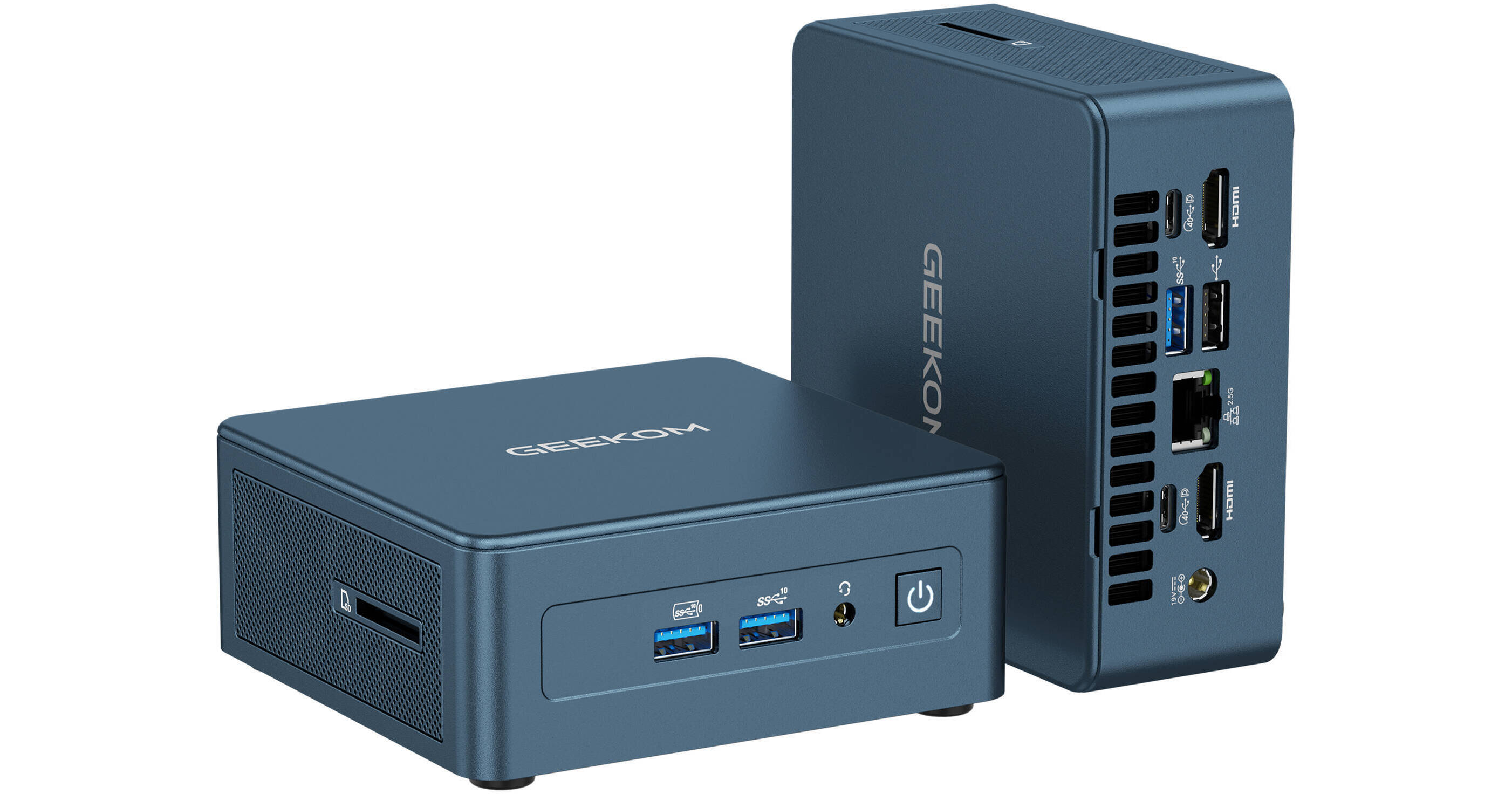
GEEKOM IT12 Mini Desktop Computer

BH #GEIT12BLU • MFR #GMIT12I512450H-16512
Print
GEEKOM IT12 Mini Desktop Computer
Key Features
  • 2 GHz Intel Core i5 8-Core (12th Gen)
  • 16GB DDR4 RAM
  • Integrated Intel Iris Xe Graphics
  • 512GB M.2 NVMe PCIe 4.0 SSD
With its compact design, the GEEKOM IT12 Mini Desktop Computer may be used to create content, stream media, and play games. Inside the compact housing is an Intel Core i5-12450H 8-Core processor with 16GB of DDR4 memory and a 512GB M.2 NVMe PCIe 4.0 SSD that allows you to smoothly load and multitask applications.
More Details
Temporarily Out of Stock
No Store Display
$479.00
Microsoft 365 Subscription not included: add to your purchase
Calculate Shipping
Ask an Expert
212-444-6615

GEEKOM IT12 Mini Overview

With its compact design, the GEEKOM IT12 Mini Desktop Computer may be used to create content, stream media, and play games. Inside the compact housing is an Intel Core i5-12450H 8-Core processor with 16GB of DDR4 memory and a 512GB M.2 NVMe PCIe 4.0 SSD that allows you to smoothly load and multitask applications.

Dual USB4 ports allow you to transfer up to 40 Gb/s with compatible devices and link up to two 8K monitors. Combining them with the two HDMI 2.0 ports lets you enhance your workflow with four simultaneously connected 4K displays. Three USB-A 3.2 Gen 2 ports are available for up to 10 Gb/s devices, and you can use the USB-A 2.0 port for peripherals such as a separately purchased wireless keyboard and mouse adapter. Use the integrated SD card reader to transfer photos, videos, and other files. Wi-Fi 6E (802.11ax) support and a 2.5 Gb/s Ethernet port provides smooth video streaming, online gaming, and file transfer experiences with compatible networks. Windows 11 Pro is preinstalled.

Performance
The 12th Gen Intel i5-12450H processor powers applications with four Performance cores while four Efficient cores handle background tasks. The Performance cores have a base speed of 2 GHz and can be boosted up to 4.4 GHz. Integrated Intel Iris Xe Graphics provides rich visuals.
Compact Design
With its space-saving design and included VESA mount, you can place this mini PC almost anywhere, including behind a monitor, underneath a desk, or on a wall.
Sturdy Shell
The top and outer frame are made from PC+ABS material that's not easy to dent or break.
Upgrade Ready
Two dual-channel DDR4-3200 SO-DIMM slots are available, supporting up to 64GB. For storage, there is an up to 2TB M.2 2280 PCIe 4.0 x4 slot alongside a 1TB M.2 2242 SATA SSD slot. There is also room for a 2.5" SATA drive. The screws always remain attached to the bottom cover, preventing them from getting lost while you install upgrades.
Quad Display Support
Enhance your workflow by connecting up to four displays through the dual HDMI and two USB4 ports.
3D Antenna
A 3D stereo antenna expands the wireless signal range with 360-degree coverage. It also helps to reduce signal interference.
Efficient Cooling
The dual copper heat pipe cooling system quickly transfers heat away from core components to the cooling fins. An optimized inlet and outlet design maximizes airflow to maintain optimal performance.
Windows 11 Pro
Microsoft simplified the design and user experience with Windows 11. It has a modern, clean design with a new Start Menu position. Snap Layouts, Groups, and Desktops allow you to multitask with ease. Microsoft has also integrated some of their apps, such as Microsoft Teams. The redesigned Microsoft Store makes it easier to look for supported apps. The Pro version of Windows 11 includes all the features that Windows 11 Home offers plus many designed specifically for business users, including Hyper-V virtualization, BitLocker disk encryption, and remote desktop access.
UPC: 810190721506

GEEKOM IT12 Mini Specs

Key Specs
Operating System
Windows 11 Pro
Processor
Intel Core i5-12450H (12th Gen)
GPU
Intel Iris Xe
Installed RAM
16 GB
Total Capacity
512 GB
External Bays
No
Inputs/Outputs
2x USB-C (USB4)
3x USB-A 3.1/3.2 Gen 2
1x USB-A 2.0
Display I/O
2x HDMI 2.0 Output
Audio I/O
1x 1/8" / 3.5 mm Headphone/Microphone Input/Output
Wi-Fi
Wi-Fi 6E (802.11ax)
Bluetooth
Bluetooth 5.3
Keyboard
No
Pointing Device
No
Power Supply
120 W with Barrel/Proprietary
Operating System
Windows 11 Pro
Performance
Processor
Intel Core i5-12450H (12th Gen)
CPU Socket
BGA 1744
CPU
8-Core:
2 to 4.4 GHz Performance (4 Cores)
1.5 to 3.3 GHz Efficiency (4 Cores)
Dedicated AI Cores
No
L3 Cache
12 MB
GPU
Intel Iris Xe
Installed RAM
16 GB
RAM Type
DDR4
RAM Configuration / Capacity
/ 2 Slots Supporting up to 64 GB (SO-DIMM)
vPro Support
No
Storage and Expansion
Total Capacity
512 GB
Storage Drive Type
1x 512 GB / M.2 NVMe SSD
Storage Expansion
1x M.2 Slot 2280 (PCIe 4.0 x4) [Occupied]
1x M.2 Slot 2242 (SATA III) [Available]
1x 2.5" Slot (SATA III) [Available]
PCI Expansion
No
Optical Drive
No
External Bays
No
Inputs / Outputs
Inputs/Outputs
2x USB-C (USB4)
3x USB-A 3.1/3.2 Gen 2
1x USB-A 2.0
Display I/O
2x HDMI 2.0 Output
Audio I/O
1x 1/8" / 3.5 mm Headphone/Microphone Input/Output
Network I/O
1x RJ45 (2.5 GbE)
Built-In Speakers
No
Built-In Microphones
No
Media/Memory Card Slot
Single Slot: SD (Unspecified Type)
Communications
Wi-Fi
Wi-Fi 6E (802.11ax): Tri-Band (2.4, 5, & 6 GHz) with MU-MIMO Support
Bluetooth
Bluetooth 5.3
Keyboard & Mouse
Keyboard
No
Pointing Device
No
General
Security
Dedicated Hardware TPM Security Chip, Kensington Lock Slot
Power Supply
120 W with Barrel/Proprietary
Input Power
19 VDC at 6.32 A
Dimensions
4.6 x 4.4 x 1.9" / 117 x 112 x 49.2 mm
Weight
1.4 lb / 652 g
Packaging Info
Package Weight
3.705 lb
Box Dimensions (LxWxH)
8.7 x 7.8 x 5.5"

GEEKOM IT12 Mini Reviews

See any errors on this page?

What is the maximum display resolution?

What is the maximum display resolution?
Asked by: Douglas
The GEEKOM IT12 Mini Desktop Computer, BH #GEIT12BLU, can support up to 8K resolution.
Answered by: Elchanan P
Date published: 2026-05-08
  • y_2026, m_7, d_12, h_12CST
  • bvseo_bulk, prod_bvqa, vn_bulk_3.0.47
  • cp_1, bvpage1
  • co_hasquestionsanswers, tq_1
  • loc_en_US, sid_1966480, prod, sort_[SortEntry(order=HAS_STAFF_ANSWERS, direction=DESCENDING)]
  • clientName_bhphotovideo
Whatever You Need, We've Got It