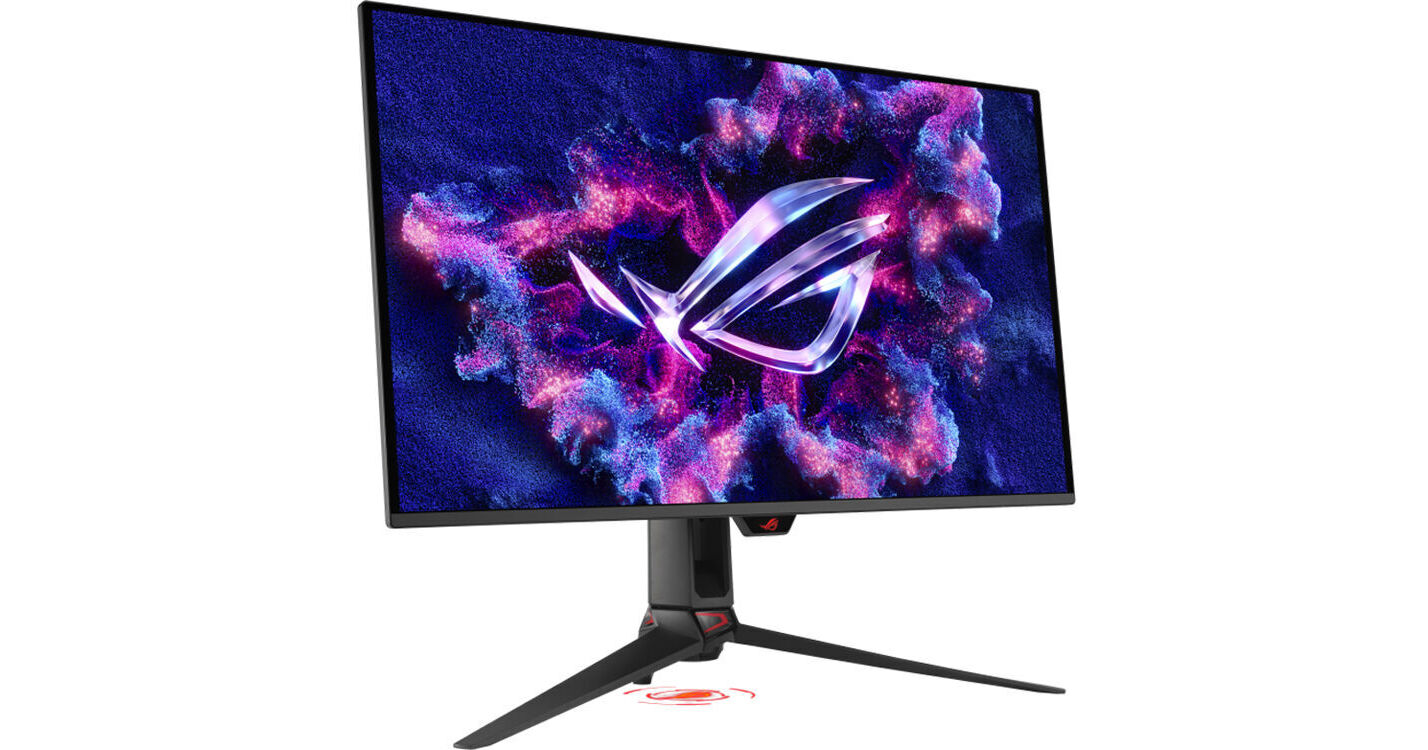
ASUS Republic of Gamers Swift OLED PG32UCDM Gen3 31.5" 4K HDR 240 Hz Gaming Monitor

BH #ASPG32UCDM3 • MFR #PG32UCDM3
Print
ASUS Republic of Gamers Swift OLED PG32UCDM Gen3 31.5" 4K HDR 240 Hz Gaming Monitor
Key Features
  • 31.5" 16:9 Tandem QD-OLED Panel
  • HDMI | DisplayPort | USB-C (90W)
  • 4K UHD 3840 x 2160 at 240 Hz
  • FreeSync Premium Pro | G-Sync Compatible
Designed primarily for enthusiasts, the ASUS ROG Swift OLED PG32UCDM Gen3 31.5" 4K HDR 240 Hz Gaming Monitor lets you catch every detail while competing in lightning fast matches and exploring vast open worlds. The 4K UHD 3840 x 2160 resolution OLED display delivers liquid-smooth visuals with a 240 Hz refresh rate and 0.03 ms response time. Additionally, AMD FreeSync Premium Pro and NVIDIA G-Sync compatibility eliminate screen tearing and stuttering with compatible graphics cards.
More Details
New Release
In Stock
No Store Display
Free 2-Day Shipping
Protect Your Gear
Add a protection plan from $79.99
Ask an Expert
800-606-6969

ASUS PG32UCDM3 Overview

Designed primarily for enthusiasts, the ASUS ROG Swift OLED PG32UCDM Gen3 31.5" 4K HDR 240 Hz Gaming Monitor lets you catch every detail while competing in lightning fast matches and exploring vast open worlds. The 4K UHD 3840 x 2160 resolution OLED display delivers liquid-smooth visuals with a 240 Hz refresh rate and 0.03 ms response time. Additionally, AMD FreeSync Premium Pro and NVIDIA G-Sync compatibility eliminate screen tearing and stuttering with compatible graphics cards.

The ROG Swift OLED PG32UCDM Gen3 also delivers vivid, realistic color with HDR10 and Dolby Vision HDR support, which enhances visuals with realistically bright highlights and deep shadows. The BlackShield film enhances the panel's durability while boosting the blackness levels. Connect your compatible laptop to the USB-C port to transfer video, data, and up to 90W charging power over a single cable. A high-bandwidth DisplayPort 2.1 input is also available alongside dual HDMI 2.1 ports. An integrated USB hub lets you connect peripherals such as keyboards, mice, and flash drives through the monitor. Connect your favorite headphones to the 3.5mm jack for listening privacy. Rear-facing lighting and a downward ROG logo projector at the base adds style to your setup. A custom heatsink quickly dissipates heat to maintain optimal performance and prevent burn-in. This OLED display features a 3-year warranty.

Stunning Visuals and Performance
Vibrant Color
Housed in a slim frame with a transparent rear panel, the bright 31.5" Tandem QD-OLED panel is factory calibrated for Delta E<2 accuracy, delivering cinematic visuals with 1.07 billion colors that cover 99% of the DCI-P3 gamut. VESA DisplayHDR True Black 500 certified high-dynamic range with a 1.5 million:1 contrast ratio and 1000 nits peak brightness enhances photos, videos, and games with lifelike color.
BlackShield Film
The BlackShield Film offers 2.5x better scratch resistance compared to the previous generation of QD-OLED panels. It also boosts the perceived black levels by up to 40% in well-lit environments.
Uniform Brightness
The Uniform Brightness setting from the OSD menu decreases peak brightness to keep levels consistent for better viewing, even when resizing bright white windows. This setting also helps to reduce eyestrain during marathon gaming sessions.
Unlock the Future
A future-ready DisplayPort 2.1a port supports up to 80 Gb/s bandwidth, allowing it to transfer uncompressed 4K video at 240 Hz or 8K at 60 Hz without losing details. The HDMI 2.1 port has a 48 Gb/s bandwidth.
ASUS OLED Care Pro
Neo Proximity Sensor
The built-in Neo Proximity Sensor detects your distance from the monitor. When you step away, the monitor transitions to a black image to protect against panel burn-in and restores onscreen content when you return. Detection distance can be customized to suit personal preference, ensuring maximum convenience and protection.
Pixel Cleaning
Recalibrate the screen when the monitor has been active for several hours. This process takes just a few minutes and activates automatically when the monitor is turned off.
Screen Move
Pixel locations are slightly shifted periodically to help prevent burn-in. Users can choose between several movement levels.
Screen Saver
Automatically dims the screen after two minutes of inactivity.
Boundary Detection
Dynamically detects the boundary of the black bars and reduces the brightness and also slightly shifts the pixel of the near borders.
Screen Saver
Automatically dims the screen after two minutes of inactivity.
Logo Brightness Adjustment
Automatically detects static onscreen logos and reduces their brightness to correct for potential picture-quality issues.
Taskbar Detection
Dynamically detects the taskbar and reduces brightness around it to avoid burn-in.
Outer Dimming Control
Automatically identifies and adjusts the brightest areas of the display to reduce the risk of burn-in.
Global Dimming Control
Dynamically adjusts the overall brightness of the display.
Target Mode
Dims the entire screen, except for a selected pinned window, which maintains its current brightness setting.
Gaming Enhancements
Adaptive Sync
Reduce screen tearing with AMD's FreeSync Premium Pro Technology and NVIDIA G-Sync compatibility. Both enable the monitor to dynamically adjust its refresh rate to the frame rate being output by the graphics card, thereby greatly reducing screen tearing, stuttering, and other artifacts.
AI Assistant Features
  • Dynamic Crosshair: Adds a crosshair to the center of the screen that automatically changes color to stand out from the background.
  • Dynamic Shadow Boost: Enhances dark areas of a scene to make it easier to spot enemies lurking in the dark.
  • AI Visual: Detects the on-screen content and automatically switches profiles for the best viewing experience.
Aspect Ratio Control
If you prefer playing on a smaller monitor, the ASUS ROG Swift OLED allows you to create a 24.5" or 27" simulated screen for high performance.
GamePlus
An integrated hotkey allows you to access features such as an on-screen stopwatch, crosshair, timer, fps counter, sniper mode, and a display alignment tool for multi-monitor configurations.
GameVisual
Optimize your visual with integrated presets that include Racing, MOBA, Cinema, RTS/RPG, FPS, sRGB, and Scenery modes.
Inspiring Design
Tripod Socket
A tripod socket allows you to mount a separately purchased webcam onto the rear of the display.
Ergonomics
Adjust the display's height, tilt, and swivel to match your comfort. Rotating the screen in either direction allows you to view content in portrait mode. With 178° horizontal and vertical viewing angles, you can see the clearly from almost any position. The 100 x 100mm VESA pattern allows you to mount the display onto a swivel arm or multi-monitor stand.
UPC: 199291274662

ASUS PG32UCDM3 Specs

Key Specs
Display Size
31.5"
Panel Type
Quantum Dot OLED (QD-OLED)
Native Resolution
3840 x 2160
Maximum Brightness
1000 nits / cd/m2 (Peak in HDR Mode)
300 nits / cd/m2 (Sustained)
HDR Support
Yes
Color Support
1.07 Billion Colors (10-Bit)
Finish
Anti-Glare
Touchscreen
No
A/V Inputs
DisplayPort 2.1 / HDMI 2.1
A/V Outputs
3.5 mm
USB I/O
USB-A 3.2 Gen 1 / USB-B 3.2 Gen 1 / USB-C
Built-In Speakers
No
Display
Size
31.5"
Panel Type
Quantum Dot OLED (QD-OLED)
Aspect Ratio
16:9
Native Resolution
3840 x 2160
Maximum Brightness
1000 nits / cd/m2 (Peak in HDR Mode)
300 nits / cd/m2 (Sustained)
HDR Support
Yes
Contrast Ratio
Near Infinite (Black Pixels Emit No Light)
Response Time
0.03 ms
Refresh Rate
240 Hz
Variable Refresh Technology
FreeSync Premium Pro, G-Sync
Color Support
1.07 Billion Colors (10-Bit)
Viewing Angle (H x V)
178 x 178°
Curved Display
No
Finish
Anti-Glare
Surface
Touchscreen
No
Connectivity
A/V Inputs
1x DisplayPort
2x HDMI
A/V Outputs
1x 1/8" / 3.5 mm
HDCP Support
Yes
USB I/O
3x USB-A 3.0 / 3.1/3.2 Gen 1
1x USB-B 3.0 / 3.1/3.2 Gen 1
1x USB-C DP Alt Mode (Video Only) with USB PD 90 W
Multi-Input Support (PIP/PBP)
Yes: Picture-in-Picture (PIP), Picture-by-Picture (PBP)
Speaker
Built-In Speakers
No
Electrical
Power Consumption
Operational: 90.0 W
Input Power
100 to 240 VAC, 50 / 60 Hz
General
Operating Conditions
32 to 104°F / 0 to 40°C
Storage Conditions
-4 to 140°F / -20 to 60°C
Certifications
BSMI, CB, CCC, CE, FCC, ICES, KC, Kcc, RCM, cTUVus
Adjustments
Adjustable
Swivel: 15°
Tilt: 25° (-5 to 20°)
Height: Up to 3.1" / 80 mm
VESA Mounting-Hole Pattern
100 x 100 mm
Lock Slot
Yes: Kensington
Packaging Info
Package Weight
29.745 lb
Box Dimensions (LxWxH)
34.6 x 20 x 8"

ASUS PG32UCDM3 Reviews

See any errors on this page?
Whatever You Need, We've Got It