Please update your browser to take advantage of the latest technology security enhancements to ensure your B&H Shopping experience is as safe as it is enjoyable:
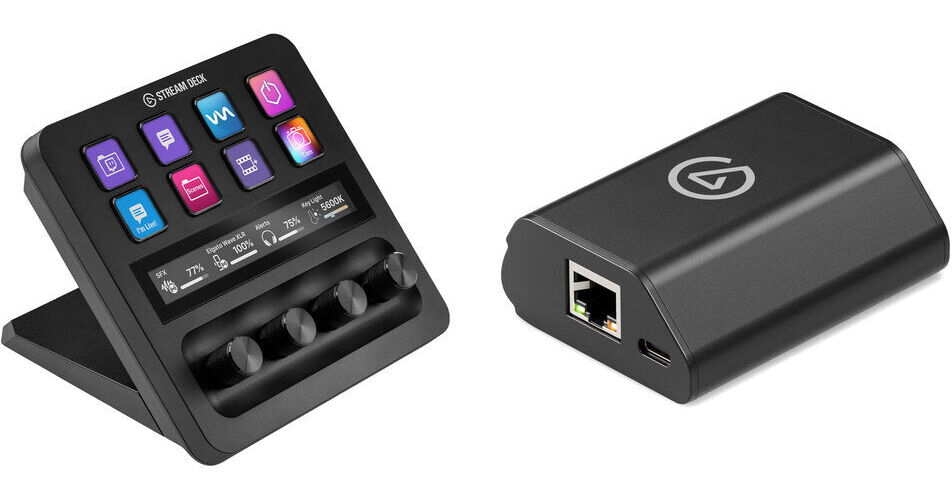
Control your post-production editing workflow with ease and limited cable clutter using the Elgato Stream Deck + with Network Dock Kit from B&H. The kit bundles a Steam Deck + with a network dock that facilitates deployment with a single Cat cable.
Power, mount, and deploy your Stream Deck device with this Network Dock from Elgato. Offering wired Ethernet connectivity, the versatile dock is designed to allow users to eliminate cable clutter by connecting via a single Cat cable and setting up in a snap. The versatile device may be powered via PoE (Power over Ethernet) using an optional Ethernet cable or using the included USB-C cable and a separately available USB-C charger.
Expand What's Possible and Control from Anywhere
Without being tied to a PC, Stream Deck takes on new roles—dedicated controller, shared interface, or task trigger. Whether from the other side of the room or the building, place your Stream Deck where you need it and not where your USB cable ends.
Perfect for Broadcast Applications
On set, mounted to a rack, or even inside Stream Deck XL's stand, the Network Dock keeps Stream Deck close and your workflow smooth.
Made to Move
From switching and graphics to comms and lighting, Network Dock makes Stream Deck feel right at home in the studio or on location.
Placement Freedom and Power Flexibility
Mount it, hide the PC, and power via PoE or USB. Network Dock opens up new ways to use Stream Deck beyond your desktop.
Quick and Intuitive Setup
Simply connect an optional Ethernet cable or connect the USB-C cable to a wall charger and power the system. Enter your IP settings on the Stream Deck and trigger actions over your network.
UPC: 840440404965
Elgato Stream Deck + Specs
Controls
8x Programmable Key with Integrated Display 4x Dial
Display
1x 4.2" LCD Touchscreen
OS Compatibility
Windows 10 (64-Bit Only) macOS 10.15 or Later
Inputs / Outputs
USB I/O
1x USB-C 2.0 Female Input
Power
Power Source
USB (Included)
Physical
Dimensions
5.5 x 5.4 x 4.3" / 140 x 138 x 110 mm
Weight
1 lb / 465 g
Packaging Info
Package Weight
2.28 lb
Box Dimensions (LxWxH)
7.6 x 6.9 x 5.4"
Elgato Stream Deck + Reviews
See any errors on this page?
Can the text on the display and button labels be ...
Can the text on the display and button labels be inverted so the Stream Deck+ can be operated with the knobs on top?
Asked by: Rex
Yes, the Elgato Stream Deck + does allow you to set the device orientation and the buttons will adjust to the orientation setting you choose to work with.
More info about Elgato Stream Deck — Device Orientation:
https://bhpho.to/3y6Qsgp
Answered by: Chris H
Date published: 2024-05-08
Paired with Companion, can I program each knob to ...
Paired with Companion, can I program each knob to a different camera’s input audio on an ATEM switcher?
Asked by: Randy
Jonathan, I looked it up and you can control the audio on an ATEM switcher using Companion.
https://www.youtube.com/watch?v=enNAXN9HnuM
Answered by: Randy
Date published: 2023-12-06
Does this work with Davinci Resolve?
Does this work with Davinci Resolve?
Asked by: Aaron
Yes, the Elgato Stream Deck + is compatible with Blackmagic Design DaVinci Resolve Studio.
Answered by: Tim Z
Date published: 2024-04-15
Can you use the dials to pan left/right on a PTZ ...
Can you use the dials to pan left/right on a PTZ NDI camera?
Asked by: Kevin
The Elgato Stream Deck + has an extensive Macro system, that would allow you to assign functions to any of the buttons and control PTZ camera functions. Elgato says the dials can be used for adjust volume levels, image details, camera zoom, brightness, white balance, and much more.
PTZOptics has an overview:
https://bit.ly/3QSswD3
Answered by: Chris H
Date published: 2023-11-24
Are you able to control Photoshop and Lightroom ...
Are you able to control Photoshop and Lightroom with this device?
Asked by: James
Yes, any MIDI controller can handle custom assignable functions, to be used as an interface within Adobe Photoshop.
Answered by: Jonathan S
Date published: 2023-10-16
Is the base removable at all? I want to setup a ...
Is the base removable at all? I want to setup a different mount for this in a portable rig.
Asked by: Mark
Yes, you can remove the base. It has 2 Philips screws at the bottom that are easily removable.