Video Chat with a Pro Audio Expert - Live

Bose S1 Pro+ Wireless PA System Kit with Backpack

BH #BOS1PROPWPBK (B&H Kit)
Print
Bose S1 Pro+ Wireless PA System Kit with Backpack
Key Features
  • Highly Flexible PA System
  • Floor, Table, Stand, Monitor Positions
  • Onboard Sensors Provide Optimal Sound
  • Supports Two Wireless Mic/Line/Inst
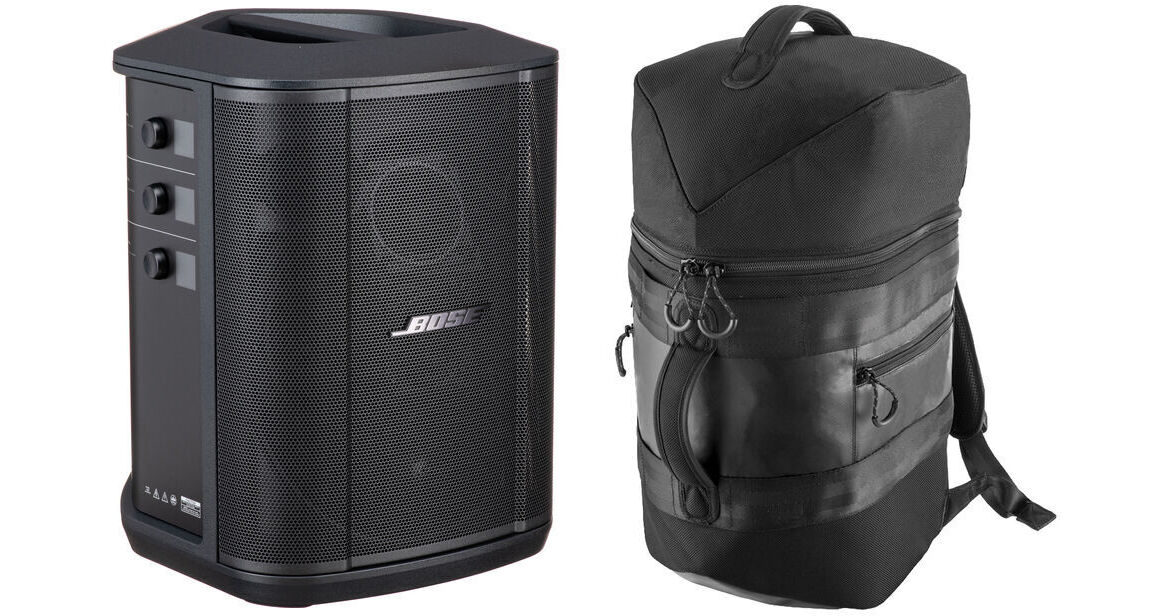
For an all-in-one PA system with protection from on-the-road wear and tear and easy transportation, check out this B&H Kit, which combines the Bose S1 Pro+ Multi-Position PA System with a custom S1 Pro backpack.
More Details
Kit Contains:

For an all-in-one PA system with protection from on-the-road wear and tear and easy transportation, check out this B&H Kit, which combines the Bose S1 Pro+ Multi-Position PA System with a custom S1 Pro backpack.

Bose S1 Pro+ Wireless PA System with Bluetooth

Audio professionals, musicians, DJs, and anyone looking for accurate sound reproduction will be thrilled with the Bose S1 Pro+ Multi-Position PA System, an all-in-one portable PA system that can be used in a variety of ways, including a floor monitor, practice amplifier, Bluetooth speaker, or a full PA setup. The S1 Pro+ includes support for optional Bose wireless transmitters for microphones and instruments. The optional transmitters are stored and charged from within the S1 Pro+'s enclosure.

The full-featured, 3-channel mixer with reverb offers two combo XLR-1/4" inputs, a 1/4" aux input, a 3.5mm stereo input, and Bluetooth for streaming audio from up to 30' away. The onboard ToneMatch processing is designed to enhance vocals and instruments. The S1 Pro+ has built-in sensors, which detect multiple aiming positions, allowing for optimal sound in nearly any position including on a table, on the floor, mounted on a standard 35mm speaker stand, or used as a wedge monitor. The integrated lithium-ion battery allows you to power-up and play your Bose S1 Pro+ system for up to 11 hours at moderate volume levels and up to 5 hours at full volume for live performances.

Make Music that Moves
Musicians transform sound into something more. It's how you get us off our feet. Make us move, shake, sing, and leave a lasting impression long after the track ends. This ability to inspire is why the S1 Pro+ Wireless PA System is for you. It's the go-to powerful, portable, all-in-one portable PA speaker for live performance.
Flexible Deployment
  • Elevated surface: place the system on an elevated surface to project sound clearly and evenly throughout your audience.
  • Tilt-back: for performances where your audience is close to you, tilt the system onto its back edge. For best performance, stand or sit to the side of the system to avoid blocking sound.
  • Monitor: to use the system as a personal floor monitor, place it horizontally on the ground in front of you and tilt it onto its side edge.
  • Speaker stand: place one or more systems on a speaker stand (sold separately) for general sound reinforcement.
The Power of Pro Sound
With more powerful performance, S1 Pro+ gets even louder than its predecessor. So you can be a vibe any time you bring this portable PA system to a gig.

An integrated 3-channel mixer lets you bring the loud:
  • Channels 1 and 2 for mics and instruments
  • Channel 3 for Bluetooth streaming or AUX input
Bring It Everywhere
Portable with a handle, it's easy to go from your car to the curb to the venue—whether it's the neighborhood bar or your neighbor's backyard. Or make it both with this battery-powered PA system that offers up to 11 hours of play time.
Plug & Play without Wires
Leave the cables in your case, simplify setup, and move freely during the show when you add wireless RF transmitters for mics and instruments (sold separately).

How they work:

  • Plug them in; they pair effortlessly
  • Play up to 4 hours
  • Store and charge them in the portable PA speaker
An Audio Engineer in Your Pocket
Control this professional Bluetooth speaker with the Bose Music app, plus get the entire ToneMatch presets library and keep track of Bluetooth connections.
Everything You Need for a Great Show
Cycle through volume, treble, and bass for each channel and access ToneMatch presets and reverb settings for Channels 1 and 2. Change positions and the OLED displays automatically rotate.
Mix Work and Play
Between shows, stream music with your phone to add professional sound to your party. The S1 Pro+ is our most powerful Bluetooth party speaker. And if your friends think they can sing better than you, connect a mic, throw a karaoke night, and prove them wrong.
UPC: 017817837347
Bose S1 Pro Backpack

The Bose S1 Pro Backpack is a durable bag designed for hands-free transport of the Bose S1 Pro system. The backpack features three zippered compartments for storing and protecting cables and accessories, while the two adjustable shoulder straps, molded foam back panel, and handles allow you to comfortably carry your S1 Pro system anywhere you travel.

  • Durable, compact design with adjustable shoulder straps and a molded foam back panel for comfortably carrying your S1 Pro system. Slim enough to stow the S1 Pro system in most airplane overhead bins
  • Three zipped storage compartments allow you to safely transport cables and small mixers
  • Convenient carry handles at the top and back allow multiple carry options
UPC: 017817792219
Kit Contains:

Bose S1 Pro+ Wireless PA System with Bluetooth

Key Specs
Speaker Configuration
2-Way Loudspeaker
Number of Input Channels
3 (2 x Mono, 1 x Stereo)
Audio I/O
Combo XLR-1/4" / XLR / 1/8" (3.5 mm)
USB I/O
1x USB-C (Service)
Wireless
Bluetooth
Portable PA System
Speaker Configuration
2-Way Loudspeaker
Number of Input Channels
3 (2 x Mono, 1 x Stereo)
Signal Processing
EQ
Yes
Semi-Parametric EQ
No
Effects
Reverb
Filters
No
Connectivity
Audio I/O
2x Combo XLR-1/4" TS Balanced/Unbalanced Mic/Line/Inst Input
1x 1/4" TRS Balanced/Unbalanced Aux Input
1x 1/8" / 3.5 mm TRS Aux Input
1x XLR 3-Pin Balanced Line Output
USB I/O
1x USB-C (Service)
Mobile App Compatible
Yes: Android & iOS
App Name: Bose Music App
Functionality: Adjust Settings, Remote Control, Setup, View Live Feed
Network I/O
No
Wireless
Wireless
Bluetooth
Max Wireless Range
Bluetooth:
30' / 9.1 m
Power
Battery Type
1x Built-In Rechargeable Lithium-Ion
Approximate Battery Life
11 Hours (Low Power)
5 Hours (Max Power)
Battery Charging Time
4 Hours
Physical
Transport Options
1x Handle (Top)
Mounting
1.4" / 35 mm Pole Socket (Bottom)
Construction Material
Aluminum, Polypropylene
Environmental Resistance
No
Dimensions
13.1 x 11 x 9.4" / 332.7 x 279.4 x 238.8 mm
Weight
14.4 lb / 6.5 kg
Packaging Info
Package Weight
19.5 lb
Box Dimensions (LxWxH)
15.9 x 14.3 x 12.8"

Bose S1 Pro+ Reviews

See any errors on this page?

How many of these speakers can be linked ...

How many of these speakers can be linked wirelessly? Just 2 or can you do 4?
Asked by: Matthew
You have the ability to link two S1 Pro+ speakers together for wireless listening.
Answered by: Bose Support
Date published: 2025-08-27

Are there any issues with pairing this version of ...

Are there any issues with pairing this version of the Bose S1 Pro + with the original version?
Asked by: Nick
As the S1 Pro system uses the Bose Connect app and the S1 Pro+ system uses the Bose app, it's not possible to connect these two systems wirelessly. However, a cabled solution does exist; it would be possible to take a LINE OUT from one speaker and run this into the 3.5mm stereo input on the other speaker. This would keep Channels 1 and 2 completely free on the second speaker.
Answered by: Bose Support
Date published: 2024-08-05

Is the Bose S1 Pro battery user repaceable?

Is the Bose S1 Pro battery user repaceable?
Asked by: Danny
Hello Danny, yes it is possible to replace the battery of the S1 Pro speaker.
Answered by: Bose Support
Date published: 2024-09-06

Can Bose S1 Pro+ interface with computer for Zoom

Can Bose S1 Pro+ interface with computer for Zoom or video transmission. What add'l equipment is needed?
Asked by: Cynthia
When using the Bose S1 Pro+ Wireless PA System Kit with Sennheiser Handheld Mic and Mic Transmitter for this application, the wireless mic system would only work with the speaker directly. It will not work to transmit that audio to the other side of the Zoom call. Furthermore, you would need to use an audio interface to output the audio from the Zoom call to the Bose S1 Pro+ speaker, and to be able to connect an external microphone so that the microphone can be heard on the other side of the zoom call and the Bose S1 Pro+.
Answered by: David M
Date published: 2026-05-03

Does the speaker system come with an adjustable ...

Does the speaker system come with an adjustable stand?
Asked by: Toy
The S1 Pro+ can be positioned in an angled up right or angled side position. Optionally it can be mounted to a 1.38" post on a tripod via the integrated pole cup.
Answered by: Bose Support
Date published: 2024-08-02

Line means from house audio mixer main output ...

Line means from house audio mixer main output goes straight to S1 Pro plus?
Asked by: Joseph Dizon
You can plug your audio mixer's main output straight into the S1 Pro+, yes. The best input to use for this would actually be the small headphone port (between "AUX" and the Bluetooth button). This will keep Input 1 and Input 2 free.
Answered by: Bose Support
Date published: 2024-09-02

What is the best hard wired connection for a ...

What is the best hard wired connection for a iPhone. 1/4 balanced Aux input on Input 3? Best cable to use? 1/4 TSR to UCBc?
Asked by: Michael
The recommended wired connection for the Bose S1 Pro+ Wireless PA System with Bluetooth is the 1x 1/8"/3.5 mm TRS Aux Input. If the iPhone has a USB-C port, we suggest this cable: https://bhpho.to/490Ttx0
Answered by: Daniel O
Date published: 2024-11-22

What wattage speaker?

What wattage speaker?
Asked by: Melodye
It works well for open areas with up to about 150 people.
Answered by: JETHRO
Date published: 2026-02-10
  • y_2026, m_6, d_3, h_11CST
  • bvseo_bulk, prod_bvqa, vn_bulk_3.0.46
  • cp_1, bvpage1
  • co_hasquestionsanswers, tq_16
  • loc_en_US, sid_1976122, prod, sort_[SortEntry(order=HAS_STAFF_ANSWERS, direction=DESCENDING)]
  • clientName_bhphotovideo
Whatever You Need, We've Got It