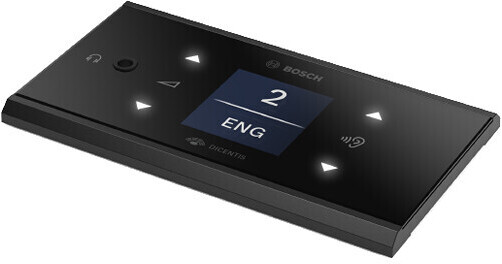
The DCNM-FSLP Flush Language Selection Panel from Bosch allows DICENTIS system users to receive audio programming in their preferred language, directly in their headphones. Language selection is automatically activated when headphones are connected to the device.
The participant can scroll through the available languages using the 1.44" display's illuminated touch buttons. If a preferred language for the participant is defined in the system, the language selector automatically uses the defined language.
Available languages can be displayed in native characters, or as ISO abbreviations. Volume can also be controlled via the LCD touch panel. The DCNM-FSLP connects through an RJ12 connector for data transfer, and to the DCNM-FBD2 headset connector for audio transfer.
- Language selection in original characters
- Language selection in ISO abbreviation form
- Language numbers
- Display is off when headphones are not connected
- Display switches off automatically after not using any buttons for approximately eight seconds, to minimize distractions from the meeting
- Panel allows you to control headphone volume so interpretations or floor can be heard clearly, even when there is excessive background noise
- To prevent acoustic feedback, volume is automatically reduced when participant is speaking
- 1.44" display with four touch buttons
- LED indicators: Left side—headphone volume control. Right side—language selector
- Control interface, through RJ12, to the DCNM-FBD2 and other devices
- Connects to a DCNM-FBD2 through a CAN connection and through the headphone connection for audio
- DCNM-FBD2 supports one DCNM-FSLP per side
- One 3.5 mm stereo headphone jack