
Holiday Headstart

LG Magic Remote Control (2026)

BH #LGMRC26 • MFR #MR26GA
Print
LG Magic Remote Control (2026)
Key Features
  • For Select 2024-2026 LG TVs
  • Mouse-Like Cursor Control
  • Built-In Mic for Voice Assistant Access
  • AI Button for AI Hub & AI Apps
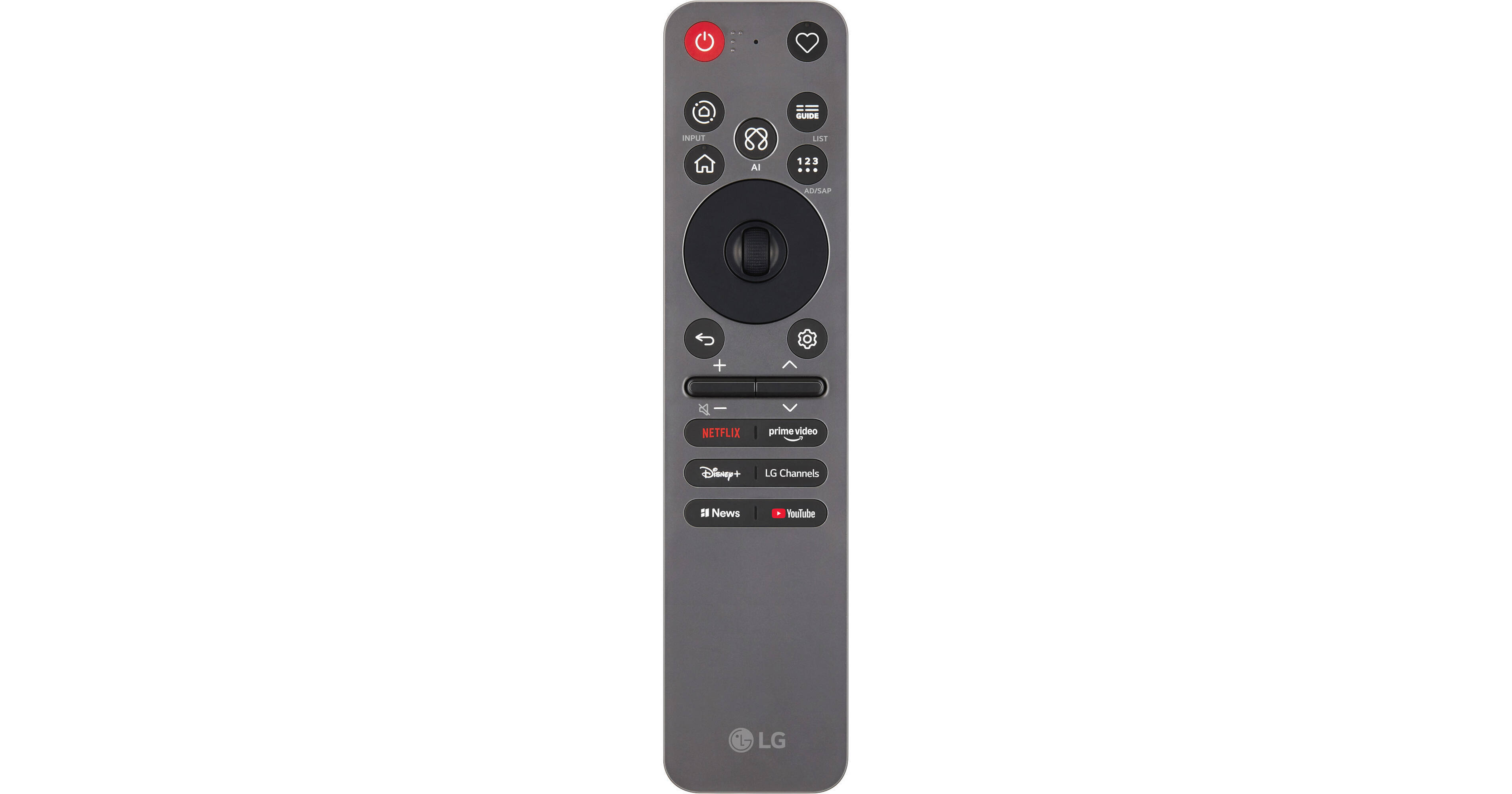
With mouse-like control and convenient voice access, the 2026 Magic Remote Control from LG makes it easy to navigate menus and find something to watch on your compatible TV. By default, it works like a traditional remote, with power, channel, and volume selections, but it's so much more than that. Integrated buttons give you direct one-click access to popular services, such as Netflix, Prime Video, YouTube, Disney+, and more. For long lists of movie titles, TV shows, and websites, you can use the integrated scroll wheel. For even more convenience, just point the remote at the TV like a mouse or speak your command to the built-in microphone.
More Details
In Stock
No Store Display
Free 2-Day Shipping
Protect Your Gear
Add a protection plan from $5.99
Ask an Expert
800-606-6969

LG 2026 Magic Remote Control Overview

With mouse-like control and convenient voice access, the 2026 Magic Remote Control from LG makes it easy to navigate menus and find something to watch on your compatible TV. By default, it works like a traditional remote, with power, channel, and volume selections, but it's so much more than that. Integrated buttons give you direct one-click access to popular services, such as Netflix, Prime Video, YouTube, Disney+, and more. For long lists of movie titles, TV shows, and websites, you can use the integrated scroll wheel. For even more convenience, just point the remote at the TV like a mouse or speak your command to the built-in microphone.

Voice Control
With TVs that support voice control, such as via Amazon Alexa or Google Assistant, you can activate them and speak searches and commands directly into the Magic Remote.
Air Mouse
On compatible TVs, point the Magic Remote at the screen and watch as a cursor smoothly moves to where you aim. It's a convenient and intuitive way to navigate dense menu screens while searching for something to watch.
AI Button
Use the AI button to access the AI Hub, which provides a variety of personalized AI features, such as AI Chatbot, AI Voice ID with My Page, Multi AI Search, AI Concierge, AI Picture Wizard, and AI Sound Wizard.
TV Compatibility
The 2026 Magic Remote Control is compatible with the following TV models:

  • 2026 OLED: W6, G6, C6, and B6 series
  • 2026 MRGB: 95B series
  • 2026 QNED: 92B, 84B, 75B, and 74B series
  • 2026 NANO: NU85, NU71, and NU70 series
  • 2026 Lifestyle LX7B Series
  • 2025 and 2024 LG TVs
UPC: 195174142905

LG 2026 Magic Remote Control Specs

General
Compatibility
LG W6 (2026) / G6 (2026) / C6 (2026) / B6 (2026) / 95B (2026) / 92B (2026) / 84B (2026) / 75B (2026) / 74B (2026) / NU85 (2026) / NU71 (2026) / NU70 (2026) / Lifestyle LX7B / 2025 / 2024
Power
Power Source
Battery
Physical
Color
Black
Dimensions
7.52 x 1.27 x 1.23" / 191.01 x 32.26 x 31.24 mm
Weight
0.21 lb / 95.25 g
Packaging Info
Package Weight
0.355 lb
Box Dimensions (LxWxH)
9.35 x 3.1 x 1.35"

LG 2026 Magic Remote Control Reviews

Infrared Codes For Audio Receivers NOT supported

By NumbersNic62
Rated 1 out of 5
Date: 2026-11-06

The MR26GA remote for the OLED65C26PUA does not support Infrared (IR) codes for audio receivers, just sound bars. Despite LG having IR codes for the Denon AVR-1906 receiver attached to the optical-out port, the sound does play but a separate remote is necessary to turn volume up/down, and to turn the audio receiver on/off. LG could put the IR codes in the software, but explained in the AI chat this "may not be supported" but did not explain why. LG has the IR codes because the prior LG HDTV did have the codes and the universal remote settings allowed this to be set up. And, there is NO MUTE button. They say it can be programmed but why require a buyer/user to add this?

Almost great

By Cerealcat
Rated 2 out of 5
Date: 2026-10-16

We love everything about this remote, except the roller ball button broke very quickly and is stuck now pushed into the face of the remote making using it extremely difficult. If only it was built a little better, this would be my favorite remote I've ever used because otherwise it is very intuitive!

See any errors on this page?

how to use this remote?

how to use this remote?
Asked by: William
The LG Magic Remote Control (2026), BH # LGMRC26, navigates like a computer mouse and works via IR.
Answered by: Mark S
Date published: 2026-10-08
  • y_2026, m_11, d_9, h_6CST
  • bvseo_bulk, prod_bvqa, vn_bulk_3.0.50
  • cp_1, bvpage1
  • co_hasquestionsanswers, tq_1
  • loc_en_US, sid_1996087, prod, sort_[SortEntry(order=HAS_STAFF_ANSWERS, direction=DESCENDING)]
  • clientName_bhphotovideo
Whatever You Need, We've Got It