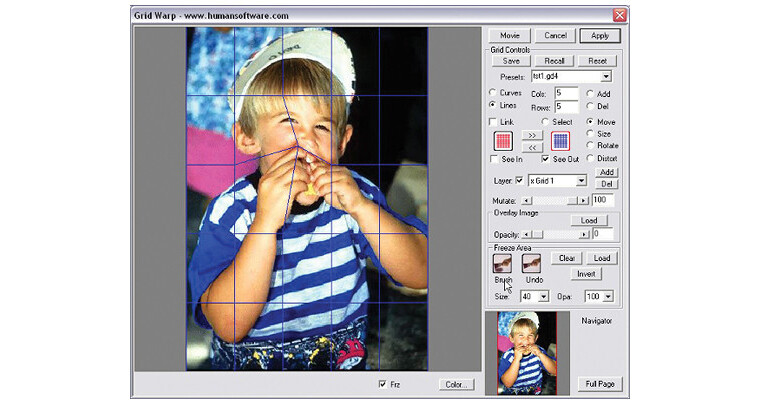
Squizz is an incredible plug-in with wich you can directly distort any Grayscale, LAB, RGB, CMYK images or even directly on a layer, within a selection. It features Squeeze, smear, wrap, twist, pinch, distort, expand your photos anyway you like...without limits!
Brush tool works like Silly-Putty
With the exclusive Hand Distorting Virtual Brush Tool, you can brush and sculpt directly onto your photos and create instantly amazing distortion effects, in real time on picture of any size and with unlimited undo. An unlimited undo allows you to brush back with more or less strength to adjust the change.
A Bezier Grid for sophisticated distortions
A unique Grid Warping with the help of a mesh lets you move points of the overlay grid in any direction to expand, pinch and distort like a rubber desktop or you can turn your grid as a set of Bezier curves. You can adjust the number of steps independently in X and Y direction on your grid. You can recall another image as a template to precisely adjust your grid and even save any distortion effect and reapply it on another picture.
Double input Grid to reverse perspectives
Squizz! features a double Input grid, so you can achieve perspective correction in a few clicks. It is very easy to achieve this effect with Squizz, simply map the Input Grid around the image to distort - automatically Squizz will straighten the image to the Output grid.
With Envelope you can warp images as easy as paths
To make your life even easier we have added this envelope tool. Need to warp a bitmap to a specific shape (flag, cone, bottle, etc...). This feature is super easy to use - just draw a rectangle over the start image, then pull and push the corners to create a new shape. the image will then follow the shape exatly.
Create real morphs inside Photoshop or PhotoPaint
You can do morphs with Squizz, no other tool is needed! Simply distort one image and register it as a Key Frame, you can do the same with another or more images. Squizz will handle all the in-betweening and create a QuickTime or AVI file. Use GifBuilder and you will get a stunning animation - great for your web page!