Video Chat with a Pro Audio Expert - Live

RDL PT-AMG2 Audio Generator/Level Monitor

BH #RDPTAMG2 • MFR #PT-AMG2
Print
RDL PT-AMG2 Audio Generator/Level Monitor
Key Features
  • Mic- and Line-Level Audio Tone Metering
  • Selectable Mic/Line Input/Output
  • Precision Stable Audio Reference Level
  • Balanced and Unbalanced Inputs/Outputs
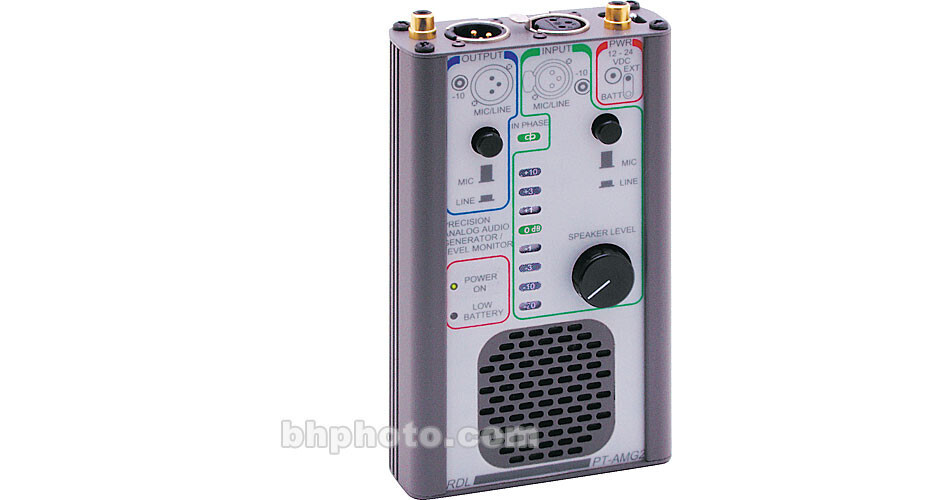
The PT-AMG2 from RDL, is a precision analog-audio generator/level monitor, that features a precision audio oscillator, precision level meter and a monitor speaker. The portable unit is a good choice for applications requiring both a stable audio signal source, and precision metering for audio system verification, alignment and testing.

The oscillator operates at 700Hz. Its output is compared against an internal, temperature-stable reference that provides the stable output required for accurate bench-top audio testing. This section features two outputs, one balanced (selectable between microphone and line level,) the other unbalanced. The outputs are able to maintain consistent level, regardless of impedance.

The audio metering circuit features two inputs, again one balanced (selectable between microphone and line level,) the other unbalanced. Either input may be used to feed the metering circuit, which is automatically referenced to the input being used. The LED meter is backlit, making the PT-AMG2 readable in light or dark environments.

The unit is also able to adjust gain in multiple directions, between microphone and line, balanced or unbalanced levels. It operates either from two internal 9V batteries, or from an external power supply. Neither is included. When operated from the batteries, a "Low Battery" LED glows steadily when less than one hour operating time remains.

More Details
In Stock
No Store Display
Free 2-Day Shipping
Protect Your Gear
Add a protection plan from $59.99
Ask an Expert
866-264-7509
See any errors on this page?

Does it have warranty? If yes, how long?

Does it have warranty? If yes, how long?
Asked by: Peir Yau
3 year warranty. You can see it listed in the "In The Box" section on your right-hand side of the Overview Tab.
Answered by: David M
Date published: 2019-10-31
  • y_2026, m_6, d_6, h_12CST
  • bvseo_bulk, prod_bvqa, vn_bulk_3.0.46
  • cp_1, bvpage1
  • co_hasquestionsanswers, tq_1
  • loc_en_US, sid_290025, prod, sort_[SortEntry(order=HAS_STAFF_ANSWERS, direction=DESCENDING)]
  • clientName_bhphotovideo
Whatever You Need, We've Got It