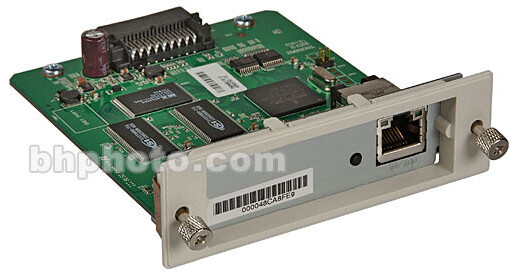
Epson EpsonNet 10/100 Base T Internal Print Server 5

BH #EPIPS7800 • MFR #C12C824341
Print
Epson EpsonNet 10/100 Base T Internal Print Server 5
Key Features
  • Provides Network Interface
  • High Performance
  • Req. Optional Interface Slot
  • Supports Multiple Protocols
The EpsonNet 10/100 Base Tx Int. Print Server 5 is a network interface that plugs into an optional interface slot of an Epson device to enable the device to connect directly to your network. Because the network interface supports multiple protocols and automatically detects protocols on your network, you can print from Microsoft Windows, Apple Macintosh, UNIX, and IBM OS/2 applications.

The Included software provided with the network interface on the CD-ROM are very useful when you set up the network interface and configure and modify the settings of the network interface.

  • EpsonNet Config for Windows is a Windows-based configuration utility for administrators that allows you to configure the network interface for various protocols such as TCP/IP, NetWare, MS Network, AppleTalk, IPP, and SNMP.
  • EpsonNet Config for Macintosh is a Macintosh-based configuration utility for administrators that allows you to configure the network interface for various protocols such as TCP/IP, AppleTalk, and IPP.
  • EpsonNet Config with Web Browser is a Web-based configuration utility that allows you to configure the network interface for various protocols such as TCP/IP, NetWare, MS Network, AppleTalk, IPP, and SNMP.
  • EpsonNet Print is a utility that enables TCP/IP printing for Windows. (Windows XP/2000/Server 2003/NT 4.0 also support OS standard LPR printing.)
  • EpsonNet Internet Print is a utility that supports printing across the Internet using Internet Printing Protocol for Windows 98/95/NT 4.0.
  • EpsonNet WebManager is a Web-based utility that helps network administrators to easily manage network devices.
  • EpsonNet SetupManager is a utility that provides a simple printer installation and configuration tool for network administrators, and an easy network printer installation process for clients.
More Details
No Longer Available
No Store Display
Ask an Expert
866-264-7509

Epson C12C824341 Overview

The EpsonNet 10/100 Base Tx Int. Print Server 5 is a network interface that plugs into an optional interface slot of an Epson device to enable the device to connect directly to your network. Because the network interface supports multiple protocols and automatically detects protocols on your network, you can print from Microsoft Windows, Apple Macintosh, UNIX, and IBM OS/2 applications.

The Included software provided with the network interface on the CD-ROM are very useful when you set up the network interface and configure and modify the settings of the network interface.

  • EpsonNet Config for Windows is a Windows-based configuration utility for administrators that allows you to configure the network interface for various protocols such as TCP/IP, NetWare, MS Network, AppleTalk, IPP, and SNMP.
  • EpsonNet Config for Macintosh is a Macintosh-based configuration utility for administrators that allows you to configure the network interface for various protocols such as TCP/IP, AppleTalk, and IPP.
  • EpsonNet Config with Web Browser is a Web-based configuration utility that allows you to configure the network interface for various protocols such as TCP/IP, NetWare, MS Network, AppleTalk, IPP, and SNMP.
  • EpsonNet Print is a utility that enables TCP/IP printing for Windows. (Windows XP/2000/Server 2003/NT 4.0 also support OS standard LPR printing.)
  • EpsonNet Internet Print is a utility that supports printing across the Internet using Internet Printing Protocol for Windows 98/95/NT 4.0.
  • EpsonNet WebManager is a Web-based utility that helps network administrators to easily manage network devices.
  • EpsonNet SetupManager is a utility that provides a simple printer installation and configuration tool for network administrators, and an easy network printer installation process for clients.

Provides a High Performance Network Interface
Connects an Epson device equipped with an optional interface slot to the network.
Supports multiple protocols, such as TCP/IP, NetWare, NetBEUI, IPX/SPX, AppleTalk, and IPP.
Supports 100Base full duplex, 100Base half duplex, 10Base full duplex, and 10Base half duplex.
Supports DHCP.
Supports Automatic Private IP Addressing (APIPA) that assigns an IP address automatically to the network interface even if there is no DHCP server on the network.
Supports the Dynamic DNS function.
Supports SNMP and MIB.
Support Rendezvous on Mac OS X (10.2.4 or higher).

Epson C12C824341 Specs

System & Software Requirements
Supported Operating Systems
Windows 95 OSR2, 98SE, NT 4.0 (with Service Pack 6 or higher), 2000, Me Server 2003, XP
Macintosh OS 9.1 or later, OS X (10.2 or later)

Supported Epson Devices
The network interface can be installed for the following Epson devices (as of March, 2005)

Ink Jet Printers
EPSON Stylus Pro10600
EPSON Stylus Pro 4000
EPSON Stylus Pro 4400/4800
EPSON Stylus Pro 7600
EPSON Stylus Pro 9600

Laser Printers
EPL-N2500
EPL-N7000
EPL-N3000
EPL-6200
EPSON AcuLaser 2600
EPSON AcuLaser C7000
EPSON AcuLaser C8600
EPSON AcuLaser C9100
EPSON AcuLaser C4100
EPSON AcuLaser C1900
EPSON AcuLaser C900
EPSON AcuLaser C2600

Impact Dot Matrix Printers
DFX-9000
DFX-5000+
FX-2190/890
LQ-2180
LQ-2090/590
LQ-680/680pro
DLQ-3500

Epson C12C824341 Reviews

See any errors on this page?
Whatever You Need, We've Got It