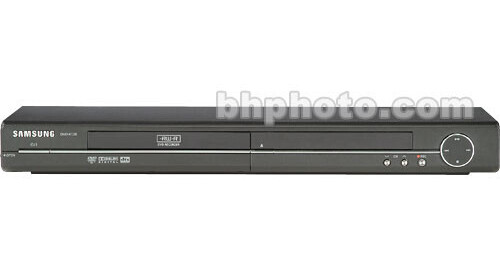
Samsung's DVD-R130 DVD Recorder is a multiformat single deck recorder that can record video content either on the DVD-RAM, DVD-R or DVD-RW discs. You can can also edit or create a playlist for digital video. The DVD-R130 is also a player; use it for DVD-Video, CD-AD, CD-R and CD-RW playback. The DVD-R130 has several useful features such as Selectable Recording Mode, Timer Recording, Title and Playlist creation and has component video output for connection to a progressive scan compatible television and one IEEE I394 DV input terminal to connect and record digital video content from a DV Camcorder.
Recordable DVD Media
Record your favorite video content in high-quality on the DVD-RAM, DVR-R and DVD-RW discs. Depending on the recording mode, you can record up to 16 hours of video on a 9.4GB DVD-RAM disc. Similarly, the recording time can go up to 8 hours for a 4.7GB DVD-RAM/DVD-R/DVD-RW disc.
Media Playback
Plays video content recorded on the DVD-RAM, DVD-R, DVD-RW discs. You can also enjoy JPEG, Video CD, CD-DA, CD-R and CD-RW playback.
One Touch and Timer Recording
Recording is extremely easy with this DVD recorder. Press the REC button to record up to 30 minutes on DVD discs. If you want to record more, press the button again. it'll record additional 30 minutes. You can also set the recording timer.
Preset Recording Quality Setting
Provides you five preset recording quality setting such as XP, SP, LP and EP. Depending on your choice, this feature allows you to extend recording time for DVD discs. For example, if you choose EP instead of XP, you can extend recording time by a considerable amount. Another recording mode is FR that is flexible in recording quality; it depends on available recording time on the disc.
Progressive Scan Component Video Output
Use DVD-R130 component-video output to feed high-quality video signal to your TV. If your TV supports the more stable and flicker-free progressive scan, image quality is further enhanced due to higher resolution (compared to interlaced video).
Front Panel A/V and IEEE 1394 DV Input
In addition to RCA composite video, and RCA L/R audio inputs at the front panel, this DVD recorder has one IEEE I394 DV input terminal to connect and store video content from a DV Camcorder
Convenient Editing
Use the integrated menu system to edit video content. You can perform basic (Title List) and advanced editing (Play List) on DVD-RAM and DVD-RW discs. For the Title List, you can rename, lock or delete a title. Also, create a Playlist and then play, edit (even modify/replace), rename the entries in the Playlist.
Parental Control
Allows you to lock DVD discs to prevent children from viewing unsuitable content. Parental control allows you to block the DVD from viewing, based on an easy-to-use numerical system.