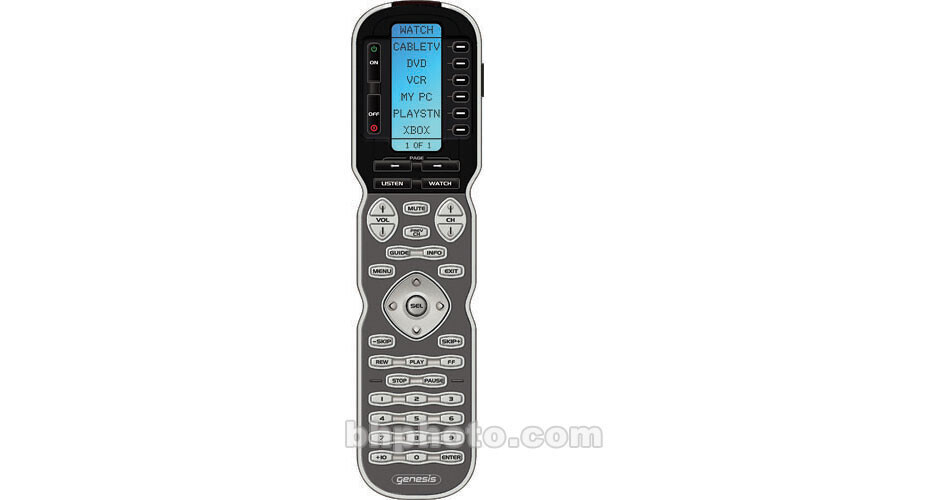
Universal Remote MX-900 Universal Remote Control

BH #UNMX900 • MFR #MX-900
Print
Universal Remote MX-900 Universal Remote Control
No Longer Available
No Store Display
Ask an Expert
800-606-6969

Universal Remote MX-900 Overview

The Universal Remote MX-900 Genesis is an easy-to-use advanced universal remote control that operates your audio and video equipment with complete satisfaction. It is a pre-programmed remote -- its Windows-based PC software MX Editor has 1,500 "code sets" -- just enter the brand name and number of your component that you want to control. MX Editor can also be used for Mac computer. Use the MX Editor to update the IR database over the Internet for any new model or brand.

This unique remote can control a maximum of 20 different devices; it has 912 macros for easy programming that allows you to take advantage of one-touch operation. For convenience, this remote has a LCD display as well as latest EL technology to backlight all the buttons brightly. It transmits both infrared (IR) and radio (RF) signals for control purposes. For radio signals; use the optional addressable base stations. Use the FAV button to select any of the 50 favorite channels. Other attractive features include a centrally located joystick, one-hand ergonomics and laser etched buttons.

IR and RF Signals
It's capable of transmitting both IR and RF signals to control devices. The range for IR is up to 60 feet whereas the range for RF is up to 100 feet. You must use optional addressable base stations to control devices using RF.
Pre-Programmed Method
You can easily setup the remote using the pre-programmed method. It has a Windows-based PC Software MX Editor that has 1,500 "code sets" or IR database for different models and brands. You need to enter just the brand and model number. You can also update this IR database over the Internet for any new model or brand. MX Editor can be used for Mac computer as well.
Macro Programming
Perform easy macro programming for a set of devices that can be controlled using one button. Automate all the steps (maximum 190 steps or commands) to control these devices for your convenience. It has capabilities for 912 macros.
Flash Memory
It has a non-volatile flash memory. Use this memory to store all your settings for up to 10 years. The configuration data is retained even when you replace the dead batteries after this considerable period of time.
LCD Screen and Backlight
This remote features an 1.4 x 2.1" LCD for display purposes. For backlighting the buttons, use the LIGHT button. This allows you to enjoy your entertainment system in the dark.
Favorite Channel
This convenient feature allows you to surf all your favorite channels without entering a channel number. Just setup each of the favorite channel button. Once setup, it allows you to choose one of the 50 favorite channels using the FAV button.
RF Advantage
In addition to extending the range of your remote up to a distance of 100 feet through walls, floor and doors, it can be programmed to operate equipments in different locations of your house. You just need to place and install additional addressable RF base station(s) at each location. The remote can talk to a maximum of 15 RF base stations, i.e., you can control components at 15 locations.

Universal Remote MX-900 Specs

Remote
IR Signal
Yes
IR Learning
Yes, Standard frequencies (15kHz to 460kHz)
RF Signal
Yes, 418MHz
RF Channels
Not Specified
RF Transmission Base
No
Operating Distance
IR: 30 ~ 50 feet
RF: 50 ~ 100 feet
Max Controlled Devices
40
Memory
8 Megabits of Flash Memory
Convenience
Touch Screen
No
LCD Size
1.4 x 2.1" (3.6 x 5.3 cm)
Display Colors
Not Specified
LCD Backlight
Yes
Button Backlight
Yes
Macro Capability
Yes, Up to 255 steps each, however nesting is allowed
Connector
Not Specified
Audio
No
Digital Media Slot
No
General
System Requirements
PC or MAC
Battery Type
AAA x 4
Battery Life
Not Specified
Dimensions
2.2 x 8 x 1.2"
Weight
12 oz
Warranty
1-Year Parts and Labor
Packaging Info
Package Weight
1.1 lb
Box Dimensions (LxWxH)
12.1 x 7.2 x 2.1"

Universal Remote MX-900 Reviews

See any errors on this page?
Whatever You Need, We've Got It