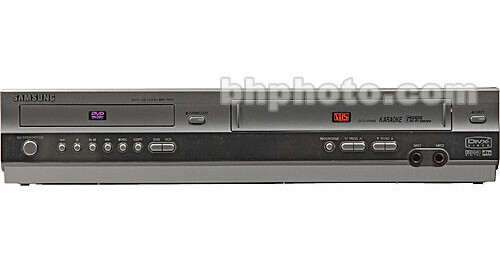
Samsung DVD-940K Multi System DVD/VCR Player

BH #SADVD940KD • MFR #DVD940K
Print
Samsung DVD-940K Multi System DVD/VCR Player
No Longer Available
No Store Display
Ask an Expert
800-606-6969

Samsung DVD940K Overview

The Samsung DVD-940 Multisystem DVD/VCR Player is the perfect unit for people hesitant to discard their old VHS tapes but eager to move forward into DVD technology. With this player you get top-quality audio and video no matter what you're watching.

On top of that you get a system chock full of features you're sure to love. Set the ShowView codes and recording couldn't be easier. You can ever pre-set up to six programs to record. Or if you're looking to get that marathon on tape, set the timer and it will automatically turn itself off when you're done recording, no extraneous in and out key strokes. You can even zip right to the spot your looking for with the automatic indexing feature. Everything you record is given an index and you can hop between them until you find the show you want.

All of these features plus many, many more tucked into this one handy unit that gives you the versatility of being DVD player, a VHS player and recorder, a CD system and a JPEG viewer.

Note:
This multi system or multi zone player may need a system converter
ShowView Record
The ShowView system lets you record a program by using a code number for each channel. This gives you a simple and efficient way to program your recorder for up to six programs at a time.
DVD/VCR
If you're not ready to throw away your VHS tapes but you'd like to begin using DVDs, then this is the player for you. Keep your archives and view them when you want with top-quality audio and video features. Or pop in a new DVD and experience the superior quality of digital technology.
Indexing
Each time you record an event onto VHS cassette an index is created, allowing you to jump from program to program until you find what you are looking for.
Assemble Edit
This feature lets you start recording at a specific position on the tape while maintaining a smooth scene change.
Universal Remote
If you have a Samsung television or compatible brand then your remote control will act as a universal remote. Enter the codes supplied in the instruction manual, if the set turns off then your remote will control everything.
Parental Controls
Set the viewing limits in your family with help from your DVD-940. There are up to eight different rating levels on a disc and you can simply program your player to refuse the disc unless a password is used.
Repeat Play
Use the repeat play button and select the A (in point) and B (out point) and review that section as many times as you'd like.
Bookmark
Set a marker and then you can return to that place on that disc anytime you'd like. If you find that you never seem to have time to view an entire show this is the perfect feature for you.

Samsung DVD940K Specs

Video
System
NTSC, PAL
DVD
Region
1, 6
Disc Playback Formats
Video: DVD, SVCD
Audio: CD, MP3, WMA
Pictures: Kodak Picture CD, JPEG CD
Progressive Scan
No
HD Upconversion
No
Dolby Digital / DTS Compatibility
Yes
Slow Motion Playback
Yes
Frame-by-Frame Playback
Yes
VCR
Format
S-VHS/VHS
Number of Heads
Not Specified by Manufacturer
Record Speeds
SP/LP
Playback Speeds
SP/LP
Repeat Playback
Yes
Slow Motion
Yes
Frame Advance
Yes
Audio Signal
Hi-fi stereo
VCR Plus
No
Commercial Advance
No
Program Timer Weeks/Events
4/6
Convenience
Digital Media Slot
N/A
Tuner
Not Specified by Manufacturer
Remote Control
Infrared remote control (universal with some models)
Connectors
Inputs
VCR only
A/V Scart: RCA x2
Antenna: x1
Stereo Audio: x1
Outputs
VCR/DVD
A/V Scart: RCA x2
S-Video: x1
Stereo Audio: RCA x1
VD only
DVI: x1
Coaxial Audio: x1
Optical Audio: x1 out
Control Ports
N/A
General
Power Requirements
AC 220 - 240V, 50 Hz
Dimensions
17.0 x 3.3 x 11.1" (430 x 84 x 282 mm)
Weight
8.6 lbs (3.9 kg)
Color
Black
Warranty
1-Year Parts and 90-Day Labor
Packaging Info
Package Weight
10.75 lb

Samsung DVD940K Reviews

See any errors on this page?
Whatever You Need, We've Got It