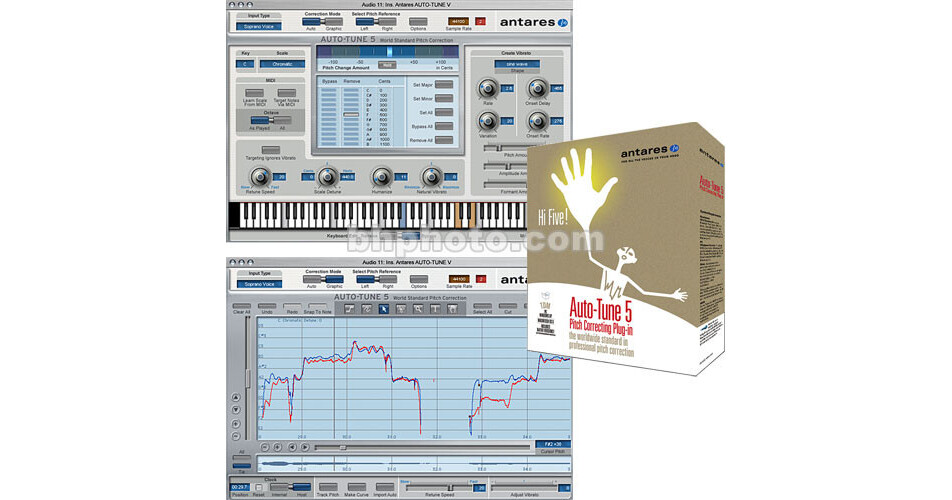
Antares Audio Technologies Auto-Tune 5 Plug-In (TDM)

BH #ANATTDM5 • MFR #23005
Print
Antares Audio Technologies Auto-Tune 5 Plug-In (TDM)
No Longer Available
No Store Display
Ask an Expert
800-606-6969

Antares Audio Technologies Auto-Tune 5 (TDM) Overview

Auto-Tune 5 (TDM) from Antares is a TDM plug-in for Digidesign HD systems running on Mac or Windows computers, that corrects intonation problems in vocals or solo instruments, in real time, without distortion or artifacts, while preserving all of the expressive nuance of the original performance.

The plug-in now contains a further enhanced pitch detection algorithm that is especially useful when dealing with performances that exhibit marginal quality audio, such as noisy or poorly isolated tracks. The interface has also been redesigned.

The previously separate Automatic and Graphical Mode Tracking controls have been consolidated into a single control and relocated to the Options dialog. The "Make Scale From MIDI" function is retained for occasions when it is not clear exactly what key a melody line is in, or where the line has too many accidentals to fit comfortably into a conventional scale.

Note:
Some host applications may not support the routing of MIDI to plug- ins, in which case Auto-Tune 5's MIDI functions will not operate.

Requires iLok if one is not already installed on the system.

Humanize Function
For those concerned about pitch correction that is "too perfect," the Humanize function allows for setting a fast retune speed for short notes, while still allowing natural variation in held notes, for results that are more natural and realistic.
Real-Time Natural Vibrato Adjustment
Allows the user to modify (either increasing or decreasing) the depth of any vibrato that is present in the original performance.
Pitch Edit Display
The Pitch Edit Display is now bigger than in previous versions.
Sync to Host Transport
For hosts that provide valid time information, Auto-Tune 5 will maintain sync with the host program. Once the audio is tracked audio and correction curves created, the user can move around in the track without having to always start playback at exactly the same location.
Selectable Clock Source
For hosts that do not provide valid time information, Auto-Tune 5's clock display and selection functions allow one to use an internal time reference for Auto-Tune 4 style operation.
Real-Time Pitch Tracking Display
During the Track Pitch process, the graphic representation of the pitch and envelope will be displayed in real-time as the audio plays.
Full-time Correction Mode (Host Dependent)
Whenever Auto-Tune 5 is not specifically tracking audio, the software will be operating in correction mode, obviating any need to continually press a "Correct Pitch" button.
Multiple Simultaneous Graphical Mode Instances (Host Dependent)
Multiple instances of Auto-Tune Graphical Mode can be operating on different tracks simultaneously, even if their windows are not open. (In previous versions plug-in windows had to be open to engage Correct Pitch mode, meaning only open instances could be active.)
Dedicated Snap To Note Button
When using the Line Tool, clicking this button constrains the tool to exact scale notes.
Pen Tablet Input
With a pen tablet, the user can control the software's graphical tools (as well as all the other controls) using a familiar pen-style input device. A pen tablet can offer increased drawing accuracy with less wrist stress in long sessions.

Antares Audio Technologies Auto-Tune 5 (TDM) Specs

System Requirements
Mac
Digidesign approved Pro Tools HD system running under OS X 10.3.9 or later
Pro Tools HD 7.2 or later required for Graphical Mode sync

Due to constantly changing requirements, for comprehensive hardware specifications and system requirements, please refer to Digidesign's website at http://www.digidesign.com

PC
Digidesign approved Pro Tools HD system running under Windows XP
Pro Tools HD 7.2 or later required for Graphical Mode sync

Due to constantly changing requirements, for comprehensive hardware specifications and system requirements, please refer to Digidesign's website at http://www.digidesign.com

Antares Audio Technologies Auto-Tune 5 (TDM) Reviews

See any errors on this page?
Whatever You Need, We've Got It