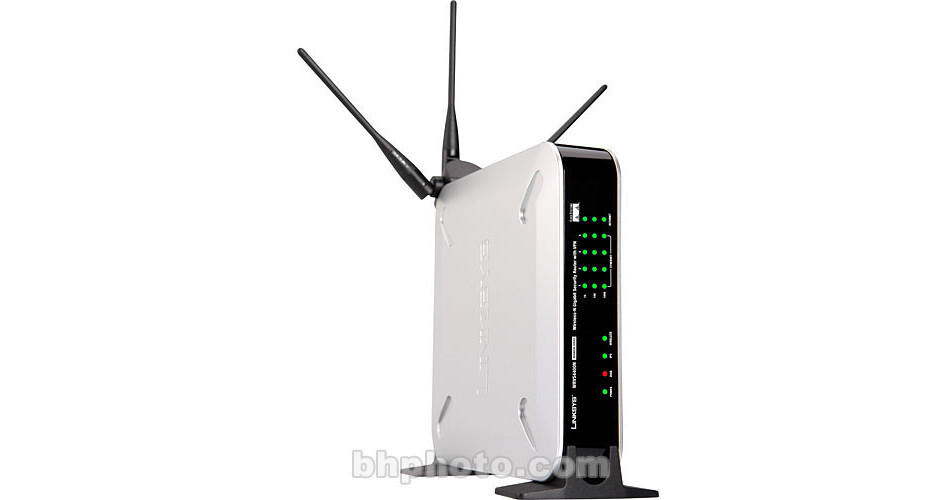
Cisco Wireless-N Gigabit Security Router with VPN

BH #CIWRVS4400N • MFR #WRVS4400N
Print
Cisco Wireless-N Gigabit Security Router with VPN
No Longer Available
No Store Display
Ask an Expert
866-264-7509

Cisco WRVS4400N Overview

The Wireless-N Gigabit Security Router with VPN from Linksys combines the functions of a Cable/DSL router, a wireless access point and a VPN gateway into one compact device. The router allows you to share your Internet connection between several computers that can connect via the draft 802.11n wireless protocol or via any of four wired RJ-45 Gigabit Ethernet ports. The router is also fully backwards compatible with legacy 802.11b/g devices.

The router also features a firewall to protect you from malicious software that can attack your computer from the Internet, as well as wireless security to insure that your data remains private.

The router can achieve speeds of 300 Mbps via the draft 802.11n wireless connection and it is also fully backward compatible with devices that use the older 54 Mbps 802.11g and 11 Mbps 802.11b standard. These features make the wireless router a great way to add wireless access to your home network.

Wired and Wireless Connections
In addition to providing wireless capabilities, the router has four standard 10/100/1000 Mbps RJ-45 Gigabit Ethernet ports to allow you to connect computers and devices that do not have a wireless card installed. This gives you the ability to simply plug in your desktop computer to the router while accessing your network wirelessly via your laptop.
VPN Gateway
The router features VPN gateway capabilities. This allows you to connect to your LAN via the IPSec VPN tunneling protocol. VPN functionality is an excellent option for businesses with employees that work from remote locations.
300 Mbps Speed
The draft 802.11n protocol allows for data rates of up to 300 Mbps when used with other 802.11n devices. The router is also fully backwards compatible with the older 54 Mbps 802.11g and 11 Mbps 802.11b protocols and up to four devices can be connected via wired RJ-45 connections at 100 Mbps.
Firewall and Network Security
The router features a powerful firewall to help protect your computer against malicious attacks that often target computers connected to the Internet. Additionally the router features network security to protect your data as it is transmitted wirelessly, ensuring that outsiders can't access your private data.

Cisco WRVS4400N Specs

Base Station
Standards
Draft IEEE802.11n, IEEE802.11g, IEEE802.11b, IEEE802.3, IEEE802.3u, 802.1X (security authentication), 802.11i Ready (security WPA2), 802.11e Ready (wireless QoS), IPv4 (RFC791), IPv6 (RFC2460), RIPv1 (RFC1058), RIPv2 (RFC1723)
Network Protocol
TCP/IP
Data Rate
802.11n: Up to 300 Mbps
802.11g: Up to 54 Mbps
802.11b: Up to 11 Mbps
RJ-45: 10/100/1000 Mbps
Frequency Range
2.4 GHz
Channel Support
11
Security
WEP, WPA-PSK, WPA2-PSK, WPA-ENT and WPA2-ENT authentication (802.11i ready)

Access Control: IP-based Access Control List (ACL); MAC-based wireless access control
Firewall: Stateful Packet Inspection (SPI) Firewall
Content Filtering: URL blocking, Keyword blocking
IPS (Intrusion Prevention System): IP Sweep Detection, Application Anomaly Detection (HTTP, FTP, Telnet, RCP), P2P Control, Instant Messenger Control, L3-L4 Protocol (IP, TCP, UDP, ICMP) Normalization, L7 Signature Matching
Signature Update: Manual download from the web
Secure Management: HTTPS, Username/password
802.1X: Port-based RADIUS Authentication (EAP-MD5, EAP-PEAP)
Antenna
3x Antennas
Operation Distance
Not Specified by Manufacturer
Transmitted Power
802.11b: 16 dBm at 1 TX, 19 dBm at 2 TX
802.11g: 13 dBm at 1 TX, 16 dBm at 2 TX
802.11n: 13 dBm at 1 TX, 16 dBm at 2 TX
Power Over Ethernet
None
Ports
1x RJ-45 10/100 Mbps Ethernet WAN
4x RJ-45 10/100/1000 Mbps Gigabit Ethernet LAN
General
System Requirements
Computer with Wired or Wireless Ethernet interface
Power Requirements
AC: 120 VAC
DC: 12 VDC, 1A
Dimensions
7.8 x 5.2 x 7.8" (19.8 x 13.1 x 19.8 cm)
Weight
1.2 lb (0.55 kg)

Cisco WRVS4400N Reviews

See any errors on this page?
Whatever You Need, We've Got It