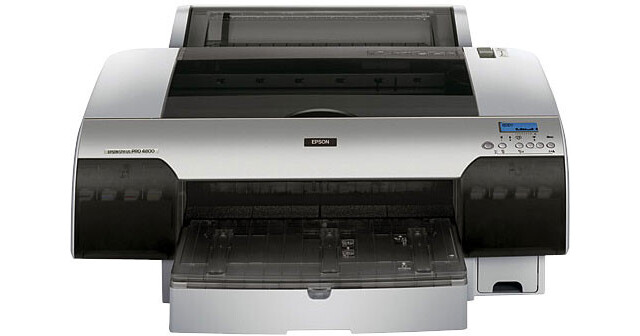
Epson Stylus Pro 4800 Inkjet Printer - Professional Edition

BH #EPSP4800PS • MFR #C593001PRO
Print
Epson Stylus Pro 4800 Inkjet Printer - Professional Edition
No Longer Available
No Store Display
Ask an Expert
800-606-6969

Epson Stylus Pro 4800 Overview

Designed to meet the needs of the most demanding professionals, the Epson Stylus Pro 4800 incorporates a unique 17-inch wide printer design with a breakthrough 8-color ink technology (Epson UltraChrome K3). You'll Be able to produce archival prints with amazing color fidelity, gloss-level, and scratch resistance, while providing consistently stable colors that significantly outperform lesser ink technologies. the Epson Stylus Pro 4800 also makes it easy to make professional neutral and toned black and white prints with higher density levels and virtually no metamerism or bronzing. Even more remarkable, the high-performance 1-inch wide print head produces an astonishing resolution of 2880 x 1440 dpi to deliver a level of image quality and speed that even exceeds our previous best.

Furthermore, the Epson Stylus Pro 4800 can handle virtually any media type in roll form up to 17-inch wide, and it incorporates a high-capacity paper tray capable of handling cut-sheet media up to 17" x 22". There is even a front-loading straight-through path capable of handling up to 1.5mm posterboard media, giving you the ultimate in media flexibility. The Professional Edition also includes a custom-designed PostScript Language Level 3 Compatible RIP by ColorBurst for professional workflow and color management support.

8-Channel Print Head Technology
The breakthrough print head design is capable of handling eight separate ink channels and the 1-inch wide high-performance print head has 180 nozzles per channel for fast print speeds
Maximum Resolution of 2880 x 1440 dpi
The Stylus Pro 4800 produces incredibly sharp text and line art with extremely fine blends and photographic transitions
Variable-Sized Droplet with AMC Technology
The Stylus Pro 4800 produces variable-sized droplets as small as 3.5 picoliter to greatly decrease print times while optimizing photographic quality. Furthermore, the proprietary Active Meniscus Control (AMC) technology precisely controls the curvature of every ink droplet within each nozzle before releasing it onto the media. The result is extremely sharp and accurate placement of ink droplets for outstanding photographic print quality.
Epson PreciseColor Technology
In order to ensure consistent printing between multiple Stylus Pro printers of the same model, Epson has enhanced the production process to include colorimetric calibration. This system evaluates and adjusts each printer's difference at the manufacturing stage, assuring you of consistent color output from printer to printer.
Automatic Print Head Alignment and Print Head Cleaning Technology
A built-in sensor reads printed data for highly precise alignments of all color channels, and auto aligns both single and bi-directional print modes while another built-in sensor reads the nozzle check pattern and automatically cleans the print head if any problems are found - even for partially clogged nozzles
Epson UltraChrome K3 Ink
Epson UltraChrome K3 ink technology uses an 8-color ink set that incorporates three unique levels of black, which along with the latest color pigment technology, dramatically improves both color and black and white prints. Imagine producing archival prints with amazing color fidelity, gloss level, and scratch resistance, while providing stable colors from the moment prints exit the printer.
    • 8-Color Pigment-Based Ink System
      Incorporating high density pigments, Epson UltraChrome K3 produces prints with an extremely wide color gamut allowing the reproduction of colors that were originally envisioned at the point of capture. With its expanded color gamut and breakthrough 8-color system, no other ink set can reproduce the three dimensional lifelike quality and stunning photographic feel of Epson UltraChrome K3 inks. Furthermore, Epson UltraChrome K3 ink incorporates High-gloss Microcrystal Encapsulation Technology along with unique screening algorithms and Light Light Black ink that significantly reduces gloss differential. There is no longer any compromise for professionals that require glossy prints that have excellent longevity and durability.

    • Three-Level Black Ink Technology
      Utilizing a unique three level black ink technology, Epson UltraChrome K3 ink significantly improves overall gray balance while enhancing midtone and highlight detail yielding a smoother tonal range. And by virtually eliminating metamerism and bronzing, both black and white and color prints can be produced with the look and feel of a traditional photograph while utilizing all the advantages of a digital workflow.

    • Advanced Black and White Printing Technology
      Epson's unique driver technology takes full advantage of the new three-level black ink system, allowing the production of the highest quality neutral and toned prints from a single ink set. In addition, proprietary Epson screening technology, developed specifically for black and white printing, produces outstanding image quality with no color crossover or color cast. For the first time photographers can make sellable black and white prints without going into a darkroom.

    • Two User-Exchangeable Black Ink Modes
      With two different black ink modes - Photo Black and Matte Black - Epson UltraChrome K3 provides an innovative solution to optimize the black ink density for various media types. Photo Black ink can be used for all media types with professional quality results. The optional Matte Black ink significantly increases black optical density when printing on matte and fine art type papers. This innovative solution enables the use of just one printer for all media types.
Professional Media Handling
With four built-in media paths including roll feed, cut-sheet tray, front-top manual feed, and a straight-through front manual feed handling weights up to 1.5mm thick posterboard, the Epson Stylus Pro 4800 can print on virtually any media type, in roll or cut sheet, from letter up to 17" wide, and the built-in high-capacity paper tray handling up to 250 sheets of plain letter-sized paper or up to 50 sheets of photographic media up to 17" x 22". Furthermore, The printer supports printing on both sides of the media without damaging the previously printed side. The user-adjustable Roll Media Spindle accepts either 2" or 3" media cores and the printer includes a built-in automatic media cutter.
True BorderFree Printing
The Stylus Pro 4800 is capable of printing off both left and right edges of roll based media, while automatically cutting top and bottom edges to produce a full-bleed print on all four sides
Epson Intelligent High-Capacity Ink System
The Epson Stylus Pro 4800 uses eight individual ink cartridges and utilizes both 110ml and 220ml ink cartridges simultaneously to optimize ink usage. The ink Cartridge system also allows users to replace ink cartridges on the fly, even during the middle of a print job thereby greatly increasing productivity.
Epson PrintJob Information System
The built-in printer memory automatically tracks key print job statistics, such as ink and media usage, remaining media, data file and user names, print times and more. These reports can be download from printer memory or printed for the purpose of job and resource management.
Superior Connectivity
The Epson Stylus Pro 4800 includes USB 2.0, and IEEE 1394 (FireWire) interfaces and even an Epson Expansion Slot for installing the included 10/100 BaseT Ethernet card. It also includes Professional Epson Photographic Drivers for Macintosh and Windows and is also fully supported by most leading third party RIPs and workflows.
Includes Custom-designed PostScript Language Level 3 Compatible RIP by ColorBurst
This fully compatible software RIP for both Macintosh OS X and Windows XP is SWOP Certified and PANTONE Licensed to include the full PANTONE Color Library. This RIP also supports Professional Color Management Technology, including separate Input ICC profiles for RGB, CMYK, and Grayscale images. Other features of this RIP include Ink Limiting Technology with CMYK curve adjustments for each ink channel, built-in Printer Linearization Technology compatible with many third-party spectrophotometer devices, an easy-to-use RIP Server Interface and Job Manager with Hot Folder Capability, and much more!
World Class Service and Support
The Epson Stylus Pro 4800 includes free one-year of coverage under the Epson Preferred Protection Plan with toll-free telephone support available Monday through Friday and usually next-business-day full unit exchange service. There is also optional one or two-year Epson Preferred Plus Service plans available.

Epson Stylus Pro 4800 Specs

Printing Method
Printing Technology
Variable-Sized Droplet Micro Piezo drop-on-demand ink jet with 8-Channel Print Head and AMC technology
Maximum Resolution
2880 x 1440 dpi
Minimum Ink Droplet Size
3.5 picoliter
Ink Type
UltraChrome K3 Ink (Pigment based)
Ink Palette
C, Lc, M, Lm, Y, Lk, LLk + PK or MK
Ink Cartridge Configuration
8 individual cartridges (110ml or 220ml)
Performance
Print Speed
8" x 10" prints: 0:50 - 6:25 (3:17 @ SuperFine/1440 dpi)
11" x 14" prints: 1:44 - 10:55 (5:35 @ SuperFine/1440 dpi)
16" x 20" prints: 4:07 - 18:57 (9:46 @ SuperFine/1440 dpi)
Input Buffer
Not Specified
Printer Duty Cycle
15,200 prints - head lifetime (8" x 10" @ 2880 x 1440 dpi)
Print Archival Life
Color: Up to 108 years
B&W: Over 200 years
Using Epson UltraChrome K3 Ink and Epson specialty media
Paper Handling
Maximum Paper Width
17"
Maximum Printable Area
17" x 128" (Full Bleed)
further limited by system configuration and available memory
Paper Sizes
Standard cut sheet sizes from 8 x 10" - 17 x 22"
Roll paper width from 8.3" - 17"
Borderless Photo Sizes
Left and right borderless "bleed" printing for roll media widths of 8.3", 10", 12", 13", 14", 16", 17"
Top and bottom edges automatically cut to any length
Paper Types
Any Inkjet receivable media (Epson media recommended)
Maximum Paper Thickness
1.5mm posterboard (using front manual feed)
Paper Capacity
Cut sheet media: Up to 250 sheets in tray
Roll media: 17" width x 132' length (limited by core dia.)
Max. roll media diameter 4" (2" core) or 6" (3" core)
Special Media Support
Posterboard up to 1.5mm thick (using front manual feed)
Built-in media cutter for automatic and manual cutting
Connectivity
Computer Interface
USB (1.1 and 2.0 compatible)
IEEE1394 (FireWire)
Epson Expansion Slot (for optional 10/100 BaseT Ethernet card)
Compatible Memory Cards
No
Direct Print Capable
No
Network Capable
Yes (with included 10/100 BaseT Ethernet card)
PostScript Support
Includes PANTONE licensed and SWOP certified PostScript Language Level 3 Compatible RIP
Supported by most leading third-party RIPs and workflows
System & Software Requirements
Macintosh System
  • 1.25GHz or higher Processor (G5 recommended)
  • Macintosh OS X (Panther 10.3.9 or higher, Tiger 10.4 or higher)
  • 1GB RAM
  • 60MB free hard disk space
    (Up to 2GB additional hard disk space depending on image file size)
  • CD-ROM Drive (4x or faster) or DVD-Drive
  • Available USB or FireWire Port
  • USB or FireWire Cable (Not to exceed 10' length)
  • Optional Ethernet Card and Cable for Network connection

Windows System

  • Pentium4 1.7 GHz Procesor or higher
  • Windows. 2000 or XP (Pro or Home Edition)
  • 1GB RAM
  • 100MB free hard disk space
    (Up to 2GB additional hard disk space depending on image file size)
  • CD-ROM Drive (4x or faster) or DVD-Drive
  • Available USB or FireWire Port
  • USB or FireWire Cable (Not to exceed 10' length)
  • Optional Ethernet Card and Cable for Network connection
Physical
Status Display
Monochrome LCD display (ink/printer status & error messages) and indicator LEDs
Image Preview Display
No
Front Panel Controls
Power, Pause, Left arrow/Paper source, Paper Feed (Up/Down), Right Arrow/Menu
Power Requirements
120V AC, 50-60 Hz
Dimensions
33.4" x 14.0" x 30.0" (849 x 356 x 762mm)
Weight
83.7 lb (31.3kg)
Packaging Info
Package Weight
142.1 lb

Epson Stylus Pro 4800 Reviews

See any errors on this page?
Whatever You Need, We've Got It