Video Chat with a Photography Expert - Live

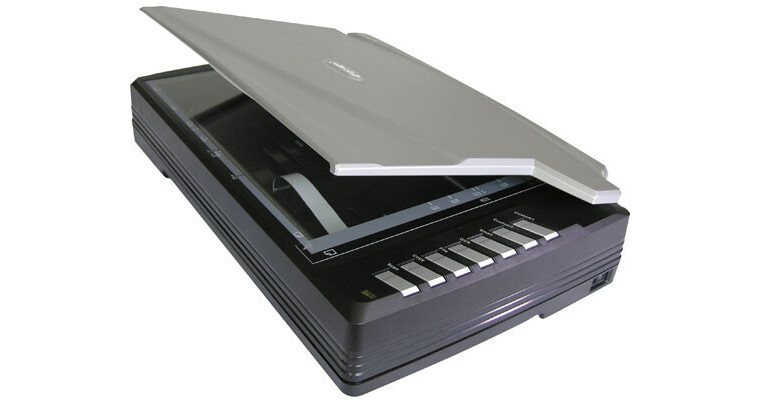
Plustek OpticPro A360 Flatbed Scanner

BH #PLOPA360 • MFR #251-BBM21-C
Print
Plustek OpticPro A360 Flatbed Scanner
Key Features
  • 600 x 1200 dpi Resolution
  • Tabloid Size (12 x 17") Scan Bed
  • Fast Scan Time
  • Network Capable
The Plustek OpticPro A360 Flatbed Scanner is a large format scanner that can scan an A3 size (12 x 17") document with resolution as high as 600 dpi x 1200 dpi, and as fast as 2.4 seconds (color at 300 dpi). The scanner provides seven one-touch function buttons to provide quick and simple access to many common scanning functions including scan to PDF, scan to OCR, copy, fax (requires PC with Fax/modem) and e-mail, to name a few. Furthermore, these buttons can be programmed by the user so you can access the functions that you personally use most often.

The OpticPro A360 features advanced networking capabilities, and is bundled with valuable yet easy-to-use document management software - making it an excellent scanner for use in finance, insurance, law, healthcare, transport and education settings. For further ease and convenience, its graphical user interface (GUI) is intuitive to use so custom scan jobs are a breeze, and the user interface is available in multiple languages.

More Details
No Longer Available
No Store Display
Ask an Expert
212-444-6615

Plustek A360 Overview

The Plustek OpticPro A360 Flatbed Scanner is a large format scanner that can scan an A3 size (12 x 17") document with resolution as high as 600 dpi x 1200 dpi, and as fast as 2.4 seconds (color at 300 dpi). The scanner provides seven one-touch function buttons to provide quick and simple access to many common scanning functions including scan to PDF, scan to OCR, copy, fax (requires PC with Fax/modem) and e-mail, to name a few. Furthermore, these buttons can be programmed by the user so you can access the functions that you personally use most often.

The OpticPro A360 features advanced networking capabilities, and is bundled with valuable yet easy-to-use document management software - making it an excellent scanner for use in finance, insurance, law, healthcare, transport and education settings. For further ease and convenience, its graphical user interface (GUI) is intuitive to use so custom scan jobs are a breeze, and the user interface is available in multiple languages.

Tabloid Scanning Area
The OpticPro A360 provides a large format scanning area of 12" x 17" (equivalent to A3 size) so you can scan large documents, artwork, newspapers, and other large items in a single operation.
Fast Scan Time
The OpticPro A360 is incredibly fast with the ability to scan an entire A3 sized document at 300 dpi in full color in as little as 2.5 seconds.
Function Buttons
The seven one-touch function buttons provide users with the ability to do multi-step tasks in a single action - enabling users to scan, file, copy, scan to OCR, scan to PDF, and email documents quickly and easily.
Intuitive User Interface
The simple-to-use image processing and document management tools are accessible through an intuitive user interface, so no special skills or experience are needed to accomplish most scanning tasks.
Versatile Functionality
The extensive bundled software included with the OpticPro A360 provides many powerful and useful functions including fast and secure PDF conversion, image and photo editing, a thumbnail viewer for locating files easily, support for sharing files over a network, and highly accurate Optical Character Recognition.

Plustek A360 Specs

Scan Quality
Scan Sensor
CCD Color Image Sensor
Optical Resolution
600 dpi
Hardware Resolution
600 x 1200 dpi
Interpolated Resolution
No
Color Depth
48-Bit RGB Internal (24-Bit RGB Output)
Dynamic Range
Not Specified by Manufacturer
Scan Area
Reflective Scan Area
12 x 17" (A3)
Transparency Scan Area
No
Film Formats
Not Applicable
Performance
Preview Speed
Not Specified by Manufacturer
Scan Speed
Color: 2.5 seconds
Grayscale & B&W: 1.7 seconds
(A3 Size @ 300dpi)
Batch Scanning
No
Automation
OCR, Scan to PDF
Connectivity
Interface
USB 2.0 Hi-Speed
System & Software Requirements
Windows System Only
  • Pentium IV 2.0 GHz Processor
  • Windows 2000, XP, Vista
  • 512MB RAM
  • 800MB Free Hard Drive Space (1GB recommended)
  • Available USB 2.0 Port
  • High Color Graphics Card (VGA or better)
  • CD-ROM Drive (for software installation)
Physical
Light Source
Cold Cathode Fluorescent Lamp
Front Panel Controls
Power, 7 One-touch Function Buttons
Power Requirements
120-240V AC, 50-60Hz
Dimensions
24.6 x 5.3 x 15.8" (623 x 133 x 400mm)
Weight
16.7 lbs (7.7kg)

Plustek A360 Reviews

See any errors on this page?
Whatever You Need, We've Got It