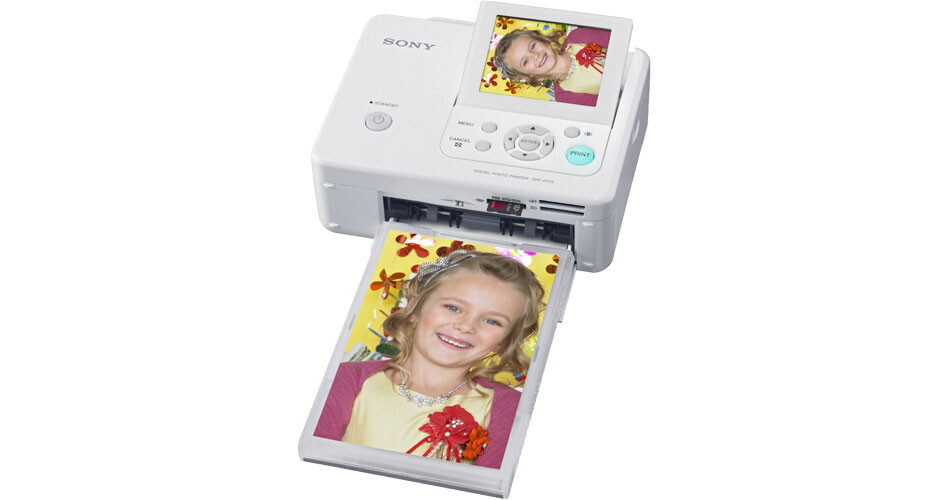
Sony DPP-FP75 Digital Photo Printer

BH #SODPPFP75 • MFR #DPPFP75
Print
Sony DPP-FP75 Digital Photo Printer
Key Features
  • Print 4x6" Borderless Photos
  • Dye Sublimation Print Process
  • SuperCoat2 Overcoat
  • 3.5" Preview Screen
The Sony DPP-FP75 Digital Photo Printer makes it possible to print lab-quality prints quickly and easily, right in your home or on-the-go. You'll create spectacular 4 x 6" color prints in about 63 seconds, and the DPP-FP75 features a 3.5" tilt-adjustable LCD screen to view your images before you print. The printer is equipped with media slots for most current flash media card formats, and has a PictBridge USB port for direct printing from compatible Digital Cameras.

The DPP-FP75 is very easy to use with an icon-based 3 step printing operation and it features large, easy-to-understand buttons with a very useful, one-touch red-eye correction button. It also offers other in-printer image editing features such as cropping and color adjustments, and simple layout functions such as ID Photo, borderless print, border print, and even a date print option is available.

More Details
No Longer Available
No Store Display
Ask an Expert
800-606-6969

Sony DPP-FP75 Overview

The Sony DPP-FP75 Digital Photo Printer makes it possible to print lab-quality prints quickly and easily, right in your home or on-the-go. You'll create spectacular 4 x 6" color prints in about 63 seconds, and the DPP-FP75 features a 3.5" tilt-adjustable LCD screen to view your images before you print. The printer is equipped with media slots for most current flash media card formats, and has a PictBridge USB port for direct printing from compatible Digital Cameras.

The DPP-FP75 is very easy to use with an icon-based 3 step printing operation and it features large, easy-to-understand buttons with a very useful, one-touch red-eye correction button. It also offers other in-printer image editing features such as cropping and color adjustments, and simple layout functions such as ID Photo, borderless print, border print, and even a date print option is available.

Print Fast and Affordably
The high-speed image processing technology incorporated into the DPP-FP75 lets you create full-sized 4 x 6" prints in about 63 seconds, and each print has a typical cost of about 29 cents.
Advanced Dye Sublimation Process
The Dye Sublimation Printing process creates spectacularly vivid prints with smooth color gradations that look more natural than other printing methods with 256 shades for each of the three dye colors.
Long-Lasting SuperCoat2 Overcoat
Enjoy your pictures longer thanks to the durable SuperCoat2 protective laminate coating fused to each print, reducing damage from fingerprints, moisture and color fading.
Print Directly from Popular Memory Cards
The printer is compatible with a wide range of media, including Memory Stick, Memory Stick Duo, Secure Digital (SD/SDHC), and xD-Picture Card media (optional adaptors required for some card types).
On-Screen Image Preview
Preview the images you like most before you print using the high resolution 3.5" LCD screen.
One-Button Red-eye Removal
Rescue a flawed shot with the touch of a button to reduce any distracting red-eye effect, the printer will also automatically improve exposure and sharpen focus for best results when you print.
Additional Photo Editing Features
Enlarge, reduce, or rotate images, shift images to improve composition, add special filter effects, and superimpose messages or greetings on photo prints.
Produce an Index Print
Make an index print of thumbnail images directly from your memory card and then quickly review the images with family and friends before making the photo prints you want.
ID Print Feature
Reproduce multiple ID photos in full color on postcard-sized paper without the need to depend on internet services, photo labs or print shops.
Convenient PictBridge Printing
Connect a PictBridge compatible camera to your Sony Picture Station printer and save time by making prints using your built-in LCD screen to preview pictures without a PC.
Portable Design
Produce lab-quality color prints quickly and easily at home, or take your DPP-FP75 on vacation or when visiting friends and family, thanks to its portable and compact design.

Sony DPP-FP75 Specs

Printing Method
Printing Technology
Dye Sublimation
Maximum Resolution
300 dpi
Ink Palette
CMY+Overcoat
Surface Options
Gloss
Performance
Print Speed
4 x 6" Color Photo: 63 seconds
Input Buffer
Not Specified by Manufacturer
Printer Duty Cycle
Not Specified by Manufacturer
Print Archival Life
Not Specified by Manufacturer
Paper Handling
Maximum Paper Width
4"
Maximum Printable Area
4 x 6" borderless
Paper Sizes
4 x 6"
Borderless Photo Sizes
4 x 6"
Paper Types
Proprietary Print Packs
Paper Capacity
20 sheets
Special Media Support
No
Connectivity
Computer Interface
USB 2.0
Compatible Memory Cards
Memory Stick Slot:
  • Memory Stick
  • Memory Stick Duo
  • Memory Stick PRO
  • Memory Stick PRO Duo
  • HighSpeed Memory Stick
  • HighSpeed Memory S-tick Duo
  • Memory Stick Micro (M2) (with optional adaptor)
  • MagicGate Memory Stick
  • MagicGate Memory Stick Duo
  • Memory Stick PRO-HG Duo (8-bit parallel transfer not supported)

SD Card Slot:

  • SD card
  • miniSD card (with optional adaptor)
  • microSD card (with optional adaptor)
  • SDHC card
  • miniSDHC card (with optional adaptor)
  • microSDHC card (with optional adaptor)
  • MMC
  • RS-MMC (with optional adaptor)
  • MMC Plus

xD-Picture Card Slot:

  • xD-Picture Card (Standard)
  • xD-Picture Card (Type M)
  • xD-Picture Card (Type H)
Direct Print Capable
Yes (PictBridge)
Network Capable
No
PostScript Support
No
System & Software Requirements
Microsoft Windows 2000 (SP3+SP4), XP (Home & Pro), Vista
Physical
Status Display
3.5" Color LCD & Indicator LEDs
Image Preview Display
3.5" TFT color LCD
Front Panel Controls
Power, Zoom, 4-way controller, Enter, Menu, Cancel, Red-eye Correction Print
Power Requirements
100-240V AC; 50-60Hz
Dimensions
6.9 x 2.4 x 5.4" (175 x 60 x 137mm) without paper tray
Weight
2.2 lbs (1000g) without paper tray

Sony DPP-FP75 Reviews

See any errors on this page?
Whatever You Need, We've Got It