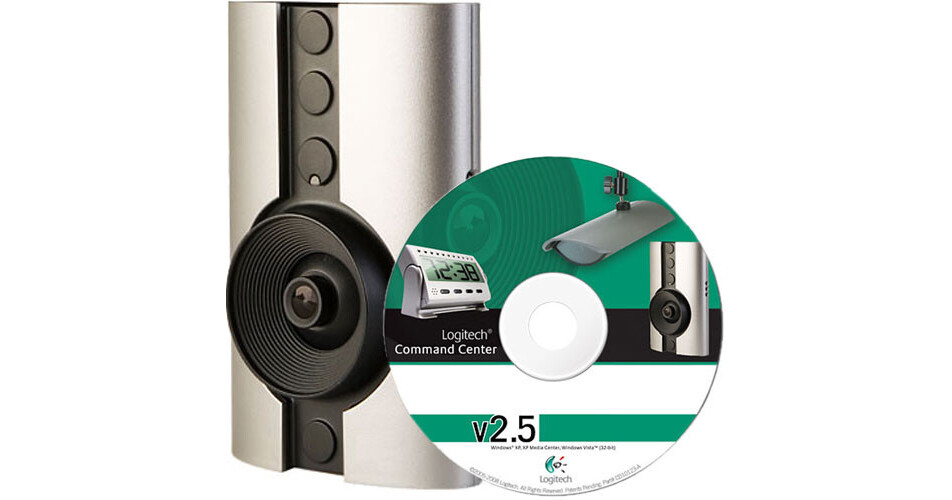
Customers looking to monitor an area from a network connection will find the DVS-800i from Logitech to be one of the most straightforward and easy to install network camera systems on the market. The key factor behind this achievement is the use of HomePlug technology. This innovative feature allows Ethernet signals to be routed over existing AC electricity wiring, eliminating the need to run lengths of Ethernet cables, a process that can be costly and time consuming. The camera simply needs to be plugged into a standard AC outlet in a home or business in order to receive both power and data communication. To further simplify installation, this camera can be quickly attached to a wall using the provided suction cup, saving users from the hassle of drilling holes into the wall. The suction cup can also be attached to the interior side of a window pane, allowing the camera to monitor an outdoor area while remaining indoors.
Ask Our Experts800-606-6969
Hello, Log InAccount & Orders
Key Features
- Ethernet Over AC (HomePlug)
- Free Remote Viewing
- Bundled Recording Software
- Motion Detection Recording
Customers looking to monitor an area from a network connection will find the DVS-800i from Logitech to be one of the most straightforward and easy to install network camera systems on the market. The key factor behind this achievement is the use of HomePlug technology. This innovative feature allows Ethernet signals to be routed over existing AC electricity wiring, eliminating the need to run lengths of Ethernet cables, a process that can be costly and time consuming. The camera simply needs to be plugged into a standard AC outlet in a home or business in order to receive both power and data communication. To further simplify installation, this camera can be quickly attached to a wall using the provided suction cup, saving users from the hassle of drilling holes into the wall. The suction cup can also be attached to the interior side of a window pane, allowing the camera to monitor an outdoor area while remaining indoors.
More DetailsNo Longer Available
Logitech DVS-800i Overview
Simply Plug It In
Why have separate cables for phone, TV and Internet when every building is already wired for AC electricity? HomePlug technology takes the first step towards solving this problem by allowing Ethernet signals to pass through the same AC electricity wiring that exists in residential and commercial buildings. This means that network camera installations are no longer limited to areas in close proximity to an Ethernet cable or a WiFi router. Cameras can now be easily installed in any room, hallway, stairwell, or anywhere that contains an AC outlet. This system also provides better security than a WiFi network.
Free Remote Viewing
Users can quickly access live camera images from a remote Internet location using WiLife's free online Remote Viewing service. Cameras can be viewed over a standard Windows browser without the need to install any specialized software. Remote camera viewing is also possible using certain compatible cell phones.
Bundled Command Center Software for Windows
Included with the camera is WiLife's Command Center Software package. Installed on a Window's PC, this program turns the computer into a central security station for managing the recording and viewing of up to 6 WiLife network cameras. By using an existing PC and monitor to handle all security operations, users don't need to acquire costly external components like a DVR, switcher and video monitor.
Digital Motion Detection with Email/Cell Phone Alerts
Built into the camera is a motion detection function that can be used to trigger the Command Center software program to start recording images to the PC's hard drive when movement is sensed. Motion detection is fully configurable for size and sensitivity. In practical terms, this will allow users to set the camera to ignore a busy roadway for example, and instead focus on activities occurring within a specific area, like in front of a garage, driveway or doorway. Motion detection event alerts can also be sent over the network to a designated email address or to a compatible cell phone.
Comprehensive Disk Management
Recorded video is saved using the Windows Media Video format. With its ability to keep file sizes to a minimum, WMV provides the necessary high image quality without overwhelming storage or network resources.
Includes USB Receiver
Included with the system is a USB receiver that plugs into a standard AC outlet and attaches to your PC via a USB cable. This USB receiver serves as the conduit between the camera and the PC and is also the device that injects Ethernet data into the electrical wiring, which is then transmitted to the camera. The camera comes with a 10' Ethernet cable, at the end of which is a power supply that plugs into an AC outlet. This way, the camera receives both the power and data transmitted by the USB receiver.
Expandable to Six Cameras
Growing businesses will find it most useful that this system can be expanded to include up to six cameras. The six cameras can be a combination of any of WiLife's indoor, outdoor or spy cameras. In a multi-camera configuration, a single Command Center software program can be used to manage the viewing and recording of all involved cameras. Furthermore, the program will detect the type of camera and its settings almost as soon as it is plugged into an AC outlet.
Logitech DVS-800i Specs
| Camera | |
| Image Sensor | |
| Resolution | |
| Lens | |
| Iris Operation | |
| Pan & Tilt | |
| Minimum Illumination | |
| Signal to Noise Ratio | |
| IR Illumination | |
| Analog Video Output | |
| Built-In Microphone | |
| Audio Input | |
| Audio Output | |
| Controls | |
| Alarm I/O | |
| Control Connectors | |
| Network | |
| Compression Format | |
| Picture Size | |
| Frame Rate | |
| Supported Protocols | |
| Built-In SD Card Slot | |
| Web Browser Access | |
| Simultaneous Client Access | |
| Multiple Camera Views | |
| Motion Detection | |
| Network Interface | |
| System Requirements | |
| General | |
| Power Requirements | |
| Power Consumption | |
| Operating Temperature | |
| Dimensions | |
| Weight |
Logitech DVS-800i Reviews
See any errors on this page?