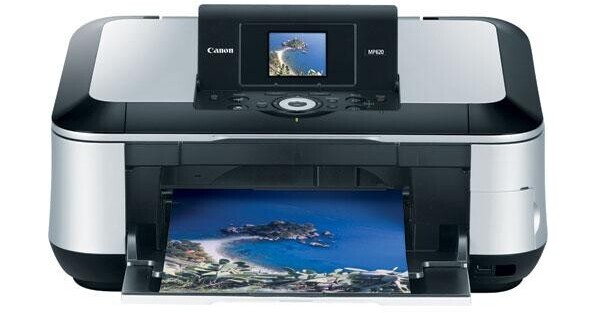
The Canon Pixma MP620 Photo All-In-One Printer produces an amazing print resolution of up to 2400 x 9600 color dpi, for remarkable detail and clarity. To achieve this, Canon Full-photolithography Inkjet Nozzle Engineering (FINE) uses a next-generation print head that ejects precise, consistent droplets as small as 1 picoliter - resulting in smoother, virtually grain-free images. The 5-color ink system includes four dye-based inks (Cyan, Magenta, Yellow, Black), and an additional pigment-based black ink. The results are truer, more life-like photos and laser-quality text. Even with all of this focus on quality images, the Canon Pixma MP620 Photo All-In-One is still incredibly fast - printing letter size black text documents at speeds up to 26 pages per minute.
Ask Our Experts800-606-6969
Hello, Log InAccount & Orders
Key Features
- Printer, Scanner & Copier Functions
- 2400 x 9600dpi Print Resolution
- 2.5" Flip-up Preview Display
- Direct Print from Cards or Cameras
The Canon Pixma MP620 Photo All-In-One Printer produces an amazing print resolution of up to 2400 x 9600 color dpi, for remarkable detail and clarity. To achieve this, Canon Full-photolithography Inkjet Nozzle Engineering (FINE) uses a next-generation print head that ejects precise, consistent droplets as small as 1 picoliter - resulting in smoother, virtually grain-free images. The 5-color ink system includes four dye-based inks (Cyan, Magenta, Yellow, Black), and an additional pigment-based black ink. The results are truer, more life-like photos and laser-quality text. Even with all of this focus on quality images, the Canon Pixma MP620 Photo All-In-One is still incredibly fast - printing letter size black text documents at speeds up to 26 pages per minute.
More DetailsNo Longer Available
Canon Pixma MP620 Overview
Large 2.5" Color LCD Viewer
The large 2.5" LCD color viewer uses a high-definition TFT display that delivers sharper, more vivid previews, and is easily viewable from up to a 170-degree angle. Just insert your compatible memory card into a built-in card slot and begin viewing
Canon FINE Printhead Technology
Canon Full-photolithography Inkjet Nozzle Engineering (FINE) uses a next-generation 4,608-nozzle print head that ejects precise, consistent droplets as small as 1 picoliter to print up to 2400 x 9600 color dpi for smoother, virtually grain-free images
ChromaLife100 System
The Canon ChromaLife100 system and FINE print head technology with select Canon photo papers, produces results rivaling that of many conventional photos. Furthermore, with the smart LED ink tanks, a LED lamp flashes when ink is running low, and flashes even faster when nearing empty
Easy Scroll Wheel
The Easy-Scroll Wheel's user interface makes it easy and fun for anyone to use. You can view and control all of the functions of the MP620 by gliding a finger around the wheel in either direction
Image Editing Without a Computer
As needed, your images will automatically be enhanced for red eye, sharpness and brightness values, or you can fine tune them yourself using the easy control panel and the 2.5" color LCD. Furthermore, the Easy-Scroll Wheel makes operation and access to the printer functions much easier than previous models
Fast Printing
The Pixma MP610 Photo All-In-One can produce a beautiful photo lab quality 4 x 6" borderless photo in an astoundingly fast 41 seconds, or black text as fast as 26 ppm
Smart Copy Feature
The Dual Color Gamut Processing Technology incorporated into the Pixma MP620 automatically optimizes reproduction quality based on the type of originals you are copying. When printing photos from the PC or from the scanner, the built-in Auto-Image Fix feature helps you produce amazing results on all your photos. When scanning, the high performance CCD technology produces spectacular 3200-dpi scans, with vibrant 48-bit color depth
Smart Scanning
The Auto Scan feature detects the type of original you're scanning then automatically scans and saves the image with the appropriate settings. It can differentiate between a photo, a business card, a personal notebook, a form, a text document - just about any type of original
Dual Paper trays
The dual paper path allows you to keep photo paper stored in one tray and plain paper in the other - so you can print photos or documents without having to switch paper
Direct Photo Printing
Print Directly from PictBrige Compatible Digital cameras and PictBridge ready devices or from select memory cards. Plus you can snap and print, wirelessly, right from your infrared-enabled mobile camera phone
A Generation Green Product
Generation Green, Canon's environmental initiative is an environmentally-friendly approach that Canon is taking to design many of its current and future products and solutions. The MP620 is part of Generation Green through low power consumption, and the energy efficient Quick Start feature that makes it Energy Star qualified. The 4-in-1 and 2-in-1 printing options allow users to place multiple pages on 1 page, saving up to 75% in paper use. Plus it is RoHS Compliant - a directive from the European Union that restricts the use of hazardous materials found in electronic products. Canon also participates in a Hardware Recycling Program to ensure appropriate recycling of electronics products and the Canon Refurbishing Program so Canon has full control over recovery and salvage for Canon U.S.A. products
Canon Pixma MP620 Specs
| Printer | |
| Printing Technology | |
| Maximum Resolution | |
| Minimum Ink Droplet Size | |
| Ink Type | |
| Ink Palette | |
| Ink Cartridge Configuration | |
| Print Speed | |
| Input Buffer | |
| Printer Duty Cycle | |
| Print Archival Life | |
| Scanner | |
| Image Sensor | |
| Optical Resolution | |
| Interpolated Resolution | |
| Color Depth | |
| Dynamic Range | |
| Light Source | |
| Reflective Scan Area | |
| Transparency Scan Area | |
| Fax | |
| Modem Speed | |
| Transmission Speed | |
| Transmission/Reception Memory | |
| Fax Resolution | |
| Dialing Options | |
| Receiver Options | |
| Copier | |
| Copy Speed | |
| Copy Resolution | |
| Reduction/Enlargement | |
| Copy Features | |
| Paper Handling | |
| Maximum Paper Width | |
| Maximum Printable Area | |
| Paper Sizes | |
| Borderless Photo Sizes | |
| Paper Types | |
| Maximum Paper Thickness | |
| Paper Capacity | |
| Special Media Support | |
| Connectivity | |
| Computer Interface | |
| Compatible Memory Cards | |
| Direct Print Capable | |
| Network Capable | |
| PostScript Support | |
| System & Software Requirements | |
| Physical | |
| Status Display | |
| Image Preview Display | |
| Front Panel Controls | |
| Power Requirements | |
| Dimensions | |
| Weight |
Canon Pixma MP620 Reviews
See any errors on this page?