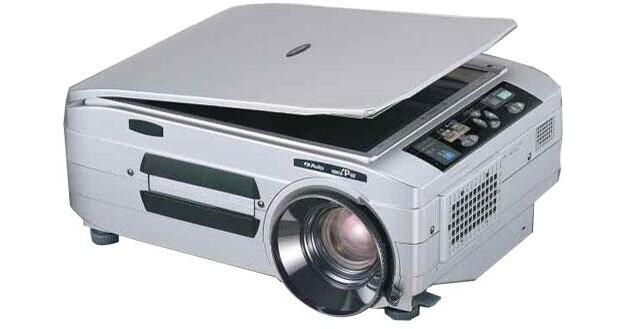
Elmo iP-60E Intelligent Projector

BH #ELIP60E • MFR #7506
Print
Elmo iP-60E Intelligent Projector
Key Features
  • 3500 ANSI Lumens
  • XGA (1024 x 768) Native Resolution
  • 1" 3LCD Imaging Panel
  • NTSC, PAL, SECAM
The XGA-resolution Elmo iP-60E Intelligent Projector is downright strange. Strangely powerful, that is. It can do things you might have never have thought a projector could do. We'll get to that in a minute. First let's go over the basics.

It's got 3500 ANSI lumens of projection power, a 100 to 240 volt 50/60 Hz power supply and it can project images in the NTSC, PAL and SECAM video standards. Its onscreen display (OSD) offers your choice of English, Chinese, French, German, Italian, Japanese, Korean and Spanish.

You can change horizontal keystone by plus or minus 10 percent and vertical keystone by plus or minus 15 percent.

It makes beautiful images thanks to its big (one inch) 3LCD imaging panels. 3LCD technology delivers sharper and brighter images with superior grayscale detail. Smooth, seamless color combined with an unparalleled grayscale range delivers incredible detail to every image displayed by the iP-60E. Grayscale is the shades of gray (from black to white) required for greater image depth and detail; it allows greater variation in shadows and brings superior accuracy to color, creating crisp and vivid images.

Now about those strange powers. Have you ever heard of a projector with a built in 4.13 megapixel camera/scanner? You have now. You can put documents and objects on the iP-60E's glass surface and project the resulting image. It feels sort of like a cross between using a copier (there's a lid you can attach) and an overhead projector. In fact Elmo calls it Overhead Projection (OHP) Mode.

But it gets better. Built right into the iP60-E is a program called iP Viewer. Connect up to a PC with RGB and USB cables and you can do all sorts of useful tricks. One thing you don't have to do is install the software. Just make the USB connection and iP Viewer starts automatically. You can enlarge, reduce and change images between portrait and landscape mode. If changing the orientation causes part of the image to be cut off you can easily scroll to the hidden portion. If you hook up an electronic tablet (not included) to your PC you can highlight and annotate your projected images.

But wait! There's more! You can store up to 32 images in the projector's memory, view them as thumbnails 16 at a time and if you've made that PC connection you can copy them to the PC where you can burn them to a CD, print them out, email them or whatever else you might need to do.

Use your strangely powerful iP-60E with care, though. Once you get used to all that it can do to make you more productive and a superior communicator, going back to a "normal" projector may be just a little disappointing.

More Details
No Longer Available
No Store Display
Ask an Expert
800-606-6969

Elmo iP-60E Overview

The XGA-resolution Elmo iP-60E Intelligent Projector is downright strange. Strangely powerful, that is. It can do things you might have never have thought a projector could do. We'll get to that in a minute. First let's go over the basics.

It's got 3500 ANSI lumens of projection power, a 100 to 240 volt 50/60 Hz power supply and it can project images in the NTSC, PAL and SECAM video standards. Its onscreen display (OSD) offers your choice of English, Chinese, French, German, Italian, Japanese, Korean and Spanish.

You can change horizontal keystone by plus or minus 10 percent and vertical keystone by plus or minus 15 percent.

It makes beautiful images thanks to its big (one inch) 3LCD imaging panels. 3LCD technology delivers sharper and brighter images with superior grayscale detail. Smooth, seamless color combined with an unparalleled grayscale range delivers incredible detail to every image displayed by the iP-60E. Grayscale is the shades of gray (from black to white) required for greater image depth and detail; it allows greater variation in shadows and brings superior accuracy to color, creating crisp and vivid images.

Now about those strange powers. Have you ever heard of a projector with a built in 4.13 megapixel camera/scanner? You have now. You can put documents and objects on the iP-60E's glass surface and project the resulting image. It feels sort of like a cross between using a copier (there's a lid you can attach) and an overhead projector. In fact Elmo calls it Overhead Projection (OHP) Mode.

But it gets better. Built right into the iP60-E is a program called iP Viewer. Connect up to a PC with RGB and USB cables and you can do all sorts of useful tricks. One thing you don't have to do is install the software. Just make the USB connection and iP Viewer starts automatically. You can enlarge, reduce and change images between portrait and landscape mode. If changing the orientation causes part of the image to be cut off you can easily scroll to the hidden portion. If you hook up an electronic tablet (not included) to your PC you can highlight and annotate your projected images.

But wait! There's more! You can store up to 32 images in the projector's memory, view them as thumbnails 16 at a time and if you've made that PC connection you can copy them to the PC where you can burn them to a CD, print them out, email them or whatever else you might need to do.

Use your strangely powerful iP-60E with care, though. Once you get used to all that it can do to make you more productive and a superior communicator, going back to a "normal" projector may be just a little disappointing.

3500 Lumens
That's plenty of projection power for a medium to large room even if there's some ambient light like lights left on so viewers can take notes.
1" 3LCD Projection Panels Offers Amazing Color Performance
The iP-60E has a 3LCD projection system that uses three one inch LCD panels. This system allows the projector to present bright and natural images. It provides high light transmission and excellent color reproduction with high color light output. It also provides smooth gradients in dark areas, and even helps prevent color breakup or the rainbow effect.
Built-In 4.13 Megapixel Color CCD Camera/Scanner
You can project an image of a document or solid object simply by lifting the document cover and placing the document or object on the projector's glass window much like you would if you were using an office copier. Elmo calls this OHP (overhead projector) mode. You can switch in and out of OHP mode (i.e., back to receiving video or PC inputs) at the press of a button.
Save Up To 32 Images in Memory and Transfer Them to PC
In OHP Mode you can capture up to 32 projected images in the projector's own memory and you can view them as thumbnails, up to 16 at a time. You can easily select a thumbnail to project full size with the remote control. If you've connected your iP-60E to a PC via USB you just as easily transfer them to the PC.
Enlarge, Reduce and Change the Orientation of Images.
Here are some more neat tricks you can do in OHP Mode: You can switch an image between portrait and landscape mode with the press of a button on the remote. If changing the orientation causes part of the image to be cut off you can easily scroll the image to reveal the hidden part. You can also enlarge or reduce an image. (You can also reduce or enlarge and image when you're in PC or Video Modes but the smallest to largest range is reduced.)
Utilize The Onscreen Pointer From the Remote Control
Using the remote control you can display a pointer on screen that you can move around the image. You can select between two shapes, three colors and three sizes of pointer.
iP Viewer Software is Built Into the Projector
A program called iP Viewer makes much of the iP-60E's magic possible. It comes pre-installed in the projector and it automatically starts up when you connect the projector to a PC via USB. No software installation is required. Once you're set up with RGB and USB connections you can use a pen tablet (not included) to annotate and highlight images. And of course you can transfer them to the PC and burn them to CD, print them and email them. The software is compatible with USB 1.1 or higher and with the English language versions of these operating systems:
  • Windows 2000 Professional SP3 or higher
  • Windows XP
  • Windows Vista

Elmo iP-60E Specs

Image Display
Projector Display System
1" 3LCD Polysilicon TFT Active Matrix With Micro Lens Array
Native Resolution
XGA (1024 x 768)
Number of Pixels
786,432
Lumens Brightness
3500 ANSI
Contrast Ratio
Not Specified By Manufacturer
Aspect Ratio
4:3
System
NTSC, NTSC 4.43, PAL, PAL-M, PAL-N, SECAM
HDTV Compatibility
None
Lens System
Lens
F = 1.7 – 2.2 f = 36.5 – 45.6
Focus/Zoom Adjusting
Manual/Manual 1.25x
Lens Shift
None
Recommended Projection Size
32 – 300"
Features
Keystone Correction
±15° Vertical ±10° Horizontal
Ceiling Mountable
No
Rear Screen Projection
Yes
Projection Tilt Option
Adjustable Feet; 7° Maximum
Built-In Speaker
1 Watt x 2 Stereo
Input/Output Connectors
Input Terminals
Analog RGB (D-Sub 15 Pin) x 2
S-Video (Mini DIN 4 Pin) x 1
Composite (RCA Jack) x 1
Stereo (Mini Jack) x 2
4.13M Pixel Color CCD Camera
Output Terminals
Analog RGB (D-Sub 15 Pin) x 1
USB (Mini Type B) x 1
Control Protocol
iP Viewer Software (Built-in to Projector)
General
Lamp (Bulb)
279 Watt SHP Mercury Lamp
Fan Noise
Not Specified By Manufacturer
Remote Control
IR Wireless
Power Requirements
100 – 120 V AC; 220 – 240V 50/60 Hz
Dimensions
15.7 x 5.7 x 12.4" (400 x 145 x 315 mm)
Weight
16.1 lbs (7.3 kg)

Elmo iP-60E Reviews

See any errors on this page?
Whatever You Need, We've Got It